
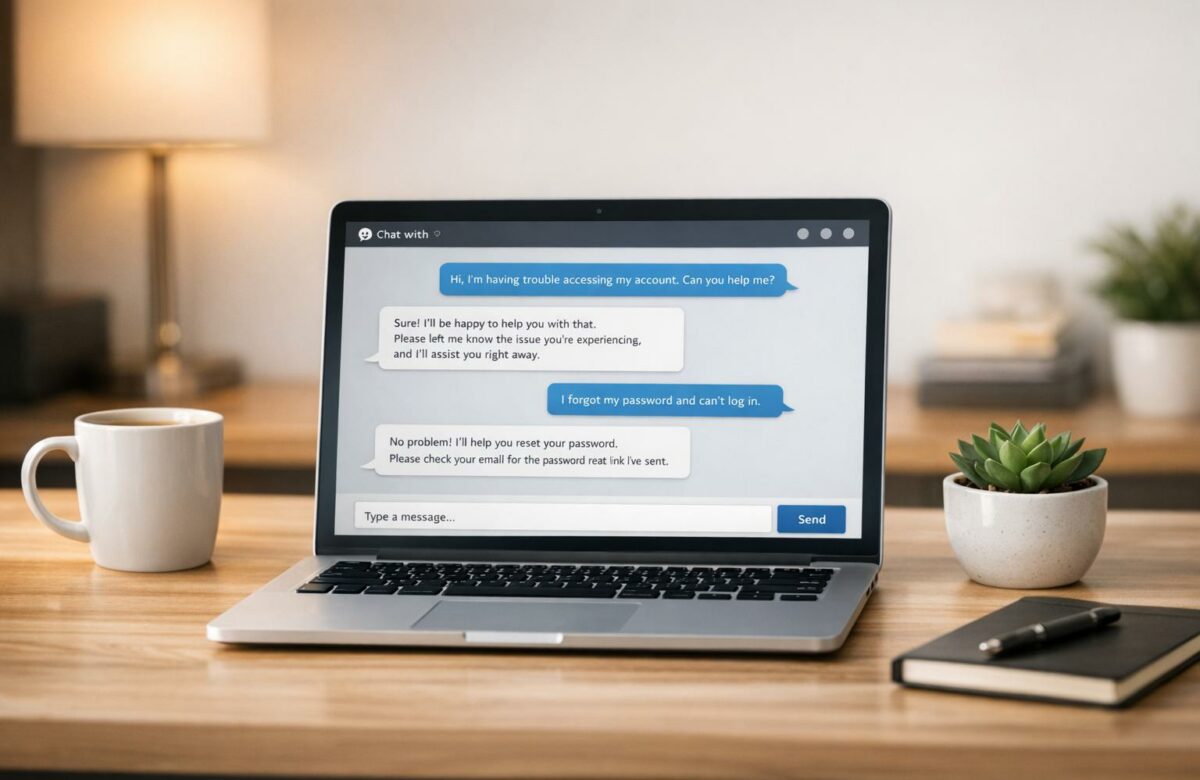
Fix Broken English In Customer Support Chats
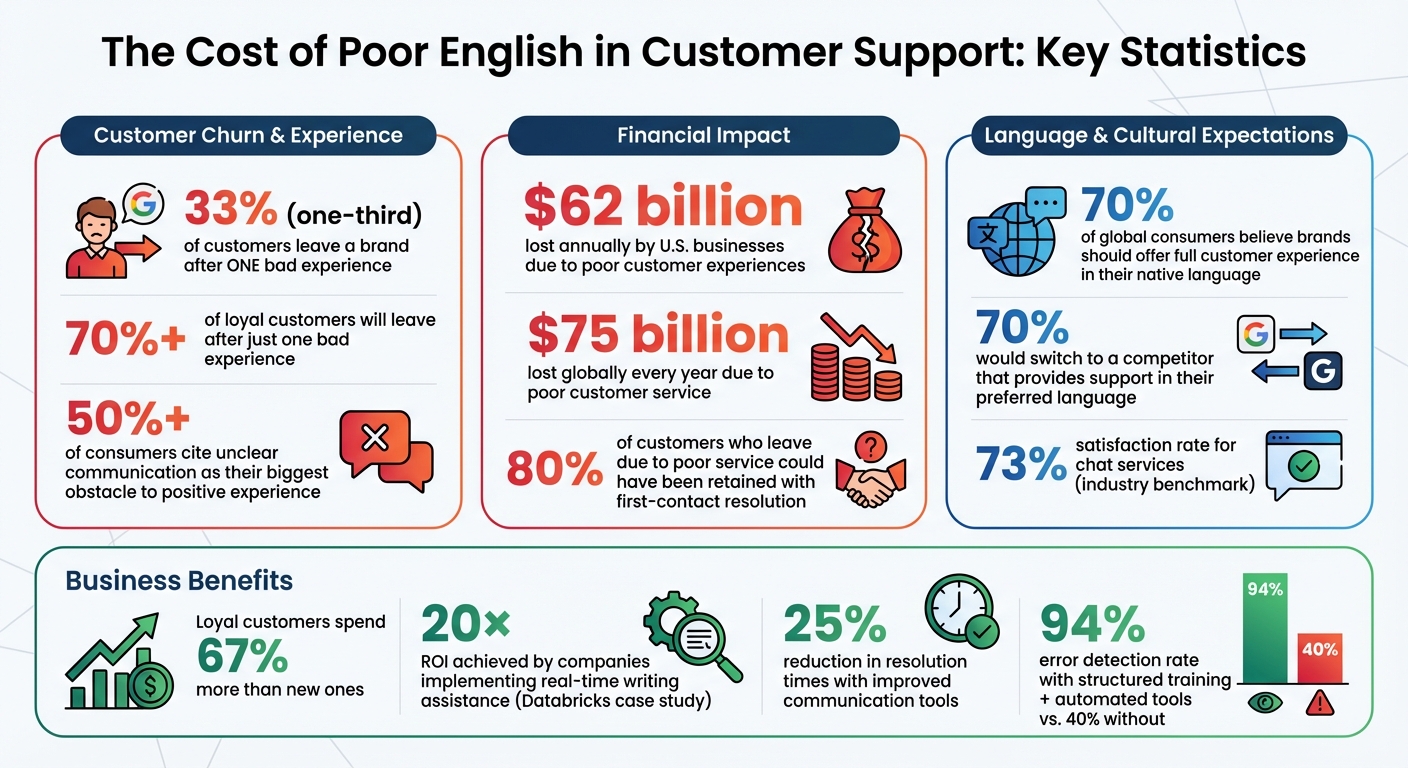
Every word your support team sends in chat shapes how customers see your brand. Poor English – grammar mistakes, unclear sentences, or wrong tone – can confuse customers, damage trust, and even drive them away. Studies show one-third of customers leave a brand after one bad experience, and unclear communication is a top reason.
Here’s why fixing English in customer support matters:
Transform Any Text, On Any Site, In Seconds
Rephrase, translate, and improve text with one shortcut. Works everywhere you write.
Add to Chrome - It's Free!- Trust and Satisfaction: Mistakes make your team seem unprofessional, lowering customer confidence.
- Faster Resolutions: Clear language avoids back-and-forth, solving issues quicker.
- Revenue Impact: Poor communication costs businesses billions annually in lost sales and churn.
Simple changes – shorter sentences, clear tone, and avoiding jargon – can improve how your team communicates. Tools like BeLikeNative, an AI-powered writing assistant, help agents write error-free, professional responses in real time. Combined with training, templates, and tracking, these changes can boost satisfaction, save costs, and retain customers.
Want better results? Start with clear, concise writing and the best AI writing tools to make every chat count.
The Cost of Poor English in Customer Support: Key Statistics
How to Communicate Clearly in English for Customer Service and Call Center Jobs
Common English Language Problems in Customer Support Chats
Customer support agents working in English often encounter challenges that stem from language differences, which can confuse customers and slow down issue resolution. Recognizing these common mistakes is the first step in addressing them. Below, we explore specific issues related to grammar, tone, and cross-cultural communication that can disrupt effective support.
Grammar and Sentence Structure Mistakes
One of the most common grammar issues in support chats is subject-verb agreement. For example, an agent might write, "The customer want a refund" instead of "The customer wants a refund." Another frequent problem is article misuse – either omitting articles like "a", "an", or "the", or adding them unnecessarily to uncountable nouns, such as saying "I need more equipments" instead of "I need more equipment." These errors can give the impression of carelessness.
Preposition mistakes also lead to awkward phrasing. For instance, an agent might say, "I am angry with the delay" instead of the correct "I am angry about the delay." Similarly, verb tense confusion is a recurring issue, especially when agents mix tenses like Present Perfect and Past Simple ("I have went yesterday") or misuse the progressive tense for habitual actions ("I am knowing the answer").
Another common stumbling block is word order, particularly in questions. Agents might forget to invert the subject and auxiliary verb, writing "You are going?" instead of "Are you going?" While these errors might seem minor, they often force customers to mentally "fix" the sentences, which can make the conversation feel clunky and frustrating.
Wrong Word Choices and Inappropriate Tone
In text-based customer support, every word matters. Choosing the wrong word or using an inappropriate tone can erode trust more quickly than a grammar mistake. For example, confusing homophones like "your/you’re" or "affect/effect" can completely change the intended message, leaving customers uncertain about what they should do next.
Inconsistent terminology is another pitfall. If one agent refers to a feature as a "dashboard", another calls it a "control panel", and yet another calls it a "home screen", customers can easily become confused. Additionally, using idioms or colloquialisms such as "we’ll circle back" or "touch base" can alienate international customers who may not understand these expressions.
Tone problems often go beyond word choice. An overly casual tone – like "Hey! No worries, we’ll fix that ASAP!" – might strike some customers as unprofessional, especially if they expect a more formal interaction. On the other hand, a tone that’s too stiff – such as "Your inquiry has been received and will be processed accordingly" – can feel cold and impersonal, making the customer feel like just another ticket in the queue.
Cultural Communication Gaps
Cultural differences play a big role in shaping communication expectations, and these nuances don’t always translate well in English-language chats. For example, a level of formality that feels appropriate to American customers might come across as too casual or even disrespectful to Japanese customers. While some cultures value warmth and reassurance, others prioritize efficiency and directness.
Even seemingly neutral expressions can carry unintended meanings across cultures. An agent might use casual greetings or emojis to seem approachable, but the customer could interpret this as unprofessional. Time zone differences can also add to the frustration – when customers don’t get an immediate response, they might feel ignored, not realizing the support team is working from a different part of the world.
Research highlights the importance of addressing these gaps: 70% of global consumers believe brands should offer a full customer experience in their native language, and nearly 70% say they’d switch to a competitor that provides support in their preferred language. These statistics underscore how essential it is to consider both language and cultural context in customer support.
How Poor English Damages Customer Support and Business Results
When customer support agents struggle with English, the impact goes far beyond awkward wording. Poor communication leads to real financial losses, drives customers away, and undermines the trust that businesses rely on to thrive. In fact, U.S. businesses lose a staggering $62 billion annually due to poor customer experiences, with unclear communication often at the core of these failures. These missteps not only cost money but also erode customer trust and satisfaction.
Lower Customer Trust and Satisfaction
Mistakes like spelling errors, clunky sentence structures, and misplaced punctuation can make customers question the competence of a support team. Without the benefit of tone or facial expressions to clarify intent, every word in a chat takes on extra significance. A well-meaning response can easily come across as sarcastic or dismissive if phrased poorly.
Here’s the reality: more than 70% of consumers who consider themselves loyal to a brand will leave after just one bad experience. Even more striking, one-third of customers will stop buying from a company after a single poor interaction with customer service. And with over half of consumers citing unclear communication as their biggest obstacle to a positive experience, it’s clear that language quality can make or break customer relationships.
Take Databricks, for example. In 2024–2025, they addressed this issue by introducing real-time writing assistance for their customer experience team. The result? A 20× return on investment, validated by third-party analysts.
Slower Problem Resolution and Customer Frustration
Beyond trust, poor English also slows down the resolution of customer issues. Unclear responses lead to prolonged back-and-forth exchanges. For instance, when an agent says, "We are looking into your concern and will update you", it leaves customers wondering when they’ll hear back or if they need to take further action. Each vague message invites more questions, delaying solutions and increasing frustration.
The financial cost of this confusion is massive. Up to 80% of customers who leave a brand due to poor service could have been retained if their issue had been resolved on the first attempt. When poor English prevents first-contact resolution, it not only extends resolution times but also drives customer churn.
Lost Sales and Revenue
Clear communication isn’t just essential for solving immediate problems – it’s also critical for long-term revenue growth. Poor communication can scare off potential customers. Imagine someone asking about pricing or product features and receiving an error-filled, jargon-heavy response. Chances are, they’ll take their business elsewhere. This is especially costly since loyal customers tend to spend 67% more than new ones.
Globally, companies lose an estimated $75 billion every year due to poor customer service, with communication breakdowns playing a major role. Meanwhile, nearly 70% of consumers say their expectations for a "good experience" have never been higher. In today’s competitive landscape, unclear English doesn’t just hurt – it directly affects your bottom line.
How to Fix English in Customer Support Chats
Improving customer support chats doesn’t require a complete overhaul. By focusing on clarity, tone, and simplicity, you can instantly enhance communication and build trust with your customers. Small tweaks in writing can make a big difference in reducing confusion and boosting satisfaction.
Write Short, Clear Sentences
Overly long sentences often lead to misunderstandings and errors. When agents try to cram too much information into a single sentence, it becomes harder to follow and increases the chance of mistakes. The fix? Keep sentences between 7 and 15 words – this range ensures readability and clarity.
For example, instead of saying:
"We are currently investigating the issue that you reported to us earlier today and will be providing you with an update as soon as we have more information available,"
try breaking it into two simpler statements:
"We’re investigating the issue you reported. I’ll update you as soon as I have more information."
This version is easier to read, quicker to type, and less prone to errors.
Stick to a standard word order – subject, verb, object. For instance, "I am processing your refund" is more straightforward than "Your refund is being processed". When giving instructions, use the imperative mood: "Click the blue button" instead of "You should click the blue button."
If a sentence has more than two commas, consider splitting it into shorter ones. For complex explanations, use bulleted lists or numbered steps instead of lengthy paragraphs. This makes instructions clearer and prevents important details from being overlooked.
Once your sentences are clear, focus on refining the tone to create a positive experience.
Use Positive, Customer-Centered Language
The words you use can shape how customers perceive the interaction. Negative phrasing – even if accurate – can come across as unhelpful. Replace it with language that feels enabling. For example:
Instead of saying, "We can’t process your request until you provide your order number,"
say, "I can process your request as soon as you share your order number."
The message is the same, but the tone shifts from a roadblock to a solution.
Avoid vague statements like, "We are looking into your concern and will update you." Be specific instead:
"I’ll check with our billing team and get back to you within 2 hours."
This sets clear expectations and reduces the need for follow-ups.
Empathy is important but should be concise. A simple, "I understand how frustrating this must be," shows you care without overwhelming the message. Long-winded sentences, even if empathetic, can confuse customers and dilute your main point.
Consistency also matters. Use the same term for a concept throughout the conversation. For instance, if you refer to something as a "subscription", don’t switch to calling it a "plan" or "membership" later. This consistency is especially helpful for non-native speakers and translation tools in teams.
Finally, simplify technical terms to make your messages even clearer.
Avoid Jargon and Technical Terms
Even if technical terms make sense to your team, they can leave customers scratching their heads. Words like "backend processing", "API integration", or "cache clearing" often confuse people. Instead, use plain alternatives:
"We’re updating your account,"
"connecting the systems," or
"refreshing your data."
Stay away from idioms or cultural expressions like, "bear with me", "circle back," or "touch base." These can confuse international customers or non-native speakers. Instead, say, "please wait", "follow up," or "contact you".
Be mindful of modifier stacks – those long chains of descriptive words that clutter sentences. For example, instead of saying, "extremely well thought-out Windows migration project plan," opt for, "a project plan for Windows migration that is well thought out". Breaking these up makes your writing much easier to follow.
If you’re unsure what the customer means, ask for clarification early. It’s much faster to ask, "Can you tell me which error message you’re seeing?" than to guess incorrectly multiple times and frustrate both sides.
sbb-itb-32359dc
Using BeLikeNative to Improve English in Real-Time Chats
When manual edits slow down customer support, an AI tool like BeLikeNative steps in to keep things smooth. This Chrome extension is designed to polish customer support responses as agents type, catching errors and improving clarity without disrupting the flow. By integrating directly with your clipboard, it eliminates the need for tab switching or copy-pasting, making it a seamless addition to your workflow.
What BeLikeNative Does
BeLikeNative works in real time to correct grammar, spelling, and punctuation – handling everything from simple typos to more complex language issues. Beyond fixing mistakes, it rephrases clunky sentences and adjusts tone to suit your brand’s voice, whether you’re aiming for a professional, empathetic, or confident style.
For teams engaging with multilingual customers, BeLikeNative supports translation and text improvement in over 80 languages, ensuring clear communication no matter the language barrier. As agents type, the tool provides dynamic feedback, helping them catch errors before messages are sent. It also shortens and "humanizes" text, making responses sound more natural and less robotic. The result? Clear, professional conversations that inspire customer confidence.
BeLikeNative Pricing Plans
BeLikeNative offers flexible subscription plans to suit various team needs. Here’s a quick breakdown:
- Free Plan: Free, with 5 daily uses and a 500-character limit – perfect for occasional corrections.
- Learner Plan: $4/month, offering 50 daily uses, a 2,000-character limit, and added features like editable functions and shortcuts.
- Native Plan: $6/month, providing 50 daily uses, a 4,000-character limit, priority bandwidth, and input into feature development.
- Premium Plan: $14/month, providing 180 daily uses, a 6,000-character limit, and exclusive perks like partnership benefits and a lifetime license option.
| Plan | Price | Daily Uses | Character Limit | Key Features |
|---|---|---|---|---|
| Free | $0 | Limited | 500 | Spelling and grammar correction, 80+ languages, data security |
| Learner | $4 | 50 | 4,000 | Everything in Free, editable functions and shortcuts |
| Native | $6 | 125 | 6,000 | Everything in Learner, priority bandwidth, influence on development |
| Premium | $14 | 180 | 10,000 | Everything in Native, partnership benefits, potential equity, lifetime license option |
How BeLikeNative Works with Support Platforms
BeLikeNative is compatible with over 1 million websites and apps, including popular support tools like Zendesk, Salesforce, Jira, and Slack. It integrates effortlessly with clipboard-based workflows on platforms like WhatsApp Web, Google products, and Notion. Agents simply copy their text, activate the shortcut, and paste the refined version – no extra plugins required.
For browser-based tools, BeLikeNative functions as a Chrome extension, with additional support for Safari and Edge. It also offers a Windows desktop app for offline use, ensuring teams can use it in virtually any setting without overhauling their existing processes.
Building Long-Term English Communication Skills
Achieving lasting success in English communication goes beyond quick fixes – it requires ongoing skill development and refining processes over time. While tools like BeLikeNative can correct errors instantly, creating a solid foundation for quality communication means focusing on continuous improvement. For example, structured training paired with automated tools can help catch 94% of errors, a significant improvement compared to the 40% of typos that often go unnoticed due to mental "autocorrect".
Train Support Teams on English Writing
Regular training sessions are essential for sharpening the communication skills of support agents. These sessions should cover grammar basics, adjusting tone for different scenarios, and understanding cross-cultural nuances. AI-driven tools can play a key role here by offering real-time coaching as agents work, enabling them to learn in context rather than through abstract lessons. This approach is especially helpful for those who speak English as an additional language, as immediate feedback on phrasing and word choice builds confidence.
Training should focus on using active voice, keeping sentences short, and maintaining consistent terminology. For instance, sticking to one specific word for a concept – rather than switching between synonyms – helps avoid confusion for both customers and translation software. Additionally, avoiding idioms and culturally specific references ensures clarity for international customers. To stay relevant, training materials should be updated monthly based on customer interactions.
Pairing these training efforts with well-designed response templates can further enhance communication quality.
Create Response Templates
Standardized response templates help ensure that all agents communicate in a consistent brand voice, regardless of their language proficiency or experience level. These templates not only save time on repetitive tasks but also provide a dependable structure that boosts confidence, particularly for non-native English speakers. For example, you can create tiered templates: one for initial contact that includes a personalized greeting and empathetic tone, and another for follow-ups that focuses on polite acknowledgment and direct resolution.
Templates should also include clear formatting guidelines. For instance, always use a "#" before order IDs, display currency with cents (e.g., $12.00 instead of $12), and use bulleted lists to simplify complex issues. Additionally, tailor templates to the communication channel – messaging platforms might allow for a casual tone and emojis, while emails often require a more formal and structured approach.
Track Communication Quality Metrics
While real-time tools can immediately reduce errors, tracking long-term metrics helps ensure steady improvement in communication quality. To measure progress, focus on specific data points. For example, monitor ticket resolution times to see if clearer writing reduces the need for back-and-forth clarifications. Keep an eye on customer satisfaction (CSAT) scores to understand how writing quality impacts customer experiences. Analytics dashboards can also help track grammar, spelling, and tone consistency across your team.
Companies that have implemented similar strategies have seen notable improvements in both efficiency and customer satisfaction. Reviewing these metrics monthly can highlight areas for further training and help identify best practices to share with the team.
Conclusion
Clear English communication in customer support chats isn’t just about avoiding awkward typos – it directly affects your business’s success. With so many customers walking away from brands after poor service experiences, every interaction matters. The good news? Fixing communication issues doesn’t require a complete overhaul. Simple adjustments like writing shorter sentences, skipping the jargon, and using positive language can instantly boost clarity and improve customer satisfaction.
To tackle these challenges right away, consider using advanced writing tools. BeLikeNative acts as a real-time assistant, correcting mistakes as you type. Starting at $0/month for basic features and going up to $14/month for high-volume teams, it works seamlessly with platforms like WhatsApp Web and Google products. Plus, with support for over 80 languages, it’s especially helpful for teams where English isn’t the first language.
The results speak for themselves. One company, for instance, cut resolution times by 25% and saw a noticeable jump in customer satisfaction.
But true, lasting success comes from combining technology with ongoing training. Pairing tools like BeLikeNative with standardized templates, regular training sessions, and performance tracking creates a system that consistently delivers excellent communication. The benefits are clear: agents feel more confident, customers get faster and clearer responses, and your business builds trust – trust that leads to long-term loyalty. In an industry where chat services already achieve a 73% satisfaction rate, mastering clear and professional English can give your company the edge it needs.
Start by integrating a writing tool, standardizing templates, and tracking key metrics. The payoff will quickly show up in your performance numbers and, more importantly, in your customers’ feedback.
FAQs
How does poor English in customer support chats affect business revenue?
Poor English in customer support chats can hurt your business in more ways than one. When customers receive unclear or error-filled messages, they often perceive the company as unprofessional. This can erode trust and make them think twice about sticking with your brand. Research backs this up: about 33% of shoppers abandon a brand after just one bad customer service experience, and poor communication is frequently to blame.
The financial toll is staggering. U.S. businesses reportedly lose around $75 billion each year due to poor customer service, with communication issues playing a major role. On the bright side, clear and well-written responses can do wonders. They not only boost customer satisfaction but also build loyalty. Repeat customers, for instance, tend to spend about 67% more than new ones. So, polished communication isn’t just about looking professional – it’s a direct driver of revenue.
What are the most common grammar mistakes in customer support chats?
Grammar mistakes in customer support chats can make responses seem unclear or unprofessional. Here are some of the most common issues:
- Run-on sentences and sentence fragments: These happen when ideas are either crammed together without proper punctuation or left incomplete, making the message difficult to understand.
- Comma splices: This is when two independent clauses are joined with just a comma instead of a period, semicolon, or conjunction.
- Subject-verb agreement errors: For example, writing "Our team were ready" instead of "Our team was ready."
- Misuse of apostrophes: A classic example is confusing its (possessive) with it’s (a contraction of "it is").
- Adjective vs. adverb mix-ups: Phrases like "You did good" should be "You did well."
In customer support, clear and precise communication is essential. Mistakes like these can undermine professionalism and create confusion. To avoid this, stick to short, well-structured sentences and consider using grammar tools to polish responses and meet customer expectations.
How does BeLikeNative enhance communication in customer support chats?
BeLikeNative provides customer support teams with the tools they need to communicate clearly and professionally in real-time chats. Its features include grammar correction, AI-driven writing assistance, and multilingual support, helping agents craft responses that are accurate and effective.
By using BeLikeNative, support teams can sidestep common language mistakes, ensure their messages are easy to understand, and deliver polished replies that leave a positive impression on customers. The platform is designed to simplify communication while keeping the tone natural and professional, perfectly aligned with your business’s unique needs.
Related Blog Posts
- Best AI Grammar Tools for Multilingual Chats
- How To Polish Your Writing With Chrome Ai Extensions
- Ai Grammar Fixers That Improve Your Writing Instantly
- Top 7 Grammar Tools for Multilingual Chats
BeLikeNative fixes grammar, rephrases, translates, and simplifies text on any website in 1 second — just highlight and hit a keyboard shortcut. No tab switching. Try it free →

