
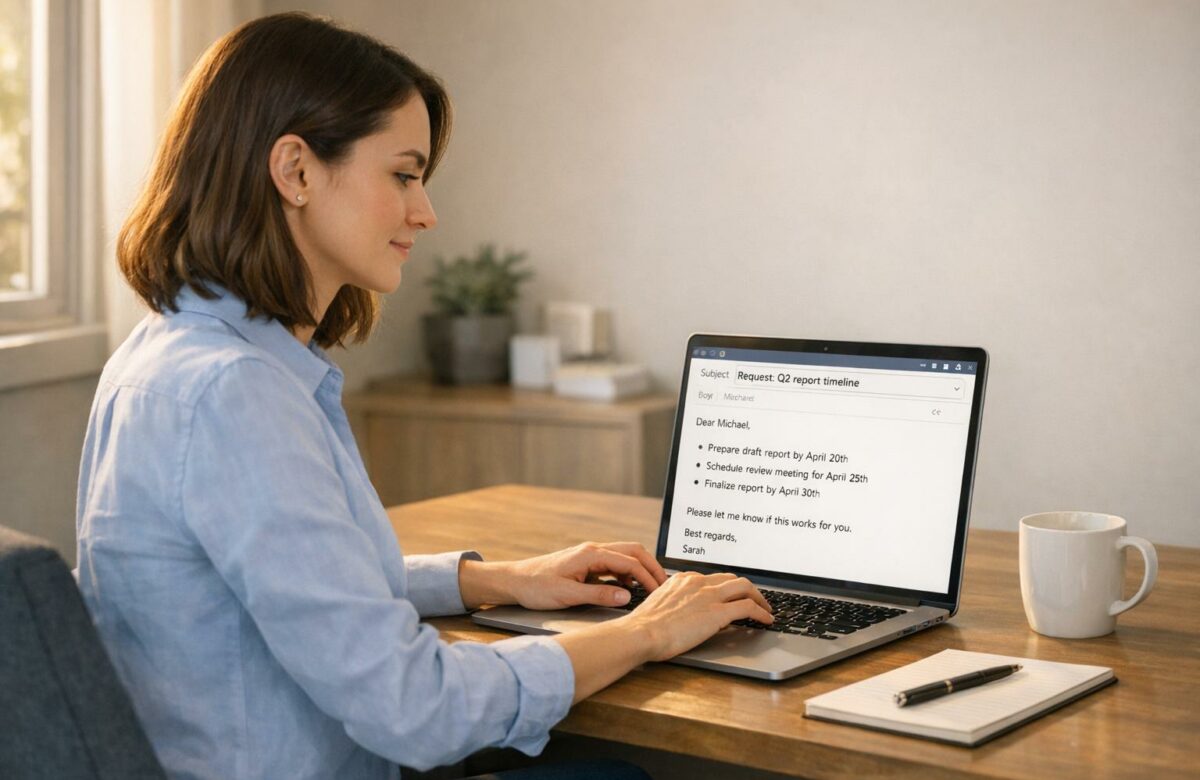
How To Write Polite Emails To Your Boss Without Sounding Weak
Writing emails to your boss can feel tricky – too polite, and you might seem unsure; too direct, and you risk sounding rude. The key? Balance respect with confidence. Emails are often the primary way your professionalism is judged, especially in today’s digital-first workplaces. Poorly written emails waste time, cause misunderstandings, and can even hurt your reputation. On the other hand, clear, well-structured emails can boost your credibility and career prospects.
Here’s how to write effective emails to your boss:
Transform Any Text, On Any Site, In Seconds
Rephrase, translate, and improve text with one shortcut. Works everywhere you write.
Add to Chrome - It's Free!- Start with a polite greeting: Match the formality to your workplace culture. Use "Dear [Name]" for formal settings or "Hi [Name]" for casual ones.
- State your purpose upfront: Be clear in the first sentence about why you’re writing. For example, "I’m requesting approval for the Q2 marketing budget."
- Close with actionable steps: End with a summary of next steps or a clear request, like, "Please let me know by Friday if this works."
Avoid weak language like "I think" or "just checking in." Instead, use confident phrases like "I recommend" or "Could you please." Replace apologies with gratitude – say "Thank you for your patience" instead of "Sorry for the late reply."
Proofread your email before sending, and keep it concise. Use bullet points for clarity when listing details. These strategies will help you craft professional emails that are polite, clear, and effective.
6 tips to write your emails like a CEO (the email etiquette of executives)
How to Structure Professional Emails
A clear structure is essential for balancing respect with assertiveness in professional emails. With the average professional receiving 121 emails daily, your message needs to stand out by being easy to scan and understand. A well-organized email not only respects your boss’s time but also increases the likelihood of a prompt response.
To achieve this, professional emails typically include a polite greeting, a direct opening, and a closing that emphasizes action. As Rachel Meltzer puts it:
A professional email should be concise, clear, and neatly formatted with a clear call to action.
By focusing on these core elements, you can ensure your boss quickly grasps your message and knows exactly how to respond.
Begin with a Respectful Greeting
The greeting sets the tone for your email and is your chance to make a good first impression. Choose a salutation that aligns with your workplace culture. For formal settings, use "Dear [Name]", while "Hi [Name]" or "Hello [Name]" works better in more casual environments. If you’re unsure, it’s safer to default to a title and last name, like "Dear Mr. Smith".
Indeed highlights the importance of this step:
The greeting is the first line of your email… Identify the name and title that your supervisor prefers you to call them and include it.
This approach ensures your email starts on a respectful and professional note without feeling overly rigid.
State Your Purpose in the First Sentence
Your boss likely doesn’t have time to sift through a long email to figure out your point. Make your purpose clear within the first sentence or two. Alison Green, founder of Ask a Manager, advises:
Start with the upshot. What’s the most important thing that your boss needs to take from the email? Find a way to say it in one sentence, and that should be your opening line.
For example, instead of saying, "I wanted to touch base about something", try, "I’m requesting approval for the Q2 marketing budget." This approach provides immediate clarity. You can include a brief polite remark before diving into your main point, but keep it short.
Your subject line also plays a role in setting expectations. A descriptive subject like "Action Needed: Q2 Budget Review" signals the email’s purpose right away.
End with a Professional Closing
The closing is your last chance to leave a good impression. It should include three parts: a closing line summarizing your intent or next steps, a sign-off, and your professional signature. "Best regards" is a reliable choice for most situations, striking the right balance between warmth and formality.
Avoid vague phrases like "Let me know" and opt for actionable language, such as "I’ll follow up with you on Wednesday" or "Please let me know if you approve by Friday". This makes your expectations clear and shows accountability. As Darren Blumenfeld from InboxAlly explains:
A clear close builds trust far quicker than clever wording ever will.
For formal situations, like a promotion request or communication with senior leadership, use "Sincerely" or "Respectfully." For routine updates, "Best regards" or "Kind regards" work well. Reserve casual closings like "Thanks" or "Cheers" for colleagues you interact with regularly. Finally, include your full name and job title in your signature, and avoid automated mobile signatures like "Sent from my iPhone", which can seem unprofessional.
How to Balance Politeness and Assertiveness
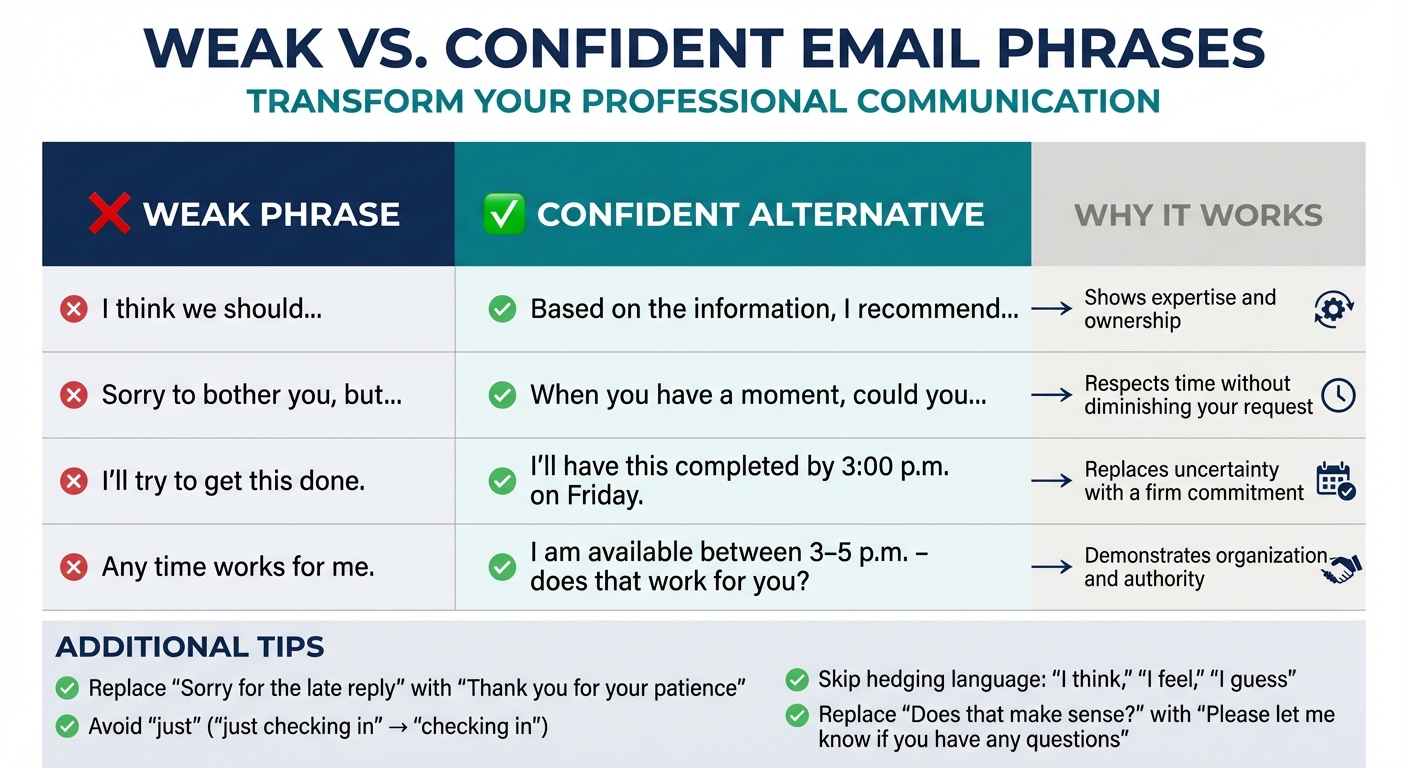
Weak vs Confident Email Phrases: Professional Communication Guide
Striking the right balance between respect and confidence is essential for professional email communication. Research from the University of California reveals that using decisive language, such as "I recommend", significantly enhances perceptions of competence and leadership, compared to hedging phrases like "I guess". This isn’t about being aggressive – it’s about being clear while remaining warm.
Assertiveness is a blend of directness and respect. Writing with clarity and avoiding unnecessary qualifiers signals that you’ve thought things through and take ownership of your message. For example, clear email structuring has been shown to improve team productivity by 31% when leaders provide explicit direction in their digital communication. This benefits everyone involved.
One common challenge is mistaking politeness for submission. As executive coach Eleni Kelakos explains:
The intention behind a phrase is what determines whether it is ‘too passive’ or just ‘polite.’ … wanting to be respectful of someone’s time is polite. Kissing up to them by being overly solicitous… is passive.
Your aim should be to respect your boss’s authority without undervaluing your own professional contributions. This guide outlines strategies to help you write emails that express both respect and decisiveness.
Choose Confident Words and Phrases
The language you use shapes how others perceive your competence. Replacing weak phrases with confident alternatives strengthens your message without coming across as aggressive. For example, instead of writing "I was wondering if…?" you can say "I am writing to see if…?" – a simple change that removes hesitation and communicates intent clearly.
Here’s how you can elevate common phrases:
| Weak Phrase | Confident Alternative | Why It Works |
|---|---|---|
| "I think we should…" | "Based on the information, I recommend…" | Shows expertise and ownership |
| "Sorry to bother you, but…" | "When you have a moment, could you…" | Respects time without diminishing your request |
| "I’ll try to get this done." | "I’ll have this completed by 3:00 p.m. on Friday." | Replaces uncertainty with a firm commitment |
| "Any time works for me." | "I am available between 3–5 p.m. – does that work for you?" | Demonstrates organization and authority |
Another effective adjustment is to express gratitude instead of apologizing. For instance, swap "Sorry for the late reply" with "Thank you for your patience." This subtle shift conveys control over your schedule instead of guilt. It’s a polite yet confident approach.
Stop Over-Apologizing and Using Weak Qualifiers
Certain words and phrases can undermine your authority by making you sound less confident. One of the biggest offenders is the word "just." Phrases like "just checking in" or "just wondering" weaken your message and should be avoided.
Hedging language – such as "I think", "I feel", or "I guess" – also signals uncertainty, suggesting you’re not fully committed to your ideas. HR consultant Olivia James explains:
Hedging language makes readers feel like they need to double‑check your work. Confident phrasing signals you’re taking ownership and have done the thinking already.
Validation-seeking phrases like "Does that make sense?" or "I hope that’s okay" can also undermine your authority. Instead, use "Please let me know if you have any questions." This assumes your explanation was clear while still offering support and reinforcing your confidence in professional communication.
Make Direct Requests While Staying Respectful
Being direct doesn’t mean being pushy. The key is to combine clarity with courtesy. Start with your request in the first sentence to show confidence and respect for your boss’s time. For example, instead of saying, "I was hoping maybe we could possibly discuss the budget", try, "Could you please review the Q2 budget proposal by Friday?"
Using words like "could" and "would" keeps your tone professional while staying direct. Adding a brief reason for your request can help prioritize it: "Could you please approve this deck by 5:00 p.m. today? I need to send it to the client before their meeting tomorrow morning".
When offering suggestions, opt for "I recommend" or "My suggestion is" instead of "I think" or "maybe we could try". These phrases carry more authority. To remain courteous, you can also provide an alternative by saying, "If this isn’t possible, let me know and I will handle it". This approach ensures clarity while maintaining a respectful tone throughout your email.
sbb-itb-32359dc
Practical Tips for Better Email Communication
Crafting emails with a respectful yet assertive tone can make a big difference in how your message is received. Considering that approximately 332 billion emails are sent daily, standing out requires a mix of clarity and professionalism. These tips will help you communicate effectively while respecting your boss’s time.
Write Short, Focused Emails
Your boss likely doesn’t have the time – or patience – for lengthy emails covering multiple topics. Stick to one specific topic, question, or request per email. Start with the main action or ask in the very first sentence to ensure your message is immediately clear.
Aim to keep your email to five sentences spread across three short paragraphs. As Alison Green from Ask a Manager points out:
Busy people are far less likely to read long emails. Your boss is unlikely to appreciate emails that read like streams of consciousness.
Focus on what’s essential. SaneBox advises:
Your boss doesn’t need every detail documented in an email. Relay only what they need to know to make a decision.
Whenever possible, suggest a solution or outline next steps to make it easier for your boss to respond quickly. Don’t forget to include direct links to any referenced files or resources – this saves your boss from having to search for them.
Use specific subject lines that clearly indicate the purpose of the email, such as "TO APPROVE: Marketing Budget by 2/7/2026." This helps your boss prioritize their inbox and immediately understand the email’s urgency.
For more detailed emails, consider using bullet points to keep the content organized.
Use Bullet Points to Organize Information
If your email includes multiple details, bullet points are your best friend. They break up dense text and ensure critical information isn’t overlooked. As Alice E.M. Underwood writes in Grammarly:
Bullet points or numbered lists have several advantages: They’re easy to read, they help highlight key details, [and] they prevent your email from looking like a wall of text.
Bullet points make emails skimmable, which is especially helpful for busy managers. Use them to list tasks that need approval, outline deliverable timelines, or present solutions to a problem. Keep each point short and straightforward to make the content easy to digest.
Once your email is structured, don’t skip the final step – proofreading.
Proofread Before Sending
Mistakes in an email can undermine your message and hurt your professional reputation. As Lindsay Kramer notes:
Email mistakes can undermine your entire message and make you look unprofessional.
Proofreading ensures clarity and professionalism. Reading your email aloud can help you catch awkward phrasing or errors. For critical emails, save the draft and review it later with fresh eyes to spot anything you might have missed.
Before hitting "send", double-check that all attachments are included, links work properly, and the correct recipients are listed. Pay close attention to details like spelling your recipient’s name and title correctly. For high-stakes emails, it’s worth asking a colleague to review your message for an extra layer of assurance.
Email Templates for Common Situations
Building on the idea of maintaining a professional tone, these templates offer practical examples for everyday workplace scenarios. Each one demonstrates how to communicate clearly and respectfully while maintaining authority.
Asking for Time Off
When requesting time off, aim to give your manager at least 7–10 days’ notice for a single day and 2–3 weeks for longer absences. Use a clear subject line that includes the dates, address how your responsibilities will be managed, and phrase the request as seeking approval rather than making a demand.
Subject: Vacation Leave Request – July 24–28, 2026 | Sarah Johnson
Dear Michael,
I’m writing to request vacation from July 24–28, 2026.
I’ve completed my current deliverables and arranged for Jennifer Martinez to oversee the client onboarding project during my absence.
Please let me know if these dates work for the team or if you’d like to discuss the coverage plan further.
Thank you for considering my request.
Best regards,
Sarah Johnson
This email is concise, outlines the key details, and reassures your manager about workload coverage.
Suggesting a New Idea or Project
When pitching a new idea, tie it to the company’s goals and address potential challenges, such as time or resources, upfront. Sara McCord, Founder of Sara McCord Innovation, advises:
Pitching a project to your boss is like pitching anything else – you need to look at the cost-benefit analysis from his or her perspective.
Subject: Proposal: Customer Feedback Dashboard for Q3 Goals
Hi David,
Last week, clients mentioned difficulty tracking support tickets. I’ve identified an opportunity to create a feedback dashboard that aligns with our Q3 goal of improving customer satisfaction scores.
What & How: A centralized dashboard to display real-time ticket status and resolution times, utilizing our existing CRM tools. Estimated development time: 15 hours over two weeks.
Why: This could reduce follow-up emails and boost customer satisfaction scores.
I can adjust my current schedule to accommodate this project. Would you be open to discussing this idea during our next one-on-one meeting?
Best,
Alex
This email breaks down the idea into actionable steps, highlights its benefits, and invites further discussion.
Following Up on an Unanswered Email
Studies show that well-timed follow-ups can increase response rates by 40%. Wait 2–5 business days before following up on non-urgent matters. Always reply within the original email thread and use polite but direct language.
Subject: Re: Question about Q3 Budget
Hi Lisa,
I’m following up on my budget question from February 1, 2026. Could you provide your input by February 10, 2026, to ensure vendor contracts remain on schedule?
Specifically, I need confirmation on:
- The approved amount for software licenses ($12,500)
- Whether we are moving forward with the analytics tool upgrade
If you’re unavailable, please let me know a better time to connect.
Thanks,
Marcus
As Kat Boogaard, Freelance Writer, puts it:
You deserve a reply in order to continue moving forward with your own work – and that’s not something you need to be sorry for.
This follow-up email is polite, sets a clear deadline, and provides flexibility if the recipient needs more time.
Conclusion
Polite emails can help you maintain confidence and authority without sacrificing clarity. Prioritizing straightforwardness over excessive formality ensures your message is both respectful and effective. A direct request, paired with a respectful tone, speaks volumes about your confidence and professionalism. By stating your purpose clearly, using bullet points to organize information, and ending with a clear next step, you show both efficiency and self-assurance.
This approach is especially important in today’s hybrid work landscape. With about 78% of U.S. workers now in hybrid or fully remote roles, strong written communication has become an essential skill. The strategies outlined here can make your emails more effective and impactful.
Leigh Steere, Cofounder of Managing People Better, LLC, puts it perfectly:
The very act of sending the email is a small intrusion on the reader’s time. If you truly need to communicate via email, keep it to the point, without apologies.
Using the examples and templates discussed earlier, try applying these techniques in your next email to your boss. Lead with your request, skip unnecessary apologies, and proofread carefully to avoid unintentional informality. These small but meaningful changes can improve your communication, strengthen trust with leadership, and enhance your professional image.
FAQs
How can I write polite and professional emails to my boss without sounding overly submissive?
To craft polite yet professional emails to your boss, focus on clarity and respect while projecting confidence. Begin with a brief statement of your purpose, include any necessary background information, and clearly specify the action or response you’re seeking. Phrases like "I recommend…" or "I’d like to discuss…" work well to express confidence without sounding overly assertive.
Incorporate politeness with friendly openings such as "Hi [Name]" and thoughtful closings like "Thank you for your time" or "Looking forward to your response." Keeping your email concise and well-organized ensures your message is professional, easy to follow, and respectful. This approach helps you communicate effectively while maintaining a courteous tone.
What are some confident ways to replace weak phrases in professional emails?
Using confident language in emails allows you to communicate clearly and assertively without coming across as passive. For instance, instead of saying, "I was wondering if you could…" or "Sorry to bother you", opt for more direct phrases like "Please review the attached document" or "I would appreciate your feedback by Friday." These alternatives are straightforward, respectful, and maintain a professional tone.
Steer clear of qualifiers like "I think" or "It seems to me", as they can weaken your message. Instead, use firmer phrasing such as "The next steps are…" or "Based on the data, we should proceed with…". If you’re suggesting actions, phrases like "I recommend," "Let’s proceed with," or "The best approach is…" can help you sound more decisive. These simple tweaks ensure your emails project authority and clarity while staying polite and professional.
How can I write an email to my boss that gets a quick response?
To get a quick response from your boss, focus on clarity and brevity in your email. Start with a straightforward subject line that clearly states the purpose of your message, like “Approval Needed: Budget Proposal”. This ensures your email grabs attention right away.
In the body of the email, lead with your main request or question so your boss can immediately understand the context. Avoid unnecessary details – stick to the key points to keep the message concise and easy to read.
Use polite yet assertive language, such as “Could you confirm…” or “Would you be able to…”, to strike the right tone while prompting a timely response. To make it even easier for your boss, suggest a specific action or deadline, like “Please let me know by 2:00 PM today if this works for you.” This approach helps prioritize your email and increases the chances of a prompt reply.
Related Blog Posts
- Multilingual Email Etiquette Checklist for Professionals
- Sound More Professional? Business Email English Improvement for Non-Native Speakers
- How To Rewrite Emails In Gmail For Better Clarity
- How To Sound Like A Native Speaker In Outlook Emails
BeLikeNative fixes grammar, rephrases, translates, and simplifies text on any website in 1 second — just highlight and hit a keyboard shortcut. No tab switching. Try it free →

