
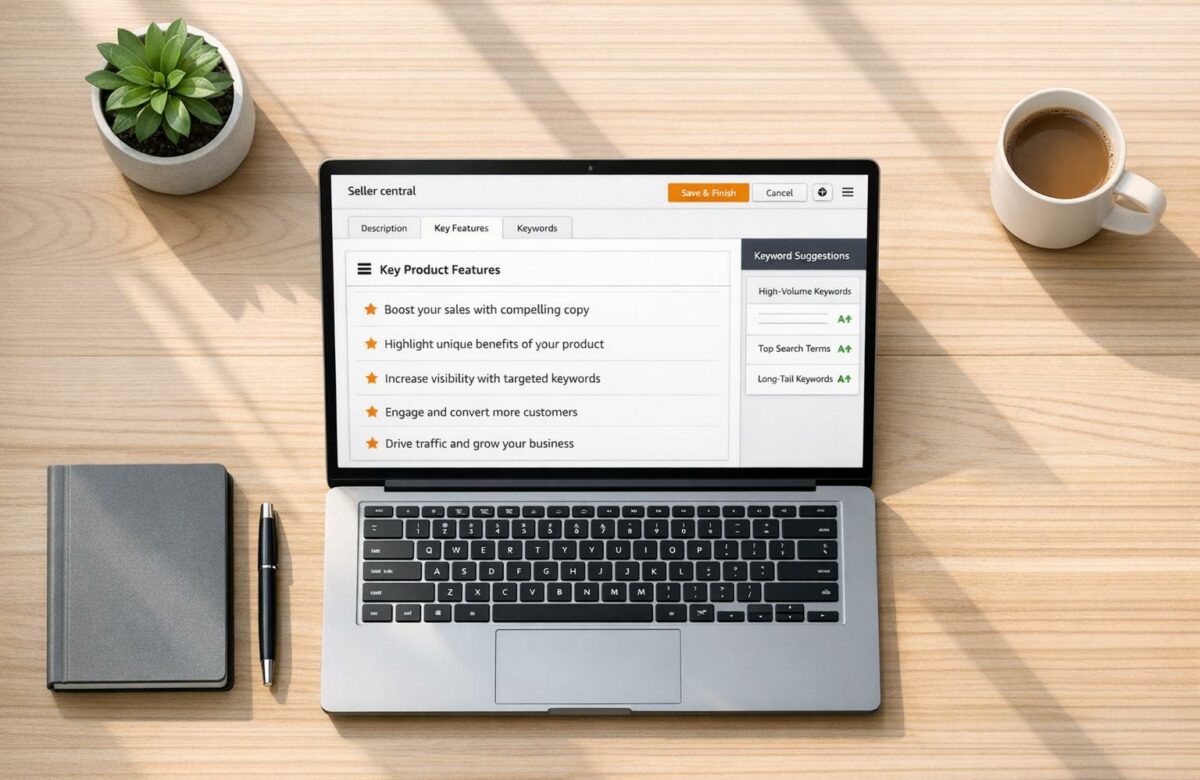
Best Amazon Product Description Writer For Seller Central
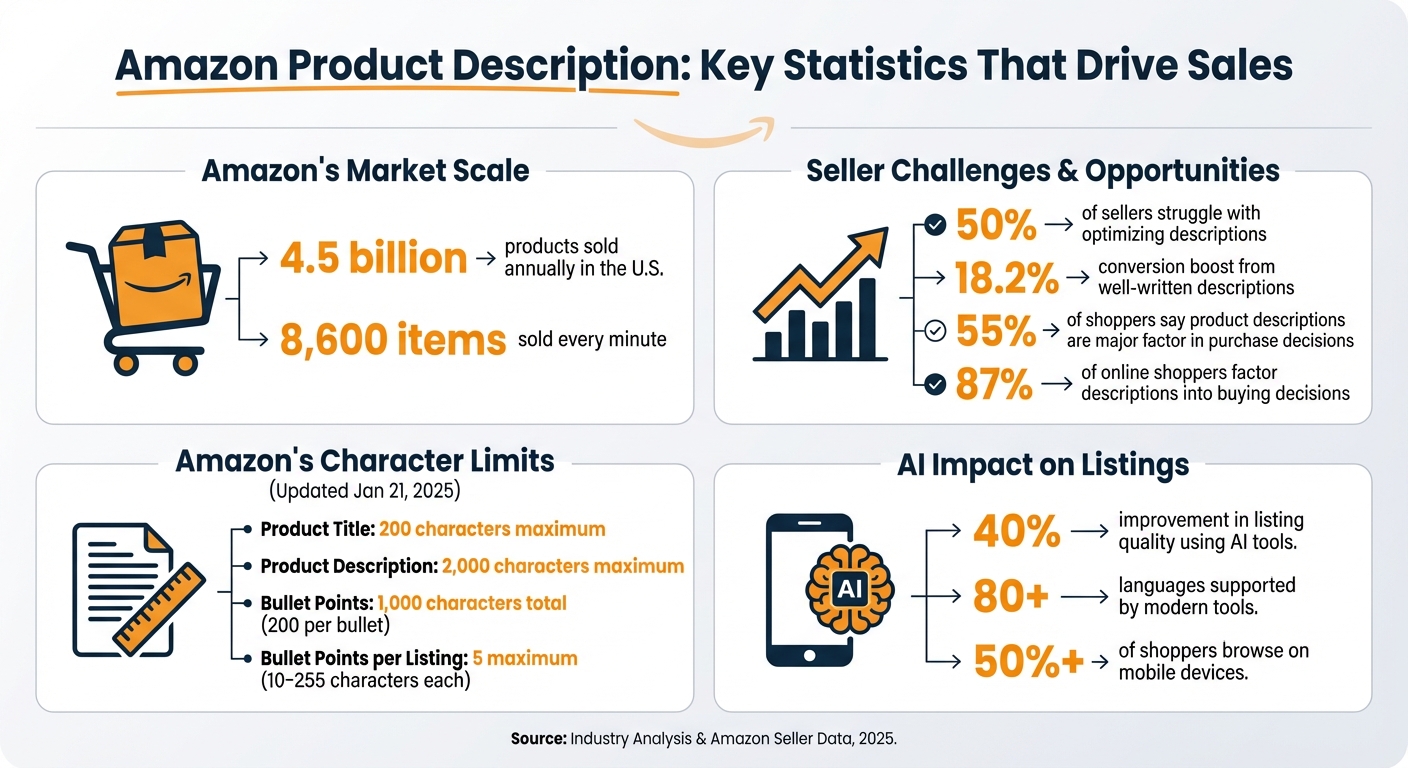
Want to sell more on Amazon? The secret is in your product descriptions. With over 4.5 billion products sold annually in the U.S. and 8,600 items sold every minute, standing out on Amazon is tough. Your product description isn’t just for shoppers – it’s also how Amazon’s A10 algorithm decides your ranking.
Here’s what you need to know:
Transform Any Text, On Any Site, In Seconds
Rephrase, translate, and improve text with one shortcut. Works everywhere you write.
Add to Chrome - It's Free!- 50% of sellers struggle with optimizing descriptions.
- Well-written descriptions can boost conversions by 18.2%.
- Amazon has strict rules: a 2,000-character limit for descriptions and a 200-character limit for titles.
A good description balances SEO for Amazon’s A9 algorithm and persuasive copy for shoppers. Focus on benefits, use concise bullet points, and strategically place keywords. Tools like BeLikeNative, a Chrome extension, can simplify this process. It helps refine descriptions, ensures compliance, and even supports 80+ languages for international markets.
Want to learn how to craft descriptions that sell? Keep reading for actionable tips, tools, and strategies.
Amazon Product Description Optimization Statistics and Key Metrics
How to Craft Amazon Product Descriptions That Boost Sales FAST
Core Components of Effective Amazon Product Descriptions
Creating a winning Amazon listing isn’t just about showcasing a product – it’s about striking the right balance between meeting Amazon’s A9 algorithm requirements and appealing to shoppers. The A9 algorithm ranks listings based on factors like relevance, conversion rate, sales velocity, customer satisfaction, and order retention. To succeed, your product description needs to align with these technical demands while addressing what shoppers are looking for. This boils down to three critical elements: the title, bullet points, and customer-focused language.
Your title is the backbone of your listing. It tells Amazon exactly what your product is, which directly impacts your search ranking. Start your title with primary keywords naturally placed at the beginning, followed by the brand name, product type, key features, size, and quantity. Keep everything within Amazon’s 200-character limit, which took effect on January 21, 2025. Be mindful to avoid repeating the same word more than twice and skip promotional phrases like "Best Seller" or "Free Shipping".
Next, bullet points serve as your opportunity to highlight the product’s benefits in a digestible format. Amazon suggests keeping bullet points concise, with the total text under 1,000 characters, or about 200 characters per bullet. Use a five-point structure to cover aspects like audience, performance, ease of care, compatibility, and contents. Each bullet should lead with a clear benefit, as benefits are what resonate most with shoppers and drive sales.
Finally, outcome-focused language amplifies your listing’s persuasive power. About 55% of shoppers say the product description plays a major role in their purchasing decision. Instead of merely listing technical specs, explain how the product improves the buyer’s life. For instance, rather than saying "24-inch vanity", you could write, "24-inch vanity, perfect for small powder rooms to save space". Reviewing competitor feedback can also uncover key phrases and pain points that resonate with your target audience.
A case study from Jungle Scout in 2024 showcased the impact of these strategies. A 186-character title that included the brand, quantity, size, and specific uses like "puppy playpen" and "whelping box", paired with five 200-character benefit-driven bullet points, helped the product earn over 400 positive reviews and climb the Best Seller Rank. This highlights how well-structured listings and customer-centered language can deliver tangible results. These foundational elements set the stage for more advanced strategies discussed later.
BeLikeNative: Chrome Extension for Amazon Product Descriptions
BeLikeNative is a Chrome extension designed to help sellers craft and refine product descriptions directly within Amazon Seller Central. With over 3,000 active users and a 4.6/5 rating from 194 reviews on the Chrome Web Store, it’s a trusted tool for many. Its standout feature? It combines nine essential writing and editing tools in a single interface. Plus, it’s been recognized as a Featured extension for adhering to top-notch security and user experience standards.
Using BeLikeNative is straightforward. The extension operates through a side panel you can open with a click on its tooltip or by pressing Alt + E (Windows) or Command + E (Mac). Highlight text in your Seller Central description field, and the tool instantly provides AI-powered paraphrasing, translation, or error corrections without requiring a tab switch. The revised text is automatically copied to your clipboard, ready to paste back into Seller Central.
How BeLikeNative Works with Seller Central
BeLikeNative integrates seamlessly into Seller Central, simplifying the editing process. It works directly within your browser, so you can optimize product descriptions without navigating away. While drafting, the side panel offers real-time AI suggestions tailored to your chosen tone – whether formal for professional listings or casual for lifestyle products.
The tool goes beyond basic spellcheck, identifying complex grammar issues, awkward phrasing, and style inconsistencies. This ensures your descriptions meet professional standards, helping to build trust with potential buyers. For those managing extensive catalogs, the keyboard shortcuts help speed up the workflow, making BeLikeNative a practical choice for busy sellers.
Writing and Rephrasing in 80+ Languages
BeLikeNative supports over 80 languages, making it an excellent tool for sellers targeting international markets. Its AI ensures that translations are context-aware, maintaining the intended tone and avoiding awkward literal translations. Whether you’re expanding to new marketplaces or testing different tones, the tool helps you create descriptions that resonate with local audiences. The AI mimics the writing style of native speakers, which is key to building trust with shoppers worldwide.
BeLikeNative Pricing Plans
BeLikeNative offers flexible pricing plans to suit sellers of all sizes:
| Plan | Price | Daily Uses | Character Limit | Best For |
|---|---|---|---|---|
| Free | $0/month | 5 | 500 | Testing basic spelling and grammar tools. |
| Learner | $4/month | 25 | 2,000 | Small sellers with a few listings. |
| Native | $6/month | 50 | 4,000 | Active sellers optimizing multiple products. |
| Premium | $14/month | 125 | 6,000 | High-volume sellers or agencies. |
All plans include access to 80+ languages, spelling and grammar checks, clarity improvements, and strong data security. Starting with the Learner plan, users gain access to editable functions and shortcuts. The Native plan adds priority bandwidth and input into the extension’s future development, making it a great option for sellers looking for more advanced features.
sbb-itb-32359dc
How to Improve Product Descriptions with BeLikeNative
Improving Readability with AI
BeLikeNative’s AI turns complex product descriptions into easy-to-read, customer-friendly content that works seamlessly across devices. With more than 50% of shoppers browsing on mobile, it’s essential to break up long paragraphs into shorter sentences and use bullet points for clarity. For example, instead of just stating "16GB RAM", highlight the benefit: "Enjoy smooth multitasking without slowdown".
For non-native English speakers, the AI eliminates language mistakes and polishes the text to sound natural for American shoppers. This refined language not only builds trust but also boosts conversion rates. Robert Tekiela, Vice President of Amazon Selection and Catalog Systems, highlights the impact:
"With our new generative AI models, we can infer, improve, and enrich product knowledge at an unprecedented scale and with dramatic improvement in quality, performance, and efficiency".
Sellers using AI tools have seen a 40% improvement in overall listing quality. BeLikeNative also ensures your catalog maintains a consistent tone and style, whether you’re selling kitchen tools or electronics. This consistency strengthens your brand image and ensures compliance with Amazon’s guidelines by avoiding restricted phrases.
Applying SEO Techniques
Once readability is addressed, the next step is optimizing your content for Amazon’s SEO requirements. BeLikeNative fine-tunes your descriptions to align with Amazon’s A9 algorithm by strategically placing keywords. For example, the main keyword should appear early in the product title and naturally throughout bullet points and descriptions. This approach keeps your content engaging while signaling relevance to the algorithm.
The platform’s multilingual capabilities also extend to SEO. When translating descriptions for different markets, BeLikeNative adjusts keywords to fit local search habits. For instance, it uses "biscuits" for UK shoppers and "cookies" for US audiences. This tailored approach ensures your products rank well in regional searches, increasing visibility and sales potential.
Step-by-Step Guide to Writing Product Descriptions in Seller Central
Let’s dive into how you can craft compelling Amazon product descriptions using BeLikeNative, all while aligning with Amazon’s A9 algorithm and building buyer confidence.
Installing and Setting Up BeLikeNative
Start by downloading BeLikeNative from the Chrome Web Store. Once installed, click its icon in your browser toolbar and configure your settings. Choose English (United States) as your language and select a tone – professional is a safe choice for most Amazon listings. Activate the extension using its clipboard integration and keyboard shortcuts directly within Seller Central. This setup keeps everything seamless, so you can edit and refine your descriptions without jumping between tabs or tools.
Next, head to Inventory > Add a Product in Seller Central. With BeLikeNative running in the background, it’s ready to enhance your descriptions as you type, ensuring a smooth workflow.
Writing and Optimizing Product Descriptions
In the Product Description field, stick to Amazon’s 2,000-character limit. Focus on benefits rather than features. Instead of saying "16GB RAM", highlight what it means for the customer: "Enjoy smooth multitasking without slowing down". This approach speaks directly to the shopper’s needs and helps connect your product to their everyday challenges.
Incorporate your primary keyword early in the product title and weave it naturally throughout the description to align with Amazon’s A9 algorithm. Use numerals for clarity and quick readability. For bullet points, Amazon allows up to five per listing, each ranging from 10 to 255 characters. Ensure your product title follows Amazon’s format: capitalize the first letter of each word, except for articles and prepositions.
Ecommerce expert Brian Connolly from Jungle Scout advises:
"Amazon wants your product listing titles to be clear and concise, not littered with random keywords".
Once your draft is complete, focus on refining it for readability and compliance.
Polishing and Testing Your Descriptions
Before publishing, use BeLikeNative’s editing tools to fine-tune your text. Highlight a section and use the Improve function to enhance clarity and flow, removing awkward phrasing. If needed, switch tones using the Rephrase function – for example, from casual to professional, depending on your product’s audience.
Check your description against Amazon’s rules. Avoid HTML (other than <br> for line breaks), URLs, and customer reviews or testimonials. Keep product titles under 200 characters and avoid special characters like !, $, ?, or ^, as per Amazon’s updated guidelines effective January 21, 2025. Once finalized, preview your listing on mobile devices – over half of Amazon shoppers browse on their phones.
For further optimization, try Seller Central’s Manage Your Experiments tool to A/B test different versions of your description. Even small tweaks in wording can lead to noticeable changes in conversion rates, helping you discover what appeals most to your audience.
Conclusion
Crafting product descriptions that convert isn’t just about filling space with text – they need to persuade shoppers and perform well in search rankings. With 87% of online shoppers factoring product descriptions into their buying decisions, it’s crucial to create listings that combine search optimization with engaging copy tailored to customer needs.
Tools like BeLikeNative make this easier by directly integrating with Seller Central, enabling you to refine, enhance, and translate descriptions into over 80 languages – all without switching platforms. As Robert Tekiela, Vice President of Amazon Selection and Catalog Systems, explains:
"With our new generative AI models, we can infer, improve, and enrich product knowledge at an unprecedented scale and with dramatic improvement in quality, performance, and efficiency".
The secret lies in striking the right balance between SEO and readability. Naturally weave primary keywords into your titles and descriptions, emphasize the benefits over technical details, and stay within Amazon’s 2,000-character limit. This strategy not only builds trust but also empowers shoppers to make confident purchasing decisions.
FAQs
How does BeLikeNative help create better Amazon product descriptions?
BeLikeNative leverages advanced AI to create engaging, clear, and tailored Amazon product descriptions specifically designed for American audiences. The platform ensures that every detail aligns with U.S. preferences, such as imperial measurements, American date formats, and language that feels natural and relatable.
By prioritizing clarity and persuasive wording, BeLikeNative helps sellers make their listings more visible and appealing, ultimately driving sales with descriptions that connect effectively with a broad and diverse audience.
What makes a great Amazon product description that drives sales?
A strong Amazon product description does more than just explain what the product is – it showcases its standout features, benefits, and what makes it worth buying. The goal? To solve customer problems and meet their needs while using persuasive language that nudges them toward hitting "Add to Cart."
For better visibility, weave in relevant keywords naturally to align with Amazon’s search algorithm. Keep the structure clean and easy to skim by using bullet points to highlight the product’s top advantages and practical solutions. Want to take it up a notch? Incorporate sensory language or address common customer frustrations to make your description more engaging and relatable.
The secret to success is blending clear writing, search optimization, and compelling storytelling to increase both visibility and sales.
What are the best ways to optimize my Amazon product descriptions for better rankings?
To boost your Amazon rankings, start by naturally weaving in relevant keywords that reflect what your customers are searching for. These keywords should fit seamlessly into the text, ensuring it feels organic and not forced.
Focus on showcasing your product’s main features and benefits in a way that grabs attention. Use concise, engaging language that resonates with your audience. Remember, potential buyers want to quickly understand why your product is the right choice for them.
Here are some tips to make your descriptions stand out:
- Follow Amazon’s content guidelines: Make sure your descriptions adhere to the platform’s rules to avoid any issues.
- Highlight unique selling points: Emphasize what makes your product different from competitors.
- Use bullet points for clarity: Organize key details in a way that’s easy to scan and digest.
Finally, maintain a professional tone that inspires confidence in your product. By aligning your descriptions with Amazon’s ranking criteria, you can increase both visibility and conversions.
Related Blog Posts
- How BeLikeNative Simplifies Multilingual Writing
- Reword Your Essays Effortlessly With Ai Paraphrasing Tools
- How Ai Language Makers Help Create Unique And Engaging Content
- Best AI English Teacher Plugin For Chrome
BeLikeNative fixes grammar, rephrases, translates, and simplifies text on any website in 1 second — just highlight and hit a keyboard shortcut. No tab switching. Try it free →

