
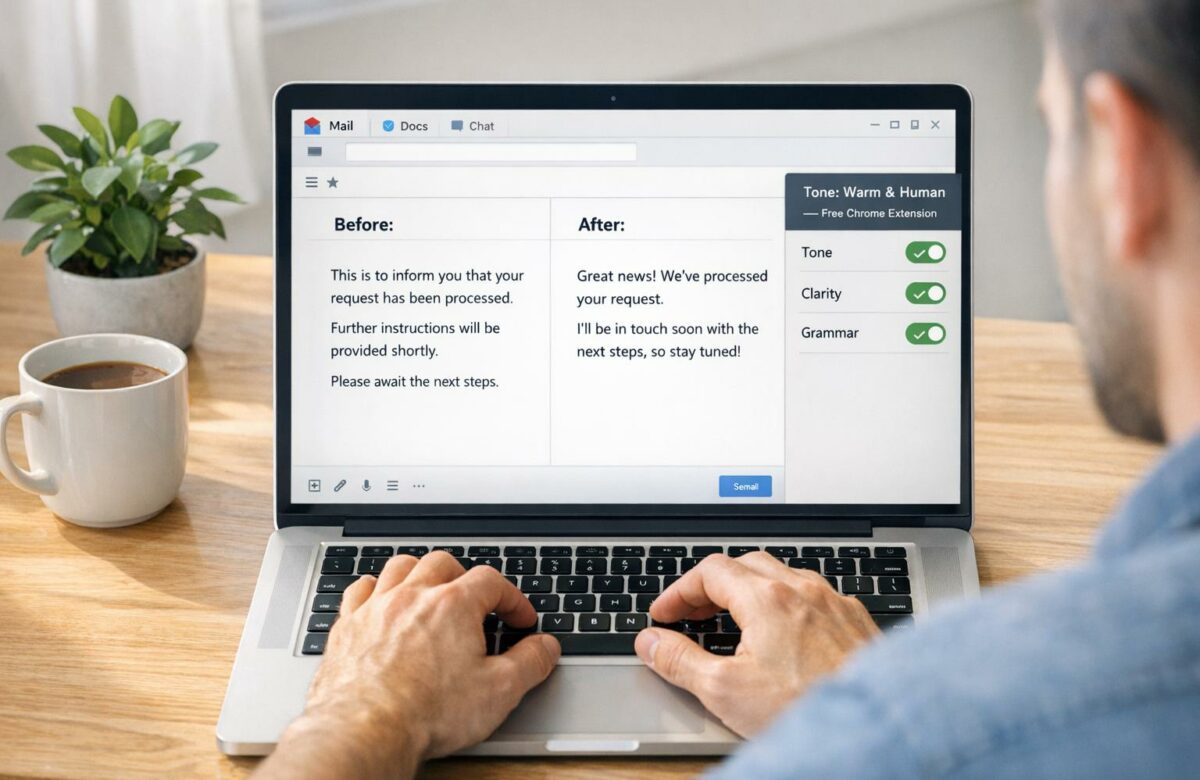
Best Free Tool To Make ChatGPT Text Sound Human
AI-generated text often feels stiff, overly formal, or predictable. BeLikeNative, a free Chrome extension, fixes this by refining ChatGPT‘s robotic tone into natural, human-like writing. Here’s why it stands out:
- Quick Edits: Highlight text, press a shortcut, and instantly get a polished version.
- Works Everywhere: Use it on Gmail, Google Docs, Slack, Notion, and more.
- Free Plan: 5 daily uses (up to 500 characters each) with features like tone adjustments, grammar fixes, and rephrasing.
- Saves Time: Users report saving 85+ hours monthly by skipping manual edits.
With simple installation and easy integration, BeLikeNative helps you transform stiff AI text into engaging, relatable content without disrupting your workflow.
Transform Any Text, On Any Site, In Seconds
Rephrase, translate, and improve text with one shortcut. Works everywhere you write.
Add to Chrome - It's Free!Why ChatGPT Text Sounds Robotic
To understand how BeLikeNative transforms AI-generated writing, it helps to first explore why ChatGPT’s unedited text often feels mechanical.
ChatGPT creates text by predicting the most statistically likely next word based on patterns in its training data. While this method produces well-structured sentences, it often lacks the natural creativity and spontaneity of human writing.
The Technical Signs of AI Writing
AI detection tools rely on metrics like perplexity (how predictable the text is) and burstiness (variation in sentence structure). ChatGPT typically scores low in both areas, which contributes to its repetitive and monotonous style. As Niyati Mahale from Writesonic puts it:
Humans speak with low perplexity and high burstiness… there’s a lot of variation in sentence lengths and structures when we speak.
In contrast, AI-generated text tends to stick to rigid patterns, making it easy to spot.
Repetition and Predictable Structure
AI writing often follows a formula. Sentences are uniform in length and complexity, giving the text a flat, robotic tone. You’ll notice repetitive sentence structures, overly formal grammar (like "do not" instead of "don’t"), and transitions that feel more like abrupt leaps than smooth flows.
Certain words and phrases – like "delve", "realm", "tapestry", and "in today’s digital landscape" – appear frequently, signaling AI authorship. Overuse of passive voice and rigid constructions, such as "whether-or" and "not just-but", further amplifies the mechanical feel.
Lack of Emotional Depth and Personal Connection
One of the biggest gaps in AI writing is its inability to reflect real human experience. Because ChatGPT relies on algorithms, it struggles to convey the emotional nuance and personal insight that make human writing relatable.
Emotionally, ChatGPT leans toward a flat, uniformly positive tone, while human writing naturally includes a broader range of emotions – like frustration, skepticism, or joy. Studies show that this lack of emotional depth turns off readers, with 80% preferring content that feels authentic and grounded. AI text also avoids personal anecdotes or specific details, favoring generalizations that feel detached from reality.
These limitations highlight the need for top AI rewriter tools that can inject authentic human qualities into AI-generated content, making it more engaging and relatable to readers.
sbb-itb-32359dc
BeLikeNative: The Best Free Tool to Make ChatGPT Text Sound Human
BeLikeNative is a Chrome extension designed to transform AI-generated text into writing that feels natural and human. This free tool makes it easy to refine ChatGPT’s robotic tone into something more relatable, all without disrupting your workflow. The process is simple: highlight the text, hit the shortcut, and instantly get a polished version copied to your clipboard. It’s quick, effective, and perfect for anyone looking to improve AI-driven content.
The extension addresses common AI text issues like repetitive phrasing, monotone delivery, and overly rigid grammar. It offers features such as tone adjustments, rephrasing, and grammar fixes. Plus, it works seamlessly across various platforms, including Gmail, Slack, Notion, and WhatsApp Web.
What the Free Free Plan Offers
The Free plan provides essential tools for humanizing text at no cost. With 5 uses per day and a 500-character limit, it’s ideal for short tasks like emails, social media updates, or quick messages. Features include spelling and grammar fixes, improved clarity and fluency, support for 80+ languages, and tone customization. Tools like "Simplify This", the Paraphraser, "Fix Grammar", and "Fix Punctuation" help convert AI-generated text into conversational, easy-to-read content.
What Makes BeLikeNative Different
BeLikeNative stands out thanks to its smart integrations and ease of use. The clipboard integration eliminates the need for manual copy-pasting. With a simple keyboard shortcut – Alt+E (Windows) or Command+E (Mac) – you can instantly copy the refined text to your clipboard. The extension works across all platforms, whether you’re drafting in Google Docs, chatting on Slack, or posting on LinkedIn. Users report saving more than an hour a day, boosting productivity by 66%, which adds up to over 85 hours saved each month.
How to Use BeLikeNative to Improve ChatGPT Text
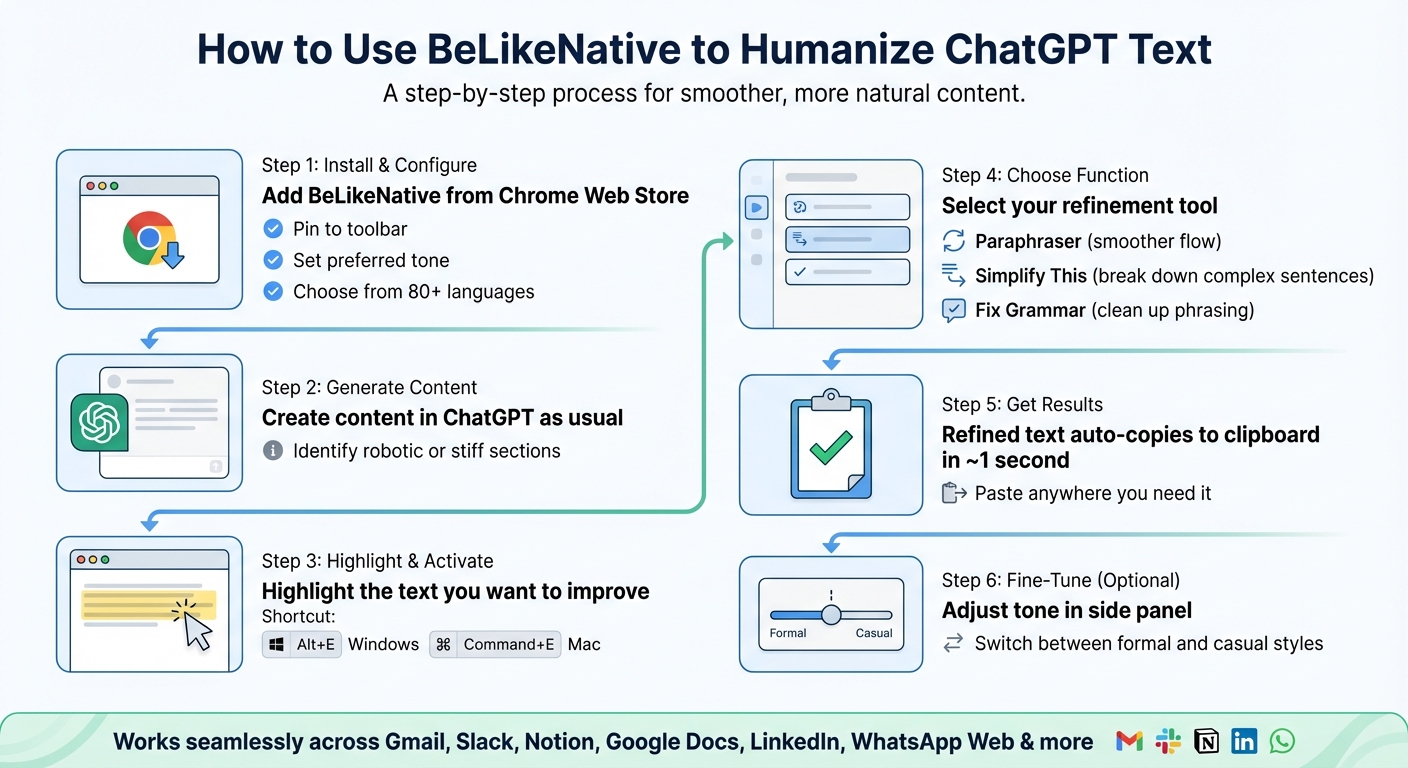
How to Use BeLikeNative Chrome Extension to Humanize ChatGPT Text
Installing and Configuring BeLikeNative
Start by heading to the Chrome Web Store and clicking "Add to Chrome". Once installed, pin BeLikeNative to your browser toolbar for easy access. From there, open the dashboard to set your preferred tone – whether formal for business emails or casual for personal messages. You can also choose from over 80 available languages to tailor the tool to your needs.
To make things even smoother, configure your keyboard shortcuts in the settings. The default shortcut is Alt + E on Windows or Command + E on Mac, which opens the side panel and activates functions instantly. Adjusting these shortcuts ensures the tool fits right into your workflow without interrupting your creative process.
Refining Your ChatGPT Text
Once BeLikeNative is installed, turning stiff AI-generated responses into natural-sounding text becomes a breeze. Begin by generating content in ChatGPT as usual. If the output feels robotic, highlight the specific section you want to improve. Instead of copying it elsewhere, use BeLikeNative directly within the ChatGPT interface.
Highlight the text, press your shortcut, and pick a function – "Paraphraser" for smoother flow, "Simplify This" to break down complex sentences, or "Fix Grammar" to clean up awkward phrasing. The tool processes your request in about one second and automatically copies the refined text to your clipboard. You can then paste the improved version wherever you need it.
Need further tweaks? Open the side panel with your shortcut and experiment with different tones. Switch between formal and casual styles until the text feels just right. The extension integrates seamlessly with platforms like Gmail, Slack, Notion, and Google Docs, so you can refine your writing without switching tabs or disrupting your workflow.
Next, explore how BeLikeNative enhances text with clear before-and-after comparisons.
Before and After Examples Using BeLikeNative
Let’s dive into some specific examples that highlight how BeLikeNative turns AI-generated text into something that feels more natural and human.
Making Text Flow Better and Easier to Read
AI-generated text, like what ChatGPT produces, can often feel stiff or overly formal. Take this sentence: "It is recommended to evaluate your options." After running it through BeLikeNative’s Paraphraser, it becomes: "You might want to take a look at your choices." See the difference? The revised version feels conversational and approachable.
Another example: ChatGPT might generate something like "Implementing productivity tools can enhance performance." While accurate, it sounds robotic and dull. The Simplify This function transforms it into: "Better tools help us work faster." It’s shorter, clearer, and has a more human touch.
The tool also tackles awkward phrasing that can make sentences clunky. For instance, "The individual moved rapidly" is reworked to "He rushed past me." The shift to a specific, relatable description makes the text easier to read and more engaging.
Beyond improving flow, BeLikeNative also adjusts tone, adding a personal touch where needed.
Changing Tone and Style
BeLikeNative doesn’t just refine the flow – it also adapts the tone and style to suit your audience. For example, if ChatGPT generates "Thank you for your correspondence," which might be fine for a legal document but feels too formal for an email, the tool revises it to "Thanks for reaching out." The tone becomes much more relaxed without losing the original meaning.
The tool’s adaptability shines when tailoring text for different contexts. For business writing, you might need a polished yet approachable tone, but for social media or quick messages, a casual style works better. BeLikeNative ensures you’re not stuck with ChatGPT’s default "neutral corporate" voice. Instead, you can make the text sound like you – whether that’s friendly, professional, or somewhere in between.
These examples show how BeLikeNative transforms AI-generated text into something that feels natural, engaging, and perfectly suited to your needs.
Conclusion
ChatGPT may be a powerful tool, but it often struggles to produce writing that feels natural and relatable. That’s where BeLikeNative steps in, offering a simple and effective way to bridge this gap.
If you’re frustrated with AI-generated text that feels rigid or overly mechanical, BeLikeNative provides an easy-to-use solution – and it’s free to get started. The Free Plan gives you access to essential tools that transform robotic AI text into smooth, human-like writing, all within the platforms you’re already using.
What makes it even better is how effortlessly it integrates into your workflow. Highlight your text, hit the shortcut, and in about a second, you’ll see a polished version ready to go. This works seamlessly across Gmail, Google Docs, Notion, LinkedIn, Slack, and more than 80 other platforms.
The benefits go beyond convenience. With users saving over 85 hours per month, BeLikeNative lets you spend less time editing and more time focusing on what matters – your creative work. Whether you need professional business writing or a casual, conversational tone, it adapts to your needs. Plus, with features like AI grammar correction, sentence simplification, and summarization, it’s more than just a tool for humanizing text – it’s a full-fledged writing assistant.
BeLikeNative transforms stiff, robotic AI output into clear, engaging, and human-sounding text. Starting with the free version is an easy way to see the difference for yourself.
FAQs
How does BeLikeNative make AI-generated text sound more natural?
BeLikeNative fine-tunes AI-generated text to make it sound more like genuine human communication. It focuses on improving tone, style, and readability, ensuring the content feels natural and relatable. Whether you’re targeting professionals, casual readers, or working on creative endeavors, it adapts to fit the audience.
By examining the purpose and context of your writing, BeLikeNative helps craft messages that connect with readers, turning AI outputs into engaging and impactful content for a variety of needs.
What are the limitations of the free Free Plan on BeLikeNative?
The Free Plan on BeLikeNative is perfect for basic use and testing, but it does come with some restrictions compared to the paid options. For instance, it may have lower character limits, fewer ways to customize, and limited access to advanced tools like tone refinement, multi-language functionality, or handling large-scale text processing.
This free plan might also cap the number of texts you can process daily or monthly, making it more suitable for casual users rather than those with high-volume or professional needs. If you’re looking for more powerful tools and greater flexibility, upgrading to a paid plan is the way to go.
Can I use BeLikeNative with different apps and platforms?
Yes, BeLikeNative works smoothly across multiple platforms. As a Chrome extension, it integrates directly with widely-used web-based tools like Google Docs, WhatsApp Web, and other online applications. This allows you to highlight text, receive suggestions, and fine-tune your writing without leaving these platforms.
What’s more, BeLikeNative supports over 80 languages and offers features such as translation, text refinement, and tone adjustment. This makes it an adaptable solution for a variety of writing tasks in different settings.
Related Blog Posts
- How to Use ChatGPT to Rewrite & Improve Your Text (Step-by-Step Guide!)
- How To Polish Your Writing With Chrome Ai Extensions
- Best AI Tool To Rewrite Chatgpt Content
- Best AI English Teacher Plugin For Chrome
BeLikeNative fixes grammar, rephrases, translates, and simplifies text on any website in 1 second — just highlight and hit a keyboard shortcut. No tab switching. Try it free →

