
Best Sentence Rephraser For Legal Documents
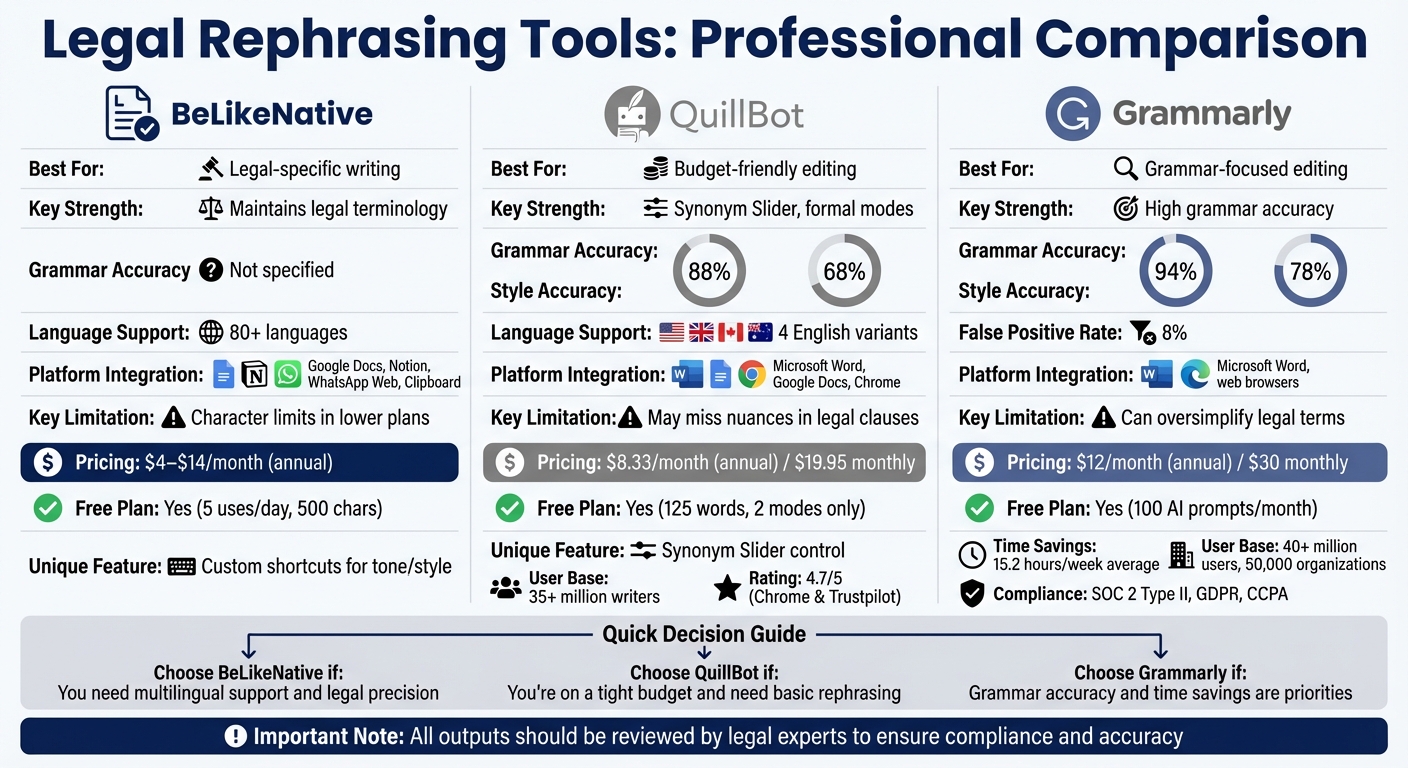
Legal professionals need tools that save time while preserving accuracy. Misinterpreted legal terms or altered meanings can lead to costly mistakes. This article reviews three tools – BeLikeNative, QuillBot, and Grammarly – to help you choose the best sentence rephraser for legal writing. Here’s what you need to know:
- BeLikeNative: Designed for legal precision, it ensures terminology like "tortious conduct" remains intact. Offers integration with platforms like Google Docs and customizable tone settings. Pricing starts at $4/month.
- QuillBot: Features modes like "Formal" and a Synonym Slider for control over edits. Affordable at $8.33/month (annual plan) but can struggle with complex legal language.
- Grammarly: Known for grammar accuracy (94%) and saving time, but may oversimplify legal terms. Costs $12/month (annual billing).
Each tool has strengths, but outputs should always be reviewed by a legal expert to ensure compliance and accuracy.
Quick Comparison
| Tool | Best For | Key Strength | Key Limitation | Monthly Cost (Annual) |
|---|---|---|---|---|
| BeLikeNative | Legal-specific writing | Maintains legal terminology | Character limits in lower plans | $4–$14 |
| QuillBot | Budget-friendly editing | Synonym Slider, formal modes | May miss nuances in legal clauses | $8.33 |
| Grammarly | Grammar-focused editing | High grammar accuracy (94%) | Can oversimplify legal terms | $12 |
Choose based on your workload, budget, and need for legal precision.
Comparison of Top 3 Legal Document Rephrasing Tools: Features, Pricing & Accuracy
1. BeLikeNative
Accuracy in Legal Terminology
BeLikeNative is a Chrome extension designed to integrate seamlessly with your clipboard, letting you rephrase legal text without disrupting your workflow. Supporting over 80 languages, it offers customizable tone and style settings to uphold the formal tone required for legal documents. Unlike general paraphrasing tools that often oversimplify, BeLikeNative gives users control over how much the text is reworded – critical for preserving precise legal terms like "tortious conduct" or "indemnification clauses."
Precision matters. For example, a 45-attorney law firm once faced a major issue when a writing assistant simplified "tortious conduct" to "bad behavior." This mistake led to 18 hours of correction work and nearly cost the firm a $2.3M client relationship. Tools like BeLikeNative help avoid such costly missteps by ensuring legal terminology remains intact while improving readability.
Customization for Tone and Style
BeLikeNative allows users to create custom shortcuts to define how text is rephrased. You can tweak the formality level, decide whether to retain technical terms, and choose specific sentence structures. This is especially helpful when adjusting contracts for different audiences. For instance, you can simplify dense legal jargon into plain English for clients while keeping the legal meaning unchanged.
The extension works across platforms like Google Docs, Notion, and WhatsApp Web, requiring no extra integrations. This means you can rephrase and translate legal documents directly in your preferred editor with a simple keyboard shortcut, saving time while maintaining accuracy. This adaptability helps ensure that documents retain their legal nuances without interrupting your workflow.
Pricing and Usage Limits
BeLikeNative offers four pricing options tailored to different needs:
- Explorer: Free, with 5 uses per day and a 500-character limit.
- Learner: $4/month, providing 25 uses per day and a 2,000-character limit, ideal for moderate workloads.
- Native: $6/month, offering 50 uses per day and a 4,000-character limit for professionals handling higher volumes.
- Premium: $14/month, with 125 uses per day and a 6,000-character limit, perfect for heavy legal drafting tasks.
All paid plans include data security protections and priority support, ensuring confidentiality and reliability when working with sensitive client information.
sbb-itb-32359dc
2. QuillBot
Accuracy in Legal Terminology
QuillBot is a widely used paraphrasing tool, trusted by over 35 million writers globally. Designed to combine accuracy with efficiency, it offers specialized modes like Academic for technical writing and Formal for polished word choices – both particularly useful for legal documents [18,19]. One standout feature is its Synonym Slider, which allows users to adjust how much the text is modified. For legal writing, keeping the slider toward the left ensures that precise legal terminology remains intact. However, because QuillBot processes text one sentence at a time, it might occasionally miss the bigger picture in intricate legal clauses.
Customization for Tone and Style
QuillBot’s Custom mode lets users tailor the tone of their writing, with options such as "confident" or "concise". Its AI-powered thesaurus adds another layer of control, enabling users to click on any word to explore synonyms. The tool also supports four English variants – US, UK, Canada, and Australia – making it adaptable for different regional preferences. Additionally, QuillBot integrates seamlessly with Microsoft Word, Google Docs, and Chrome, streamlining the editing process [19–21].
"The paraphraser improves the flow and logic of my emails. When I explain complex strategies, there is less confusion."
- Abel R., via QuillBot for Chrome
These customization options make QuillBot a versatile tool, catering to the nuanced requirements of legal drafting while offering flexibility in pricing.
Pricing and Usage Limits
QuillBot provides a free plan with a 125-word paraphrasing limit per session, granting access to only the Standard and Fluency modes. For more advanced features, the Premium plan removes word limits and unlocks over 10 modes, including Formal, Academic, and Custom. Premium users also gain access to a Plagiarism Checker and full functionality of the Synonym Slider [18,22].
| Plan | Price | Word Limit | Available Modes |
|---|---|---|---|
| Free | $0 | 125 words | Standard, Fluency |
| Monthly | $19.95/month | Unlimited | All 10+ modes |
| Semi-Annual | $13.31/month ($39.95 every 3 months) | Unlimited | All 10+ modes |
| Annual | $8.33/month ($99.95 every 12 months) | Unlimited | All 10+ modes |
Premium plans come with a three-day money-back guarantee, offering peace of mind for new users. QuillBot has earned a 4.7/5 rating on both the Chrome Web Store and Trustpilot, reflecting its reliability and user satisfaction [18,20].
3. Grammarly
Accuracy in Legal Terminology
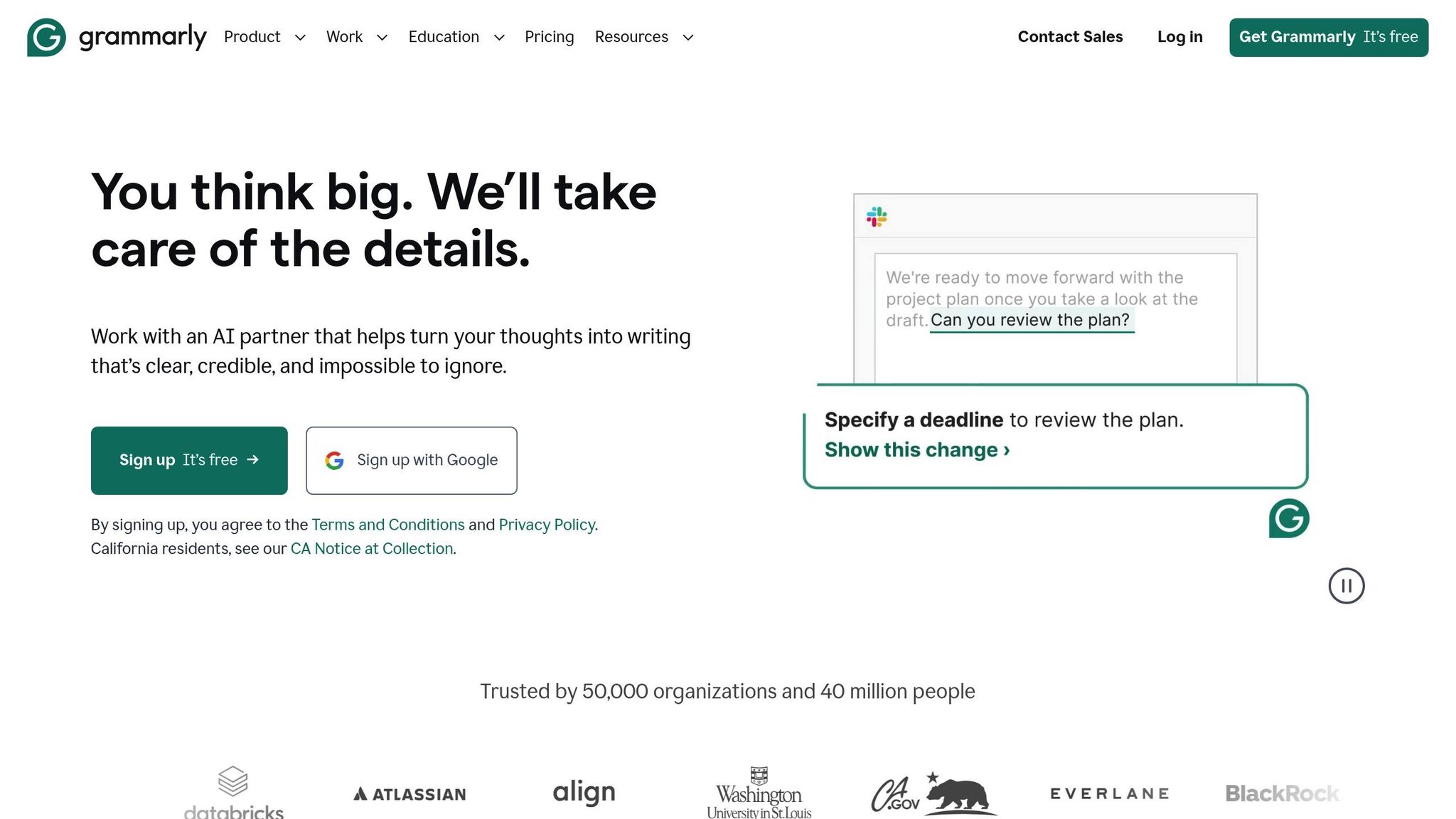
Grammarly, a widely-used writing assistant with over 40 million users and 50,000 organizations relying on it, boasts an 89% overall accuracy rate. It catches 94% of grammar errors but struggles more with style issues, identifying only 78% of them. Additionally, its 8% false positive rate often flags technical or legal jargon as mistakes, which can be problematic for legal professionals. For example, it may suggest simplifications to improve clarity that unintentionally alter the meaning of legal documents or fail to distinguish between legally critical terms like "form" and "forum". This makes human oversight essential when using Grammarly for legal writing.
To address these shortcomings, users can enhance Grammarly’s functionality by adding legal terms to its personal dictionary or using the "Goals" feature available in paid plans. Setting the Domain to "Legal" and the Audience to "Expert" can help refine Grammarly’s suggestions to better fit the nuances of legal writing.
"The major drawback to using a machine to check your writing in a highly specialized field like the law is that there will invariably be words with which Grammarly is unfamiliar."
- LawRank
These challenges highlight the importance of customization features to align Grammarly more closely with the standards of legal documentation.
Customization for Tone and Style
Grammarly offers tools to fine-tune tone and style, making it adaptable for legal contexts. The Paraphraser allows users to choose from six preset styles or create a "custom voice" by specifying tone and style preferences. Another feature, Reader Reactions, provides instant feedback on how a document might be perceived by its intended audience – whether a judge, client, or colleague. This helps users adjust their writing to maintain clarity and professionalism.
For teams, Grammarly supports uploading a style guide or defining "brand tones" to ensure consistency in legal and professional documents. Additionally, the GrammarlyGO feature leverages AI to suggest contextual rewrites, tone adjustments, and clarity improvements while aiming to preserve the original meaning. However, there are limitations: GrammarlyGO can process only about 5,000 characters (roughly 800 words) per input, with outputs capped at 1,600 characters (around 260 words).
Though the tool has its limitations, these customization options make it a useful resource for legal professionals looking to maintain tone and style across documents.
Pricing and Usage Limits
Grammarly offers three main pricing tiers: Free, Pro, and Enterprise.
- The Free plan provides basic grammar, spelling, and punctuation checks, along with 100 AI prompts per month.
- The Pro plan, at $12/month (billed annually) or $30/month for monthly subscriptions, includes 2,000 AI prompts, full-sentence rewrites, and plagiarism detection across 100 billion web pages.
- The Enterprise plan, tailored for larger teams, offers unlimited AI prompts, advanced security features, and dedicated support.
| Plan | Price | AI Prompts | Key Features |
|---|---|---|---|
| Free | $0 | 100/month | Basic grammar and spelling |
| Pro | $12/month (annual billing) | 2,000/month | Full rewrites, plagiarism checker, style guides |
| Enterprise | Contact Sales | Unlimited | BYOK encryption, DLP, dedicated support |
On average, Grammarly Business users report saving 15.2 hours per week, a significant time-saver for professionals. The platform also ensures compliance with SOC 2 Type II, GDPR, and CCPA standards, with robust data encryption. For legal teams handling sensitive information, the Business and Enterprise plans guarantee that customer content will not be used to train third-party AI models.
"Grammarly’s monthly pricing is 2.5x the annual rate. A 10-person team paying monthly ($300/month) wastes $1,800 yearly vs. annual billing."
- Jonathan Bailey
Quillbot | A useful AI writing tool for Researchers
Advantages and Disadvantages
When it comes to legal drafting, precision and efficiency are non-negotiable. Each tool has its strengths and weaknesses, so choosing the right one depends on your specific needs.
BeLikeNative is great for international legal work, thanks to its clipboard integration and support for over 80 languages. It also allows for customizable tone settings and works seamlessly with platforms like Google Docs and Notion. However, its character limits might pose challenges for longer documents, as users may need to break text into smaller chunks.
On the other hand, QuillBot offers features like the Synonym Slider and specialized modes such as "Formal" and "Academic", which help maintain professional language. At just $4.17 per month (billed annually), it’s a cost-effective option for individual users. That said, its output can sometimes feel mechanical, and the free plan’s low word cap makes it less suitable for lengthy legal documents. Standardized tests show it achieves 88% grammar accuracy and 68% in style, which might not meet the high bar required for legal precision.
Grammarly excels in grammar accuracy, scoring 94%, and can save users an average of 15.2 hours per week. It integrates well with Word and web browsers, making it a popular choice for professionals. However, it occasionally simplifies legal terms, which can be problematic. For instance, it might replace "pursuant to" with "according to", potentially altering the meaning in a legal context. At $12 per month, Grammarly is more expensive than its competitors, but annual plans offer better value.
General-purpose tools like QuillBot and Grammarly rely on pattern recognition rather than deep legal reasoning. This can lead to errors in nuanced legal language, such as misinterpreting confidentiality clauses or indemnity terms. This limitation explains why roughly 43% of law firms now prefer AI tools specifically designed for legal workflows. These specialized tools can reduce documentation time by up to 70%, but it’s crucial to have a qualified professional review the final drafts to ensure accuracy.
| Tool | Best For | Key Strength | Key Limitation | Monthly Cost (Annual) |
|---|---|---|---|---|
| BeLikeNative | Multi-platform legal work | Clipboard integration, 80+ languages | Character limits per plan | $4–$14 |
| QuillBot | Budget-conscious drafting | Synonym Slider, customization | Mechanical output, low free word cap | $4.17 |
| Grammarly | Grammar accuracy | 94% grammar accuracy, time savings | Occasional oversimplification of legal terms | $12 |
These comparisons provide a clear overview to help legal professionals select a tool that fits their drafting requirements while balancing cost, accuracy, and efficiency.
Conclusion
Selecting the best rephrasing tool for legal documents comes down to your specific requirements and budget. For professionals managing legal work across multiple platforms and languages, BeLikeNative stands out. It supports over 80 languages, integrates seamlessly with tools like Google Docs and Notion, and offers scalable usage plans. While its character limits might require breaking longer documents into smaller sections, its efficiency in maintaining legal precision makes it a valuable time-saver for legal professionals.
On the other hand, QuillBot appeals to budget-conscious users with its free version, which allows quick edits up to 125 words. Features like the Synonym Slider and formal writing modes add flexibility. However, its 88% grammar accuracy and 68% style score may not meet the rigorous standards required for critical legal work.
For those prioritizing integration and accuracy, Grammarly delivers 94% grammar accuracy and reportedly saves users an average of 15.2 hours per week. Its compatibility with Microsoft Word and web browsers makes it highly versatile. However, its tendency to oversimplify legal terms – like replacing "pursuant to" with "according to" – could risk altering the intended meaning in legal contexts.
Each tool offers unique strengths for streamlining legal drafting, but all outputs should be carefully reviewed by a legal expert to ensure accuracy, compliance, and intent.
FAQs
How do I rephrase legal text without changing its meaning?
To rephrase legal text effectively, prioritize clarity, precision, and preserving the original meaning. Adjust the wording or sentence structure without altering the legal intent. AI tools tailored for legal documents can assist in maintaining contextual accuracy, but it’s crucial to review the output thoroughly. This ensures the original intent and critical legal details remain intact, as even minor errors can lead to misinterpretation.
Is it safe to use an AI rephraser with confidential client documents?
Using an AI rephraser for sensitive client documents comes with potential security and privacy concerns. Legal information could be at risk depending on how the tool processes and stores data. It’s crucial to carefully examine the tool’s privacy policy and data management practices to ensure they align with confidentiality standards.
What should I review before using a rephrased clause in a contract?
Before including a rephrased clause in a contract, double-check its accuracy, clarity, and legal soundness. Make sure the revised wording stays true to the original intent without introducing confusion or changing its meaning. Confirm it aligns with applicable legal requirements and maintains all necessary context and qualifiers. To minimize risks or potential misinterpretation, a thorough review or consultation with a legal professional is highly advisable.

