
How To Write eBay Listings Faster In Browser
Creating eBay listings can be tedious, especially when handling hundreds daily. The key to faster, more effective listings lies in optimizing your browser setup and leveraging tools like BeLikeNative, an AI-powered Chrome extension. Here’s how you can cut listing time significantly:
- Browser Setup: Use extensions like BeLikeNative, enable Chrome’s Memory Saver, and organize tabs with color-coded groups for better multitasking.
- BeLikeNative Features: Rephrase titles, refine descriptions, and translate listings into 80+ languages directly on eBay.
- Automation: Save time with clipboard integration, custom keyboard shortcuts, and pre-saved templates for repetitive tasks.
- Plans: Choose from free to premium plans ($0–$14/month) based on your listing volume and needs.
These strategies can save hours each month while improving listing quality and reaching global markets. Start optimizing today to focus more on selling and less on editing.
Set Up Your Browser for Better Productivity
Your browser isn’t just a tool for browsing – it’s the heart of your workflow, especially when managing eBay listings. By fine-tuning your browser setup, you can transform repetitive tasks into quick, one-click actions. Over time, these small efficiencies add up, saving you hours when dealing with hundreds of listings.
Install Browser Extensions
One tool worth exploring is BeLikeNative, an AI-powered writing assistant designed to work seamlessly within your browser. It helps you rephrase titles, translate descriptions into over 80 languages, and even adjust the tone of your listings – all without leaving the eBay page. As of February 2026, this extension boasts a 4.6/5 rating from over 200 users on the Chrome Web Store. Power users have reported a 66% boost in productivity, saving over 85 hours per month by streamlining their listing workflows.
Installing BeLikeNative is quick and simple. Head to the Chrome Web Store, download the extension, and activate it in under a minute. Once installed, you can open its side panel using Cmd+E (Mac) or Alt+E (Windows). From there, set default tones and customize AI instructions to suit your needs. Plus, your content stays private since the extension processes text without storing any data.
Configure Browser Settings for Multitasking
To further boost efficiency, tweak your browser settings for multitasking. If you’re using Chrome, enabling Memory Saver ensures your active eBay tabs remain responsive, while Energy Saver helps extend your laptop’s battery life during long work sessions.
Organizing tabs can also make a world of difference. Use color-coded tab groups to separate active listings, templates, and research materials. This simple structure eliminates the frustration of hunting through a sea of open tabs. Additionally, Chrome’s autofill feature can save time by automatically entering details like your business address, return policies, and contact information.
For sellers managing multiple eBay accounts or working across international sites, creating separate browser profiles is a game-changer. Each profile can have its own extensions, bookmarks, and autofill settings, making it easy to switch between accounts without mixing up inventory or shipping policies.
sbb-itb-32359dc
Use BeLikeNative to Improve eBay Listings
Once your browser setup is ready, it’s time to take things to the next level with BeLikeNative. This Chrome extension is a game-changer for eBay sellers, letting you rephrase, translate, and refine your text directly on the eBay platform. Just highlight the text you want to work on and use keyboard shortcuts to polish it up. This tool simplifies the process of optimizing your titles and descriptions while helping you connect with a broader audience.
Rephrase Titles and Descriptions
Rewriting item titles and descriptions for multiple listings can be a tedious task. BeLikeNative makes it faster and easier. You simply highlight your text and rephrase it instantly with a shortcut. What’s even better? You can pick a tone that matches your product – professional for high-end gear, friendly for everyday items, or creative for unique, vintage finds.
The extension also lets you use custom AI instructions, giving you more control over how your listings are updated. For example, you can create shortcuts to optimize titles with relevant keywords or summarize key features for a cleaner description. Once edited, the improved text is ready to paste directly into your eBay listing. Beyond just rephrasing, BeLikeNative also helps you break into international markets with its powerful translation capabilities.
Create Listings in Multiple Languages
If you’re looking to attract international buyers, translating your listings is a must – but generic tools often fall short. BeLikeNative steps in with translations that are not only accurate but also feel natural. With support for over 80 languages, this tool ensures your listings resonate with buyers in key markets like Germany, France, or Japan, where localized language makes a big difference.
The process is simple: highlight your English text, activate the translation shortcut, and paste the result. You can even tweak the tone to suit different audiences – formal for European business buyers or casual for U.S. shoppers. For sellers who frequently target multiple regions, setting up browser profiles with pre-saved language and tone preferences can make switching between markets a breeze. These multilingual listings help build trust and consistency with international customers, giving your eBay store a global edge.
Automate Repetitive Tasks in eBay Listings
Manually re-entering shipping details, return policies, and condition notes can drain time that could be better spent growing your sales. Automation tools take care of these routine tasks, freeing you up to focus on strategies that truly impact your bottom line. Below are some tools and techniques designed to simplify repetitive processes in eBay listings.
Use Clipboard Integration for Faster Text Entry
BeLikeNative’s clipboard integration streamlines text entry by eliminating the need to jump between your eBay listing page and external tools. Here’s how it works: highlight your draft title or description directly on the eBay page, activate the AI function using a custom keyboard shortcut, and get a polished version of the text in about a second. This saves users a lot of time daily by making workflows more efficient. Plus, the tool integrates seamlessly across websites without requiring complicated setups.
Set Up Custom Shortcuts for Bulk Listings
Custom shortcuts take efficiency to the next level, especially for bulk operations. BeLikeNative allows you to create AI-powered shortcuts through its side panel. Assign keyboard combinations to tasks like “rewrite for SEO,” “summarize features,” or “adjust tone to professional.” Once activated, the results either display in a floating indicator or are automatically copied to your clipboard, ready to paste into eBay forms.
For bulk listings, you can set up configuration profiles tailored to different product categories. For instance, use a technical profile for electronics and a more creative one for collectibles. Combine these shortcuts with text expansion tools for even greater efficiency. For example, typing short codes like /ship or :policy can instantly insert complete paragraphs of shipping terms or return policies directly into your listings. This approach ensures consistency while saving time.
Choose the Right BeLikeNative Plan
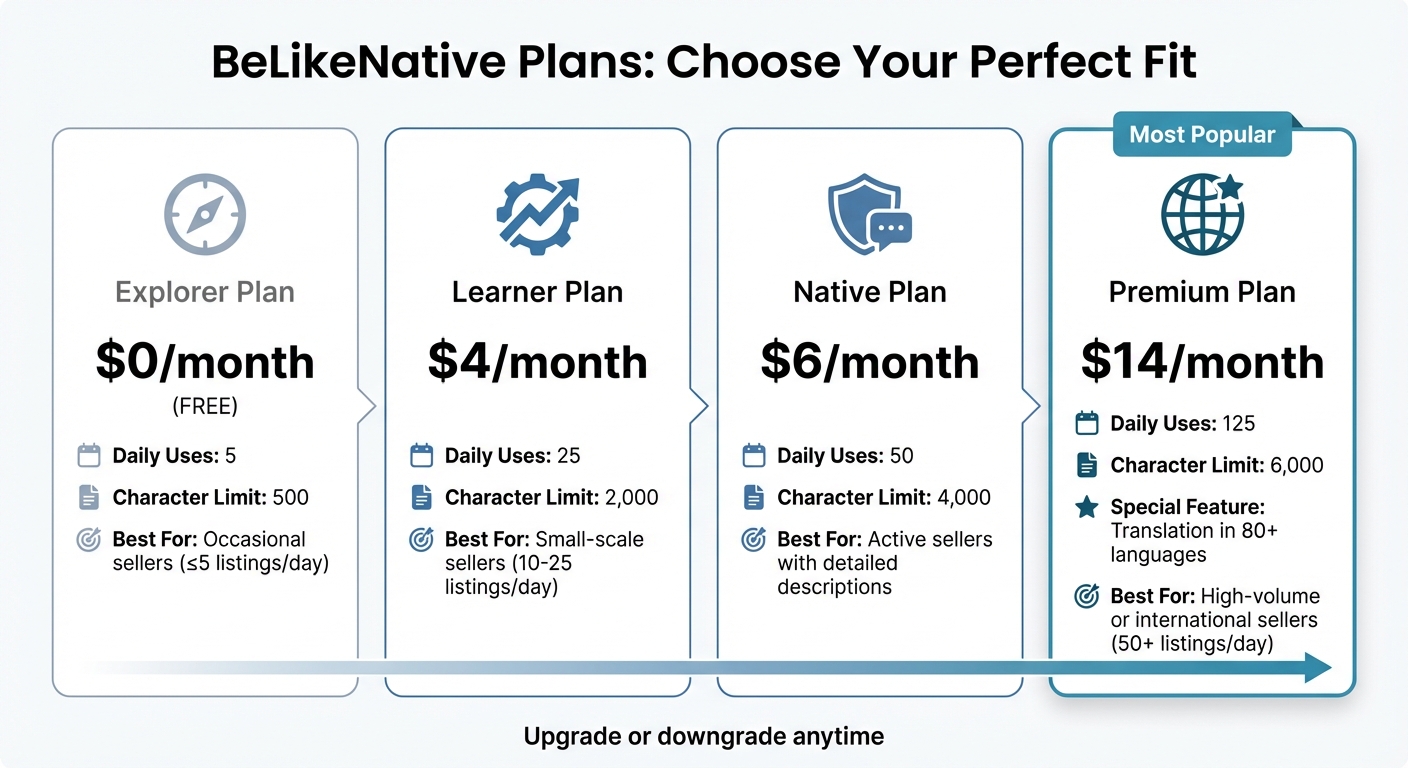
BeLikeNative Pricing Plans Comparison for eBay Sellers
Once you’ve streamlined your eBay workflow with BeLikeNative, it’s time to pick the plan that aligns with your listing needs. Your choice will depend on how many listings you handle daily and the level of detail required.
For sellers managing five or fewer listings daily with short descriptions, the Explorer plan is a great starting point. It’s completely free at $0/month, offering 5 daily uses and a 500-character limit. This plan focuses on basic spelling and grammar fixes for titles and brief product details.
If you’re handling 10–25 listings a day, the Learner plan at $4/month might be a better fit. It includes 25 daily uses and a 2,000-character limit, making it ideal for crafting longer descriptions and using custom shortcuts. For more active sellers needing detailed listings, the Native plan at $6/month provides 50 daily uses with a 4,000-character limit.
For high-volume sellers or those targeting international markets with 50+ listings daily, the Premium plan is the way to go. At $14/month, it offers 125 daily uses, a 6,000-character limit, and translation support in over 80 languages – perfect for expanding your reach globally.
| Plan | Price | Daily Uses | Character Limit | Best For |
|---|---|---|---|---|
| Explorer | $0/month | 5 | 500 | Occasional sellers |
| Learner | $4/month | 25 | 2,000 | Small-scale sellers (10–25 listings/day) |
| Native | $6/month | 50 | 4,000 | Active sellers with detailed descriptions |
| Premium | $14/month | 125 | 6,000 | High-volume or international sellers |
You can easily upgrade or downgrade your plan anytime through your dashboard. Start with the plan that fits your current needs, and adjust as your business evolves to maintain efficiency as you grow.
Conclusion
After optimizing your browser setup and refining your workflow, the next step is to reap the rewards of faster, more efficient eBay listings. Achieving this doesn’t mean reinventing your process – it’s about using the right tools directly within your browser. With browser extensions and automation, you can refine your listings using top AI rewriter tools without bouncing between tabs, saving time and improving quality.
The secret lies in cutting out unnecessary steps like tab-switching and manual edits. Simply highlight your draft text, use a quick keyboard shortcut, and instantly get improved text ready to go. For high-volume sellers, this method can save over 85 hours each month. Beyond just saving time, this streamlined approach ensures consistency, which helps strengthen your brand’s presence across markets.
Whether you’re handling a few listings or expanding into global marketplaces, this method scales effortlessly. With support for over 80 languages and tone adjustments, your listings stay accurate and aligned with your brand’s voice – whether it’s professional for tech gadgets or casual for vintage finds.
Choose a plan that matches your current needs and adapt as your business grows. Features like clipboard integration, custom shortcuts, and instant text rephrasing let you focus on selling, not editing. The result? Listings that are completed faster, sound better, and attract more buyers – all while staying right on the eBay platform.
FAQs
How do I set up BeLikeNative for my listing style?
Getting started with BeLikeNative is simple. Here’s how you can set it up to match your listing style:
- Install the BeLikeNative Chrome extension: Download the extension and make sure to grant the necessary permissions during installation.
- Access the extension menu: Click the green icon in your browser’s toolbar to open the menu.
- Adjust your settings: Choose your preferred language, tone, and style under the Settings tab.
- Personalize your preferences: Tailor the settings to align with your branding for a consistent look across your listings.
By configuring these options, BeLikeNative ensures your eBay listings are streamlined and maintain a uniform style efficiently.
Will BeLikeNative keep my listing text private?
BeLikeNative keeps your listing text completely private by handling everything locally and securely. This means you can explore various languages, tones, and styles with confidence, knowing your text stays protected.
Which BeLikeNative plan fits my daily listing volume?
BeLikeNative provides subscription plans designed to fit your specific needs, whether it’s about managing daily listing volumes or character limits. Pick the plan that suits your workflow and helps simplify your eBay listing process.

