
Fix Russian To English Grammar Mistakes In Teams
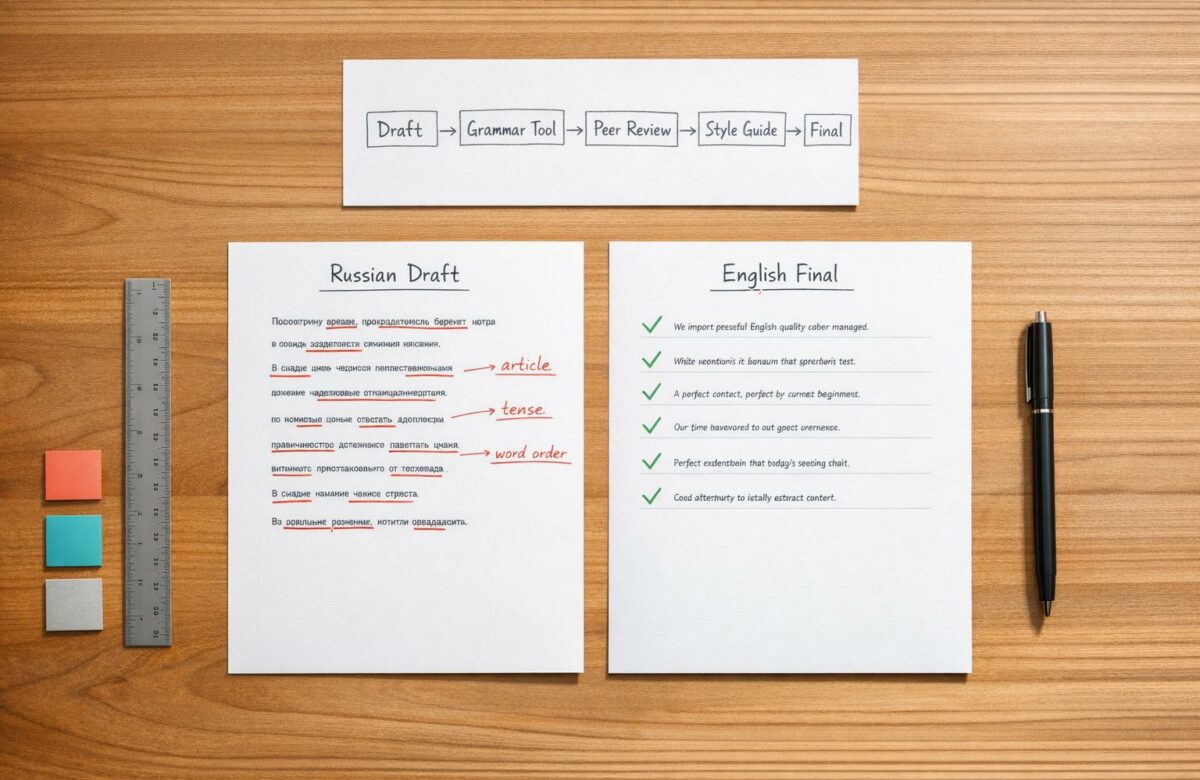
Russian-to-English grammar mistakes can disrupt team communication and create misunderstandings. These errors often stem from structural differences between the two languages, such as the absence of articles in Russian, flexible word order, and simplified tense usage. For example, phrases like "I had online consultation" instead of "I had an online consultation" or "I am training 6 years" instead of "I have been training for 6 years" can confuse readers and reduce professionalism.
Key takeaways:
- Russian lacks articles ("a", "an", "the"), leading to omissions in English writing.
- Word order in Russian is flexible, while English relies on a strict Subject-Verb-Object structure.
- Russian verbs don’t always align with English tenses, causing errors like "When I will do the presentation" instead of "When I do the presentation."
How to fix these issues:
- Use grammar tools like Grammarly, Microsoft Editor, or LanguageTool to catch errors early.
- Establish peer review workflows to ensure translations are accurate and polished.
- Create a multilingual style guide tailored to Russian-to-English translation challenges, focusing on article usage, verb tenses, and word order.
Common Russian-to-English Grammar Errors and Corrections
Typical Grammar Problems in Russian-to-English Translation
1.1 How Language Differences Create Errors
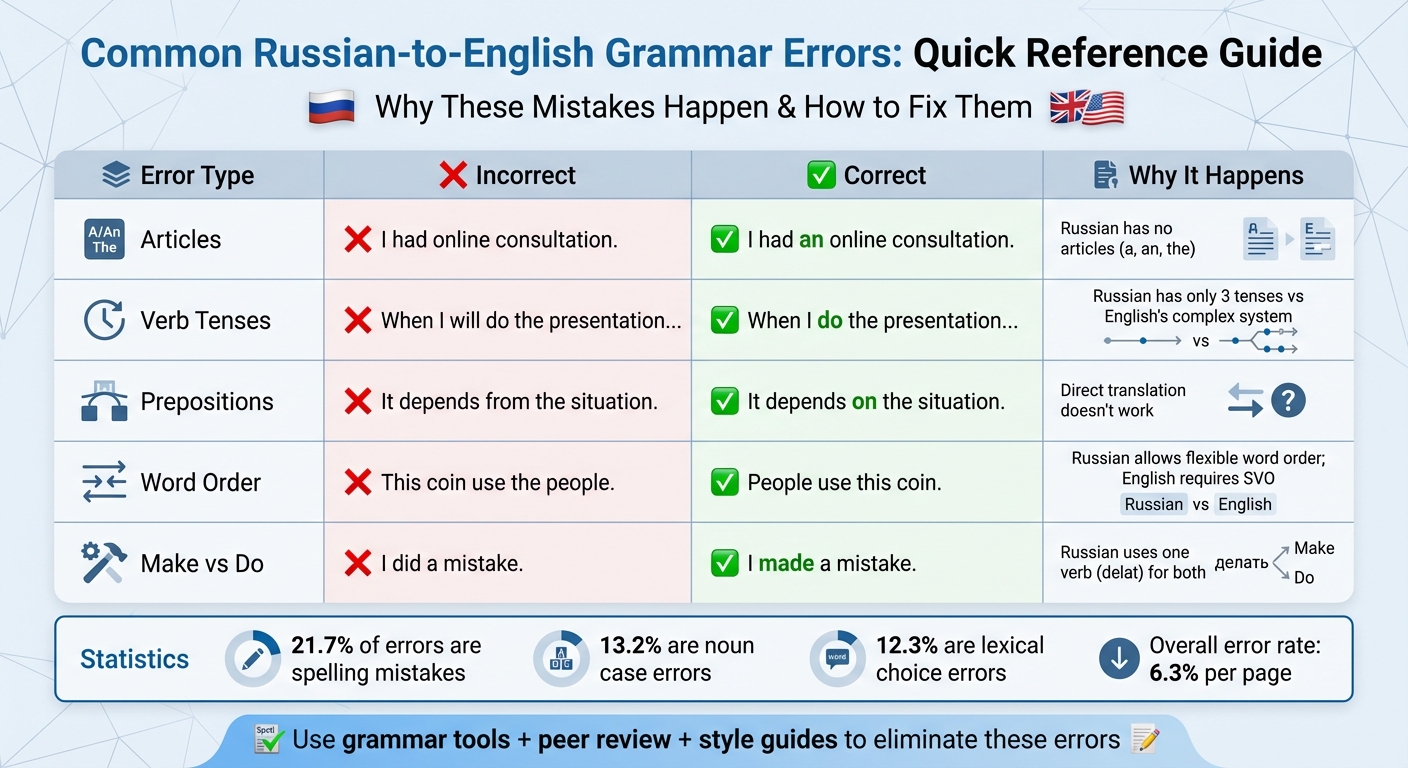
The structural differences between Russian and English often lead to recurring grammar mistakes during translation. For instance, Russian doesn’t use articles like "a", "an", or "the", which results in errors such as omitting or misplacing them entirely. You might encounter sentences like, "I had online consultation" instead of "I had an online consultation".
Another common issue stems from the verb "to be." In Russian, this verb isn’t conjugated in the present tense; instead, a dash is used between the subject and predicate (e.g., "My brother – student"). This pattern often carries over into English, leading to mistakes like "I doctor" instead of "I am a doctor."
Word order also poses challenges. English relies on a strict Subject-Verb-Object structure, while Russian allows more flexibility because grammatical relationships are signaled by word endings. As a result, Russian speakers might produce sentences like "This coin use the people" instead of "People use this coin."
Tense usage is another tricky area. While Russian has only three tenses (past, present, future), English features a much more nuanced system. This difference can lead to errors like "I am training 6 years" instead of "I have been training for 6 years." Additionally, Russian uses a single verb, delat, for both "make" and "do", which often results in phrases like "I did a mistake" rather than "I made a mistake".
Here’s a quick summary of these common errors:
| Error Category | Typical Error | Correct English Form |
|---|---|---|
| Articles | "I had online consultation." | "I had an online consultation." |
| Tense | "When I will do the presentation…" | "When I do the presentation…" |
| Prepositions | "It depends from the situation." | "It depends on the situation." |
| Word Order | "This coin use the people." | "People use this coin." |
| Make/Do | "I did a mistake." | "I made a mistake." |
These differences in grammar and structure don’t just create awkward sentences – they can also disrupt communication in professional environments.
1.2 How Grammar Mistakes Affect Business Operations
Grammar mistakes in translations go beyond being minor annoyances – they can significantly impact productivity and credibility in business settings. Research on Russian learners shows that spelling errors account for 21.7% of mistakes, noun case errors for 13.2%, and lexical choice errors for 12.3%. With an overall error rate of 6.3% [8, 19], even a single page of translated text can be riddled with issues that confuse readers.
"In professional and academic settings, frequent grammatical errors can undermine the writer’s authority and expertise. Documents riddled with errors are often perceived as less credible and reliable."
– Omonova Sitora Shukhrat Kizi, Assistant at Tashkent Institute of Textile and Light Industry
Errors in business documents – like "met with him" instead of "met him" or "on Zanzibar" instead of "in Zanzibar" – can make communication feel awkward or overly blunt. This can hurt team morale, strain client relationships, and raise doubts about a team’s attention to detail. Mistakes in critical documents like project proposals or technical reports may lead to delays, additional review cycles, and wasted time correcting errors.
The issue isn’t just about grammar. English has over 1,000,000 words, compared to Russian’s roughly 200,000. Many Russian words have multiple meanings depending on the context, making it easy to choose the wrong English equivalent. Without thorough review processes, these choices can lead to serious misunderstandings in business communications. Fixing these errors is essential to ensure clarity, professionalism, and efficiency in collaborative work.
sbb-itb-32359dc
5 English grammar mistakes RUSSIAN SPEAKERS make | английская грамматика
Using Grammar Checking Tools
When it comes to improving communication for teams working between Russian and English, grammar tools play a big role. They catch mistakes that manual reviews might overlook and work seamlessly within everyday apps – like browsers or Microsoft Office – making corrections quicker and more consistent.
Grammarly, trusted by 40 million users and 50,000 organizations, provides AI-powered suggestions to help multilingual speakers avoid common language issues. LanguageTool stands out for its dual support of Russian and English grammar, making it ideal for teams that often translate between these languages. Meanwhile, Microsoft Editor offers basic grammar and spelling checks for free, with advanced features like clarity refinements available to Microsoft 365 subscribers.
Whether through browser extensions or Office add-ins, these tools adapt to where your team writes most – be it Teams chats, shared documents, or emails. Let’s dive into how browser extensions and Office integrations can streamline your workflow.
2.1 Browser Extensions for Instant Corrections
Browser extensions provide real-time grammar checks across web-based tools like Gmail, LinkedIn, and even the browser version of Microsoft Teams. Options like Grammarly, Microsoft Editor, and Linguix are available for Chrome, Edge, Safari, and Firefox, ensuring your writing is polished without needing to switch between apps.
These extensions work across over a million platforms, including Google Docs, Slack, and social media. For instance, Linguix offers a time-saving feature: intelligent shortcuts. With this, typing something like "//intro" can expand into a pre-written paragraph based on your team’s templates. This can cut down time spent on repetitive tasks like client emails or social media posts by as much as 90%.
"Grammarly is embedded everywhere I write – texts, documents, email, social media – and it has saved me the time and energy I need to focus on other things."
– Newton Kiwia, Architect
Another helpful feature is LanguageTool’s "Picky Mode", which flags advanced style issues like passive voice or awkward phrasing – problems that often arise in literal Russian-to-English translations. This mode ensures your sentences not only follow grammar rules but also sound natural to native English speakers.
While browser extensions cover web apps, desktop tools offer deeper integration for Microsoft platforms.
2.2 Grammar Tools for Microsoft Teams and Office

For teams that primarily use Microsoft products, desktop applications and Office add-ins offer a more seamless experience. Grammarly for Windows and Mac integrates directly with Microsoft Teams, Word, Outlook, and PowerPoint, providing real-time suggestions without needing to copy and paste your text elsewhere.
Microsoft Teams itself includes a basic spell checker that can be enabled via Settings > General > Language by checking the "Enable Spell check" box. However, for more advanced grammar checking – especially for Russian-to-English translations – tools like LanguageTool or Microsoft Editor can be added to Word and Outlook. These appear as sidebars, reviewing your text for grammar and style issues as you type. Microsoft Editor, for example, supports spelling in 89 languages and grammar checks in over 20, making it versatile for multilingual teams.
Here’s a quick comparison of tools:
| Tool | Teams Integration | Key Feature for Russian-English | Platform |
|---|---|---|---|
| Grammarly | Desktop App / Extension | Fluency suggestions for non-native speakers | Windows, Mac, Browser |
| Linguix | Browser Extension | Paraphrasing tool and team performance stats | Browser, Web Editor |
| Microsoft Editor | Native / Extension | Clarity and conciseness refinements | Edge, Chrome, M365 |
| LanguageTool | Word Add-in | Explicit Russian and English grammar support | Windows, Mac, Word |
For managers, Linguix’s team dashboard tracks error rates and readability, making it easier to identify team members who might need extra writing support. Both Linguix and Grammarly Business also let you upload custom style guides, ensuring company-specific terms, brand voice, and executive names are consistent across all communications.
If literal translations are causing awkward or overly complex sentences, tools like Grammarly and Linguix include paraphrasing features. These AI-driven tools can rework sentences into smoother, more natural English – especially helpful for addressing verb tense or word order challenges mentioned earlier.
Setting Up Peer Review Workflows
Automated tools are great for catching surface-level errors, but they can’t replace the nuanced understanding that human reviewers bring to language review. While grammar tools handle many mistakes, peer reviews add a critical layer of insight, identifying subtle issues that machines often miss. A structured workflow ensures that Russian-to-English translations are thoroughly reviewed before they reach clients or stakeholders.
For best results, assign 2–4 reviewers per document. This strikes a balance between thoroughness and avoiding conflicting feedback. Include both subject matter experts (SMEs) who can verify technical accuracy and lay reviewers who can identify phrases that might sound awkward to native English speakers. For high-stakes materials, like legal contracts or client-facing documents, consider a double-blind review process. This approach eliminates bias by ensuring neither the author nor the reviewer knows each other’s identity, sharpening clarity and objectivity.
A multi-pass strategy can be particularly effective. For example:
- One reviewer focuses on clarity and flow.
- Another checks for common Russian-to-English errors, such as homophones.
- A third ensures punctuation and grammar are correct.
This division of labor keeps reviewers from feeling overwhelmed and ensures every type of error is addressed. Aim for a 3–5 business day turnaround for feedback and hold quick meetings to resolve any conflicting edits. Below, we’ll dive into how to assign roles and create effective checklists for this process.
3.1 Assigning Reviewers and Using Checklists
Start by defining clear reviewer roles. For Russian-to-English translations, you’ll need at least one bilingual reviewer who can compare the English version to the Russian source for accuracy. Additionally, assign a native English speaker to evaluate fluency. As Jenna Brinning, a Localization Consultant at Modilingua, explains:
"Reviewers should focus on accuracy, cultural appropriateness, and alignment with brand guidelines. Translators handle linguistic fluency, grammar, and technical terminology consistency".
Develop a Russian-English-specific checklist to address common challenges. For example, include items to review:
- Transliteration consistency (e.g., using the Library of Congress standard for Russian names and places).
- Subject-verb agreement, which can be tricky due to Russian’s flexible word order.
- Article usage, as Russian doesn’t use "a", "an", or "the", leading to frequent errors in English.
- Character conversion errors, to catch stray Cyrillic characters that might slip into the text during copy-pasting.
Consider organizing your checklist into four practical categories:
| Review Category | Key Focus Areas |
|---|---|
| Meaning & Completeness | Check for omissions, resolve "false friends", and ensure the original intent is preserved. |
| Terminology & Style | Maintain brand voice, use inclusive language, and ensure the appropriate level of formality. |
| Locale & Conventions | Use U.S. date formats (MM/DD/YYYY), proper decimal points, and correct currency formatting (e.g., $100.00). |
| Formatting & Layout | Verify heading hierarchy, table alignment, and proper handling of code snippets or placeholders. |
Reviewers should also distinguish between objective errors and stylistic preferences. Objective issues – like mistranslations, grammar problems, or inconsistent terminology – must be corrected. Stylistic choices (e.g., "use" vs. "utilize") should only be flagged if they conflict with the team’s style guide.
Once roles and checklists are in place, standardizing documentation can further streamline the review process.
3.2 Documenting Review Outcomes
Standardized documentation ensures that corrections are tracked, and recurring mistakes are avoided. Require reviewers to maintain a change log for every handoff, noting unresolved questions and any issues identified in the source Russian text. If there are errors or ambiguities in the original, flag them immediately so they can be corrected before translation continues.
Use a tiered classification system to categorize documents post-review:
- Accepted
- Minor Modifications
- Major Modifications
- Rejection.
Some organizations also implement an originality threshold of at least 85%, using plagiarism-detection tools to ensure the English version isn’t overly derivative.
Once a document passes review, update your Translation Memory (TM) and termbase with the approved changes. This helps prevent repeated errors in future projects.
For content polished with AI tools, set clear guidelines. Springer Nature defines AI-assisted editing as:
"AI-assisted improvements to human-generated texts for readability and style, and to ensure that the texts are free of errors in grammar, spelling, punctuation and tone".
If AI tools are used to refine drafts, authors should disclose this in a Materials and Methods section or internal documentation. A human reviewer must always conduct the final review to ensure the translation accurately reflects the original intent.
Lastly, train reviewers to escalate critical issues immediately – such as changes to legal statements, inconsistent pricing, or altered safety instructions. These go beyond grammar concerns and can have serious business implications, requiring prompt attention from leadership or legal teams. By integrating these standards into your workflow, you not only improve translation quality but also strengthen overall team communication.
Creating Team Writing Standards for Russian-to-English Content
After establishing review workflows, the next step is to create a style guide – a go-to resource that ensures consistency and prevents errors before they happen. A style guide acts as a unified rulebook, helping your team navigate the challenges of translating and writing Russian-to-English content. By addressing common pitfalls, it eliminates recurring mistakes and keeps everyone on the same page.
When crafting your style guide, focus on the areas where Russian and English differ most. Start by defining your voice and tone. For example, should your brand use the conversational "you", common in English, or stick to the impersonal tone typical of Russian business communication? Next, clarify grammar conventions, particularly around active versus passive voice. Russian often favors passive constructions, while English leans toward active ones. Similarly, include capitalization rules – English capitalizes job titles and department names, unlike Russian. Add punctuation preferences (e.g., whether to use the Oxford comma) and build a terminology glossary with approved translations for product names and technical terms.
Formatting is another critical element. Specify how to handle dates (MM/DD/YYYY instead of DD.MM.YYYY), numbers (decimal points, not commas), and currency (e.g., $100.00 instead of 100,00$). As Tatiana Ryabinina, Localization Manager at Grow-thru, puts it:
"What helps in my experience are guidelines that are actually created to put translators in a position to make copy decisions. Most style guides I have seen have do’s and don’ts, but no explanation of the reasoning behind them".
To make the guide practical, include ‘Do’ and ‘Don’t’ examples. For instance, instead of saying "use active voice", show the difference: "The report was completed by the team" (passive) versus "The team completed the report" (active). Explain why active voice is clearer and more direct in English business writing.
Keep your guide short and accessible – a 3–5 page document stored in Microsoft Teams or a shared drive often works better than an exhaustive manual that no one reads. Many organizations adopt a base guide like AP or Chicago and then document only their brand-specific exceptions to save time. Treat the guide as a "living document", updating it regularly based on recurring issues identified during peer reviews.
4.1 Creating a Team Style Guide
Begin with an audit of your existing content to identify recurring errors or inconsistencies. Review recent emails, client documents, and internal communications to pinpoint areas where Russian grammar habits might be influencing English writing. Organize your guide into sections such as voice/tone, grammar, capitalization, punctuation, terminology, and formatting. For Russian-to-English teams, include targeted advice on subject-verb agreement and article usage.
| Style Guide Element | Description | Russian-to-English Context |
|---|---|---|
| Voice/Tone | Defines brand personality and formality. | Choosing between conversational "you" or a more formal tone. |
| Grammar | Sentence structure and verb tense rules. | Clarifying active versus passive constructions. |
| Capitalization | Rules for titles, headers, and names. | Correcting the Russian preference for lowercase job titles. |
| Terminology | Approved names for features and actions. | Ensuring consistent translations of product names. |
| Formatting | Standards for dates, times, and numbers. | Using MM/DD/YYYY and decimal points instead of Russian formats. |
| Punctuation | Rules for commas, hyphens, and quotes. | Applying the Oxford comma and English-style quotation marks. |
Concrete examples make the rules more tangible. For instance, explain article usage with examples like "Manager approved budget" versus "The manager approved the budget", highlighting how English requires articles before singular countable nouns.
If your team uses AI tools, set clear, rule-based instructions. Vague advice like "be formal" won’t cut it. Instead, provide specific guidelines such as "capitalize all job titles in email signatures" or "use the formal second person." Joaquín Muñoz, Localization Manager at Life360, underscores this point:
"Having a structured glossary and style guide makes a huge difference because the AI is only as good as you train it… It helps translators stay consistent with your terminology, and it’s a living document you continue to update".
Involve cross-functional stakeholders in the process. Product managers can verify feature names, designers can confirm UI terminology, and legal teams can review compliance language. Store the final guide in a centralized, accessible location – whether that’s a company wiki, shared drive, or integrated into tools like BeLikeNative, which can apply your custom rules in real time.
Once the guide is ready, shift your focus to training your team to apply these standards effectively.
4.2 Teaching Team Members About Common Mistakes
A style guide is only effective if your team understands how to use it. Training should prioritize internalizing concepts over rote memorization. This means helping team members grasp English grammar rules deeply enough to apply them naturally, even in high-pressure situations.
Start by addressing the key friction points between Russian and English. Focus on articles (nonexistent in Russian), the verb "to be" in the present tense (often omitted in Russian), and verb aspects. Use annotated examples to break down sentences line by line, explaining why certain grammar choices are necessary. For example, take "Manager approved budget" and show why English requires "The manager approved the budget."
Keep training sessions manageable by dividing them into short, focused modules. Instead of overwhelming your team with a single marathon session, cover topics like prepositions, tense variations, or subject-verb agreement in bite-sized lessons. Use real-time tools like Grammarly to reinforce these lessons as team members write. Lauren Reed, Content Strategist at Zoom, notes:
"By incorporating our style guidelines across the organization, we have fewer typos and inconsistencies in capitalization or voice and tone. Grammarly elevates our writing and leads to more polished content overall".
Create a "Core Rules List" to address common errors. For example, clarify differences like "log in" (verb) versus "login" (noun). Teach formal English phrasing for requests, such as "Could you please…" instead of direct commands, to avoid overly blunt translations. Include guidance on modal expressions like "Could you…" or "I would like…" to help soften requests.
Address nuances like the T–V distinction (Ты vs. Вы) by creating a checklist for professional English equivalents. Since Russian allows flexible word order while English follows a strict subject-verb-object structure, emphasize sticking to the SVO order for clarity.
Finally, train your team to separate objective errors from stylistic preferences. Objective issues, like grammar mistakes or inconsistent terminology, must be corrected. Stylistic choices, however, should only be flagged if they conflict with the style guide. This distinction prevents unnecessary debates and keeps the focus on improving overall quality. A well-trained team not only reduces errors but also strengthens the peer review process outlined earlier.
Conclusion: Improving Team Communication Through Better Grammar
Addressing Russian-to-English grammar mistakes goes beyond fixing typos – it’s about unlocking your team’s potential. By using AI grammar tools for multilingual chats, implementing structured peer reviews, and establishing clear writing standards, you create a system that not only catches errors before they reach clients but also helps team members enhance their English skills over time.
The stakes are high: miscommunication costs U.S. businesses an estimated $1.2 trillion annually, and most knowledge workers experience communication breakdowns weekly. Teams that adopt standardized writing tools report an average ROI of 17x and save around $5,000 per employee annually – a clear advantage for any organization.
An integrated system for better communication combines several key elements. Grammar tools, embedded in platforms like Microsoft Teams, deliver instant corrections to prevent early-stage errors. Peer review workflows add a human touch, catching subtleties that automated tools might miss. A consistent style guide ensures everyone follows the same rules, reducing confusion and maintaining professionalism. Together, these strategies cut down the nearly four hours per week professionals typically spend switching between applications and reorienting themselves.
This approach effectively addresses common challenges like missing articles, inconsistent verb tenses, and awkward phrasing. As Ana Leguisamo, an Engineering Manager, explains:
"This tool not only corrects mistakes but also helps me improve my vocabulary and express myself clearly".
The impact goes even further. A staggering 93% of professionals say AI writing tools help them accomplish more, and 4 in 5 report these tools improve their ability to gain clear buy-in. By fostering precise communication, these tools enhance team collaboration and build stronger client relationships.
To start reaping these benefits, take small but meaningful steps. Enable multi-language spellcheck in Teams, assign a peer reviewer for your next deliverable, or draft a simple style guide addressing the most frequent errors. These adjustments can transform your team’s communication and boost the confidence of multilingual members. Every step forward matters.
FAQs
What are the most common Russian-to-English grammar errors at work?
Common grammar mistakes when translating from Russian to English often involve incorrect verb tense usage, such as mixing up the present perfect and simple present. Another frequent issue is the misuse of articles and prepositions, as Russian doesn’t use articles, making it tricky to apply them correctly in English. Additionally, word order problems arise because Russian syntax is more flexible compared to the stricter structure in English. These errors typically result from the differences in grammar rules and sentence construction between the two languages.
How can we add grammar checks inside Microsoft Teams?
To check grammar in Microsoft Teams, you can install tools like Grammarly on your desktop. This way, you’ll get real-time grammar suggestions as you type in Teams. While Teams doesn’t directly integrate with Grammarly, you can still use its browser extension when working in the web version of Teams. Another option is Microsoft Editor, which offers built-in grammar and style checks for Office apps, including Teams, when accessed through a web browser.
What’s a simple peer review process for translations?
A straightforward peer review process starts with selecting a reviewer who has the right expertise and follows a clear review cycle to maintain accuracy and quality. The main steps include confirming the accuracy of the content, identifying any omissions or errors, and ensuring alignment with established style guides or glossaries. Incorporating a checklist to evaluate meaning, formatting, and correctness, along with leveraging automated QA tools, can make the process more efficient and lead to better translation outcomes over time.

