
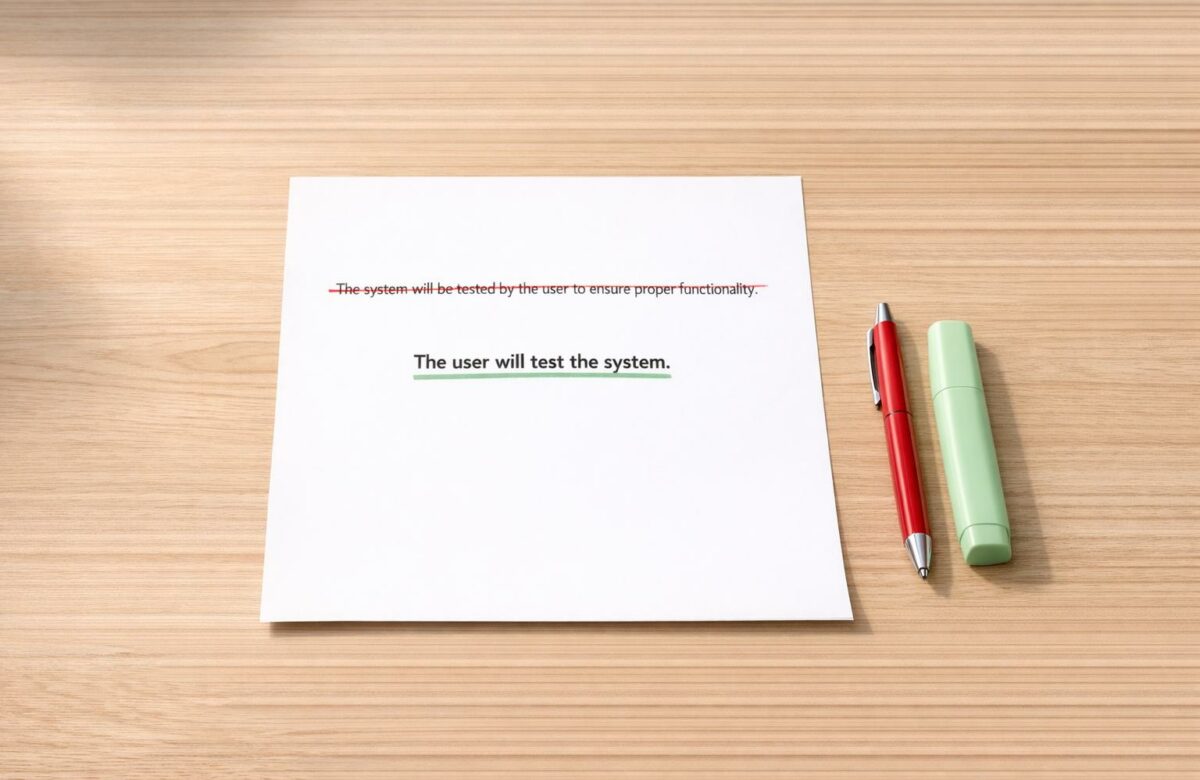
Fix “Passive Voice” In Technical Documentation
Passive voice can confuse readers and slow down task completion in technical documentation. Switching to active voice improves clarity, reduces ambiguity, and makes instructions more concise. For example, "The file was processed by the system" becomes "The system processes the file." Studies show this change can boost task completion rates by 35% and reduce troubleshooting times by 25%.
Key Takeaways:
- What is passive voice? It flips the sentence structure, making the object the subject (e.g., "The server was rebooted" instead of "The admin rebooted the server").
- Why avoid it? Passive voice hides the actor, creates ambiguity, and adds unnecessary words.
- How to fix it? Identify passive phrases (look for "to be" verbs + past participles), determine the actor, and rewrite in active voice.
- When to use passive voice? It’s useful for neutral error messages, unknown actors, or focusing on results (e.g., "The connection was terminated").
Tools like Grammarly, Microsoft Word Editor, and BeLikeNative can help detect and rephrase passive sentences. Aim for 15–25% passive voice in your documentation to ensure readability and clarity.
What Is Passive Voice and How Does It Affect Technical Documentation?
Defining Passive Voice
Passive voice changes the usual sentence structure by making the object of an action the subject of the sentence. It uses a form of "to be" combined with a past participle. Instead of the straightforward subject-verb-object order, passive voice flips it so the action’s receiver becomes the focus. For example, "The admin rebooted the server" (active) transforms into "The server was rebooted by the admin" (passive).
This structure always includes a "to be" verb (like am, is, are, was, were, been, being) paired with a past participle. These participles often end in "-ed" (e.g., "completed" or "analyzed") but can also be irregular forms like "written" or "hidden". A quick way to spot passive voice is the "zombie test": insert "by zombies" after the verb. If the sentence still makes sense (e.g., "The server was rebooted [by zombies]"), it’s passive.
"Use of the passive voice is not a grammatical error. It’s a stylistic issue that pertains to clarity – that is, there are times when using the passive voice can prevent a reader from understanding what you mean." – The Writing Center, University of North Carolina at Chapel Hill
Recognizing how passive voice works helps explain why active voice is often preferred in technical writing.
Why Active Voice Works Better in Technical Writing
Once you understand passive voice, it’s easy to see how it can reduce clarity in technical documentation. Passive constructions tend to obscure who is responsible for an action. This lack of clarity – sometimes called the "who problem" – can confuse readers. For instance, they may not know if they need to perform a task, if the system handles it automatically, or if an administrator is involved.
Active voice, on the other hand, follows a logical subject-verb-object flow, making instructions easier to follow. In technical documentation, where clear and direct communication is critical, active voice eliminates the need for readers to mentally untangle sentences. It also reduces wordiness – rewriting passive sentences in active voice can cut word count by 20–30% while improving readability. Studies show this shift can boost reader engagement by 23–42% across different types of content.
How to Find Passive Voice in Technical Writing
Recognizing Passive Voice Patterns
Passive voice can be identified by looking for a form of the verb "to be" (such as am, is, are, was, were, be, being, been) paired with a past participle. These participles often end in "-ed", but irregular forms like known or hidden also fit the pattern. For instance, "The server was rebooted by the admin" is a clear example of passive voice.
Another way to spot passive voice is to look for the word by followed by an actor. For example, "The server was rebooted by the admin" includes a clear agent performing the action. However, technical writing often uses agentless passives, where the actor is omitted entirely. For example, "The server was rebooted" leaves the reader guessing about who performed the action – was it the system, the administrator, or the reader?
If you’re using Microsoft Word, you can enable a built-in feature to detect passive voice. Navigate to File > Options > Proofing, and activate the passive voice check. This tool will highlight passive constructions as you write, making them easier to identify and revise.
Using Grammar Tools to Detect Passive Voice
Grammar-checking tools can make finding passive voice even easier. For example, the BeLikeNative Chrome extension is designed specifically for identifying and rephrasing passive constructions, flagging them automatically as you type.
Microsoft Word Editor also highlights passive sentences with color-coded indicators, often offering one-click suggestions to convert them into active voice. Some advanced editors even calculate your passive-to-active ratio, helping you maintain the recommended 20–30% passive voice threshold for technical documents. These tools not only save time but also help ensure your writing stays clear and easy to follow.
Certified Technical Writer – Active versus Passive Voice
How to Convert Passive Voice to Active Voice
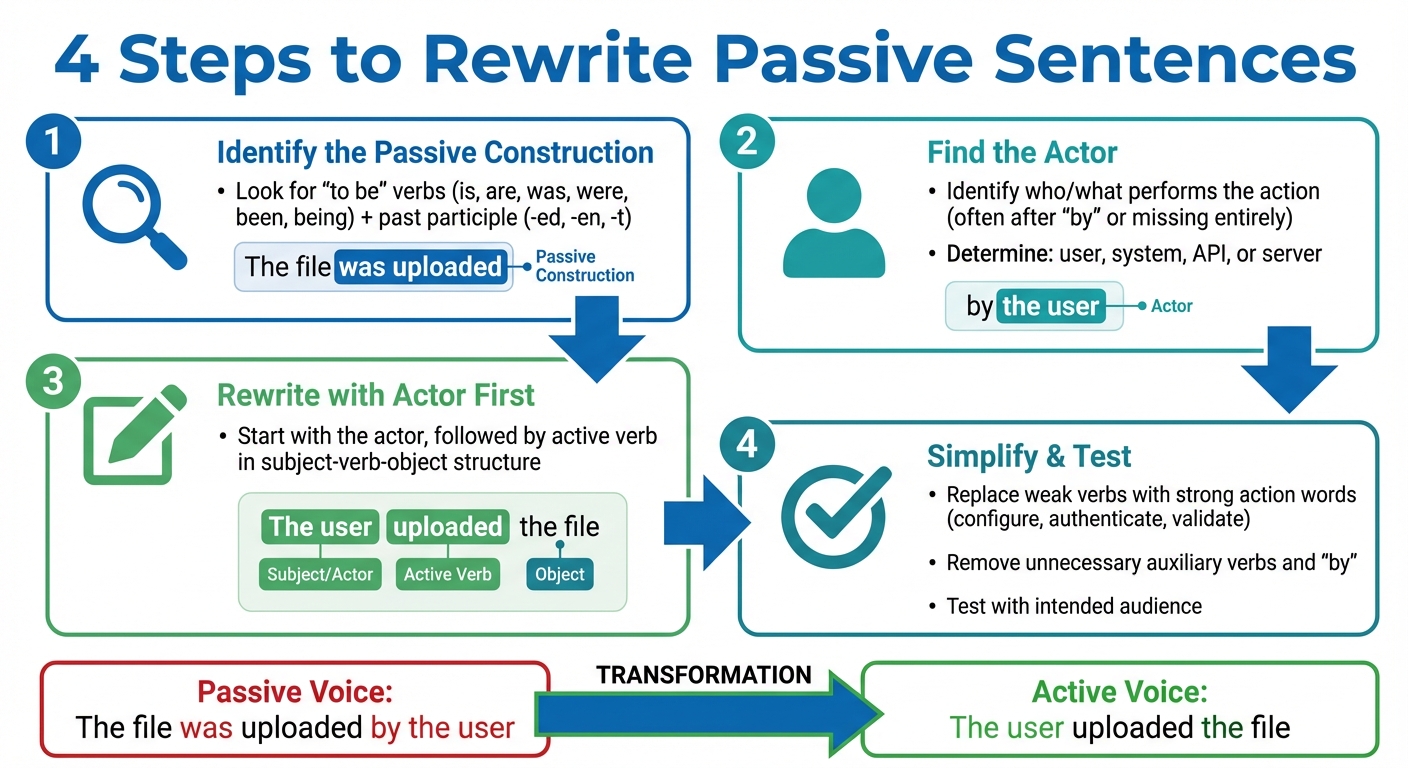
4-Step Process to Convert Passive Voice to Active Voice in Technical Writing
4 Steps to Rewrite Passive Sentences
Switching from passive to active voice is straightforward if you follow a few clear steps. Start by spotting the passive construction. Look for a form of the verb "to be" (like is, are, was, were, been, being) or "get" followed by a past participle (usually ending in -ed, -en, or -t). For example, in "The file was uploaded", you can see the passive structure.
Next, figure out who or what is performing the action – the actor. In passive sentences, the actor often appears after the word "by" or might not be mentioned at all. If the actor is missing, decide who it should be – perhaps the user, the system, or a specific component like an API or server. When unsure, consult experts or refer to technical documents to ensure accuracy.
Then, rewrite the sentence so it starts with the actor, followed by a strong, active verb in a clear subject-verb-object structure. For instance, "The file was uploaded by the user" becomes "The user uploaded the file."
Finally, simplify the sentence by replacing weak verbs with more direct action words like configure, authenticate, or validate. Cut out unnecessary auxiliary verbs and avoid using "by" to make the sentence more concise. Once you’ve rephrased it, test your revised instructions with the intended audience—adapting writing tone for global audiences where necessary – whether developers or end-users – to ensure clarity and effectiveness.
Before and After Examples from Technical Documentation
Here are some examples that show how rewriting passive sentences into active voice can make technical instructions clearer and more actionable.
| Before (Passive) | After (Active) | Benefit |
|---|---|---|
| The .zip file should be downloaded. | Download the .zip file. | Gives a direct command; fewer words. |
| The service is queried by the user. | The user queries the service. | Identifies the actor right away. |
| A report is generated every 24 hours. | The system generates a report every 24 hours. | Removes ambiguity about the source. |
| The configuration was facilitated through utilization of the interface. | Configure the system using the admin panel. | Replaces jargon with clear, strong verbs. |
| The command was entered by the user. | The user entered the command. | Shorter and more straightforward. |
Switching to active voice in technical documentation isn’t just about style – it has measurable effects. For instance, teams using active voice in API guides have seen developers complete integrations 40% faster. Similarly, rewriting user manual steps in active voice can boost task completion rates by 35%, and troubleshooting resolution times can drop by 25% when instructions are rewritten as direct commands. These results highlight how active voice can significantly improve the usability and effectiveness of technical content.
sbb-itb-32359dc
Tools and Methods for Fixing Passive Voice
Using BeLikeNative to Rephrase Passive Sentences

BeLikeNative is a handy tool for turning passive sentences into active ones across more than 80 languages. Just paste your technical content into its web-based editor, and it quickly makes your writing clearer and more concise. The clipboard integration makes it easy to move text between editors without hassle.
Once you’ve rephrased your sentences, the tool also offers a shortening feature to trim unnecessary words, ensuring your documentation stays sharp and to the point. With its broad language support, BeLikeNative helps global technical writing teams maintain a unified tone, working seamlessly with platforms like Google products and Notion.
While BeLikeNative is a strong option, there are other tools worth considering for similar tasks.
Other Grammar Checkers for Technical Writing
Tools like Grammarly and Hemingway Editor are also great for spotting passive voice. They highlight passive constructions, encouraging you to rework them for better clarity.
To keep your documentation effective, aim for a passive voice density of 15–25%. This range helps ensure your content remains direct and easy to follow. For most technical user guides, try to stick to a readability level around grades 7–8, with sentences averaging 15–20 words. If a tool flags a passive sentence as too long, consider breaking it into two shorter ones to make it easier to understand.
When to Use Passive Voice and Common Mistakes to Avoid
When Passive Voice Is Acceptable
There are times when passive voice is not just acceptable but actually works better – especially when the focus is on the outcome or status rather than who performed the action. For example, in situations where neutrality is key, passive voice can soften the tone and make the message more user-friendly.
Take error messages, for instance. Saying, "The password entered is incorrect" feels neutral and helpful. On the other hand, "You entered the wrong password" might sound accusatory to the user. Similarly, in troubleshooting scenarios where the actor isn’t known or relevant, a statement like "The connection was terminated" delivers the necessary information without unnecessary details about who or what caused it.
The Call and Response pattern is another area where passive voice shines. For instance, in user interfaces, active voice works well for commands like "Click Save", but passive voice is better for system feedback, such as "Your changes are saved". Passive voice also fits well in scientific or compliance documentation, where maintaining an objective and neutral tone is essential, especially in methodology sections or lab reports.
While understanding when passive voice is appropriate is important, it’s equally critical to avoid common mistakes when trying to rewrite sentences in active voice.
Common Mistakes When Rewriting to Active Voice
Switching to active voice can improve clarity, but doing it poorly can cause more harm than good. One of the biggest mistakes is forcing active voice into contexts where it doesn’t belong. This can lead to awkward phrasing or overly long sentences that confuse rather than clarify.
Another pitfall is inventing an actor when none exists or is relevant. For instance, rewriting "The connection was terminated" as "The system terminated the connection" might introduce unnecessary details, potentially distracting readers from the key point: the connection ended.
"Passive voice is acceptable in the following situations: Using active voice sounds like you are blaming the user… The subject of the action is unknown… Recasting the sentence in active voice is wordy or awkward." – Veeam Technical Writing Guidelines
When using passive voice, follow the Compensation Principle: simplify your vocabulary to keep the sentence easy to understand. Pairing complex grammar with technical jargon can make your writing harder to follow, potentially raising the reading difficulty to a level that alienates your audience. Keep it clear and concise to maintain accessibility.
Conclusion
Active voice isn’t just a stylistic choice – it’s a tool for clarity, precision, and keeping your audience engaged. For example, saying "Click the Save button" instead of "The Save button should be clicked" not only uses fewer words but also reduces mental effort, making instructions easier to follow.
Research suggests that effective technical documentation often includes 15–25% passive voice, keeps sentence lengths between 15–20 words, and targets a readability grade of 7–8.
"Say what you mean in as few words as possible"
- Rocky Linux Style Guide
BeLikeNative simplifies this process by spotting passive phrases and replacing them with strong, direct verbs while maintaining a polished, professional tone. Whether you’re addressing users directly or utilizing the Call and Response approach, every sentence should serve a purpose and deliver value.
FAQs
How do I quickly spot passive voice?
Passive voice happens when the subject of a sentence is on the receiving end of an action. A quick way to identify it is by looking for a form of the verb "be" (like "is", "was", or "has been") followed by a past participle (such as "written" or "created").
Here’s a fun trick: try the Zombie Test. Add "by zombies" after the verb. If the sentence still makes sense – like, "The report was written by zombies" – you’ve got passive voice!
When should I keep passive voice?
Passive voice can be a useful tool in technical documentation, especially when the system status is the main focus. It helps reduce cognitive load by shifting attention away from the actor, which is often irrelevant in these contexts.
Some common scenarios where passive voice works well include:
- Error Messages: When the priority is to highlight what went wrong rather than who caused it.
- Unknown or Irrelevant Actor: When the individual or system performing the action isn’t important to the reader.
- Results-Focused Writing: When the outcome or system response is more critical than the entity responsible.
These approaches ensure technical documentation remains clear and easy to follow, keeping the reader’s focus on what truly matters.
What passive voice % should I aim for?
When it comes to passive voice, there’s no magic percentage to aim for. The goal is to minimize its use to make your writing sharper and more engaging. Prioritize active voice whenever you can – it’s easier to read and keeps your audience interested. If you’re unsure which sentences need tweaking, grammar tools can be a handy way to spot and revise passive constructions.

