
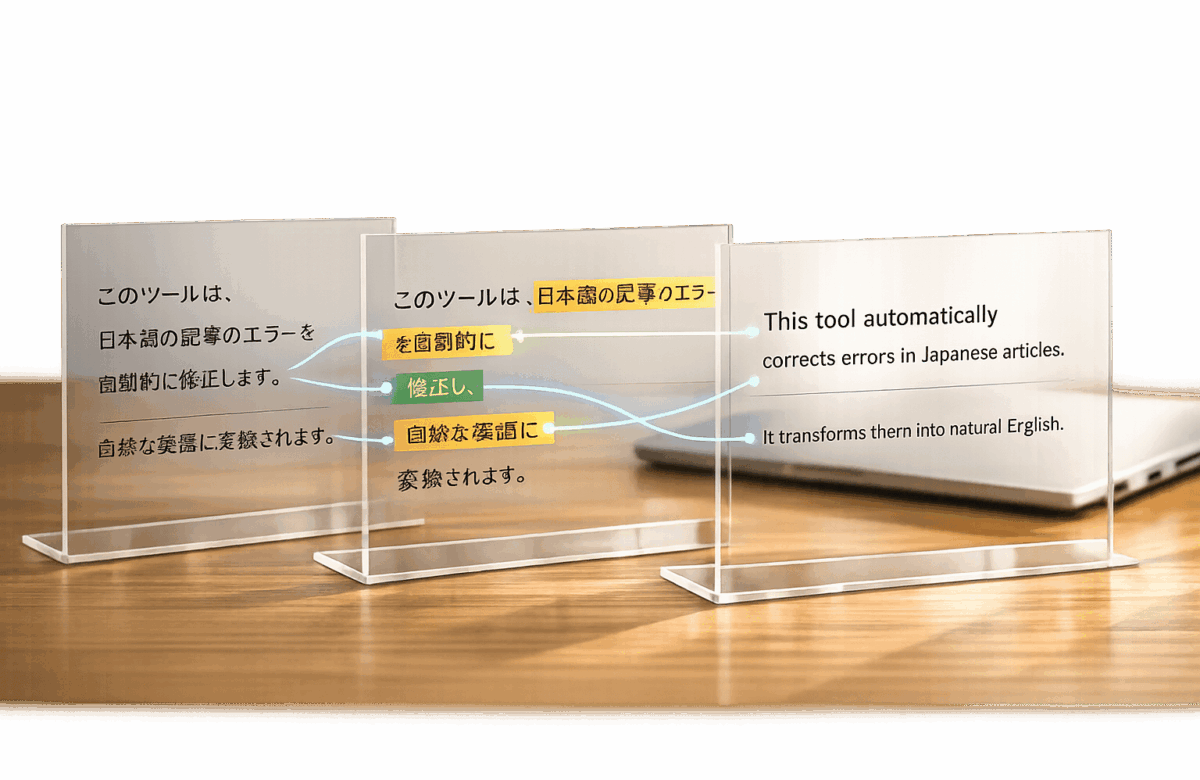
Fix Japanese To English Article Errors Automatically
Translating Japanese to English is complex, involving challenges like sentence structure differences, omitted subjects, and unique scripts. Automated tools like BeLikeNative simplify this process by correcting errors, reorganizing sentences, and ensuring natural, polished English translations. Here’s what you need to know:
- Key Challenges:
- Japanese uses Subject-Object-Verb (SOV) order, unlike English’s Subject-Verb-Object (SVO).
- Scripts (Kanji, Hiragana, Katakana) and cultural nuances can confuse translations.
- Japanese omits subjects and articles, requiring contextual understanding.
- Why Use Tools?:
- Manual editing is slow and costly.
- AI translation features ensure consistency, speed, and accuracy.
- Features like translation memory and tone customization improve results.
- BeLikeNative Highlights:
- Real-time corrections for over 80 languages.
- Tailored tone options (formal, casual, professional).
- Integrates with platforms like Google Docs and WhatsApp Web.
- Affordable plans starting at $0/month.
Automated tools save time, reduce costs, and produce fluent translations that meet US standards. Whether you’re translating business documents or casual content, these solutions make the process efficient and reliable.
Common Errors in Japanese-to-English Translations
Translating Japanese into English comes with its fair share of challenges. Certain recurring mistakes can make translations awkward, unclear, or even misleading. These issues often arise from differences in grammar, cultural context, and language structure. By understanding these common errors, translators and language tools can work toward creating more accurate and readable translations.
Sentence Structure Differences: SOV vs. SVO
One of the biggest hurdles is the difference in sentence structure. Japanese sentences follow a Subject-Object-Verb (SOV) order, meaning the verb comes at the end of the sentence. For example, "I cake eat" in Japanese becomes "I eat cake" in English, which uses a Subject-Verb-Object (SVO) structure. This difference means you can’t just rearrange words; you often need to rewrite the entire sentence for it to make sense in English.
"The verb always comes at the end in Japanese sentences. Always. This is challenging for English speakers because we’re hardwired to expect the action in the middle of the sentence." – Migaku
Japanese also tends to omit the subject when it’s understood from context. While this is perfectly natural in Japanese, it can make translations into English feel incomplete or confusing since English typically requires explicit subjects and articles. Another challenge is that Japanese often stacks several subordinate clauses before revealing the main idea, whereas English readers expect the main point upfront.
Script Conversion and Untranslatable Terms
The complexity of Japanese scripts – Kanji, Hiragana, and Katakana – adds another layer of difficulty. Each script has multiple context-dependent readings, which can confuse automated tools, especially when dealing with specialized or technical terms.
Loanwords can also trip up translators. For instance, the Japanese word konsento comes from "concentric plug" but refers to an electrical socket, not "consent". Additionally, certain cultural concepts like wabi-sabi (embracing imperfection) or omotenashi (selfless hospitality) have no direct English equivalents. Automated tools often oversimplify or leave these terms untranslated, stripping away their nuance. Idioms pose similar challenges; for example, "monkeys fall from trees too" (saru mo ki kara ochiru) literally translates poorly but actually means "everyone makes mistakes".
Maintaining Natural Flow and Tone
Ensuring a natural flow in English is another major challenge. Japanese uses three levels of politeness – casual, formal, and keigo – which influence verb forms and vocabulary based on social hierarchy. Since English doesn’t have an equivalent system, translators must rely on tone, phrasing, and word choice to convey the appropriate level of respect.
"The greatest failure in translating business Japanese is not misunderstanding the words, but misrepresenting the relationship. You must interpret the implicit social cues within the grammar and recast it using appropriate English pragmatic markers." – Dr. Kenji Yoshida, Linguist and Translator
These nuances underline the importance of understanding both languages deeply to ensure translations are not only accurate but also respectful of the original tone and intent. This is especially critical for automated tools aiming to provide reliable translations.
sbb-itb-32359dc
Why Automatic Error Correction Tools Matter
Manual editing can be a real bottleneck – it’s slow, expensive, and often inconsistent. Imagine editing a 50,000-word website manually; it could cost anywhere from $10,000 to $25,000. In contrast, AI-powered tools can handle the same task for just $50 to $200, and they do it in a fraction of the time. Even when post-editing is factored in, the total cost drops to just 30% to 60% of traditional translation rates.
Modern tools like neural machine translation (NMT) and large language models have revolutionized the process. Unlike older statistical methods, these systems capture the full context of sentences, producing translations that sound much more natural. For example, Google’s machine learning-based grammar correction tools flag over 100 million suggestions weekly, catching errors that manual reviews might overlook.
"Changing to the neural machine translation method gives a marked increase in the recall of grammar correction suggestions in Docs." – Shankar Kumar and Simon Tong, Google Research
Beyond just fixing grammar, these tools perform multilayered quality checks. They can analyze English text for fluency while simultaneously comparing it to the original Japanese source, ensuring nothing gets lost in translation. This dual-check system is particularly effective at catching awkward phrasing and translation errors that might slip through when deadlines are tight.
Benefits of Automated Error Detection
AI-powered error detection is a game-changer for speed and consistency. These tools excel at identifying "unnatural" expressions – phrases that are grammatically correct but sound off to native speakers. They also handle nuances like formal and informal registers, which are critical when translating Japanese content that often incorporates varying levels of politeness (keigo, formal, or casual).
Translation memory (TM) systems add another layer of efficiency by storing previously translated segments. These segments can be reused for similar content, ensuring consistency across large projects. When paired with terminology databases, TM systems automatically enforce brand-specific language, preventing generic terms from sneaking into your content.
The workflow benefits are huge. Quality assurance checks can run in parallel with ongoing translations, eliminating the need to wait until the entire document is finished. Tools like MTrans for Office integrate directly into programs like Word, Excel, and PowerPoint, allowing one-click translations without the hassle of copy-pasting. Batch processing capabilities even let you translate entire files while preserving formatting, saving countless hours of manual tweaking.
These advancements not only improve translation quality but also lay the groundwork for precise localization tailored to US audiences.
Adapting Content for US Readers
When translating content for American audiences, it’s essential to adapt to US conventions. For example, Japanese dates (YYYY/MM/DD) should be converted to the US format (MM/DD/YYYY). Currency symbols, number formats, and measurement units (like miles and Fahrenheit) also need to be adjusted.
Spelling differences are another key area. US English favors "color", "organize", and "analyze", while other English variants use "colour", "organise", and "analyse." Automated tools configured for US English can instantly catch and correct these variations, whereas manual editors might apply inconsistent standards across a document.
"AI translation handles the language layer. Human judgment handles cultural adaptation." – Gatilab
Localization goes beyond formatting – it’s about making content resonate. A study revealed that 96.9% of brands underperform in the Japanese market compared to their global results, often due to poor localization efforts. The same principle applies when adapting Japanese content for US readers. Literal translations aren’t enough; the tone, phrasing, and references must be adjusted to feel natural and relatable to American audiences.
BeLikeNative: Fixing Japanese-to-English Translation Errors
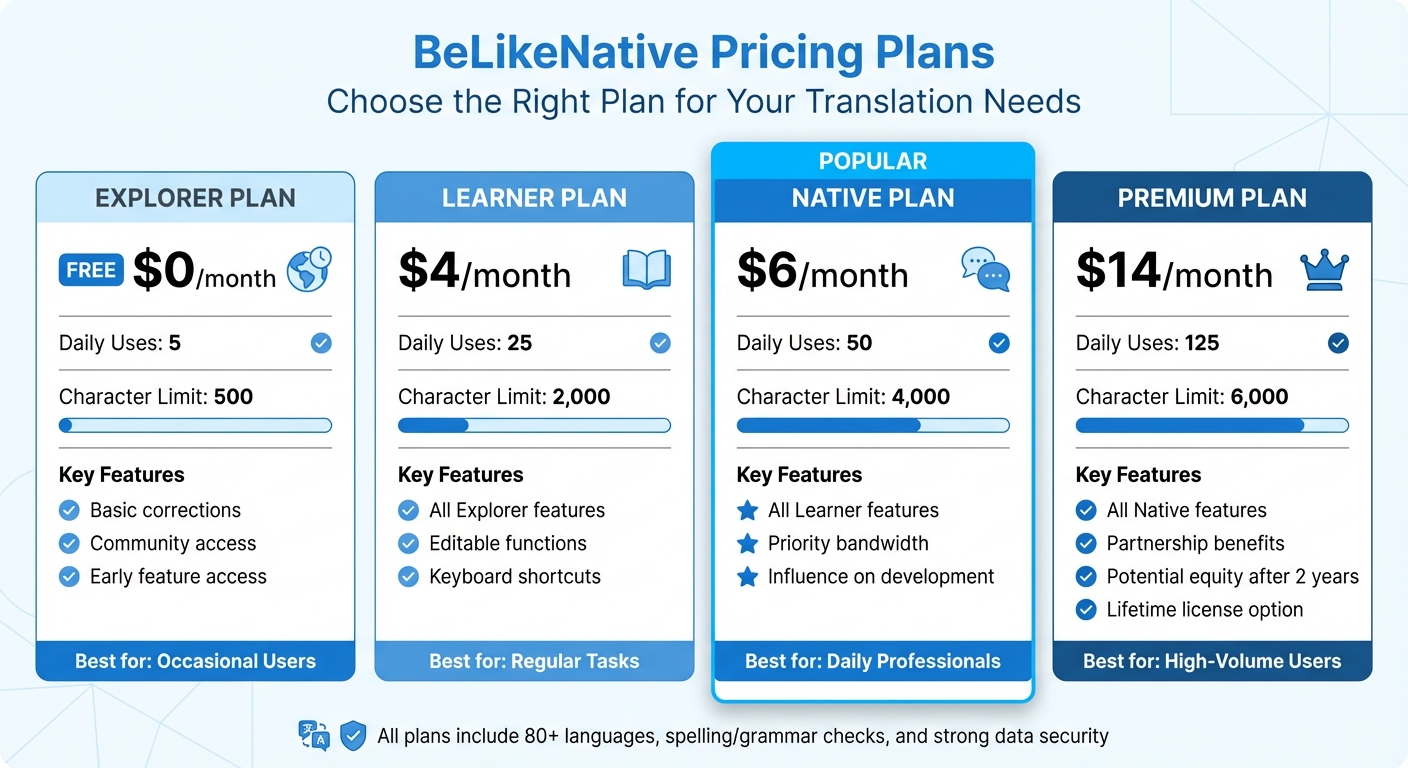
BeLikeNative Pricing Plans Comparison for Japanese-English Translation
BeLikeNative uses a context-aware AI that goes beyond simply swapping words between languages. Instead, it analyzes sentence structure, tone, and meaning to deliver translations that feel natural. This is especially important for Japanese-to-English translations, where sentence order differs (Japanese uses SOV, English uses SVO) and subtle nuances can easily get lost. The tool also excels at handling idioms, slang, and cultural references – areas where traditional machine translations often fall short.
Using BeLikeNative is simple. Highlight your text, press a keyboard shortcut, and receive an improved version instantly copied to your clipboard. It works seamlessly across platforms like Google Docs, WhatsApp Web, and Notion. Whether you need to rephrase, translate, or adjust tone, you can do it without switching apps. This streamlined workflow has helped top users increase productivity by 66%, saving up to 85 hours each month.
Here’s a closer look at its standout features.
Main Features of BeLikeNative
BeLikeNative focuses on real-time text improvement as one of the top grammar tools for multilingual writers in over 80 languages. Its rephrasing feature enhances clarity and flow while preserving meaning, and its translation function handles Japanese-to-English conversions with ease. Thanks to clipboard integration, polished text is always just a shortcut away.
The tool allows you to customize language, tone (formal, casual, professional), and style based on your needs. This is particularly valuable for Japanese translations, as the language often uses varying levels of politeness – such as formal (keigo) or casual tones. BeLikeNative lets you specify whether the English output should be formal for business or casual for everyday use, ensuring the translation feels natural and appropriate for US audiences.
Its context-aware AI tackles common Japanese-to-English translation issues, such as awkward sentence structures, unnatural phrasing, and cultural misinterpretations. Built-in translation memory stores previously translated segments, ensuring consistency across projects. This is especially helpful for technical writing or brand-specific language, where precise terminology is key. Plus, cross-device synchronization keeps your settings and translation history intact, no matter where you’re working.
Automatic quality checks flag errors and inconsistencies before publication, and the tool’s editable functions and keyboard shortcuts allow you to tailor it to your specific needs. The translation memory feature is particularly useful for teams, helping maintain consistent terminology across collaborative projects.
Pricing Plans Comparison
BeLikeNative offers flexible subscription options to suit different needs. There are four plans, each designed to match varying levels of translation volume. All plans include support for over 80 languages, spelling and grammar checks, and strong data security.
| Plan | Monthly Cost | Daily Uses | Character Limit | Key Features |
|---|---|---|---|---|
| Explorer | $0 | 5 | 500 | Basic corrections, community access, early feature access |
| Learner | $4 | 25 | 2,000 | Editable functions and shortcuts |
| Native | $6 | 50 | 4,000 | Priority bandwidth, influence on development |
| Premium | $14 | 125 | 6,000 | Partnership benefits, potential equity after 2 years, lifetime license option |
The Explorer plan is ideal for occasional users who need quick fixes, while the Learner tier works well for those with regular translation tasks. Professionals who translate daily will benefit from the Native plan, and the Premium tier is designed for high-volume users managing multilingual content. You can easily adjust your subscription at any time through the user dashboard to fit your changing needs.
How to Use BeLikeNative for Japanese-to-English Corrections
BeLikeNative simplifies translation tasks, instantly correcting errors to produce clear and natural English. This Chrome extension integrates directly into your browser, making it easy to translate Japanese text while working online – whether you’re writing an email, editing a document, or chatting in a messaging app. Here’s a step-by-step guide to ensure smooth, accurate translations across all your favorite platforms.
Installing the Chrome Extension
Start by visiting the Chrome Web Store and searching for "BeLikeNative – AI Writing Assistant." Once you find it, click Add to Chrome to install the extension. After installation, the BeLikeNative icon will appear in your browser toolbar. To get started, set English as your target language and choose your preferred tone – options include professional, casual, or friendly. This way, your translations are tailored to fit your audience without needing further tweaks. As of March 2026, the extension holds an impressive 4.6/5 rating from 242 users on the Chrome Web Store. With everything set up, you’re ready to dive into effortless translations.
Translating and Editing Your Text
To translate, simply highlight the Japanese text and press Ctrl+Shift+1. In less than a second, the AI transforms your text, correcting awkward phrasing and ensuring it reads naturally in English. The polished translation is automatically copied to your clipboard, so you can press Ctrl+V to paste it wherever needed. For formal business emails written in keigo (Japanese polite speech), choose the "Professional" tone to keep the appropriate level of formality. If you’re crafting a casual social media post, switch to "Friendly" for a more relaxed style. This adaptability ensures your translations always match the context.
Using BeLikeNative Across Different Platforms
BeLikeNative works flawlessly on virtually any website. Use it in Google Docs, Notion, Gmail, Slack, LinkedIn, and WhatsApp Web – anywhere you can highlight text in your browser. Whether you’re drafting a report in Google Docs or replying to a message on WhatsApp Web, the same shortcut delivers accurate corrections across all platforms.
Tips for Better Japanese-to-English Translations
Improving your translation workflow isn’t just about relying on automated tools. By refining your approach, you can achieve smoother, more accurate Japanese-to-English translations. Here are some practical tips to help you get the most out of your workflow with BeLikeNative.
Choosing the Right Plan for Your Workflow
The type and volume of content you handle daily play a huge role in determining the best plan for your needs. Whether you’re tackling occasional translations with the Explorer plan or managing high-volume tasks with the Premium plan, aligning your plan with your workload is key. Once you’ve selected the right plan, focus on configuring tools to handle technical or specialized language efficiently.
Translating Technical and Industry Terms
Handling technical terms requires extra care compared to translating casual language. If you’re working on IT manuals, legal documents, or medical content, start by building a glossary of key terms. BeLikeNative’s terminology management feature is particularly helpful here. It allows you to define industry-specific jargon in advance, ensuring the AI doesn’t replace precise terms with generic alternatives. For instance, in software documentation, terms like "API endpoint" or "authentication token" must remain consistent throughout.
Another essential tool is translation memory, which helps maintain consistency while cutting costs and saving time. This feature stores your past translations, so repeated phrases – such as product names, disclaimers, or process descriptions – are translated uniformly across your content. For technical terms that lack direct translations, consider keeping the original term and providing a brief explanation. Lastly, remember to update your glossaries frequently, especially in rapidly changing fields like IT and healthcare.
Conclusion
Handling Japanese-to-English translation comes with its fair share of challenges. From shifting sentence structures (SOV to SVO) to preserving a natural flow, the process becomes even trickier with technical terms and nuanced expressions. Relying solely on manual editing often isn’t enough, especially when managing large volumes of content. That’s where automated tools can step in to fill the gaps.
BeLikeNative offers a streamlined solution with its Chrome extension, designed to integrate effortlessly with platforms like Google Docs, Notion, and WhatsApp Web. Its context-aware AI evaluates tone, meaning, and sentence structure, ensuring polished, professional results. Features like translation memory help maintain consistent terminology and brand voice across all documents. Plus, real-time editing allows for seamless refinement of AI-generated content.
For US English readers, BeLikeNative goes a step further with built-in localization. It automatically adapts dates to the MM/DD/YYYY format, uses $ currency symbols with proper comma placement (e.g., 1,000.00), and converts metric measurements to imperial units. Even the tone and phrasing are adjusted to align with the straightforward communication style preferred by US audiences, avoiding the overly formal tone that often comes with machine translations. These features make it a versatile tool for diverse translation needs.
Whether you need occasional help or handle high-volume translations, BeLikeNative adapts to your workflow. Simply install the extension, input your Japanese text, and let the AI take care of sentence structure, terminology, and cultural adjustments – all in a matter of seconds.
The end result? Fluent, error-free content that feels natural to readers. BeLikeNative takes the guesswork out of professional translations, simplifying the entire Japanese-to-English process while ensuring the precision and clarity US audiences expect.
FAQs
How do I keep Japanese nuance in natural US English?
To bring Japanese nuances into US English effectively, it’s important to prioritize tone, context, and the deeper cultural meaning over literal translation. Pay attention to how expressions are used within their original cultural setting and adapt them into fluid, idiomatic English. Select words that capture the intended sentiment while honoring the social and emotional subtleties of the original. This approach helps your writing resonate naturally with US readers while staying true to the original message.
Can BeLikeNative handle keigo and tone changes correctly?
BeLikeNative excels at managing keigo (formal Japanese language) and tone variations by accurately interpreting the context of the Japanese language. It fine-tunes particles, formal expressions, and subtle nuances to produce natural and professional phrasing. This makes it ideal for delivering polished outputs tailored to different needs and scenarios.
How do translation memory and glossaries improve consistency?
Translation memory (TM) and glossaries play a key role in maintaining consistency in translations by standardizing terminology, style, and phrasing. TM works by storing previously translated text segments and offering suggestions when similar content appears, which helps cut down on inconsistencies. Glossaries, on the other hand, provide clear definitions and specific translations for terms, ensuring uniformity, especially in technical or specialized language. When used together, these tools help produce translations that feel seamless and polished – critical for clear communication and reinforcing a consistent brand image.

