
How To Write A Project Update Email To Stakeholders
Effective project update emails keep stakeholders informed and aligned. Here’s how to write one that works:
- Start with a clear subject line: Include the project name, date, and current status (e.g., "Website Redesign – Weekly Update – March 21, 2026").
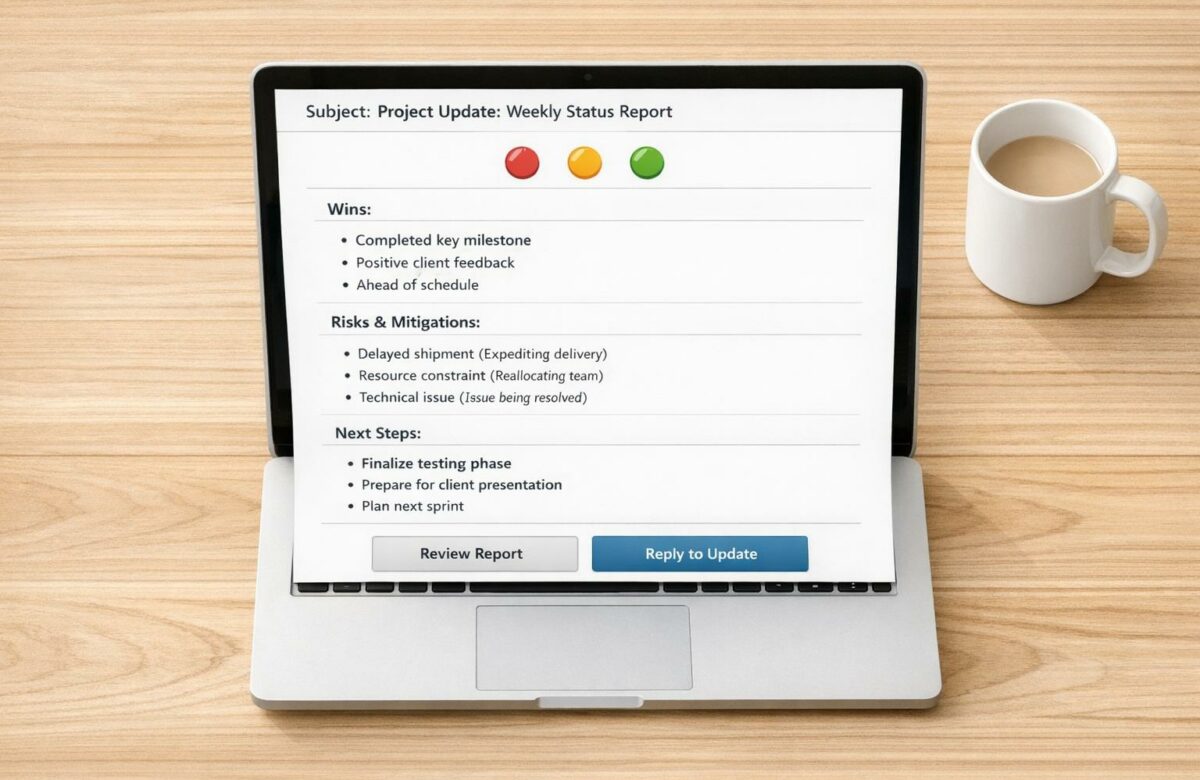
- Executive Summary: Open with a brief Red-Amber-Green (RAG) status indicator and a 30-second overview of the project’s health.
- Highlight Key Accomplishments: Share 2–3 recent wins to show progress.
- Address Risks and Blockers: Clearly outline challenges and provide solutions or actions needed.
- Next Steps: Specify upcoming tasks with owners and deadlines.
- Call to Action: Request feedback, approvals, or decisions to keep the project moving.
Tailor updates based on your audience. Executives prefer concise summaries, while internal teams need detailed task breakdowns. Use a consistent format and send updates on a regular schedule (e.g., every Friday at 3:00 PM). Tools like Asana or Monday.com can help streamline this process, pulling in metrics and visual aids to make updates more effective.
Transform Any Text, On Any Site, In Seconds
Rephrase, translate, and improve text with one shortcut. Works everywhere you write.
Add to Chrome - It's Free!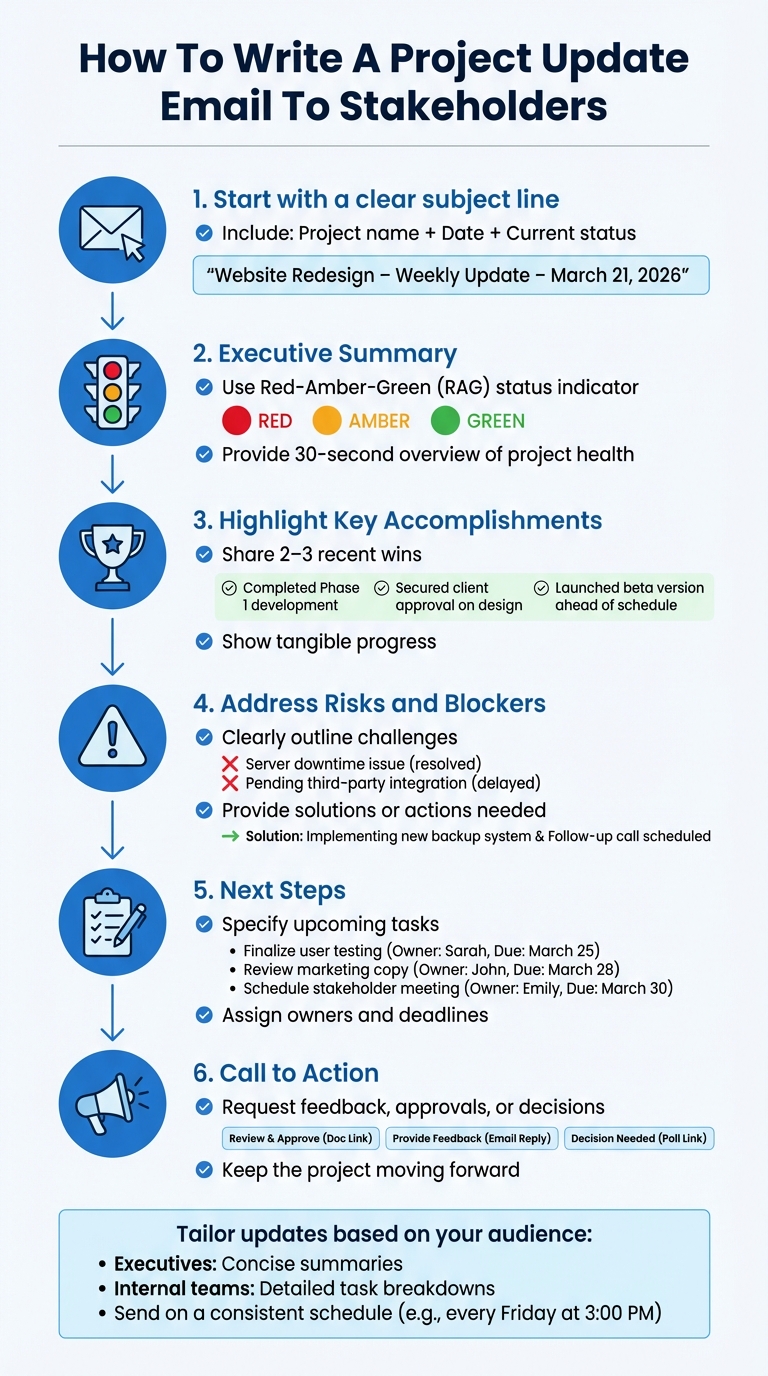
6-Step Process for Writing Effective Project Update Emails to Stakeholders
How to Write a Project Update Email
sbb-itb-32359dc
Know Your Stakeholders
Not all stakeholders are interested in the same details. Executives want to know if the project is on track and whether they need to step in. Clients care about progress toward their goals and staying within budget. Internal teams need specifics like task assignments and deadlines. According to the Project Management Institute (PMI), a project stakeholder is "an individual or organization that is actively involved in the project, or whose interests may be positively or negatively affected by the execution or completion of the project".
Types of Stakeholders
The first step is identifying who has a stake in your project. Look at organizational charts, project documentation, and agreements to pinpoint key stakeholders. It’s also helpful to consult sponsors and functional leads to identify less obvious stakeholders who may hold influence despite lacking formal titles.
Stakeholders generally fall into two categories: internal (team members, managers, department heads, company leadership) and external (clients, subcontractors, suppliers, partners, regulators). You can also classify them by their role in the project:
- Decision-makers (e.g., executives, sponsors): Set the direction and approve budgets.
- Contributors: Handle task execution.
- Consulted parties: Provide specialized input, like legal or finance experts.
- Informed stakeholders: Need updates but aren’t actively involved.
A RACI matrix is a useful tool for clarifying roles. It assigns four roles for tasks: Responsible (executes the work), Accountable (owns the task), Consulted (provides input), and Informed (receives updates). This framework ensures you know who needs detailed updates versus high-level summaries.
To prioritize communication efforts, use a Power/Interest grid. Stakeholders with high power and interest require regular, detailed updates. High-power, low-interest stakeholders – like executives – prefer concise summaries that focus on business outcomes. Low-power, high-interest stakeholders benefit from asynchronous updates, while low-power, low-interest observers only need minimal communication at key milestones.
Once you’ve identified your stakeholders, tailor your messaging to meet their specific needs.
Adjust Your Tone and Content
After identifying stakeholders, adapt your tone and content to suit their preferences. Executives, for instance, typically spend just 30 seconds reviewing project updates. For this group, keep it short and direct. Use a Red/Yellow/Green status indicator in the subject line and lead with the key takeaway, such as risks or decisions they need to address.
"Your first sentence should answer the only question anyone cares about: ‘Should I be worried about this project right now?’" – The Cranky PM
For clients, maintain a proactive and professional tone. Highlight achievements and upcoming deadlines to reassure them. Be specific and transparent; for example, instead of saying, "There’s a delay", say, "We identified a data quality issue and are extending testing by two weeks to clean records". This approach builds trust and avoids surprises.
Internal teams need detailed, operational updates. Use bullet points to outline tasks, owners, and deadlines. Emphasize dependencies and blockers that could impact progress. Keep the tone collaborative and focused on execution rather than strategy.
Document stakeholder preferences in a stakeholder register early on. Note their preferred communication methods (e.g., Slack, email, dashboards) and how often they want updates (weekly, monthly, or milestone-based). Avoid generic updates – send technical details to the project team, while providing concise, strategic summaries to leadership. This segmentation reduces unnecessary information and ensures everyone gets what they need to make informed decisions. Tailoring your communication in this way shows your dedication to delivering clear, effective updates.
Collect and Organize Project Information
Start by gathering the right data. Research shows stakeholders typically spend just five seconds scanning status update emails to find the current status and what requires attention next. To make this process seamless, collect information steadily throughout the reporting period instead of cramming it all in at the last minute. A good practice? Start a draft email at the beginning of the week and update it as milestones are reached or challenges arise. This approach ensures your updates are accurate and concise.
What Information to Include
Focus on six key categories to make your updates effective:
- Begin with a project health snapshot, using a Red-Amber-Green (RAG) status indicator. Define clear triggers for each color – for instance, "Amber" might signal a 1–5 day delay, while "Red" could indicate the project is over budget by more than 15%.
- Highlight 2–3 key accomplishments since your last update. This helps show progress and builds confidence in the team’s momentum.
- Address challenges and blockers, but don’t stop there – pair them with mitigation plans to demonstrate control and problem-solving.
- Outline next steps with clear owners and deadlines. This creates a roadmap for what’s coming.
- Include metrics and KPIs like budget usage, completed user stories, or team velocity. These provide essential context for stakeholders.
- End with a key request – whether it’s a decision, feedback, or approval. This keeps things moving and avoids bottlenecks.
As the Project Management Institute notes, clear communication with stakeholders is one of the most critical factors for project success.
"The true value of this template is not just reporting information but directing attention." – Recurrr
Organizing your update around these categories ensures you address what each stakeholder needs most.
Use Project Management Tools
Simplify your data collection by leveraging project management tools.
Platforms like Monday.com, Asana, and ClickUp can automatically pull project metrics into your emails, saving you from manual data entry. These tools also offer automated reporting features, ensuring your updates are always current and not outdated from copying and pasting. You can even generate visual aids – like burndown charts, sprint metrics, or progress indicators – that can be embedded or linked directly in your emails. For smoother collaboration, schedule automated reminders for team input by Thursday evening so your final update is polished and ready by Friday morning. Keep your email body brief, but include links to detailed project plans, risk logs, or reports for stakeholders who need more in-depth information.
Structure Your Project Update Email
Once you’ve gathered your project details, the next step is structuring your update email. A well-organized email should have a layout that’s easy to scan, allowing stakeholders to grasp the key points in seconds. The goal is to use the information you’ve prepared to create a clear message that encourages timely action while maintaining the communication flow you’ve already established. The most effective updates immediately address the big question: "Should I be worried about this project right now?". That means your very first sentence should clearly state the project’s health status – skip the background details and jump straight to the point.
"Your first sentence should answer the only question anyone cares about: ‘Should I be worried about this project right now?’" – The Cranky PM
Main Sections of a Project Update Email
To make your email concise and impactful, focus on six essential sections. Start with a subject line that includes the project name, date, and current status (e.g., "Website Redesign – Weekly Update – March 21, 2026"). Then, follow this structure:
- Executive Summary: Provide a 30-second overview of the project using a Red-Amber-Green (RAG) status indicator.
- Key Accomplishments: Highlight 2–3 major achievements since the last update to build confidence.
- Risks and Blockers: Identify challenges and outline mitigation plans, or flag items requiring executive action.
- Next Steps: Clearly state upcoming tasks, assigning specific owners and deadlines to ensure accountability.
- Call to Action: Specify what you need from stakeholders, such as decisions, feedback, or approvals.
For stakeholders focused on finances, include a brief Budget and Resource Update. This should show the spent versus forecasted amounts, ideally within a 3% variance.
Format for Easy Reading
Even with a well-structured email, formatting plays a crucial role in how quickly stakeholders can digest the information. Executives often have just 30 seconds to review updates, so make every second count. Use bold text to emphasize completed milestones and italics for tasks in progress. Break content into bullet points and short paragraphs, with one key idea per line. Add clear subheadings to create a modular format, making it easy for readers to locate specific details. Keep high-level updates under 150 words, and include links to detailed dashboards or reports for those who need more information.
"The RAG template is most powerful when it shifts the communication focus from ‘what happened’ to ‘what needs attention.’" – Recurrr
Consistency is also key. Send updates at the same time each week, such as every Friday at 3:00 PM, to establish a reliable routine.
Write With Professionalism
Once your project data is organized, writing with professionalism ensures your updates are not only informative but also impactful. Professionalism here doesn’t mean drowning your updates in technical jargon or overly formal language. Instead, it’s about being transparent, clear, and respectful of your audience’s time. Sharing setbacks openly, along with proposed solutions, fosters trust and accountability. The best updates strike a balance: conversational yet respectful, avoiding overly technical terms that might alienate some readers. Tailor the level of detail to suit your audience, using professionalism as a tool to improve clarity.
"Transparency breaks down barriers. Honest updates open doors for feedback and fast problem solving, helping catch small issues before they grow." – PMPlaybook
When discussing risks or challenges, include immediate mitigation plans to show you’re in control and guiding the project effectively. Recognize and thank team members for exceptional contributions – this small gesture strengthens relationships, especially in remote work settings. These principles of clarity and professionalism should extend to every part of your communication, starting with the subject line.
Write an Effective Subject Line
Your subject line should answer three key questions at a glance: What project? What type of update? When? A format like "Website Redesign – Weekly Status Update – March 21, 2026" ensures your emails are easy to locate and clearly show their purpose. This approach helps stakeholders prioritize their inbox and quickly reference past updates. Avoid vague phrases such as "Quick Update" or "Project Status", which lack precision and can be overlooked.
Keep Your Messaging Consistent
Clear subject lines are just the start. Consistency in your messaging style builds trust and reduces confusion. Stick to a predictable schedule for sending updates, such as every Friday at 3:00 PM or Monday at 9:00 AM. This routine helps stakeholders know exactly when to expect updates, making their workflow smoother. Use the same template for every update, with sections like "Completed", "In Progress", and "Next Steps." A consistent format allows readers to quickly find the information they need without having to adjust to a new structure each time.
Use Templates to Save Time
Using templates for project updates can simplify your workflow and ensure that every key detail is communicated effectively.
Starting a project update from scratch every week can eat up valuable time. Templates solve this by eliminating "blank page syndrome", a term productivity experts use to describe the struggle of starting with nothing. Instead of drafting new content each time, you simply plug in current data. This approach not only saves time but also shifts your focus to executing the project rather than getting bogged down in reporting.
But the advantages go beyond just speed. Poor communication costs organizations an average of 11.4% of their project investments. Templates help prevent this by ensuring you include all critical details every time. When updates follow a predictable format, stakeholders can quickly find what they need, such as milestones or risks, without wading through unnecessary text. Considering that executives often have only about 30 seconds to assess a project’s status, making updates instantly scannable is crucial.
Why Email Templates Help
Templates take the guesswork out of writing project updates. When you use a consistent structure, you can focus on filling in the blanks instead of figuring out how to organize your information. Stakeholders also benefit because they know exactly where to look for updates on budgets, blockers, or next steps without needing to adjust to a new format each week.
Consistency also prevents the chaos that vague or incomplete updates can create. Poorly written emails lead to unnecessary follow-ups, micromanagement, and emergency meetings – all of which waste more time than a well-crafted update would have taken. A clear and reliable template shows stakeholders that you’re organized and on top of things, reducing their need to check in constantly.
By using a strong template, you can create updates that are both efficient and effective, fostering better communication and trust.
What to Include in a Template
A good template should cover all the essentials for clear and efficient communication. Here’s what to include:
- Subject Line: Make it searchable and specific.
- Project Health Indicator: Use a color-coded system (On-Track, At-Risk, or Off-Track) for quick visual feedback.
- Executive Summary: Offer a 30-second snapshot of the project’s current status.
- Key Accomplishments: Highlight 2-3 tangible wins since the last update.
- Current Progress: Include completion percentages to show where things stand.
- Risks and Blockers: Identify challenges and outline how you’re addressing them.
- Next Steps: List upcoming priorities.
- Action Needed: Clearly state what you need from stakeholders, whether it’s feedback, approvals, or other input.
For executive-level audiences, keep the main content under 150 words. If more detail is required, link to a full project dashboard. Focus on outcomes rather than tasks – say "Launched landing page" instead of "Worked on landing page". Even during challenging weeks, include at least one positive update to keep morale high.
Conclusion
Writing effective project update emails isn’t just about routine communication – it’s about building trust and keeping everyone on the same page. As Rares Enescu aptly says, "Project status updates are more than a routine task; they are the lifeblood of successful project management". Clear, consistent updates reassure stakeholders that the project is on track and progressing as planned.
To achieve this, focus on making your updates scannable, honest, and action-oriented. Use tools like RAG status indicators to highlight progress, pair every challenge with a proposed solution, and stick to a predictable schedule so recipients know when to expect updates. Even in challenging situations, clarity and transparency go a long way in reducing stress and avoiding unnecessary micromanagement.
Adapt your updates to your audience. Provide concise executive summaries for decision-makers and more detailed reports for team members, ensuring everyone gets the information they need. Using templates can streamline the process, helping you include all critical details while saving time and effort.
Well-structured updates do more than just inform – they help prevent issues from escalating, cut down on back-and-forth communication, and create clear accountability. When stakeholders can quickly find the information they need and understand the actions required, projects tend to run more smoothly, and communication becomes far more effective.
FAQs
How do I define RAG status so everyone interprets it the same way?
To keep everyone on the same page about RAG status, it’s essential to establish clear, standardized definitions for each color. Generally speaking:
- Green: The project is progressing as planned and remains on track.
- Amber: There are issues, but they can be addressed with proper monitoring and management.
- Red: Serious problems have emerged, requiring urgent attention to avoid project failure.
By documenting these definitions across the organization, you can minimize confusion and ensure stakeholders can quickly grasp a project’s health at a glance.
What should I do if I have bad news but no solution yet?
If you have to deliver bad news without an immediate solution, it’s important to address it openly and without delay. Clearly explain the situation, stick to the facts, and avoid making assumptions or guesses. Let stakeholders know that you’re actively working toward a resolution and will share updates as soon as there’s more to report. Taking a moment to gather all available details before communicating can help you deliver the message in a more considerate and professional manner.
When should I switch from email updates to a dashboard or meeting?
When updates become too detailed, complicated, or frequent for email, it’s time to consider switching to a dashboard or holding a meeting. Dashboards are ideal for real-time tracking and providing detailed, up-to-date information. On the other hand, meetings are better suited for interactive discussions or engaging stakeholders in a more dynamic way.
If emails are no longer effective at clearly conveying key points or encouraging collaboration, these alternatives can offer better clarity and ensure everyone stays on the same page.
Related Blog Posts
- Multilingual Email Etiquette Checklist for Professionals
- How To Sound Like A Native Speaker In Outlook Emails
- How To Write Professional Rejection Emails Fast
- How To Write Polite Emails To Your Boss Without Sounding Weak
BeLikeNative fixes grammar, rephrases, translates, and simplifies text on any website in 1 second — just highlight and hit a keyboard shortcut. No tab switching. Try it free →

