
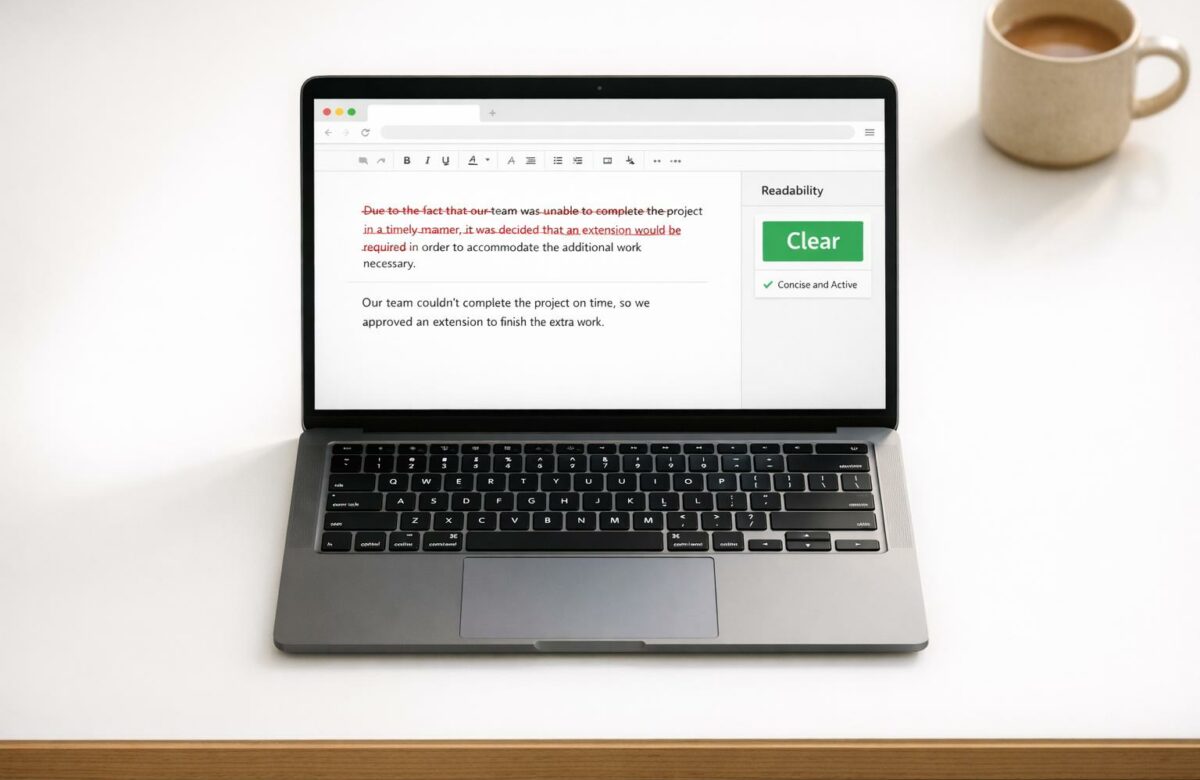
Fix “Wordiness” In Corporate Reports Instantly
Wordy corporate reports waste time and bury key insights. Clear, concise writing helps executives act faster and improves decision-making. Here’s how to fix verbose reports:
- Avoid passive voice: Write “The team submitted the report” instead of “The report was submitted by the team.”
- Cut filler phrases: Replace “due to the fact that” with “because.”
- Simplify nominalizations: Use “decided” instead of “made a decision.”
- Eliminate redundancy: Drop phrases like “each and every.”
Tools like BeLikeNative streamline this process, offering quick edits directly in your browser. Use features like rephrasing, tone adjustment, and readability metrics to sharpen your reports. Always review AI edits for accuracy and tone to maintain professionalism.
Transform Any Text, On Any Site, In Seconds
Rephrase, translate, and improve text with one shortcut. Works everywhere you write.
Add to Chrome - It's Free!Bottom line: Trim unnecessary words to make your reports clear, impactful, and easy to understand.
Eliminating Wordiness: Writing Clearly and Concisely
sbb-itb-32359dc
Why Wordiness Damages Corporate Reports
Wordiness can seriously harm the clarity and effectiveness of corporate reports. When executives read a quarterly review or a strategic recommendation, they need to understand the main point quickly. Overly verbose writing buries important ideas under unnecessary words, forcing readers to sift through clutter to find meaning. This added effort can lead to critical action items being missed.
The consequences go beyond just readability. Reports filled with vague language or unclear conclusions often fail to achieve their purpose in decision-making settings. For instance, a budget proposal that uses phrases like “significant improvement” without providing concrete data, or one that relies on passive voice to obscure accountability, loses its ability to drive decisions. Executives often view such inconsistencies as either poor quality or an attempt to mask weak evidence.
Tentative language compounds the problem. Phrases like “I believe” or “I feel” weaken the writer’s authority, while qualifiers such as “basically” or “pretty much” dilute the message. Recognizing these pitfalls helps explain why some reports fail to make an impact.
Common Causes of Wordiness in Business Writing
Understanding the damage caused by wordiness also requires identifying where it originates. Certain patterns are common culprits in bloated corporate writing. One major offender is passive voice, which adds unnecessary words and hides who is responsible for an action. For example, “The report was submitted by the team late” (8 words) can be rewritten as “The team submitted the report late” (6 words). The active version is not only shorter but also clearer and assigns accountability directly. In business settings, this kind of ambiguity can delay decisions when stakeholders are unsure who is responsible.
Another frequent issue is nominalizations, where verbs are turned into nouns. For example, “made a decision” becomes “decided”, and “conducted an investigation” becomes “investigated.” These constructions add extra words and make sentences feel sluggish. This slows down the reader, forcing them to work harder to extract the intended meaning.
Redundant phrases like “each and every”, “advance planning”, or “end result” are another common problem. These pairs repeat the same idea unnecessarily, and one word is always enough. While each instance may seem minor, the cumulative effect across a lengthy report can significantly increase reading time.
Lastly, filler phrases add bulk without contributing value. Phrases like “due to the fact that” (better as “because”), “at this point in time” (better as “now”), and “in order to” (better as “to”) are common examples. These phrases often appear in early drafts as writers think through their ideas, but they should be removed during editing. In fast-paced corporate environments, such filler slows down comprehension when quick insights are needed.
Examples of Wordiness in Corporate Reports
Here are some examples of how these issues appear in typical corporate reports, along with concise alternatives:
| Wordy Version | Concise Version | Word Reduction |
|---|---|---|
| Due to the fact that our operating costs increased | Because our operating costs increased | 3 words |
| We conducted a series of meetings with stakeholders | We met with stakeholders | 4 words |
| In the event that the merger is approved | If the merger is approved | 3 words |
| At this point in time, we are experiencing growth | Now we are experiencing growth | 4 words |
| The policy of the company regarding remote work | The company’s remote work policy | 3 words |
Entire sentences can also be trimmed significantly. Take this example: “There is a need for us to make a decision regarding the allocation of resources for the purpose of improving our customer service capabilities.” This 26-word sentence can be rewritten as, “We must decide how to allocate resources to improve customer service”, in just 12 words. The revised version removes unnecessary constructions (“There is”), simplifies nominalizations (“make a decision” to “decide”), and replaces wordy phrases (“for the purpose of” to “to”).
How to Identify Wordiness in Your Corporate Reports
Before tackling wordiness in your reports, you need to know how to spot it. Verbose writing tends to follow specific patterns, making it easier to identify and address without combing through every sentence.
Key Indicators of Verbose Writing
Here are some common signs that your report may be unnecessarily wordy:
- Expletive Phrasing: Phrases like “There is”, “There are”, or “It is” often bury the main point. For example, instead of saying, “There is a need for the team to review the budget”, streamline it to “The team must review the budget.”
- Unnecessary Qualifiers and Intensifiers: Words such as “actually”, “basically”, “very”, “really”, and “extremely” often add fluff without adding value. For instance, “The results were very impressive” can be simplified to “The results were exceptional.”
- Clumsy List Connectors: Phrases like “as well as” or “in addition to” can usually be replaced with “and” or a simple list. For example, “The proposal addresses marketing, as well as sales, in addition to customer service”, becomes “The proposal addresses marketing, sales, and customer service.”
- The “That” Test and Prepositional Clusters: Redundant uses of “that” and prepositions (e.g., “of”, “at”, “by”, “for”) can often be trimmed. For example, “the policy of the company” is more concise as “the company’s policy.”
Once you’ve identified these patterns, you can use tools to measure and improve your report’s readability.
Using Readability Metrics to Diagnose Wordiness
Readability metrics provide clear, data-driven insights into your writing’s clarity. These tools analyze sentence length and word complexity, giving you a score to help refine your content. For corporate reports, aim for a Flesch-Kincaid Grade Level of 8 and keep sentences under 20 words on average.
Modern editing tools often highlight problem areas with color codes – yellow for “slightly difficult” sections and red for “very difficult” ones. High grade-level scores usually indicate long sentences or excessive use of complex words, which can make your writing harder to follow.
Beyond overall readability scores, these tools can flag specific issues like passive voice or an overreliance on adverbs. A Flesch Reading Ease score between 60 and 70 is ideal for business writing.
“A readability score is a proxy for a good user experience. When you make your content easy to digest, you are respecting your reader’s time and cognitive energy.” – Natural Write
Fixing Wordiness Instantly with BeLikeNative
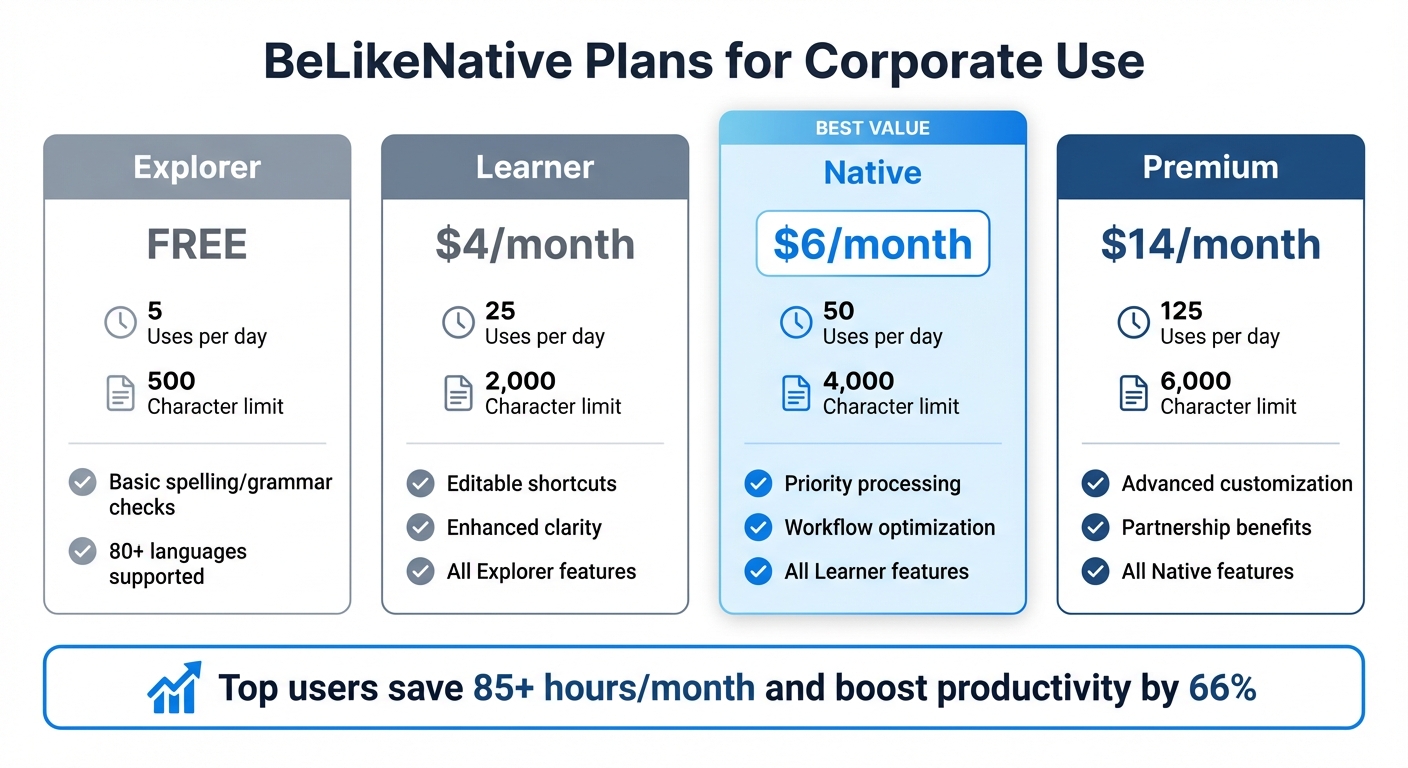
BeLikeNative Pricing Plans Comparison for Corporate Users
Once you’ve identified sections that feel overly verbose, BeLikeNative can help you streamline them in seconds. This Chrome extension works directly in your browser, so there’s no need to juggle tabs or copy and paste your content. It integrates effortlessly with web-based tools like Google Docs, Microsoft Word Online, and popular email platforms.
Setting Up BeLikeNative for Quick Edits
Getting started is quick and easy. Download the extension from the Chrome Web Store – it installs in under a minute, and you don’t even need to create an account. Once installed, BeLikeNative activates automatically on all web-based writing platforms you use. Thanks to its built-in content scripts, it operates directly within your browser pages. You can access its features using keyboard shortcuts or a convenient side panel. With the setup complete, you’re ready to refine your writing quality with browser extensions and rephrasing tools.
Using BeLikeNative Rephrasing Features
To use the rephrasing feature, simply highlight the text you want to improve and press the designated keyboard shortcut to activate the extension. Then, choose between the “Shorten” or “Simplify” modes to reduce wordiness while keeping the original meaning intact. For formal and polished communication, select the “Professional” tone setting. The extension provides inline suggestions, which you can apply instantly. With a 4.6/5 star rating from 256 reviews on the Chrome Web Store (as of March 2026), users frequently commend its smooth integration and time-saving capabilities.
BeLikeNative Plans for Corporate Use
BeLikeNative offers various pricing plans tailored to meet different business needs:
- Free Plan: Get started at no cost with limited daily uses. Includes basic spelling and grammar checks across 80+ languages.
- Learner Plan: $4/month, offering 50 uses daily and a 4,000-character limit. Includes editable shortcuts, community access, and faster editing.
- Native Plan: $6/month, with 125 daily uses and a 6,000-character limit. Includes premium support, priority processing, and early access to new features.
- Premium Plan: $14/month, providing 180 uses per day and a 10,000-character limit, along with partnership benefits and priority feature development.
Top users report saving over 85 hours per month and boosting productivity by 66% through streamlined writing and editing tasks.
| Plan Name | Price/Month | Uses/Day | Character Limit | Key Features |
|---|---|---|---|---|
| Free | $0 | 25 | 2,000 | Basic spelling/grammar checks, 80+ languages |
| Learner | $4 | 50 | 4,000 | Editable shortcuts, community access, faster editing |
| Native | $6 | 125 | 6,000 | Premium support, priority processing, early access to features |
| Premium | $14 | 180 | 10,000 | Partnership benefits, priority feature development |
Streamlining Collaborative Reports with BeLikeNative
Integrating BeLikeNative into Collaborative Platforms
BeLikeNative simplifies teamwork by embedding directly into widely-used platforms like Google Drive, Notion, and WhatsApp Web. No more exporting files or jumping between apps – everything happens where you’re already working. For example, in Google Docs, you can highlight wordy sections and apply inline edits with a simple shortcut. This feature refines sentences on the spot without disrupting your workflow. It’s a game-changer for teams that draft ideas in Notion, refine updates in WhatsApp Web, and finalize reports in Google Drive. Plus, with support for over 80 languages, BeLikeNative is a handy tool for global teams working across different languages and time zones. Along with smooth integration, its tools help unify writing styles across multiple contributors.
Maintaining Consistency in Multi-Author Reports
When multiple people contribute to a report, differences in writing styles can stand out. BeLikeNative tackles this issue with its Tone Adjustment feature, enabling teams to set a consistent voice – like “Professional” – at the beginning of a project. This ensures that the entire report feels cohesive, no matter how many contributors are involved. The AI also provides context-aware suggestions, such as using “Simplify” to clarify technical terms or “Shorten” to cut down on unnecessary details. By setting a unified tone and leveraging these smart tools, teams can create reports that are clear, aligned, and impactful. This approach not only saves time but also strengthens communication across the board.
Finalizing and Refining AI-Edited Reports
Reviewing for Data Accuracy
Double-check every single number and fact. AI tools, while useful, can sometimes make scaling mistakes – like mixing up thousands and millions. This happens in about 8% of text-based data retrievals. Pay extra attention to financial metrics, especially those pulled from footnotes or complex financial statements, as the error rate in these areas can skyrocket to 29%. Never blindly accept all AI changes at once. AI might inadvertently repeat errors it was supposed to fix or introduce new issues, like subject-verb mismatches, during rephrasing. To avoid these pitfalls, conduct a separate review of numbers, dates, and technical terms. Skipping this step can be costly – poor data quality costs U.S. businesses an estimated $3.1 trillion every year. A quick cross-check with your original source documents is absolutely essential.
“Effective monitoring is the cornerstone of AI optimization. It allows us to identify bottlenecks, fine-tune algorithms, and ultimately deliver more accurate and timely insights.” – Sarah Chen, Data Scientist
Once you’ve verified the data, shift your attention to refining the tone and context of the report.
Preserving Tone and Context
AI-edited text often runs the risk of sounding bland or overly mechanical. Tools can default to passive voice or overuse generic corporate jargon like “leverage synergies”. Go through each section carefully to ensure that the original intent and nuance are intact. For reports dealing with sensitive topics like risk or compliance, it’s particularly important to confirm that the AI hasn’t unintentionally altered the meaning.
Replace vague phrases with specific, measurable outcomes. For instance, instead of saying “improved efficiency”, be precise: “reduced manual journal entry time from 47 minutes to 90 seconds”. This not only gives your report credibility but also makes it more engaging. Additionally, check that the AI hasn’t stripped away your unique tone or accidentally shifted the narrative perspective. This can happen when individual sentences are edited without considering the broader context.
Conclusion
Cutting out unnecessary words sharpens your reports and makes communication more effective. Extra phrases dilute your message and waste precious time for readers. For example, swapping phrases like “in the event that” with a simple “if” enhances clarity and makes your writing more direct. These small edits lead to reports that are easier to read, more impactful, and professional.
BeLikeNative fits seamlessly into your workflow, offering features like real-time tone adjustments, smart summaries, and quick transformations of raw notes into polished content.
Concise writing doesn’t just save time – it ensures your key points stand out. Removing weak modifiers like “very” or “pretty” makes your statements stronger and more confident. This precision is especially helpful for stakeholders who need to absorb critical details quickly.
Incorporating BeLikeNative into your daily routine – whether for quarterly updates, compliance reports, or strategic presentations – can simplify complex ideas and make technical content more approachable. Just be sure to review AI suggestions to maintain the right balance of emphasis and nuance.
Success in business relies on clear and efficient communication. By adopting concise writing habits and leveraging smart tools, your reports will grab attention, convey authority, and inspire action. Streamline your writing process and ensure every word counts.
FAQs
How do I cut wordiness without losing meaning?
To make your writing more concise, trim excess words or phrases that don’t contribute to the message. Simplify expressions, eliminate redundant word pairs, and rework prepositional phrases for clarity. Tools like BeLikeNative can help you find shorter alternatives. Also, watch for passive voice and overly complex structures. The goal is to remove redundancy while ensuring your message stays clear and effective.
What readability score should corporate reports target?
Corporate reports should target a Flesch Reading Ease score of 60 to 70. This sweet spot ensures the content is easy to understand while still sounding professional. By hitting this range, reports become clear and concise, making them accessible to a wide audience without sacrificing their impact.
How can I verify AI edits don’t change facts or tone?
To make sure AI edits stay true to your original facts and tone, take time to review the revised content carefully. Verify that all factual details are correct and that the tone aligns with your intended style. Comparing the original and edited versions side-by-side can help catch subtle shifts in nuance or emphasis that AI might introduce. While some tools let you adjust tone settings, a manual review is the best way to ensure the final result is accurate and fits your needs.
Related Blog Posts
- 10 Tips for Concise Academic Writing
- Convert Informal Text To Formal Business English
- How To Change Passive Voice To Active Voice Online
- Fix “Passive Voice” In Technical Documentation
BeLikeNative fixes grammar, rephrases, translates, and simplifies text on any website in 1 second — just highlight and hit a keyboard shortcut. No tab switching. Try it free →

