
Best Grammar Checker For French Speakers Writing In English
Struggling with English grammar as a French speaker? You’re not alone. Writing in English can be tricky due to differences in grammar, word order, and false cognates. Tools like BeLikeNative, Grammarly, and ProWritingAid are designed to help. Here’s what you need to know:
- BeLikeNative: Perfect for catching false cognates and awkward phrasing. It works across multiple platforms and supports over 80 languages. Plans start at $4/month.
- Grammarly: Offers advanced suggestions for syntax and fluency issues, with features like false cognate detection and inline translation. Premium plans unlock unlimited corrections.
- ProWritingAid: Great for preposition errors and passive voice detection. It also offers custom style guides and lifetime pricing options.
Quick Comparison
| Feature | BeLikeNative | Grammarly | ProWritingAid |
|---|---|---|---|
| False Cognate Detection | Yes | Yes | No |
| Platform Integration | Clipboard-based | Browser & app plugins | Browser & app plugins |
| Multilingual Support | 80+ languages | 19 languages | Limited |
| Pricing | From $4/month | From $12/month | From $10/month |
| Free Plan | Limited (5 uses/day) | Basic grammar checks | 500 words per check |
Each tool has strengths tailored to different needs. If you’re looking for a budget-friendly option with French-specific support, BeLikeNative is a solid choice. For advanced grammar help, Grammarly and ProWritingAid offer broader features.
Transform Any Text, On Any Site, In Seconds
Rephrase, translate, and improve text with one shortcut. Works everywhere you write.
Add to Chrome - It's Free!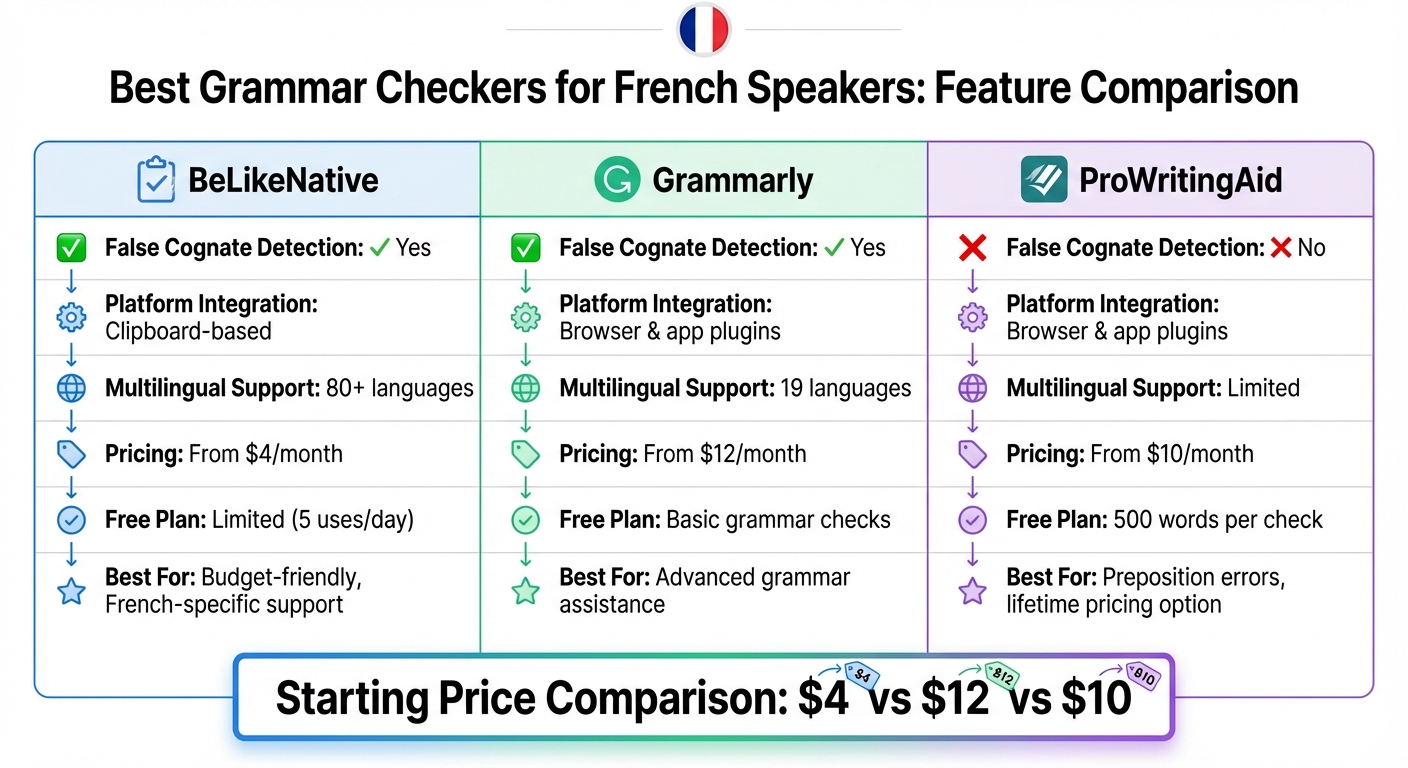
Grammar Checker Comparison for French Speakers: BeLikeNative vs Grammarly vs ProWritingAid
1. BeLikeNative
French-specific error handling
BeLikeNative tackles a common challenge for French speakers: translationese. This happens when French speakers translate their ideas directly into English, leading to sentences that are grammatically correct but feel awkward or unnatural.
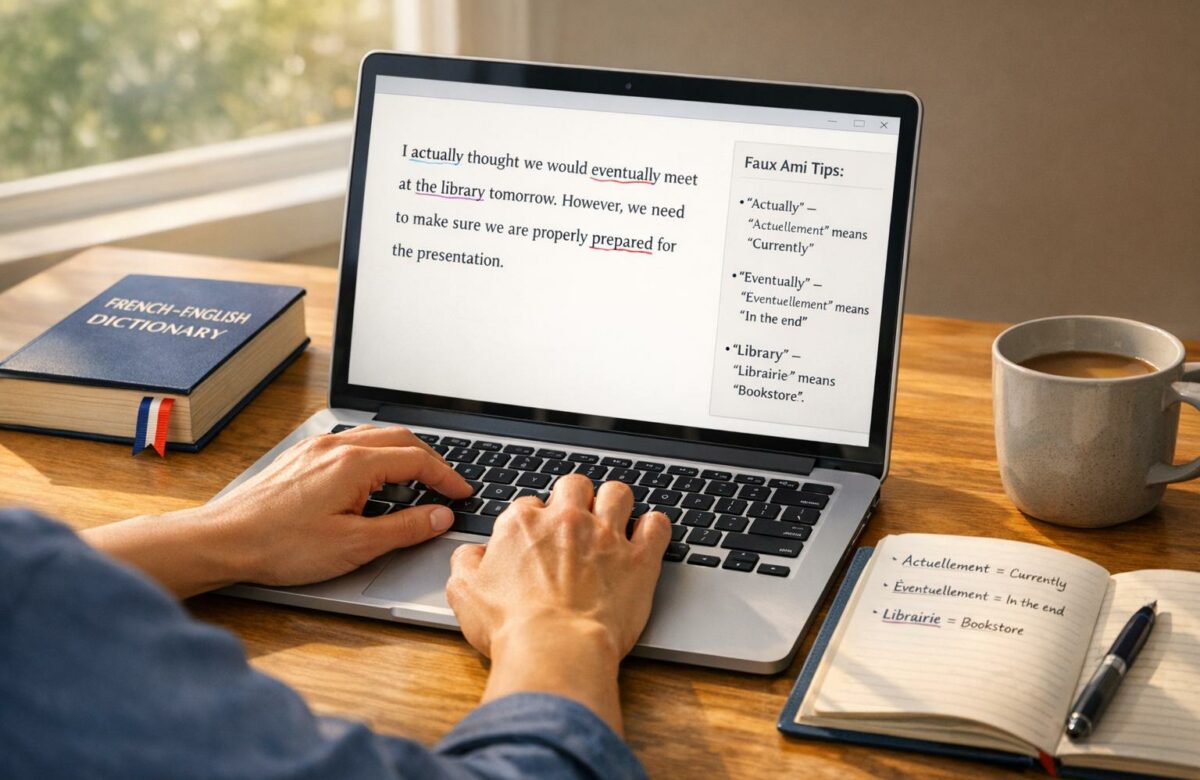
One standout feature of the tool is its ability to catch false cognates – words that look similar in both languages but have different meanings. For example, it flags instances where someone uses "eventually" instead of "possibly" (confusing it with the French éventuellement) or "actually" instead of "currently" (mistaking it for actuellement). This targeted approach ensures smoother, more natural translations.
Multilingual support
BeLikeNative isn’t just for French – it’s designed to handle over 80 languages. This makes it especially useful for people who regularly switch between languages. The tool integrates seamlessly with your clipboard, allowing you to refine your text with a single keyboard shortcut. Whether you’re using WhatsApp Web, Google Docs, or Notion, you don’t need separate integrations for each platform – it’s all covered.
Pricing and usage limits
BeLikeNative offers four pricing options:
- Explorer plan (free): 5 uses per day with a 500-character limit.
- Learner plan ($4/month): 25 daily uses and a 2,000-character limit.
- Native plan ($6/month): 50 daily uses with up to 4,000 characters.
- Premium plan ($14/month): 125 daily uses and a 6,000-character limit.
All paid plans include features like text editing, keyboard shortcuts, and options to customize language, tone, and style.
sbb-itb-32359dc
2. Grammarly
French-Specific Error Handling
Grammarly has stepped up its game for French speakers navigating English writing challenges. One standout feature in its Premium plan is the "Sound more fluent" category, which zeroes in on tricky false cognates – words that look similar in English and French but mean entirely different things. For example, writing "We had the good chance of winning" mistakenly mirrors the French use of "chance." Grammarly also tackles syntax errors common among French speakers, like missing articles or incorrect prepositions (e.g., using "on" instead of "in"). These issues are flagged in a sidebar labeled "Common issue for multilingual speakers." To make the most of this, users can set French as their primary language and enable the "I want fluency assistance" option. This targeted approach integrates seamlessly with Grammarly’s broader multilingual grammar tools.
Multilingual Support
Beyond helping French speakers with English, Grammarly now fully supports French text. It provides grammar and spelling corrections, along with paragraph-level rewrites to adjust tone. The tool automatically detects the language you’re writing in, switching its suggestion engine to match. Additionally, Grammarly includes inline translation for 19 languages, making it easy to translate between French and English without disrupting your workflow. Ailian Gan, Grammarly’s Director of Product Management, explained:
Our customers have been asking for multilingual support, and we’re meeting them where they are… in the languages that they think, learn, and communicate in daily.
These multilingual features have already gained traction, with more than 1 million users adopting them during early trials.
Pricing and Usage Limits
Grammarly’s Free Plan offers basic spelling and grammar checks, marked by red underlines, in both French and English. However, advanced suggestions – marked with blue underlines – are limited to three per day. Premium, Pro, and Enterprise Plans lift these limits, granting unlimited access to features like false cognate detection, paragraph-level rewrites in French, and inline translations. A 2021 study revealed that Grammarly detected 66% of errors accurately, though it missed around 7%.
3. ProWritingAid
French-Specific Error Handling
ProWritingAid is designed with English language users in mind, but it goes a step further to address specific challenges faced by French-English writers. One standout feature is its ability to flag preposition errors, which are notoriously tricky for non-native speakers. As Krystal N. Craiker points out, prepositions are "often the last part of English that non-native speakers master". The tool’s Sticky Sentences report highlights filler or "glue words", recognizing that polished English writing typically contains less than 40% glue words. Moreover, its Clichés Report identifies idioms that might not translate effectively from French, helping writers avoid awkward phrasing. Another advantage is its passive voice detection, which is particularly helpful since French often leans more heavily on passive constructions compared to English. These features, combined with adjustable settings, cater to the unique needs of French-English writers.
Customization Options
ProWritingAid doesn’t just stop at error detection – it allows users to tailor the tool to their preferences. Writers can select from US, UK, Canadian, or Australian English dialects, which is especially handy for French speakers in Quebec who may need to align with Canadian English conventions. The software also automatically ignores non-English text within the first 200 characters of a paragraph, so users mixing French and English won’t be overwhelmed by irrelevant error alerts. For Premium users, there’s even an option to create custom multilingual style guides that flag recurring errors specific to French-to-English translations.
Pricing and Usage Limits
ProWritingAid offers a Free Plan, but it comes with limitations: you can only check 500 words at a time, and you’re restricted to 10 rephrases and 3 AI Sparks (automated rewrite suggestions) per day. For those needing more, the Premium plan is available at $10 per month when billed annually ($120 total) or $30 for a monthly subscription. This unlocks unlimited word counts, unlimited rephrases, and access to over 25 writing reports. For even more features, Premium Pro is priced at $12 per month when billed annually ($144 total) and includes 50 AI Sparks daily. If you’re looking for a long-term commitment, ProWritingAid stands out with its lifetime pricing: $399 for Premium or $699 for Premium Pro. This one-time payment option is unmatched by competitors.
How to Use Grammar Check Tools to Improve your Grammar | English Grammar Hacks
Pros and Cons
BeLikeNative stands out with its strengths but also comes with a few limitations for French speakers looking to write in English. Here’s a breakdown of the main advantages and drawbacks:
Pros:
- Easy clipboard integration: Works effortlessly with platforms like WhatsApp Web, Google Docs, and Notion – no extra setup required.
- Multilingual support tools: Covers over 80 languages, making it perfect for users who regularly switch between French and English.
- Smart false cognate detection: Identifies tricky errors, like mixing up "eventually" with "possibly" or "actually" with "currently", thanks to its context-aware design.
- Personalized settings: Lets users adjust language, tone, and style to suit their unique writing needs.
- Budget-friendly plans: Starts at just $4 per month, with a free Explorer plan for those who want to try it out.
Cons:
- Usage limits: Free plan users are capped at 5 daily uses, while Premium users get up to 125 uses, which might not be enough for heavy users.
- Character restrictions: Depending on the plan, you can process between 500 and 6,000 characters at a time, which may require splitting larger documents into smaller chunks.
Conclusion
BeLikeNative is a standout tool for French speakers writing in English. It excels at catching false cognate errors – like confusing "eventually" with "possibly" – and offers seamless clipboard integration that works smoothly with platforms such as Google Docs and Notion. At just $4 per month for the Learner plan, it provides excellent value, making everyday writing tasks simpler and more accurate for French speakers.
What sets BeLikeNative apart is its focus on tackling common French-English interference issues, combined with support for over 80 languages. It’s particularly adept at identifying syntax differences and verb tense problems that often arise in French-English translations. While the Learner plan’s limit of 25 uses per day might not suffice for heavy users, the tool’s ability to address these specific challenges ensures it remains highly effective for daily writing needs.
For French speakers struggling with "translationese" – those awkward sentences born from overly literal translations – BeLikeNative offers a solution. It transforms stiff, unnatural English into fluid, polished writing. Whether you’re drafting emails, reports, or social media posts, having a AI grammar tools tailored to your linguistic background can make a huge difference in achieving clarity and confidence.
FAQs
How does BeLikeNative spot false cognates in context?
BeLikeNative employs advanced linguistic analysis to spot false cognates – those deceptive words that look alike in French and English but carry different meanings. By identifying these tricky terms in context, the tool helps users sidestep common French-English writing errors and offers precise corrections.
Will BeLikeNative work in Google Docs and web apps without plugins?
BeLikeNative integrates effortlessly with any website, including Google Docs and various web applications, without needing additional plugins. It functions through a Chrome extension, enabling you to highlight text, press a shortcut, and see corrections appear directly on the platform you’re using.
What plan do I need for longer texts or heavier daily use?
For those who need to handle longer texts or use the service frequently, opting for a premium or paid plan is a smart choice. These plans come with extended features, higher usage limits, and better support, making them perfect for users with more intensive requirements.
Related Blog Posts
- Best Tools for Multilingual Grammar Feedback
- Top 7 Grammar Tools for Multilingual Writers
- Ai Grammar Fixers That Improve Your Writing Instantly
- Best Grammar Checker For French Speakers Writing In English
BeLikeNative fixes grammar, rephrases, translates, and simplifies text on any website in 1 second — just highlight and hit a keyboard shortcut. No tab switching. Try it free →

