

Convert Complex Academic Language To Simple English For Presentations
Simplifying academic language makes your presentations clearer and easier to follow. The goal isn’t to dumb down your ideas – it’s to help your audience understand them quickly and act on them. Here’s how to make your content accessible:
- Focus on key points: Extract the main ideas from abstracts, introductions, and conclusions.
- Use plain language: Replace complex words with simpler ones your audience knows.
- Shorten sentences: Keep sentences under 25 words to improve clarity.
- Add examples: Use relatable, concrete examples to explain abstract ideas.
- Organize logically: Follow a clear structure (e.g., Introduction, Methodology, Results, Conclusion).
- Test and refine: Practice with an audience and adjust based on feedback.
Tools like BeLikeNative can help streamline the process by simplifying text instantly. Whether you’re addressing experts or newcomers, clear communication ensures your message lands effectively.
Transform Any Text, On Any Site, In Seconds
Rephrase, translate, and improve text with one shortcut. Works everywhere you write.
Add to Chrome - It's Free!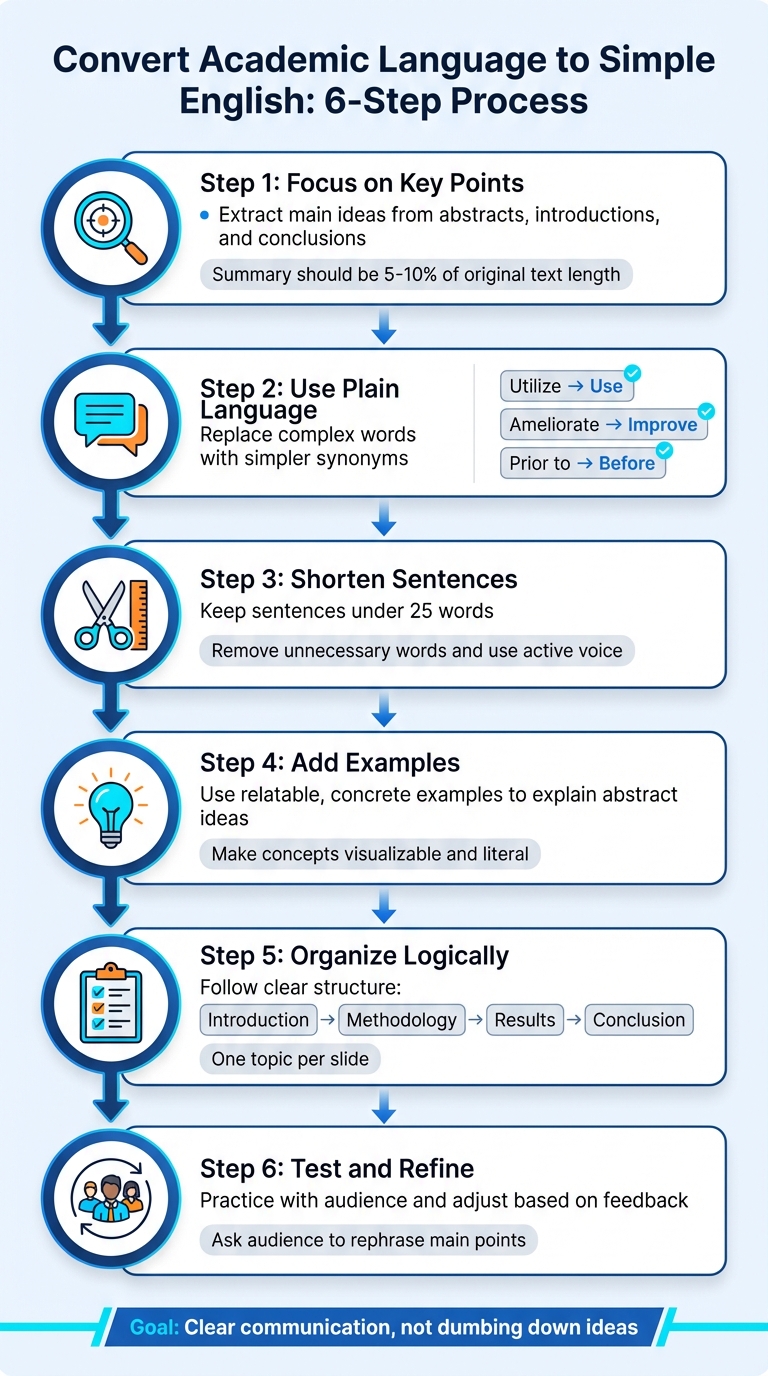
6-Step Process to Convert Academic Language to Simple English for Presentations
Find the Main Ideas in Academic Texts
Academic texts can be overwhelming. Research papers often pack in numerous concepts, but only a few are crucial for your presentation. Your goal is to extract these core ideas and leave the rest behind.
Start by focusing on the sections that consistently deliver the main points. The abstract, introduction, and conclusion are your go-to areas for uncovering the thesis, research objectives, and key findings. As Lindsay Kramer from Grammarly puts it:
"The key to summarizing a research paper is keeping it concise, objective, and focused on the original paper’s main points rather than its details."
Break Down Dense Text
To tackle dense material, read it twice. The first read gives you a general sense of the content, while the second helps you pinpoint the thesis and supporting arguments. After each section, close the document and try explaining the main points from memory. This "memory test" helps you internalize the essential concepts.
Zero in on the research’s purpose and findings, skipping over less critical details. Ask yourself questions like, "What is this about?" or "What is the author trying to say?" Use headings like Methodology, Results, and Discussion to guide you through the key parts. For lengthy articles, group related paragraphs by their argument stages and distill each section into a one-sentence summary. A good rule of thumb: your summary should be 5% to 10% of the original text’s length.
Once you’ve nailed the summary, arrange the ideas into a structured framework.
Organize Key Points Logically
With your concise summaries in hand, organize them based on the academic text’s structure. Stick to the original framework – Introduction, Methodology, Results, and Conclusion – to create a logical flow for your presentation. This approach helps your audience follow along and retain the key message.
Before diving into slide creation, draft an outline. Visualize where each supporting point will fit to strengthen the main thesis. Introduce the central idea within the first couple of slides to give your audience an "advance organizer", helping them connect the dots as you present. Keep each slide focused on one topic to avoid overwhelming your listeners. As the University of Toronto Writing Advice explains:
"A summary has two aims: to reproduce the overarching ideas in a text… and to express these overarching ideas using precise, specific language."
sbb-itb-32359dc
Replace Jargon with Plain Language
Academic writing often hides ideas behind complex vocabulary, leaving readers confused. But the goal isn’t to impress with big words – it’s to share ideas clearly. As The Writing Center at the University of North Carolina at Chapel Hill points out:
"The most important goal of academic writing is not to sound smart – it is to communicate an argument or information clearly and convincingly."
Using plain language doesn’t mean oversimplifying. You can explain complicated topics in a way that’s easy to understand without losing depth. The key is to swap out technical terms for words your audience already knows. This makes your content more accessible, whether your readers are non-native speakers, neurodivergent individuals, or simply tired or distracted.
Use Simpler Synonyms
Start by spotting words that might confuse your audience. Complex words often have multiple syllables, unusual letter patterns, and are rarely used in everyday conversation. Replace them with straightforward alternatives that convey the same meaning.
If you’re unsure which word to use, try the "slash/option" technique: jot down a few alternatives and choose the one that feels most relatable. For example, instead of "questionable", you might use "vague" or "inaccurate", depending on the context. Aim for words with high "imageability" – ones that create a clear mental picture. For instance, "friend" is easier to visualize than "collegiality."
| Complex Phrase | Simple Alternative |
|---|---|
| Utilize | Use |
| Ameliorate | Improve |
| Prior to | Before |
| In the event that | If |
| At that point in time | Then |
But don’t oversimplify – choosing a word that’s too generic can create confusion. The goal is to be clear, not vague. Pair these simpler terms with examples to make your message even clearer.
Add Relatable Examples
Abstract concepts become easier to grasp with concrete examples. For instance, instead of explaining "cognitive load" in academic terms, describe it as "the mental effort it takes to remember a phone number while someone talks to you." This approach helps your audience visualize the idea and process it more quickly.
Stick to literal language and avoid metaphors that might confuse your audience. If you need to use a technical term, define it right away. For example: "We measured attrition – the rate at which participants dropped out of the study – over three months." This keeps everyone on the same page without slowing down your explanation.
Tailor your examples to fit your audience’s experiences and background. Test your simplified language on a few people who represent your audience to make sure your message is landing as you intend. By combining straightforward language with relatable examples, you’ll not only clarify your points but also connect more effectively with your readers.
Shorten Sentences for Clarity
Keeping sentences short makes your message easier to follow. Long sentences, especially those over 25 words, can overwhelm your audience and bury the main idea. As the University of Leeds explains:
"Academic writing is concise, clear, formal and uses a mixture of the active and passive voices. It does not need to be complex or use long sentences and obscure vocabulary."
Short sentences reflect clear thinking. They allow your audience to quickly grasp your message, which is critical during live presentations where there’s no opportunity to reread confusing phrases. Shortening dense text also improves accessibility for individuals with reading disorders or cognitive challenges.
Remove Unnecessary Words
Trim words that don’t add value. Fillers like "basically", "actually", "really", and "very" often clutter sentences without enhancing meaning. Look for prepositions such as "in", "for", and "at", which can signal overly wordy phrases. For example, simplify "due to the fact that" to "because" or "at this point in time" to "now."
Cut redundant pairs like "each and every" or "first and foremost" to just one word. Similarly, eliminate redundant categories – "pink in color" is simply "pink", and "round in shape" is just "round."
Switch passive voice to active voice for more direct communication. Instead of saying, "The data was analyzed by the research team", say, "The research team analyzed the data." Also, watch for nouns disguised as verbs (often ending in "-tion", "-ence", or "-ment"). Replace "make a collection of" with "collect" or "provide a demonstration of" with "demonstrate."
| Wordy Phrase | Simple Alternative |
|---|---|
| Due to the fact that | Because |
| In the event that | If |
| For the purpose of | To |
| It is necessary that | Must |
| At this point in time | Now |
These edits make your writing sharper and more impactful.
Use Bullet Points for Key Information
Once you’ve shortened sentences, use bullet points to highlight key ideas. Bullet points create white space, making content easier to scan and less overwhelming. While you expand on details verbally, your audience can quickly absorb the main points.
Keep bullets consistent. If one bullet starts with a verb, the others should too. For example, "saves time", "increases accuracy", and "reduces errors" are easier to process than mixing styles like "saves time", "accuracy is increased", and "fewer errors."
Use your presentation software’s templates to ensure clean formatting. Stick to sans-serif fonts like Arial or Helvetica at a minimum size of 24 pt (never below 18 pt) so everyone in the room can read your slides. Maintain at least 1.15 line spacing for better readability.
Before finalizing your bullet points, remove unnecessary words like "the" and "that" unless they add clarity. Start each bullet with the main idea and use active voice to keep your points concise and engaging.
Use BeLikeNative to Simplify Academic Texts
BeLikeNative is a Chrome extension designed to make dense academic writing easier to understand and presentation-ready in no time. Instead of spending hours rephrasing complex language, you can simply highlight the text, use a keyboard shortcut, and instantly copy the simplified version to your clipboard. It’s ready to paste wherever you need it.
This tool integrates smoothly with platforms like Google Docs, Notion, Teams, and Evernote Web. This means you can simplify text directly within your workspace, helping you stay focused and avoid the hassle of switching tabs or juggling multiple tools. The result? A streamlined workflow that saves time and energy.
Key Features of BeLikeNative
BeLikeNative offers several features that make it a go-to tool for simplifying academic texts:
- Customizable Tone and Style: Adjust the output to match your preferred tone, whether formal or casual. For example, the sentence “The paradigm shift in epistemological frameworks necessitates a reevaluation of ontological assumptions” can be rephrased as “This big change in how we think about knowledge requires rethinking basic realities” with just a click.
- Clipboard Integration: Paste complex text, such as “Utilizing multivariate regression analysis, we ascertained a statistically significant correlation,” and receive a simplified version like “Using advanced stats, we found a strong link.” The tool supports over 80 languages, making it valuable for international users preparing multilingual presentations.
BeLikeNative has a 4.6/5 rating on the Chrome Web Store, based on 256 reviews. Users frequently highlight how it eliminates distractions like tab-switching. Power users report a 66% boost in productivity, while active users save up to 85 hours a month.
These features not only simplify academic language but also make your workflow more efficient across various platforms.
BeLikeNative Plans and Pricing
| Plan | Price | Daily Usage Limit | Character Limit | Best For |
|---|---|---|---|---|
| Explorer | $0/month | 5 uses | 500 characters | Testing basic features |
| Learner | $4/month | 25 uses | 2,000 characters | Occasional presentations |
| Native | $6/month | 50 uses | 4,000 characters | Weekly presentation prep |
| Premium | $14/month | 125 uses | 6,000 characters | Frequent academic talks |
The Explorer plan is free and perfect for quick tests, offering 5 uses per day with a 500-character limit. If you need more flexibility, the Learner plan at $4/month lets you simplify up to 25 texts daily, with a 2,000-character limit – ideal for occasional use.
For those who regularly prepare academic presentations, the Native plan ($6/month) provides 50 daily uses and a 4,000-character limit, making it great for handling multiple abstracts. For heavy users, the Premium plan ($14/month) supports 125 daily uses and 6,000 characters, perfect for converting longer papers or frequent academic talks.
All paid plans include advanced features like editable options and customizable shortcuts, allowing you to fine-tune the tool to fit your workflow. With BeLikeNative, you can seamlessly integrate simplified text into your presentations and tweak it based on your audience’s needs.
Test and Refine Your Presentation
Once you’ve worked on simplifying your language, the next step is testing and refining your presentation. This helps ensure your message not only comes across clearly but also connects with your audience in a meaningful way. One effective method is the reconstruction test: ask your audience to restate your main ideas. This can reveal whether your simplified language is truly clear or if it unintentionally creates confusion. These steps can make your presentation both engaging and actionable.
Practice with an Audience
Try presenting your material to colleagues or mentors who resemble your target audience. Instead of asking vague questions like, "Does this make sense?", ask them to rephrase your main point. If they struggle to do so, it’s a sign that your language needs further refining.
You can also take it a step further by asking your practice audience to apply your ideas to a new scenario. If they can successfully adapt your concept, it’s a strong indicator that they’ve grasped it.
During your practice sessions, pause occasionally to ask for rephrasing or questions. Another useful approach is to invite your audience to point out where your concept might fall short or lose relevance. This can help ensure you haven’t oversimplified things to the point of losing nuance.
Use the feedback you gather during this process to guide your final adjustments.
Adjust Based on Feedback
Feedback is your best tool for honing your presentation. Use it to tweak your language, pacing, and examples. For example, when the SEC introduced a "plain English" rule for securities prospectuses in 1998, testing with 600 investors showed a 27% improvement in comprehension and doubled their ability to identify risk factors. These results highlight how even small adjustments can make a big impact.
If your practice audience struggles with specific sections, consider replacing any remaining jargon with simpler terms or adding relatable, concrete examples. A real-world case of this is the Veterans Administration’s 2011 plain-language rewrite of a benefits letter. The rewrite led to a 40% increase in correctly completed applications and reduced follow-up inquiries by 60%.
To help your audience stay focused, emphasize your key points by explicitly stating, "The central point is…" This can reduce cognitive overload and make your message easier to follow.
Conclusion
Simplifying academic language for presentations isn’t about lowering standards – it’s about making your ideas easier to grasp. As Johann Wolfgang von Goethe wisely said:
"If any man wishes to write in a clear style, let him first be clear in his thoughts".
Breaking down complex ideas, swapping jargon for plain words, and using shorter sentences shows a deep understanding of your topic.
Plain language ensures that your audience can grasp your message the first time they hear it. This is especially important for non-native speakers, individuals with cognitive challenges, or anyone who might be distracted or fatigued during your talk. Sticking to an 8th-grade reading level helps make your content clear and widely understandable. This approach doesn’t just clarify – it empowers your audience to act on your ideas.
Clear communication also saves time. It allows your audience to quickly pinpoint what they need and confidently use the information you provide. Even the most intricate ideas can be expressed in plain language without losing their depth or meaning.
FAQs
How do I simplify without losing accuracy?
To make academic language easier to understand without sacrificing precision, stick to the main ideas and express them clearly. Tools like Hemingway Editor or Grammarly can help refine your sentences, keeping them concise and easy to follow. Structure your thoughts in a logical order, starting with the key point, and use examples to illustrate concepts. Steer clear of jargon or overly complicated wording, but always ensure your simplified version retains all critical details and subtleties.
What academic details can I safely cut for slides?
To keep your slides sharp and to the point, trim down lengthy explanations, skip over detailed background information, and drop any overly descriptive language. Stick to the core ideas and the most important data. Avoid packing in full narratives about processes or context your audience is probably already familiar with. This approach ensures your presentation stays clear and keeps your audience engaged.
How can I test if my audience really understands?
To ensure your audience understands your message, try using direct questions or encourage feedback to keep them engaged. Interactive methods, like quick polls or group discussions, can also be effective. Simplify your language and present your ideas in a clear, organized way. Tools like Hemingway Editor can help refine your content for better clarity. Another helpful approach is to ask your audience to summarize key points or answer specific questions during or after your presentation to gauge their understanding.
Related Blog Posts
- 10 Tips for Concise Academic Writing
- How to Explain Complex Ideas in Simple Language
- Simplify Long Paragraphs With AI For Better Readability
- One-Click Text Simplifier for Explaining Complex Topics in Presentations
BeLikeNative fixes grammar, rephrases, translates, and simplifies text on any website in 1 second — just highlight and hit a keyboard shortcut. No tab switching. Try it free →

