
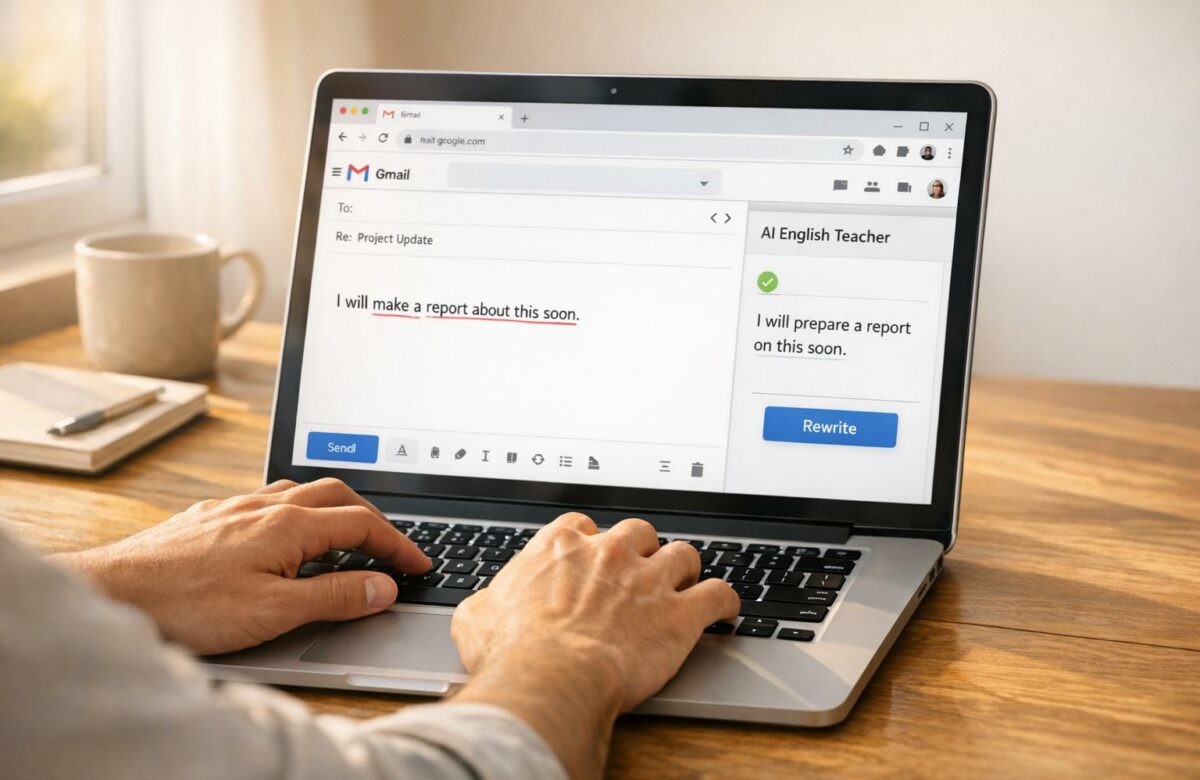
Best AI English Teacher Plugin For Chrome
Struggling with polished English writing? BeLikeNative is a Chrome plugin that simplifies the process of improving your English, whether you’re crafting emails, collaborating in apps like Notion, or chatting on WhatsApp Web. Forget the hassle of copy-pasting into external tools – this plugin lets you refine grammar, rephrase sentences, and even translate text directly in your browser.
Key Features:
- Quick Corrections: Highlight text, press Alt/Command + E, and get instant improvements.
- Supports 80+ Languages: Perfect for multilingual users transforming non-native text into fluent English.
- Customizable Plans: Free basic plan (5 daily uses) and paid options starting at $4/month.
- Versatile Writing Styles: Switch between formal and casual tones as needed.
Why It Matters:
Users report saving over an hour daily and increasing productivity by 66%. Whether you’re handling short emails or professional documents, BeLikeNative streamlines your workflow —especially when you need to rephrase for clarity in technical work—, helping you focus on your message instead of editing.
Transform Any Text, On Any Site, In Seconds
Rephrase, translate, and improve text with one shortcut. Works everywhere you write.
Add to Chrome - It's Free!| Plan | Price | Daily Uses | Character Limit |
|---|---|---|---|
| Free | $0 | Limited | 500 |
| Learner | $4 | 50 | 4,000 |
| Native | $6 | 125 | 6,000 |
| Premium | $14 | 180 | 10,000 |
BeLikeNative is ideal for short-form content and quick edits. However, daily and character limits might be restrictive for heavy editing needs. Try the free plan to see if it fits your workflow!
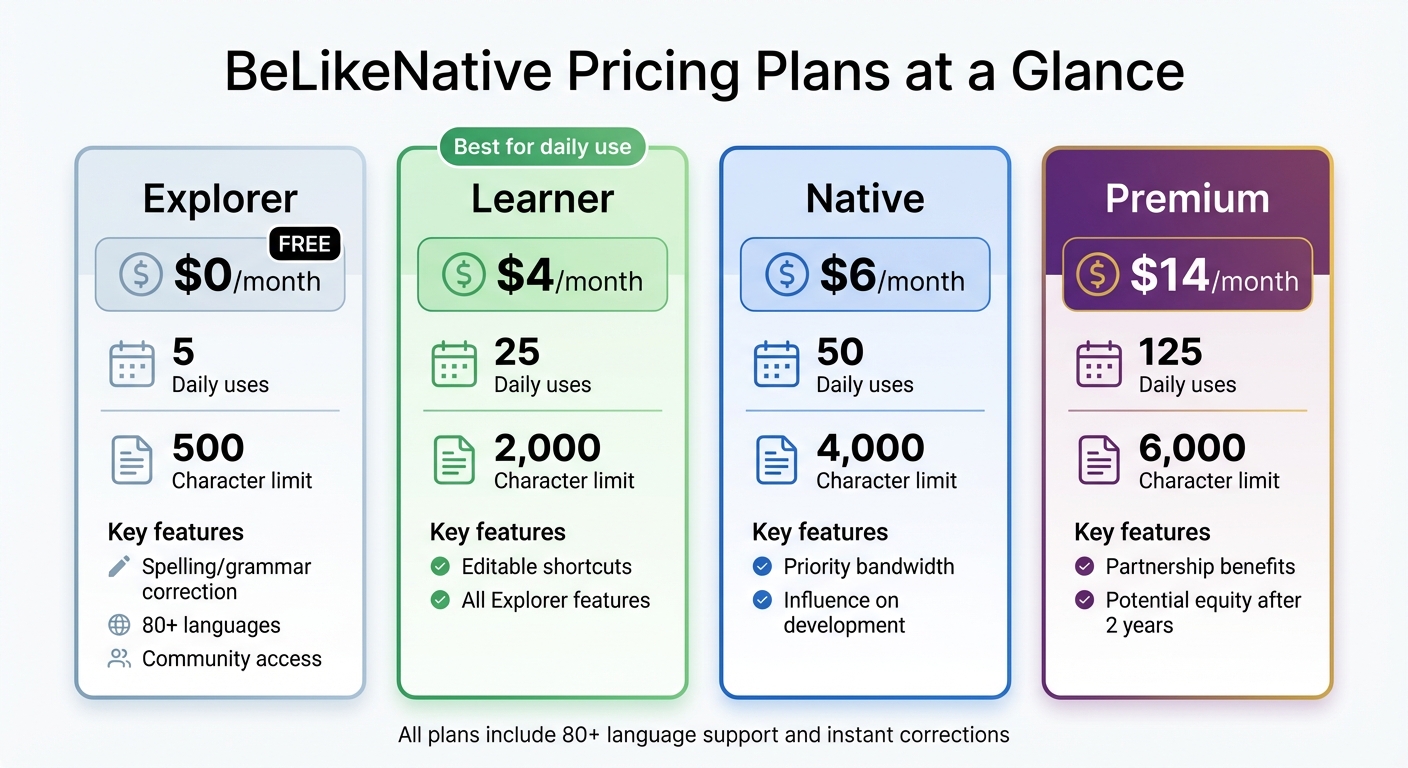
BeLikeNative Pricing Plans Comparison – Features and Limits
1. BeLikeNative
Features
BeLikeNative keeps things straightforward: highlight text, press Alt/Command + E, and the corrected version is instantly copied. This plugin focuses on four main functions – rephrasing, translating, improving, and shortening text – while also refining grammar and polishing your writing style. It works effortlessly across platforms like WhatsApp Web, Notion, Google products, Evernote Web, and Microsoft Teams.
With support for over 80 languages, BeLikeNative goes beyond fixing simple typos. It tackles complex grammar issues, awkward phrasing, and style inconsistencies. The tool has earned a solid 4.6/5 rating on the Chrome Web Store, based on feedback from 194 users, and boasts over 3,000 active users as of late 2025.
These features come with flexible pricing plans, making it accessible for a wide range of users.
Pricing Plans
| Plan | Monthly Price | Daily Uses | Character Limit | Key Features |
|---|---|---|---|---|
| Free | $0 | Limited | 500 | Spelling/grammar correction, 80+ languages, community access |
| Learner | $4 | 50 | 4,000 | Editable shortcuts, all Free features |
| Native | $6 | 125 | 6,000 | Priority bandwidth, influence on development |
| Premium | $14 | 180 | 10,000 | Partnership benefits, potential equity after 2 years |
The free Free plan offers basic corrections, perfect for trying out the tool. For $4/month, the Learner plan is ideal for daily use, while the Premium plan provides extended limits and exclusive perks for $14/month.
Effectiveness
BeLikeNative doesn’t just refine your writing – it saves you time. Users report gaining back over an hour each day by cutting out repetitive copy-pasting. Top users have experienced a 66% productivity boost, saving more than 85 hours monthly. That’s an estimated annual value of $35,700. The August 2025 update (v1.4.1) introduced a side panel interface and a caching layer, making corrections nearly instantaneous and further streamlining workflows.
Customization
BeLikeNative adapts to your needs with tone and style options, allowing you to switch between formal and casual writing effortlessly. Subscribers on the Learner plan and above can even customize keyboard shortcuts, tailoring the tool to their workflow. These features make it especially useful for global teams that need reliable translation and content refinement tools.
sbb-itb-32359dc
The BEST Chrome AI Extensions
Pros and Cons
BeLikeNative stands out as a handy tool for multilingual writers who want quick corrections without juggling multiple apps. Its free Free plan lets users test the waters with 5 daily uses, while the Learner plan, priced at $4/month, offers 25 uses and supports up to 2,000 characters – perfect for everyday tasks. Plus, it boasts a smooth correction shortcut compatible with all integrated platforms.
Here’s a closer look at its strengths and limitations to help you decide if it fits your editing needs:
| Strengths | Limitations |
|---|---|
| Supports over 80 languages seamlessly | Daily use limits across all plans |
| Easy-to-use shortcut (Alt/Command + E) | Character limits can make editing longer texts tricky |
| Free basic plan available | Advanced features locked behind a subscription |
| Affordable starting price of $4/month | No option for unlimited usage |
| Customizable shortcuts on paid plans |
While BeLikeNative is fantastic for emails, chats, and other short-form content, the daily and character caps – especially on the $14/month Premium plan with 125 daily uses – can be a hurdle for those working on longer or more frequent edits. It’s a great choice for focused, smaller tasks but might not be the best fit for heavy-duty editing sessions, where AI grammar fixers might be more suitable.
Conclusion
BeLikeNative offers a practical solution for improving English writing, especially for multilingual users. Its streamlined workflow eliminates the hassle of switching tabs or copy-pasting, while support for over 80 languages allows you to work in your native language and produce polished English text effortlessly.
The pricing is straightforward: plans start at $4/month for 25 daily uses and go up to $14/month for 125 daily uses with a 6,000-character limit. According to top users, the tool can boost productivity by 66%, saving more than 85 hours per month by cutting down on repetitive editing tasks.
For those working on short-form content like emails, chat messages, or social media posts, BeLikeNative integrates seamlessly into your workflow. The free Free plan, offering 5 daily uses, is a great way to try it out before committing. Meanwhile, the Native and Premium plans cater to professionals handling longer documents across multiple platforms.
The tool shines in scenarios where quick corrections are key. Whether you’re replying to clients on WhatsApp Web, collaborating in Notion, or drafting emails in Gmail, its clipboard-first design ensures your corrected text is ready to paste instantly, keeping you focused on your message rather than the mechanics of editing.
That said, the daily and character limits might not suit users with heavy editing demands. However, for everyday tasks where you need to sound polished and natural in English, BeLikeNative delivers exactly what it promises.
FAQs
How does BeLikeNative help users work more efficiently?
BeLikeNative enhances productivity by providing real-time AI-driven writing assistance that streamlines and refines the writing process. With features like instant grammar corrections, style improvements, and text simplifications, it helps users produce polished, easy-to-read content in less time. This means less time spent on editing and proofreading, freeing up more time for other tasks.
Supporting over 80 languages, BeLikeNative is a great option for multilingual users. Its ability to simplify complex language promotes clearer communication and reduces the chance of misunderstandings. Plus, it integrates directly into your browser, so you can use its features without needing to switch between apps, keeping your workflow seamless. By automating repetitive tasks and improving clarity, BeLikeNative makes it easier to work efficiently and communicate effectively.
What are the restrictions of the free Free plan?
The free Free plan often includes certain restrictions, primarily around usage limits. For example, there might be a daily cap on the number of words you can generate or edit, which is designed to encourage users to consider upgrading for broader access.
These limitations are typical for free plans, as they help manage server resources while promoting paid options. Upgraded plans usually offer perks like higher word limits, access to advanced editing tools, and quicker customer support. If you’re on the free Free plan, keep these limits in mind – you might need to upgrade if you require more extensive features.
Can BeLikeNative effectively manage long-form content?
BeLikeNative is built to handle long-form content effortlessly. Whether you’re crafting detailed lesson plans, developing curricular materials, or working on other educational texts, it’s equipped to manage extensive and complex projects. Its tools are specifically designed to help users create well-structured, polished, and professional materials with maximum efficiency.
Related Blog Posts
- How To Polish Your Writing With Chrome Ai Extensions
- Reword Your Essays Effortlessly With Ai Paraphrasing Tools
- Ai Grammar Fixers That Improve Your Writing Instantly
- Best Free Quillbot Alternative For Chrome Users
BeLikeNative fixes grammar, rephrases, translates, and simplifies text on any website in 1 second — just highlight and hit a keyboard shortcut. No tab switching. Try it free →

