

Best AI Tool For Rewriting Code Documentation
Developers spend 58% of their time reading code, and poor documentation costs mid-sized teams over $300,000 annually. Clear, up-to-date documentation can cut onboarding time by 45%, but keeping it aligned with evolving code remains a challenge. AI tools now solve this by automating documentation updates, saving time, and maintaining consistency.
Here’s a breakdown of three popular tools for rewriting code documentation:
- BeLikeNative: A Chrome extension for quick text refinement. Processes text in seconds, supports 80+ languages, and integrates with platforms like Notion and GitHub. Pricing starts at $0 (free plan) and goes up to $14/month.
- DocuWriter.ai: Automates documentation updates with GitHub sync and supports multiple programming languages. Pricing ranges from $33/month to $199/month.
- Hyperlint: Focuses on maintaining consistent style guides and real-time corrections. Also offers multilingual support with neural machine translation.
Quick Comparison:
| Feature | BeLikeNative | DocuWriter.ai | Hyperlint |
|---|---|---|---|
| Multilingual Support | 80+ languages | Code language converter | Neural machine translation |
| Integration Options | Chrome extension | GitHub, API access | Style guide integration |
| Pricing | $0–$14/month | $33–$199/month | Contact for pricing |
| Key Strength | Fast, clipboard-based editing | Automated updates, Git sync | Consistent style guide enforcement |
Each tool addresses different needs, from quick edits to automated workflows. Choose based on your team’s size, workflow, and budget.
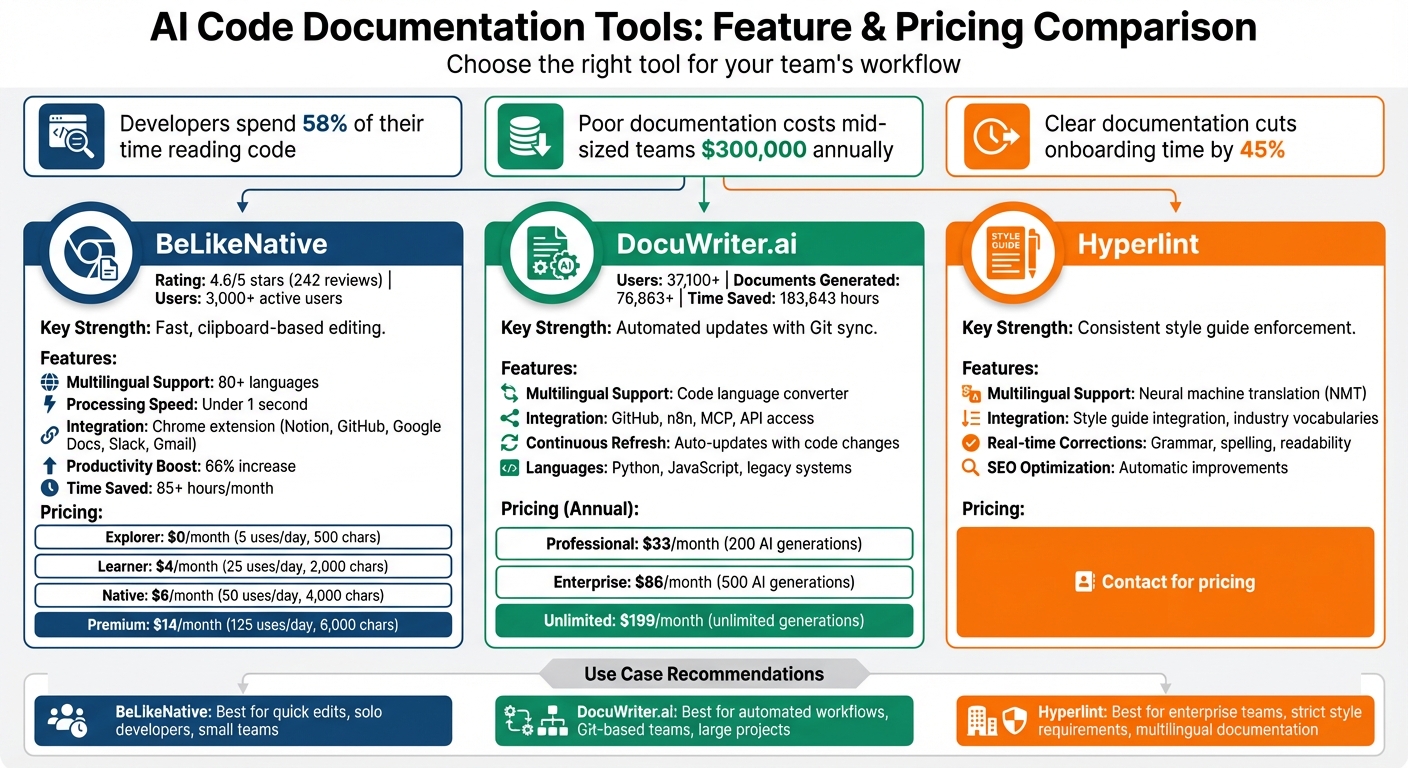
AI Code Documentation Tools Comparison: BeLikeNative vs DocuWriter.ai vs Hyperlint
AI Code Documentation Tools 2024
sbb-itb-32359dc
1. BeLikeNative
BeLikeNative is a Chrome extension designed to streamline and refine code documentation. With over 3,000 active users as of March 2026 and a 4.6/5 rating from 242 reviews on the Chrome Web Store, it’s clear that this tool has earned its place among developers. It processes highlighted text in under a second, delivering polished documentation directly to your clipboard.
Rephrasing Quality
This tool tackles common documentation challenges like awkward wording, unclear explanations, and inconsistent tone. It even offers multiple paraphrasing styles to align with your preferred standards. Plus, its grammar checker doesn’t just catch spelling mistakes – it identifies technical errors that other tools might overlook. According to users, BeLikeNative increases productivity by 66%, saving them more than 85 hours each month.
Using it is incredibly simple: highlight the text, press Ctrl+Shift+1, and the refined version instantly appears in your clipboard. This efficiency makes it easy to edit documentation directly in platforms like GitHub, Notion, or Google Docs.
Next, let’s look at how BeLikeNative supports teams worldwide with multilingual capabilities.
Multilingual Support
BeLikeNative supports translation and rephrasing in over 80 languages, making it a valuable tool for global teams. It eliminates the need for manual translation, letting you customize both the target language and tone. Whether you need casual notes for internal use or formal documentation for external audiences, a single shortcut does the trick. The translated and refined text is delivered straight to your clipboard.
This language flexibility is paired with seamless integration into your favorite platforms.
Integration Options
As a Chrome extension, BeLikeNative integrates effortlessly with websites like Slack, GitHub, Gmail, Notion, and ChatGPT. There’s no need for API keys or complicated setups. The default keyboard shortcut (Ctrl+Shift+1) triggers the AI to process highlighted text, syncing the improved output to your clipboard without interrupting your workflow.
Pricing and Plans
BeLikeNative offers flexible pricing to suit a wide range of documentation needs:
- Explorer ($0/month): A free plan for basic spelling and grammar corrections, limited to 5 uses per day and a 500-character cap.
- Learner ($4/month): Boost productivity with 25 uses per day, a 2,000-character limit, and access to customizable features.
- Native ($6/month): This plan includes 50 daily uses, a 4,000-character limit, priority bandwidth, and the chance to influence future updates.
- Premium ($14/month): Designed for heavy users, this plan offers 125 uses per day, a 6,000-character limit, potential equity after two years, and a lifetime license option.
All subscriptions are managed through a central dashboard, allowing users to easily upgrade or downgrade as their needs change.
2. Tool A
DocuWriter.ai stands out in the ever-changing world of AI tools for code documentation. With over 37,100 users, it has already generated 76,863+ documents while saving developers an impressive 183,843 hours of work. Designed to handle a variety of programming languages – from Python and JavaScript to older, legacy systems – it’s a versatile solution for modern development teams.
Rephrasing Quality
One of DocuWriter.ai’s standout features is its Intelligent Code Refactoring, which simplifies code and makes documentation easier to understand. Its continuous refresh ensures that documentation stays up-to-date as your codebase evolves. Scott A., CTO and Co-Founder at Tech, shared his experience:
I have been in this business for over 20 years, and this is one of the most useful tools I have encountered.
This combination of technical refinement and adaptability makes it a valuable tool for teams managing complex projects.
Multilingual Support
DocuWriter.ai also includes a Code Language Converter, which allows developers to translate code seamlessly between languages and frameworks. For example, you can convert Java to Dart or Bootstrap to TailwindCSS. This feature is especially helpful for teams working across various technology stacks.
Integration Options
The platform integrates with tools like n8n to automate documentation updates and supports Model Context Protocol (MCP) for use with AI assistants such as Cursor, Claude, and ChatGPT. Additionally, its Git Repository Sync feature automatically updates documentation alongside code changes. For those on Professional and Enterprise plans, API access allows for custom integrations. These options make it easier to align documentation workflows with modern development practices.
Pricing and Plans
DocuWriter.ai offers three subscription tiers, billed annually:
- Professional: $33/month – Includes 200 AI generations, Git Sync, MCP support, and API access
- Enterprise: $86/month – Offers 500 AI generations, team management tools, and full API access
- Unlimited: $199/month – Provides unlimited AI generations, unlimited spaces, and a dedicated success manager
To ensure data security, the platform processes uploaded files without storing them – they are automatically deleted after processing.
3. Tool B
Hyperlint takes a different approach by focusing on maintaining a consistent style guide. Instead of just pointing out mistakes, it actively monitors documentation for grammar, spelling, and readability issues. Plus, it automatically applies fixes to ensure your writing stays clear, polished, and aligned with your brand’s tone.
Rephrasing Quality
One of Hyperlint’s standout features is its ability to resolve issues as they arise. Its AI offers real-time corrections that improve both clarity and overall content quality. It also identifies weak SEO performance and common readability problems, making the necessary adjustments to boost the effectiveness of your content.
Multilingual Support
For teams juggling documentation in multiple languages, Hyperlint (also referred to as Docsie in some cases) uses neural machine translation (NMT) to handle technical terms and context effectively, steering clear of clunky, word-for-word translations. It provides real-time translation tools for quick localization and batch processing for larger projects. Over time, the system gets better at translating thanks to human feedback, which helps refine its accuracy.
Integration Options
Hyperlint integrates seamlessly with specialized industry vocabularies and organizational style guides, ensuring consistency across all documentation. This makes it especially handy for companies with strict requirements or those operating in technical fields. Its ability to adapt to such needs solidifies its role in simplifying documentation processes for demanding environments.
Pros and Cons
Breaking down the strengths and drawbacks of these tools helps clarify how they fit into different documentation workflows.
BeLikeNative is perfect for quick, clipboard-based text refinement in over 80 languages. It works seamlessly with platforms like Notion, Google Docs, and WhatsApp Web, making it a go-to for rapid edits. However, it comes with usage restrictions: the free plan allows only 5 uses per day, while the paid plan ($14/month) increases this to 125 uses, with character limits ranging from 500 to 6,000.
On the other hand, Tool A (DocuWriter.ai) focuses on automating polished public documentation with GitHub integration. Trusted by over 37,100 users, it has generated more than 76,863 documents and saved developers a staggering 183,843 hours of work. But its pricing – ranging from $33 to $199 per month for annual plans – might be a hurdle for some, and its heavy reliance on Git workflows could pose challenges for teams using alternative version control systems.
Each tool caters to a specific need: BeLikeNative excels in fast, on-demand editing, while DocuWriter.ai shines with automation and seamless code integration. Choosing the right one depends on what aligns best with your documentation process.
Conclusion
BeLikeNative stands out as a practical solution for modern code documentation challenges, offering a combination of efficiency, simplicity, and affordability.
This tool is tailored for quick, multilingual code documentation, supporting over 80 languages and integrating seamlessly with platforms like Notion, Google Docs, and WhatsApp Web. Its clipboard-based functionality allows for fast edits, while its pricing plans cater to a variety of needs – from a free option for basic grammar correction to a $14/month Premium plan, which includes 125 uses per day and a 6,000-character limit.
By tackling common pain points like documentation delays, multilingual collaboration, and the need for speed in development workflows, BeLikeNative helps teams stay on track. With the ability to process highlighted text in under a second and deliver polished results directly to your clipboard, it eliminates unnecessary bottlenecks. According to users, it boosts productivity by 66% and saves over 85 hours each month.
Whether you’re a solo developer organizing notes or part of a global team managing complex technical documentation, BeLikeNative’s extensive language support and flexible pricing make it an effective choice for keeping your documentation accurate, efficient, and up-to-date.
FAQs
How accurate is AI when rewriting technical documentation?
AI can do an impressive job of rewriting technical documentation, particularly when paired with code for automatic updates. However, the precision of these rewrites hinges on the specific tool being used and its compatibility with your goals. Choosing the right solution tailored to your requirements is key.
Will it maintain my tone and style across docs?
Maintaining a consistent tone and style across all documentation is key to presenting a unified voice. This approach enhances clarity, ensures readability, and gives your content a polished, professional feel.
Is my code or documentation data stored or shared?
When using an AI tool for storing or sharing your code or documentation, it’s essential to consider the platform’s privacy policies and terms of service. Some tools might store or analyze your data to improve their features or services. Make sure to carefully review the terms provided by the specific tool to fully understand how your data will be handled.

