

Best Chrome Extension For Learning English Vocabulary While Working
BeLikeNative is a Chrome extension designed to help you improve your English vocabulary while staying productive. It integrates directly into tools like Gmail and Google Docs, offering AI-powered suggestions for paraphrasing, grammar corrections, and tone adjustments. With features like context-aware word recommendations, quick keyboard shortcuts, and word cards for passive learning, it fits seamlessly into your workflow.
Key features include:
Transform Any Text, On Any Site, In Seconds
Rephrase, translate, and improve text with one shortcut. Works everywhere you write.
Add to Chrome - It's Free!- Context-aware suggestions tailored to formal, casual, or professional tones.
- Word cards displayed in new tabs to learn vocabulary passively.
- AI grammar fixers and spelling checks for real-time improvement.
- Lightweight design (999KiB) that doesn’t slow down your browser.
Pricing plans range from free to $14/month, with options for different usage needs. While it’s a helpful tool for learning through writing, it lacks progress-tracking features found in dedicated vocabulary apps. If you’re looking to improve your English while working, BeLikeNative offers a practical, time-saving solution.
1. BeLikeNative
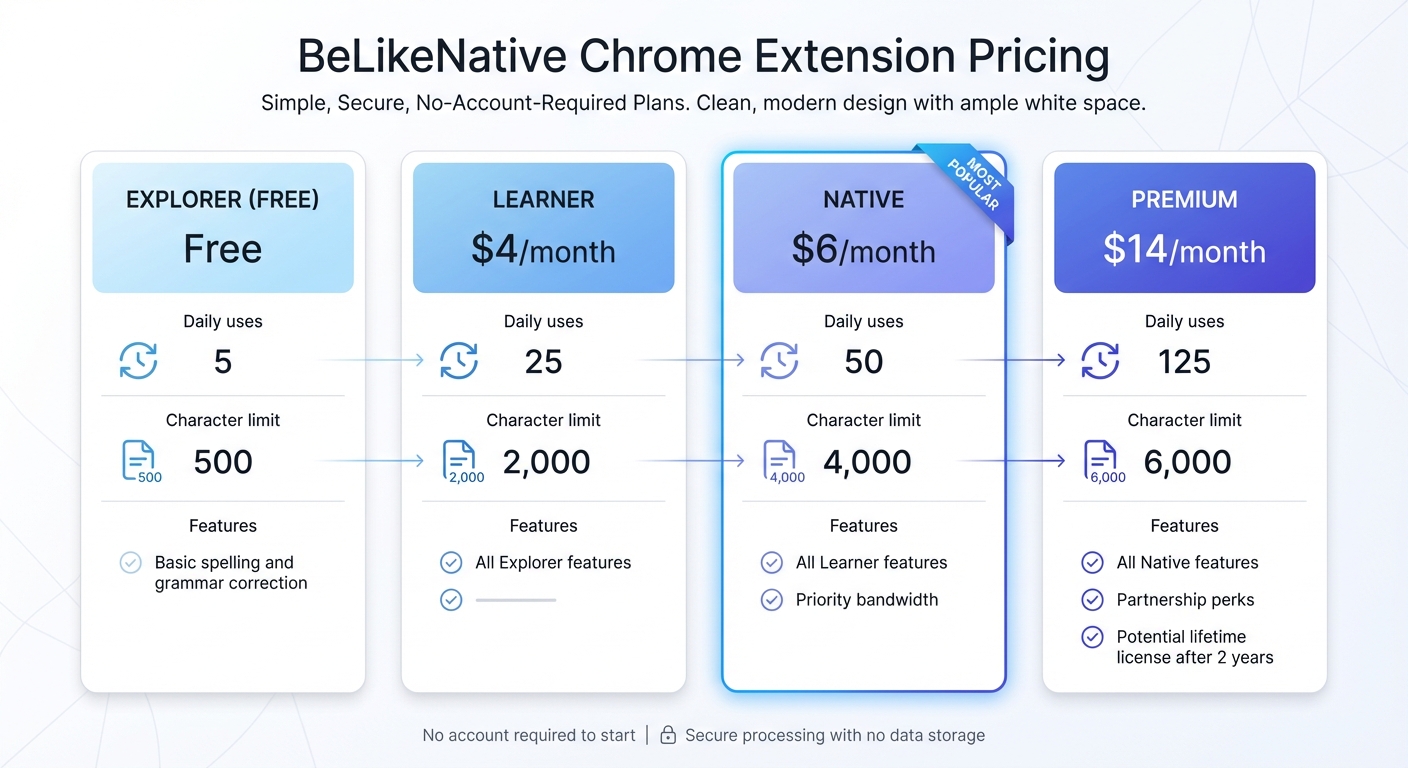
BeLikeNative Chrome Extension Pricing Plans Comparison
Learning Words in Context
BeLikeNative takes vocabulary learning to the next level with context-aware AI. Whether you’re writing an email or drafting a report, this tool understands the intent behind your text and suggests the right words for your specific situation. Highlight any text, and you’ll see multiple variations tailored to different tones – formal, casual, friendly, professional, or academic. Instead of just memorizing definitions, you’ll learn how to use words naturally in real-world scenarios.
Every time you open a new tab, BeLikeNative displays word cards, turning idle moments into learning opportunities. The focus is on 20 words at a time – once you master them, new ones take their place. Each word comes with multiple example sentences, offering practical insights into how native speakers use them.
How It Fits Into Your Workflow
BeLikeNative integrates seamlessly into your daily tasks. It works directly where you type – whether it’s Gmail, Google Docs, social media, or messaging apps. Forget about switching tabs or searching for a dictionary. With keyboard shortcuts, you can instantly paraphrase or translate text without breaking your flow.
Despite its powerful features, the extension is lightweight at just 999KiB, ensuring it won’t slow down your browser. It also offers AI modes like Simplify, Expand, or Shorten, allowing you to explore different ways to express the same idea. With support for over 55 languages, it helps bridge the gap between your native language and English, all while you work on actual projects.
Pricing and Plans
BeLikeNative offers flexible pricing to suit various needs:
- Explorer: Free – 5 uses per day, 500 characters, basic spelling and grammar correction.
- Learner: $4/month – 25 uses per day, 2,000 characters.
- Native: $6/month – 50 uses per day, 4,000 characters, and priority bandwidth.
- Premium: $14/month – 125 uses per day, 6,000 characters, with added partnership perks and a potential lifetime license after two years.
You can start using the extension without creating an account. Plus, your text is processed securely, with no data stored – ideal for professionals handling sensitive information. These plans make it easy to find an option that fits your workflow while helping you avoid common errors.
Saving Time While Learning
Last updated on March 10, 2026, BeLikeNative has gained praise for its speed and lightweight design. The built-in grammar and spelling checker not only helps you spot mistakes but also teaches you correct usage, making it a handy alternative to traditional proofreading tools. This means you save time while improving your skills in professional settings.
sbb-itb-32359dc
Pros and Cons
BeLikeNative stands out for its integration and functionality, making it a practical tool for professionals aiming to enhance their English vocabulary while working. Let’s break down its strengths and limitations.
One of its biggest perks is inline integration, allowing users to learn and improve their vocabulary directly within emails, reports, or other documents – no need to switch tabs. It’s received a solid 4.6/5 rating from 256 reviews on the Chrome Web Store, which speaks to its effectiveness and user satisfaction.
However, BeLikeNative is more of a writing assistant than a full-fledged vocabulary-building tool. It doesn’t include features like flashcards, spaced repetition, or dashboards for tracking progress – elements that are common in dedicated vocabulary apps. Additionally, while its AI suggestions are generally reliable and context-sensitive, they might occasionally miss the mark in highly specialized or technical writing scenarios, requiring manual adjustment.
Another factor to consider is privacy. The extension requires permissions for "Website content" and "User activity", which could conflict with corporate security policies, especially when handling sensitive information. Although the developer assures users that text is processed securely and not stored, it’s always wise to verify that this aligns with your organization’s data protection standards.
| Pros | Cons |
|---|---|
| Inline integration for learning while you work, no tab switching required | Lacks flashcards, quizzes, or spaced repetition for active recall |
| Context-aware AI suggests vocabulary tailored to tone (formal, casual, academic) | No progress tracking or vocabulary growth features |
| Lightweight (999KiB) and supports keyboard shortcuts for efficiency | Requires "Website content" permissions, which might conflict with company policies |
| Offers translation and writing support in 55 languages | AI suggestions may need manual tweaks for technical or niche writing |
| Processes text securely without storing data | Focuses on writing assistance rather than structured vocabulary building |
BeLikeNative is ideal for those who prefer learning through practical use rather than traditional study methods. However, its suitability depends on your specific needs and how well it fits within your work environment.
Conclusion
BeLikeNative weaves vocabulary learning seamlessly into your daily tasks, making it a practical choice for professionals. Its effectiveness has already gained recognition among users who value productivity without compromising on skill-building.
With features like real-time vocabulary updates, keyboard shortcuts, and a lightweight design (only 999KiB), it ensures your workflow remains smooth and uninterrupted. This aligns perfectly with the goal of combining efficient learning with everyday activities.
Unlike traditional vocabulary drills, BeLikeNative focuses on refining your writing as you work. For those in environments with strict data policies, it’s wise to double-check the extension’s permissions to ensure they meet your company’s security standards.
If you’re aiming to grow your professional English vocabulary while maintaining productivity, BeLikeNative offers a practical solution. By embedding learning directly into your work process, it demonstrates how technology can elevate professional communication.
FAQs
How do I use BeLikeNative inside Gmail and Google Docs?
Getting started with BeLikeNative in Gmail and Google Docs is simple:
- Install the Chrome extension: Head to the Chrome Web Store and add the BeLikeNative extension to your browser.
- Highlight your text: Select any text within Gmail or Google Docs that you want to work on.
- Activate the extension: Use the designated shortcut (like a specific keyboard command) to rephrase, translate, or adjust your text instantly.
This integration lets you refine your writing effortlessly, keeping your workflow smooth and uninterrupted.
Which plan should I choose for my daily writing needs?
The best "BeLikeNative" plan depends on what you’re aiming to achieve.
- The Boost plan, priced at $299, is perfect if you’re looking for simple upgrades to your workflow.
- The Advanced plan, at $999, includes a broader set of features for those who need more robust tools.
- The All In plan, costing $2,999, offers the most extensive package, including tools for vocabulary building and productivity improvements.
Pick the plan that aligns with the level of support you need for your daily activities.
Can I use BeLikeNative at work without storing my text?
BeLikeNative allows you to use its tools at work without storing any of your text. With simple shortcuts, you can highlight and transform text instantly, all while keeping your input private. This keeps your workflow both secure and seamless.
Related Blog Posts
- How To Polish Your Writing With Chrome Ai Extensions
- Best Chrome Extension for ESL Students: Correct Grammar and Improve Writing Style
- How To Expand Vocabulary While Writing In Google Docs
- Best AI English Teacher Plugin For Chrome
BeLikeNative fixes grammar, rephrases, translates, and simplifies text on any website in 1 second — just highlight and hit a keyboard shortcut. No tab switching. Try it free →

