
Best Grammar Checker For French Speakers Writing In English
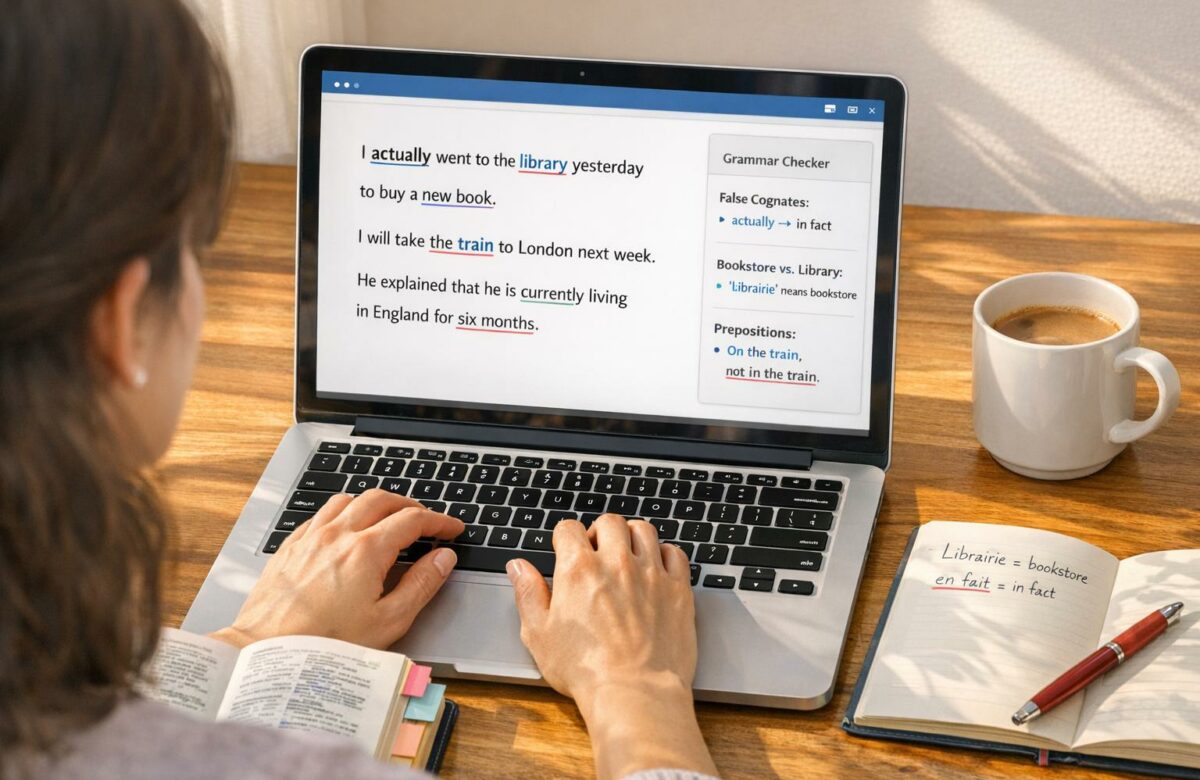
Writing in English can be tricky for French speakers due to differences in grammar, vocabulary, and sentence structure. Common issues include false cognates (e.g., "actually" vs. actuellement), article misuse, incorrect prepositions, and verb tense confusion. Grammar tools can help address these challenges and improve fluency.
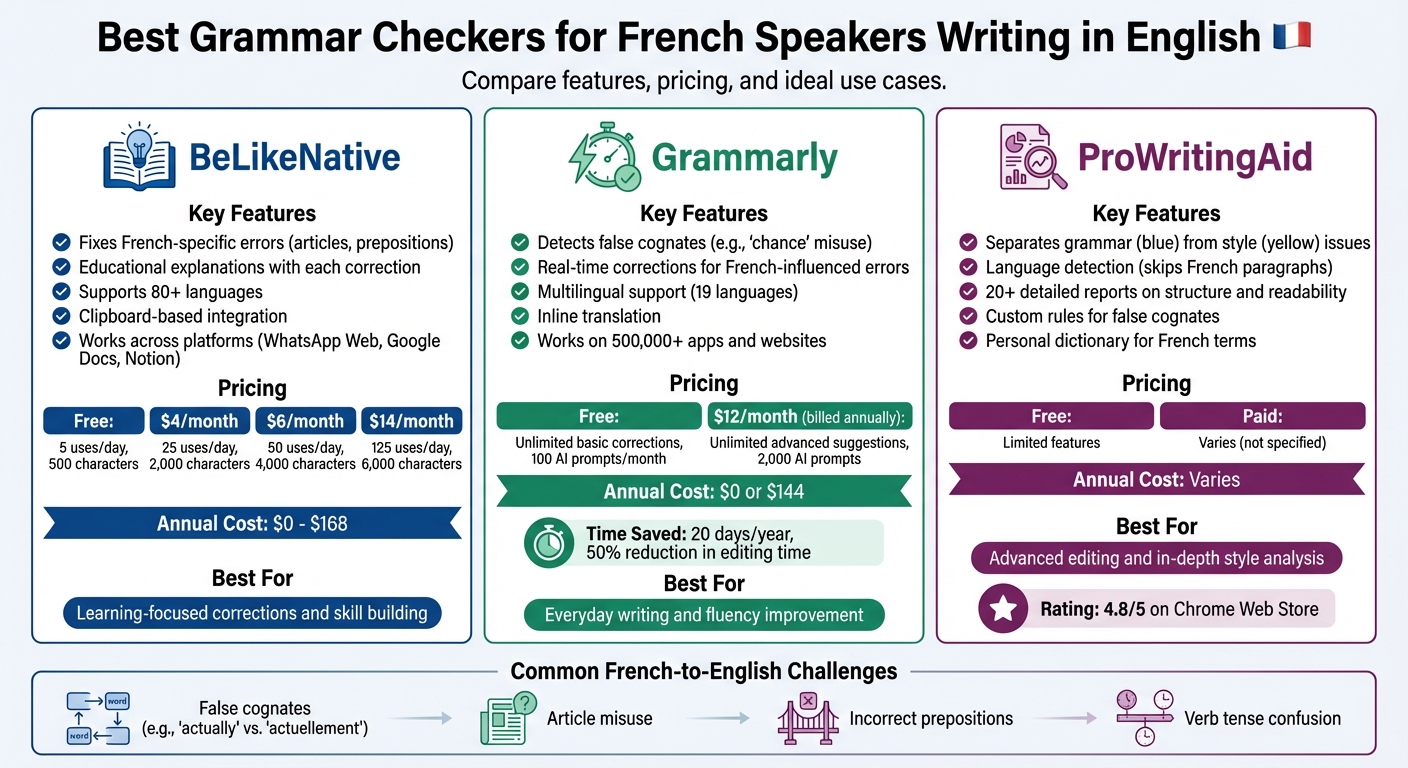
Here’s a quick look at the top grammar checkers tailored for French-English writing:
Transform Any Text, On Any Site, In Seconds
Rephrase, translate, and improve text with one shortcut. Works everywhere you write.
Add to Chrome - It's Free!- BeLikeNative: Focuses on French-specific errors, like article usage and prepositions, with educational explanations. Supports 80+ languages and works across platforms. Pricing starts at $0/month with usage caps.
- Grammarly: Offers real-time corrections for French-influenced errors, including false cognates and prepositions. Multilingual support and advanced features are available for $12/month (billed annually).
- ProWritingAid: Separates grammar and style issues, provides detailed reports, and skips over non-English text. Ideal for bilingual writers, starting at $0 with premium options available.
Quick Comparison
| Tool | Key Features | Free Plan | Paid Plan (Monthly) | Best For |
|---|---|---|---|---|
| BeLikeNative | Fixes French-specific errors, offers explanations | 5 daily uses, 500 characters | $4–$14 (25–125 daily uses) | Learning-focused corrections |
| Grammarly | Multilingual, real-time suggestions | Unlimited basic corrections | $12 (billed annually) | Everyday writing and fluency |
| ProWritingAid | Detailed reports, style analysis | Limited features | Varies | Advanced editing and style checks |
Each tool has strengths depending on your goals. BeLikeNative is great for learning, Grammarly excels in daily use, and ProWritingAid is ideal for in-depth feedback.
Grammar Checker Comparison for French Speakers: Features, Pricing, and Best Use Cases
1. BeLikeNative
Tackling French-influenced Grammar Errors
BeLikeNative is designed to address common mistakes in English writing caused by French grammar influences. For instance, it catches errors like using "depend of" instead of "depend on" and incorrect verb tenses. It also fixes issues with article usage, which can often confuse French speakers transitioning to English. What sets this tool apart is its focus on teaching – each correction comes with a clear explanation, helping users understand the "why" behind the fix rather than just offering a solution. This approach not only improves accuracy but also strengthens long-term writing skills.
Multilingual Features for Writers
This Chrome extension supports over 80 languages and integrates seamlessly with your clipboard. With just one shortcut, you can rephrase, translate, or enhance your text without disrupting your workflow. Whether you’re using WhatsApp Web, Google Docs, or Notion, BeLikeNative adapts to your platform of choice. Plus, you can tweak the language, tone, and style to suit your specific needs, whether you’re drafting a casual email or preparing a formal report.
Flexible Pricing for French-English Users
BeLikeNative offers a freemium model, making it accessible to a wide range of users. Whether you’re an occasional writer or a professional looking to refine English skills influenced by French, there’s a plan for you:
- Free plan: Free, includes 5 uses per day with a 500-character limit
- Learner plan: $4/month, allows 25 uses per day with a 2,000-character limit
- Native plan: $6/month, offers 50 uses per day with a 4,000-character limit
- Premium plan: $14/month, provides 125 uses per day with a 6,000-character limit
All plans come with spelling and grammar correction, clarity improvements, and secure data handling.
Enhancing Writing Skills Through Practice
BeLikeNative goes beyond simple corrections by encouraging a learning-focused approach. Instead of automatically fixing every mistake, the tool sometimes requires users to identify and correct errors themselves. This method helps French speakers actively engage with their writing, turning mistakes into learning opportunities. By showing corrections alongside explanations, BeLikeNative empowers users to improve their English skills and avoid repeating errors in the future.
sbb-itb-32359dc
2. Grammarly
For French speakers navigating the nuances of English, Grammarly provides tailored corrections that help achieve clarity and natural fluency.
Accuracy in French-Influenced Grammar Corrections
Grammarly offers customized suggestions that cater to French speakers, particularly addressing common challenges like "false friends" – words that look similar in English and French but have different meanings. For instance, in April 2022, Grammarly updated its Premium service to flag errors like misusing the French word chance (meaning "luck") in English contexts. If you write, "We had the good chance of winning 50 new sales accounts", the tool highlights this under its "Sound more fluent" category, recommending a more natural phrasing for professional use.
The platform also identifies common multilingual mistakes, such as missing articles or incorrect prepositions (e.g., using "on" instead of "in"). These are labeled as "Common issue for multilingual speakers." To activate these features, go to Account > Customize > Language Settings, select French as your primary language, and enable "I want fluency assistance". This attention to context-specific corrections enhances its support for multilingual users.
Features for Multilingual Writers
Grammarly takes its functionality further by automatically detecting whether you’re writing in English or French and adjusting its corrections accordingly. It provides real-time spelling and grammar checks for both languages and includes inline translation for 19 languages, making external translation tools unnecessary. Ailian Gan, Grammarly’s Director of Product Management, explained:
Our customers have been asking for multilingual support, and we’re meeting them where they are… in the languages that they think, learn, and communicate in daily.
Before its full release, these multilingual features were tested with over 1 million users, ensuring their effectiveness.
Pricing and Value for French-English Users
Grammarly operates on a freemium model. The Free Plan (US$0/month) offers unlimited basic spelling and grammar corrections (red underlines) in both French and English, along with 100 AI prompts per month. However, advanced suggestions for clarity and tone (blue underlines) are limited to three per day.
For US$12/month (billed annually), the Pro Plan unlocks unlimited advanced suggestions, top AI rewriter tools for full-sentence rewrites, tone adjustments, and 2,000 AI prompts. This plan is a time-saver for content creators, helping users save an average of 20 days per year and cutting writing and editing hours by 50%.
Practical Usability Examples
Grammarly integrates seamlessly with over 500,000 apps and websites through browser extensions (Chrome, Safari, Edge) and desktop apps for Mac and Windows. When writing in English, green-highlighted suggestions in the "Sound more fluent" category help address subtle syntax and vocabulary issues influenced by French. Additionally, the platform supports multiple languages within the same document, allowing users to switch effortlessly between French and English.
3. ProWritingAid
Accuracy in French-Influenced Grammar Corrections
ProWritingAid stands out by separating grammar mistakes (highlighted in blue) from composition issues (highlighted in yellow), making it easier for French speakers to address specific writing challenges. This distinction allows users to focus on either grammatical relationships, like subject-verb agreement, or sentence structure problems that often arise from direct translations.
The tool is particularly adept at catching false cognates and commonly confused words using thousands of custom rules. For instance, it flags errors like mixing up "adverse" and "averse" or structural missteps such as using a gerund incorrectly – like "allows identifying" instead of the proper "allows it to be identified." Each flagged error includes a brief explanation, which helps users quickly understand and learn from their mistakes.
Features for Multilingual Writers
ProWritingAid’s Language Detection feature scans the first 200 characters of each paragraph to identify non-English text. When French is detected, the tool skips over that paragraph, ensuring that irrelevant error flags don’t clutter the document. This means the accuracy score reflects only the English content. Libby Bushill, ProWritingAid’s Lifecycle Marketer, explains:
That means you can focus your time and attention on actual mistakes with your spelling, grammar and style without having to trawl through a list of irrelevant suggestions.
For the best results, keep French and English text in separate paragraphs. The tool also offers over 20 detailed reports analyzing structure, style, and readability, giving users insights far beyond basic spell-checking. These features make it an excellent choice for bilingual writers who want precise feedback tailored to their needs.
Pricing and Value for French-English Users
ProWritingAid offers more than just basic error detection – it provides in-depth reporting that enhances writing quality. With a focus on style and sentence structure, the platform helps French speakers not only correct their English but also learn its mechanics. Each error includes a clear explanation, making it a valuable tool for improving language skills.
With a 4.8/5 rating on the Chrome Web Store, users frequently praise its ability to boost confidence and control in their writing. The tool integrates seamlessly with platforms like Google Docs, Microsoft Office, and various browser extensions, allowing for real-time corrections without disrupting your workflow.
Practical Usability Examples
For bilingual documents, ProWritingAid offers several handy features:
- Disable Rule Function: Avoid unnecessary flags for valid sentence constructions.
- Detailed Composition Reports: Identify and address structural issues stemming from translation.
- Support for Multiple English Varieties: Choose between US, UK, Canadian, or Australian English.
- Personal Dictionary: Add French names or specialized terms to prevent false flags.
These tools make ProWritingAid a practical and powerful choice for anyone juggling French and English in their writing.
Pros and Cons
When considering how BeLikeNative caters to the unique challenges French speakers face when writing in English, it’s helpful to examine its strengths alongside its limitations. Here’s a closer look at how this tool supports French-English writers.
BeLikeNative stands out with its clipboard-based functionality, which works effortlessly with web apps like WhatsApp Web, Google products, and Notion – no extra setup required. Its ability to handle over 80 languages and offer customizable tone options makes it a strong choice for multilingual writers. This approach is especially useful for addressing common French-to-English writing issues, including false cognates, article mistakes, and preposition errors.
On the flip side, its usage caps could be a concern for those who need frequent grammar checks. The free Free plan allows for 5 daily uses, while paid options range from 25 uses per day for $4/month to 125 uses per day for $14/month. Writers should weigh their editing needs carefully when choosing a plan.
| Feature | Details |
|---|---|
| Key Strengths | Clipboard integration across platforms; supports 80+ languages; customizable tone and style; educational corrections with explanations |
| Main Limitations | Usage caps tied to subscription level (5–125 daily uses) |
| Best For | French speakers needing versatile, cross-platform grammar support with contextual understanding of French-English errors |
| Annual Cost | $0–$168, depending on the selected plan |
Conclusion
For French speakers, BeLikeNative offers a practical solution to common French-to-English challenges. Its clipboard-based functionality supports over 80 languages and works seamlessly across multiple platforms. With options to customize tone and educational corrections for tricky areas like prepositions, false cognates, and article usage, it’s a versatile tool. Pricing ranges from a free tier (5 daily uses) to $14/month (125 daily uses), catering to various user needs.
While BeLikeNative helps fix immediate errors, long-term improvement depends on active learning. Tools that explain corrections can help you understand and avoid mistakes over time. Studies show that more than 30% of French texts run through instant translation tools contain frequent spelling errors that require further correction.
To refine your grammar, consider using top browser extensions for checking emails, social media posts, and documents. However, always review suggestions carefully, as even the most advanced tools can miss subtle nuances.
Track recurring mistakes to identify areas that need focused practice. For critical documents, use grammar checkers as a starting point, followed by a review from a native speaker. Combining BeLikeNative‘s adaptability with consistent practice and attention to corrections can strengthen your English skills and improve your overall writing.
FAQs
Which French-to-English mistakes does BeLikeNative catch best?
BeLikeNative supports French speakers in refining their English by pinpointing mistakes that stem from French grammar. These include issues like awkward phrasing, incorrect prepositions, and challenges with word order. It also tackles tricky areas such as false cognates, idiomatic expressions, and subtle grammatical differences between the two languages. By addressing these specific hurdles, it offers customized corrections to help users write more fluently and naturally in English.
How can I use BeLikeNative in Google Docs and email?
To get started with BeLikeNative in Google Docs and Gmail, you’ll need to install its Chrome extension. Once added, the tool integrates automatically, providing real-time grammar and writing suggestions as you type. If you want help with a specific section, just highlight the text, and the extension will offer tailored suggestions. You can then review and accept the edits directly within Google Docs or Gmail, making it easy to improve your writing on the go.
What plan do I need for longer texts and frequent checks?
To get the most out of your writing, you’ll want a plan that includes advanced editing features. Look for tools like AI-powered assistance, strategic writing suggestions, and the ability to handle longer texts with frequent checks. These features not only boost accuracy but also make the entire writing process smoother and more efficient.
Related Blog Posts
- Best Tools for Multilingual Grammar Feedback
- Top 7 German Grammar Tools for Business Writing
- Top 7 Grammar Tools for Multilingual Writers
- Ai Grammar Fixers That Improve Your Writing Instantly
BeLikeNative fixes grammar, rephrases, translates, and simplifies text on any website in 1 second — just highlight and hit a keyboard shortcut. No tab switching. Try it free →

