

Fix Chinglish In Business Documents Instantly
Chinglish in business writing can harm your professionalism and credibility. Poorly translated or awkward English creates confusion, damages trust, and can lead to lost opportunities. For instance, HSBC spent $10 million to fix a mistranslated slogan, and NASA lost $125 million due to miscommunication. Clear communication is critical for success.
Here’s how you can fix Chinglish in your documents:
- Read aloud to identify unnatural phrasing.
- Check grammar and subject-verb agreement.
- Replace literal translations of idioms with natural expressions.
- Adjust tone to suit the audience and purpose.
For faster results, tools like BeLikeNative can polish your writing instantly. This AI-powered extension corrects awkward sentences, improves tone, and ensures clarity. With plans starting at $0, it’s accessible for everyone, from casual users to professionals managing large volumes of text.
Key takeaway: Clear, professional writing builds trust and ensures your expertise is understood. Use manual proofreading techniques or AI tools to eliminate Chinglish and make your communication seamless.
Fix Your Chinglish!
sbb-itb-32359dc
What Is Chinglish and Why It Hurts Business Communication
Chinglish refers to English written by Chinese speakers that feels unnatural or confusing to native English readers. This isn’t just about grammar mistakes – Chinglish can technically follow grammar rules but still leave readers scratching their heads due to odd word choices or phrasing. Scholar Victor Mair calls this phenomenon "Xinhua English".
The root of Chinglish lies in the structural differences between Chinese and English. For example, Chinese doesn’t use tenses, plurals, or articles, which can lead to their omission or misuse in English writing. Additionally, direct translations of Chinese idioms or expressions can result in phrases that sound odd or even nonsensical in English. A famous example is Xinhua News Agency’s literal translation of tíchū yánzhèng jiāoshè as "lodge solemn representation", a phrase that baffles most English readers.
The impact of Chinglish on businesses can be immediate and costly. Take HSBC’s "Assume Nothing" campaign in 2009 – it was mistranslated in some countries as "Do Nothing", forcing the bank to spend $10 million on rebranding. Another classic example comes from KFC’s entry into the Chinese market in the 1980s, where their iconic slogan "Finger-licking good" was translated as "Eat your fingers off", leaving an unsettling impression on customers.
"The reader doesn’t think ‘the translation was bad’ – they think ‘this person isn’t professional enough to communicate properly.’" – Pismo Editorial Team
Chinglish doesn’t just cause awkward moments; it can seriously harm a business’s reputation. Poorly worded emails, reports, or proposals can make a company appear unprofessional or incompetent, leading clients or partners to doubt their capabilities. Below are some common Chinglish errors that highlight where communication often breaks down in business writing.
Common Chinglish Errors in Business Writing
Recognizing these common mistakes can help improve clarity and professionalism in business communication.
- Redundant twins: Phrases like "help and assist livestock farmers" are unnecessarily wordy. Simply saying "help livestock farmers" is more concise.
- Unnecessary nouns: Overcomplicated phrases like "attainment of economic prosperity" can be simplified to "economic prosperity".
- Incorrect word order: Translating Chinese sentence structures directly into English often creates confusion. For example, "He arrived for his shift work early" should be adjusted to "He arrived for his work shift early" for better readability.
- Literal idiom translations: Chinese idioms translated word-for-word into English often require rephrasing to make sense.
- Pronoun confusion: Since "he" and "she" sound similar in Chinese, errors can occur. Avoid repeating nouns unnecessarily to keep sentences smooth.
- Vocabulary nuance errors: Small word choices can change the meaning. For instance, "I am living in the Hilton" should be "I am staying at the Hilton" when referring to a temporary stay.
- Dangling modifiers: Modifiers must clearly refer to the right subject. Instead of "Labeled a traitor, his journey took him across Europe", write "Labeled a traitor, he journeyed across Europe" to avoid confusion.
These examples show how small adjustments can make a big difference in ensuring your message is clear and professional. Missteps in writing might seem minor, but they can leave a lasting impression on your audience.
How to Spot and Fix Chinglish Manually
You don’t always need software to fix Chinglish. A careful, manual review can catch most issues before they reach your clients or partners. The key is to identify awkward phrasing and mismatched sentence structures during proofreading.
Approach your document as if you’re encountering it for the first time. This fresh perspective can help you spot patterns that might sound unnatural to native English speakers. While AI tools can help with quick fixes, these manual techniques ensure your communication is polished and professional. The steps below address common errors and provide actionable ways to refine your writing right away.
Step 1: Read Aloud for Natural Flow
Reading your document out loud is one of the simplest ways to identify awkward sentences. If something sounds stilted or unnatural, it’s likely influenced by Chinese grammar patterns.
Focus on word order and unnecessary repetition. For example, in Chinese, time and location often appear at the beginning of a sentence, but English places them at the end. Take this sentence: "I yesterday went to the supermarket." It feels clunky. The smoother, natural version would be: "I went to the supermarket yesterday". If a sentence feels off when spoken, it’s a clue that adjustments are needed for better readability.
Step 2: Check Grammar and Subject-Verb Agreement
Since Chinese verbs don’t change based on the subject, subject-verb agreement can be tricky when writing in English. Double-check that verbs match their subjects in both number and tense.
Pay close attention to articles ("a", "an", and "the") and avoid overusing nouns where pronouns would work better. For example, instead of repeating the same noun multiple times, use pronouns to create smoother and more natural sentences.
Step 3: Replace Literal Idioms with Appropriate Expressions
Direct translations of Chinese idioms often confuse English readers. For instance, the Chinese idiom hǔ tóu shé wěi (literally "tiger’s head, snake’s tail") might not make sense in English. Instead, use "a strong start but a weak finish".
When rephrasing idioms, think about the underlying message. Are you trying to inspire action, issue a warning, or draw a comparison? Choose an English expression that conveys the same meaning. For example, instead of a literal translation of a Chinese metaphor about perseverance, simply say, "We need to stay committed to this project despite setbacks." If no equivalent idiom exists, opt for plain, clear language to ensure your point is easily understood.
Step 4: Adjust Tone for Professional Communication
Business writing should strike a balance – not too stiff, but not overly casual either. Chinese formal writing sometimes results in English that feels overly rigid or, on the flip side, too relaxed.
Review the tone of your document to ensure it matches your audience and purpose. For example, "Let us proceed with the implementation" might feel too formal for an internal email. A better option could be, "Let’s move forward with this." However, for client-facing proposals, avoid casual language or slang.
Consistency is key. If you start with a professional tone, maintain that same level of formality throughout. This attention to tone signals professionalism and reliability, qualities that build trust and confidence in your communication.
Fix Chinglish Instantly with BeLikeNative
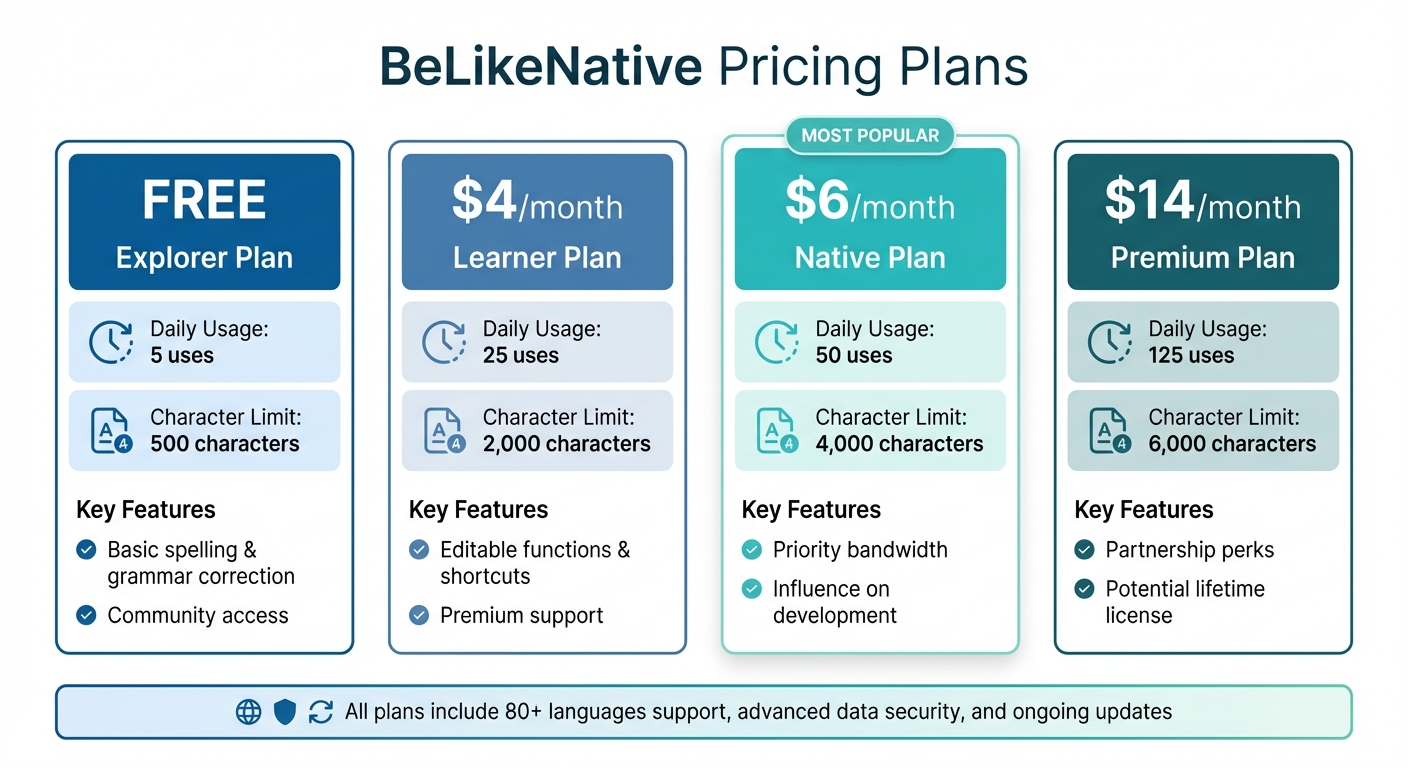
BeLikeNative Pricing Plans Comparison: Features and Limits
When manual proofreading falls short, BeLikeNative steps in to deliver polished, professional English with just a few clicks. This Chrome extension is specifically designed to tackle Chinglish – those awkward translations marked by clunky phrasing, rigid structures, and odd word choices. Instead of merely translating, BeLikeNative uses AI to rewrite your text, ensuring it reads smoothly and naturally.
BeLikeNative integrates seamlessly with platforms like Gmail, Slack, Microsoft Teams, Google Docs, LinkedIn, and WhatsApp Web. Supporting over 80 languages, it also lets you adjust the tone to suit your audience – perfect for everything from formal client proposals to casual team chats. With users saving over an hour daily, top users report reclaiming more than 85 hours each month. Let’s dive into how this tool transforms awkward sentences into professional-grade writing.
How BeLikeNative Corrects Chinglish
Using BeLikeNative is straightforward. Highlight the sentence you want to fix, press your shortcut, and within a second, the tool rewrites it for better flow and clarity. It tackles misplaced modifiers, incorrect prepositions, and overly formal phrases. The corrected version is instantly copied to your clipboard, ensuring you stay focused without needing to jump between tabs. Plus, you can tweak the output to match your desired tone – whether you need a polished professional style or a relaxed, conversational vibe for internal communication.
BeLikeNative Pricing Plans
BeLikeNative offers flexible pricing options to fit different needs, all of which include support for over 80 languages, advanced data security, and access to ongoing updates.
| Plan | Price | Daily Usage Limit | Character Limit | Key Features |
|---|---|---|---|---|
| Explorer | Free | 5 uses | 500 characters | Basic spelling and grammar correction, community access |
| Learner | $4/month | 25 uses | 2,000 characters | Editable functions and shortcuts, premium support |
| Native | $6/month | 50 uses | 4,000 characters | Priority bandwidth, influence on development |
| Premium | $14/month | 125 uses | 6,000 characters | Partnership perks, potential lifetime license option |
The Explorer plan is great for casual users who need quick fixes. The Learner and Native plans cater to professionals handling frequent communications, while the Premium plan is designed for heavy users managing large volumes of text. Higher-tier plans also provide the ability to customize shortcuts and editing functions, streamlining your workflow.
Advanced Tips for Writing Clear Business Documents
To take your business writing to the next level, it’s not just about using tools like BeLikeNative for quick fixes. Developing strong writing habits can make a big difference in how effectively your message comes across. Here’s how you can combine these habits with the tool for maximum impact.
Use Active Voice and Be Specific
Active voice gives your writing clarity and energy by focusing on the subject performing the action. For example, instead of saying, "The report was completed by the team", go with "The team completed the report." This approach answers the essential "Who did what?" question right away, making your sentences more engaging and easier to follow. If it takes more than a few seconds to identify the actor and action, it’s time to rework the sentence.
Another key tip is to ditch vague jargon in favor of concrete details. Phrases like "seamless integration" sound nice but don’t tell the reader much. Instead, be specific: "Paste one API key into your dashboard and data appears in 17 seconds." Providing clear, detailed examples helps your audience – especially non-native English speakers or those relying on translations – understand exactly what you mean and avoids potential confusion.
Proofread in Stages
Breaking down proofreading into multiple steps can help you catch a variety of issues. Start with a first pass to ensure your message is clear and nothing critical is missing. Next, check for tone and brand voice consistency across different languages. After that, review for locale-specific details, such as using the correct date format (MM/DD/YYYY in the U.S.) or ensuring currency symbols are accurate. Finally, do a layout review to spot any font or alignment issues that might distract from your message.
Leverage BeLikeNative’s Custom Shortcuts
To make these strategies even more effective, take advantage of BeLikeNative’s customizable shortcuts. Whether you’re adjusting tone for different audiences or ensuring consistent terminology across a team, these shortcuts can streamline repetitive edits. For example, you can set preferences for switching between formal and casual language or standardizing key phrases. This feature is especially helpful when working on shared documents or managing large volumes of client communications. With BeLikeNative’s Learner, Native, and Premium plans, you can tailor these shortcuts to fit your specific needs, saving time and ensuring uniformity across all your documents.
Conclusion
Chinglish can harm your credibility by giving the impression that your expertise doesn’t match your communication skills. Research shows that 63% of readers evaluate professionalism based on grammar and tone. When your writing falls short, it can lead to lost opportunities, strained relationships, and diminished trust in your abilities.
While manual techniques like reading aloud, checking subject-verb agreement, and refining tone are helpful, combining them with automated tools offers faster and more effective results. BeLikeNative’s AI-powered corrections provide an easy way to turn awkward phrasing into polished, professional English. Its advanced grammar engine handles tricky nuances – like homophones and complex sentence structures – that manual proofreading might overlook. Plus, its tone customization ensures your message resonates with your audience. By blending manual adjustments with AI support, you can ensure your writing reflects your expertise.
Whether it’s proposals, emails, or presentations, clear communication is essential for success. BeLikeNative offers affordable solutions, from the free Explorer plan to the Premium option at $14/month, making professional writing accessible for any budget. Features like custom shortcuts and terminology consistency help you maintain your brand voice while reducing time spent on repetitive edits.

