
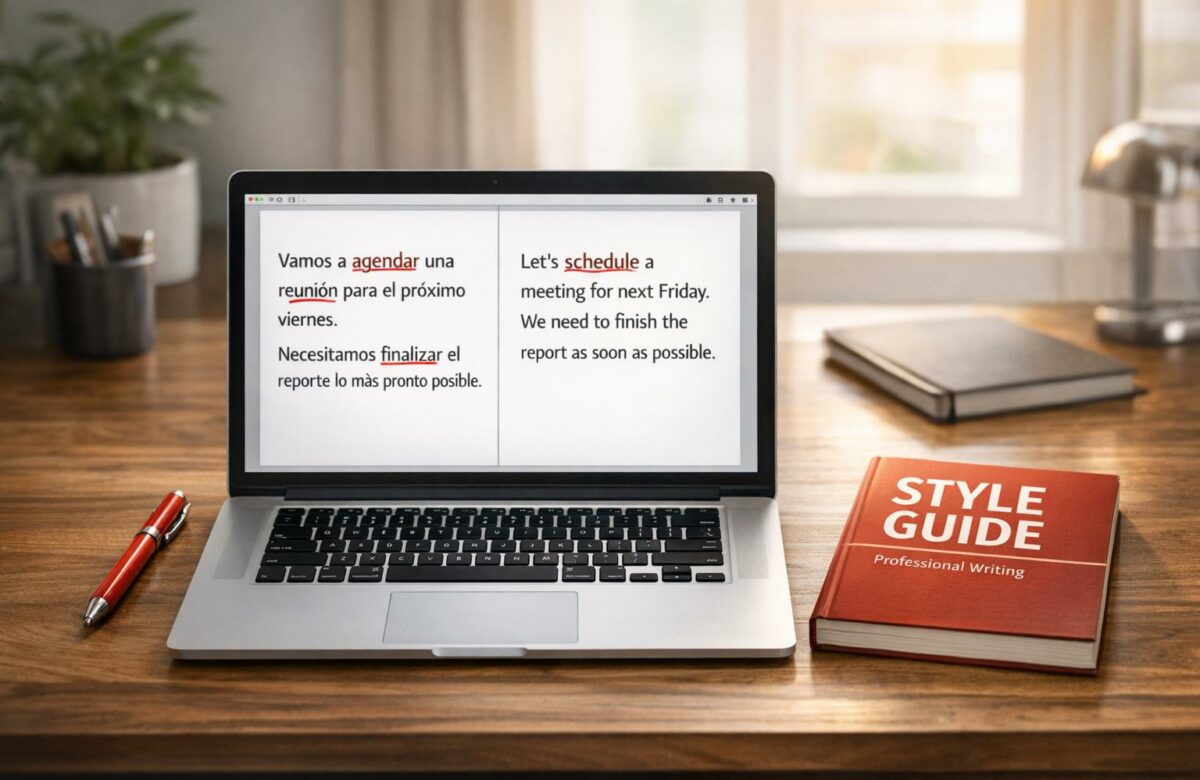
How To Fix Spanglish In Professional Documents
Spanglish in professional writing can confuse readers, harm credibility, and disrupt clarity. This mix of Spanish and English often leads to errors like incorrect capitalization, punctuation, and grammar. To ensure professionalism, stick to one language, proofread carefully, and use tools like BeLikeNative for precise corrections.
Key Takeaways:
- Common Errors: Capitalization mistakes (e.g., "Lunes" instead of "lunes"), missing inverted punctuation (¿, ¡), and mixed language phrases.
- Why It Matters: Spanglish can damage clarity and professionalism, especially in formal documents.
- Solutions: Proofread manually, follow language-specific style guides, and use correction tools like BeLikeNative for final edits.
Pro Tip: Tools like BeLikeNative help identify and fix language mixing, ensuring your content stays professional and error-free.
Common Spanglish Errors in Professional Writing
Professional documents often reveal mistakes where English rules overshadow Spanish conventions. These range from subtle formatting issues to noticeable language mixing that can confuse readers.
Examples of Common Spanglish Words and Phrases
One frequent issue is capitalization errors. In Spanish, days of the week, months, languages, and nationalities are not capitalized. However, professionals often mistakenly apply English rules, writing "Lunes" or "Enero" instead of the correct "lunes" or "enero".
Number formatting is another area of confusion. In the U.S., "billón" aligns with the English "billion", meaning 1,000,000,000. But internationally, "billón" refers to 1,000,000,000,000. To avoid misunderstandings, the North American Academy of Spanish Language (ANLE) advises using U.S. conventions for decimals and thousands separators. This means formatting numbers as $1,276.50 instead of $1.276,50.
Punctuation errors also stand out. Spanish requires inverted punctuation marks like "¿" and "¡". Omitting these – writing "Como estás?" instead of "¿Cómo estás?" – can reduce clarity. Similarly, ambiguous date formats cause problems. For instance, "10/26/2004" might confuse readers unfamiliar with U.S. conventions. A clearer alternative would be "26 de octubre de 2004".
On top of formatting issues, mixing languages within a single sentence can further disrupt readability.
How Code-Switching and Hybrid Words Affect Clarity
Mixing languages mid-sentence, or code-switching, adds another layer of complexity to professional communication. It forces readers to shift their linguistic framework, which can be jarring. Dr. Cindy Blanco highlights this challenge:
Codeswitching requires high degrees of language proficiency and sensitivity to the language abilities of the people in the conversation.
If your audience doesn’t share the same bilingual background, comprehension can break down. For example, a sentence like "I swear que no estaba" interrupts grammatical consistency and may confuse readers unfamiliar with code-switching. In professional contexts, such disruptions can lead to misinterpretation – particularly when dealing with technical language or numerical data, where precision is critical.
How to Identify and Fix Spanglish: Step-by-Step
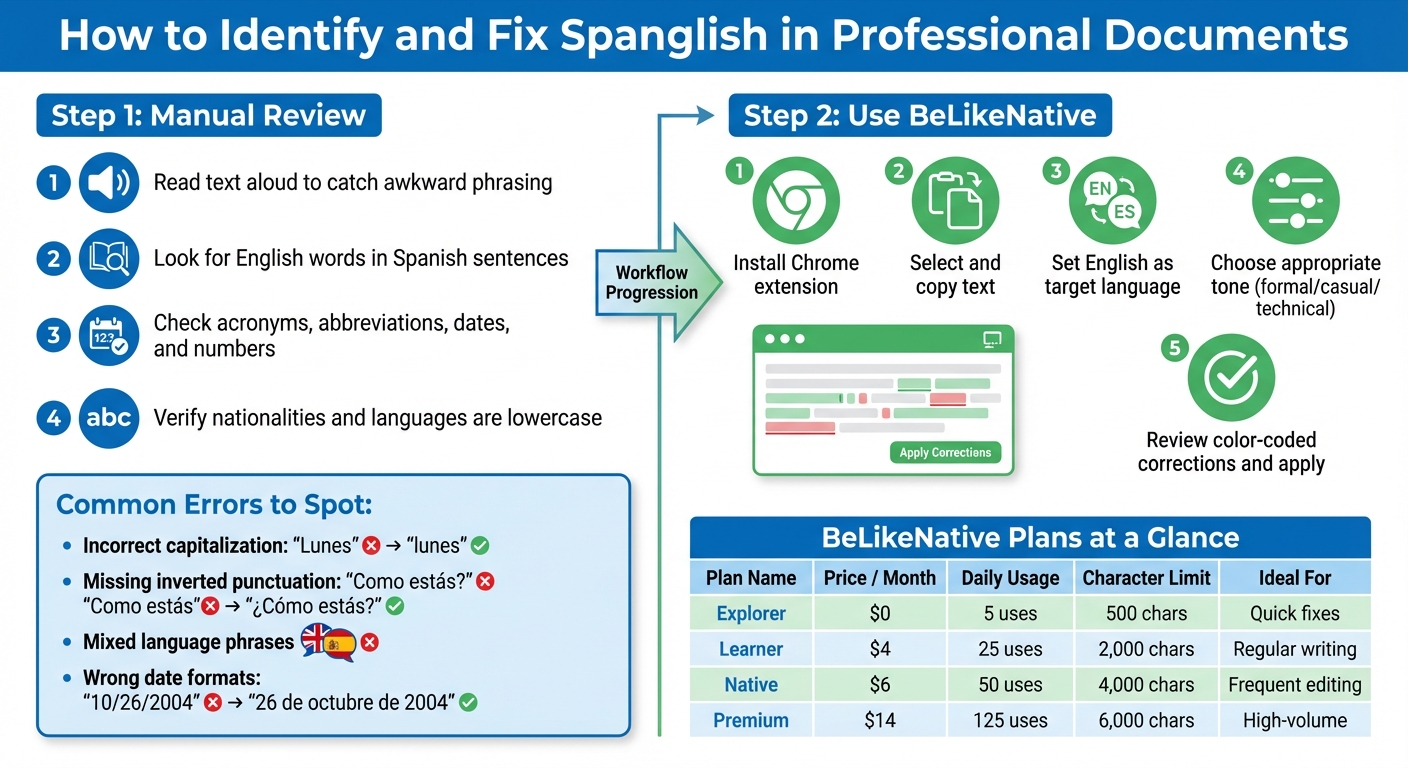
Step-by-Step Guide to Fixing Spanglish in Professional Documents
Spotting Spanglish requires a careful review process. Start by looking for clear signs like incorrect capitalization, missing inverted punctuation, or title-case errors. These formatting issues often pop up when writers unintentionally apply English rules to Spanish text.
Manually Reviewing Text for Spanglish
- Read the text aloud to catch awkward phrasing or errors.
- Look for English words sneaking into Spanish sentences.
- Double-check acronyms, abbreviations, dates, and numbers to ensure they follow U.S. formatting rules.
Pay extra attention to words like nationalities and languages, which should stay lowercase in Spanish (mexicano, inglés) unless they begin a sentence.
For a quicker and more efficient approach, you can turn to tools like BeLikeNative.
Using BeLikeNative for Correction
After pinpointing potential errors manually, technology can step in to save time. BeLikeNative is a tool designed to detect language mixing and suggest corrections across more than 80 languages. It works straight from your clipboard, so there’s no need to jump between apps.
This tool catches issues like grammatical errors, improper code-switching, and formatting mistakes that might slip through a manual review. Plus, its customizable tone and style settings allow you to tailor corrections depending on whether you’re working on something casual, like an email, or formal, like a technical report.
BeLikeNative offers flexibility with its pricing plans. The free Explorer tier provides 5 uses per day with a 500-character limit, while the Premium plan supports 125 uses per day and up to 6,000 characters per session. You can choose the option that best fits your writing needs and workload.
How to Use BeLikeNative to Fix Spanglish
Now that you know how to spot Spanglish, let’s dive into how BeLikeNative can help you clean it up effortlessly. This handy tool works straight from your clipboard, so you can fix Spanglish without hopping between apps. Its Chrome extension automatically identifies mixed-language usage and corrects it based on your preferred tone and style.
Step-by-Step Instructions for Using BeLikeNative
First, download and install the BeLikeNative Chrome extension from the Chrome Web Store. Once installed, it integrates seamlessly with platforms like Google Docs, Gmail, Notion, and WhatsApp Web.
To start fixing Spanglish, simply select and copy the text you want to correct. Then, use the BeLikeNative shortcut to open the correction panel. From there, set English as your target language and pick a tone – whether you need something formal for business, casual for emails, or technical for specialized content.
BeLikeNative will scan your text and highlight errors using color-coded underlines. Grammar issues, improper code-switching, and formatting problems are flagged with different markers, making it easy to pinpoint and fix each one. Review the suggestions and apply the corrections with a single click. For longer documents, tackle them section by section for better focus.
Once you’re comfortable with the process, consider upgrading to a plan that fits your writing needs.
BeLikeNative Plans Comparison
| Plan | Price | Daily Uses | Character Limit | Best For |
|---|---|---|---|---|
| Explorer | $0/month | 5 | 500 | Quick email checks and basic fixes |
| Learner | $4/month | 25 | 2,000 | Regular professional writing tasks |
| Native | $6/month | 50 | 4,000 | Frequent document editing and reports |
| Premium | $14/month | 125 | 6,000 | High-volume professional writing |
All plans include support for 80+ languages, spelling and grammar correction, and robust data security. Paid plans (Learner and above) unlock editable functions and shortcuts, while the higher tiers (Native and Premium) offer priority bandwidth. Select a plan based on how much you write and the typical size of your documents.
sbb-itb-32359dc
Best Practices for Spanglish-Free Professional Writing
Addressing Spanglish errors is one step, but keeping them out of your writing entirely requires a proactive approach. These habits will help you maintain consistency and professionalism in your documents, complementing earlier strategies for spotting Spanglish mistakes.
Use Bilingual Style Guides and Standards
Leverage trusted style guides to ensure your writing adheres to proper Spanish language rules. For example, the Chicago Manual of Style offers detailed guidance on Spanish capitalization, punctuation, and word division. If you work in media or public relations, the Manual de Estilo de la AP is another excellent resource for translating English phrases into Spanish.
For government or public-sector projects, the Digital.gov Spanish Language Style Guide is invaluable. It includes standardized Spanish communication practices, peer-reviewed by members of the North American Academy of the Spanish Language. Plus, it features specialized glossaries for fields like Information Technology and Health Care, helping you avoid technical Spanglish. Choose the guide that aligns with your work and keep it handy for reference.
Write in One Language and Proofread Thoroughly
To avoid mixing languages unintentionally, draft your document entirely in one language. This approach minimizes the risk of hybrid terms and confusing code-switching. As the American Psychological Association explains:
Incorrect grammar and careless construction of sentences distract readers, introduce ambiguity, and impede clear communication.
While automated spell-checkers can help, they often miss nuanced errors. Manual proofreading is essential. Carefully review your draft to ensure every word belongs to your target language. If you’re unsure about a term, consult reliable resources like Merriam-Webster.com or a specialized dictionary tailored to your field.
Use BeLikeNative for Final Edits
After you’ve proofread manually, let tools like BeLikeNative refine your work further. This tool is designed to catch lingering Spanglish and mixed-language issues. Considering that 97.2% of people believe grammar mistakes harm a company’s professionalism and credibility, this final review can significantly enhance your document’s quality.
Set BeLikeNative to your target language, select a tone that suits your audience, and let it identify any remaining inconsistencies. When combined with the other strategies, this step ensures your writing is polished and maintains linguistic integrity.
Conclusion
Ensuring your content avoids Spanglish not only protects your credibility but also guarantees your message is clear and professional. As highlighted in Microsoft’s Style Guide, content that adheres to strict grammar and punctuation rules is much easier for both human translators and machine translation tools to process accurately. Mixing languages inconsistently can confuse readers and damage your organization’s image. These guidelines emphasize the need for linguistic precision in every document.
To recap the strategies outlined earlier, the key is to follow established style guides and focus on a few essential practices: standardize terminology, use correct capitalization and punctuation, and simplify sentence structures for clarity and effectiveness.
Paying attention to even the smallest details is critical. Professional writing demands linguistic precision. Whether you’re drafting a business proposal, crafting marketing materials, or preparing technical documentation, sticking to one language consistently shows respect for your audience and a commitment to quality. Small touches – like using "EE. UU." instead of "USA" or correctly applying inverted punctuation marks (¿, ¡) – can make a big difference in how your work is perceived.
Start applying these practices now. Review your templates, consult reliable style guides, and incorporate a trusted correction tool into your workflow to eliminate language mixing and elevate the quality of your content.
FAQs
How can I eliminate Spanglish from my professional documents?
To keep your professional documents clear and polished, stick to one language throughout. If you’re writing in English, steer clear of adding Spanish terms unless absolutely necessary, and make sure to follow U.S. rules for spelling, punctuation, and capitalization. For Spanish documents, rely on established style guides to ensure accuracy and consistency.
Leverage bilingual glossaries to standardize terms and avoid common pitfalls like anglicisms or false cognates. Grammar tools configured for both English and Spanish can also be a lifesaver, helping you catch any unintentional language mixing during your final review. These steps will help you maintain a professional tone and ensure your message comes across clearly.
What are the most common Spanglish mistakes in professional writing?
The most common Spanglish errors in professional documents tend to fall into three main areas:
- Using English words unnecessarily: Words like marketing, feedback, or event often sneak into Spanish writing, even though proper Spanish equivalents like mercadotecnia, retroalimentación, and evento exist. Sticking to the correct Spanish terms helps maintain clarity and professionalism.
- Mistakes with verb usage: English verb structures sometimes influence Spanish writing, leading to errors like using soy instead of tengo for "I have." For example, you should say Yo tengo una reunión (I have a meeting), not Yo soy una reunión (I am a meeting). Paying close attention to verb forms can prevent these slip-ups.
- Literal translations and false cognates: Some words look similar in both languages but have different meanings. For instance, actual in Spanish means "current", not "real." Similarly, translating phrases word-for-word, like "to break a habit" as romper un hábito, can result in awkward or incorrect expressions.
Being aware of these common pitfalls can help you create polished, professional documents that communicate effectively.
How can BeLikeNative help ensure consistent language in professional documents?
BeLikeNative offers tools and expert advice to help you maintain consistent language use in professional documents. By addressing issues like improper language blending – such as Spanglish – it helps ensure your writing remains polished and meets high standards of professionalism.
With BeLikeNative, you’ll find practical tips, examples of frequent mistakes, and personalized suggestions to refine your multilingual writing. These resources are crafted to help you create clear, culturally sensitive documents that align with professional norms.

