

Make Your Writing More Polite With One Click
Want to make your writing sound polite and professional instantly? BeLikeNative is a Chrome extension that helps you refine your tone with a simple shortcut, saving time and improving communication. Whether you’re drafting an email, writing a proposal, or collaborating globally, this tool adjusts your text to sound courteous and clear. With support for over 80 languages, customizable tone settings, and seamless integration into tools like Gmail, Slack, and LinkedIn, it’s designed to simplify tone adjustments for any situation.
Key Features:
- Polite and Formal Tone Options: Refine your tone for professional or casual communication.
- Quick Setup: Install in under 2 minutes from the Chrome Web Store.
- Shortcut-Based Editing: Highlight text and press a shortcut to rephrase instantly.
- Clipboard Integration: Refined text is automatically copied for easy pasting.
- Flexible Plans: Free and paid options ($4-$14/month) to match your usage needs.
Why It Matters:
- Professionals spend 28% of their workweek on emails, often rephrasing for tone.
- Miscommunication can harm relationships, especially in global teams.
- BeLikeNative saves time and ensures your tone is always appropriate.
Start with the free plan or explore premium features like tone customization with a 7-day trial. Communicate better with just one click.
AI tools for Style, Tone & Voice in Tech Writing [Part II] (Module 5: TECM 5190)
sbb-itb-32359dc
How to Install the BeLikeNative Chrome Extension
Setting up BeLikeNative is quick and easy – it takes less than two minutes. You can find the extension in the Chrome Web Store by searching for "BeLikeNative: AI Writing with Shortcuts" or by clicking the "Add to Chrome" button on its official website.
Installation Steps
Once you’ve located the extension, click the "Add to Chrome" button. A prompt will pop up asking for confirmation. Simply click "Add extension" to proceed. The download is lightweight, around 970KiB.
After installation, a welcome page will open, allowing you to set your preferences. You can choose a tone like "Polite" or "Formal", select your primary language from over 80 options, and fine-tune your writing style with top AI rewriter tools. Once that’s complete, the extension will appear in your browser’s toolbar. To make it easily accessible, pin it using the puzzle piece icon.
To ensure the extension is working, highlight any text and press Alt + E (Windows/Linux) or Command + E (Mac). If the side panel pops up, you’re all set.
System Requirements and Compatibility
Before using BeLikeNative, make sure your system is ready to support it.
The extension works exclusively on Chromium-based browsers like Google Chrome and is compatible with Windows, macOS, and Linux. Version 1.4.1 (released on August 11, 2025) is designed to run smoothly on these platforms without requiring any additional software.
BeLikeNative integrates effortlessly with popular tools like Gmail, Google Docs, Outlook, Slack, Notion, LinkedIn, and more. Whether you’re drafting an email or collaborating on a project, the extension activates instantly without needing extra setup. Users have reported a 66% boost in productivity, saving over 85 hours a month by eliminating the hassle of switching between tabs and affordable AI writing tools.
Setting Up Polite Tone Preferences in BeLikeNative
Once you’ve installed BeLikeNative, you can tailor its tone settings to fit your communication style. Whether you need polished business language or a friendly tone for everyday emails, this extension puts you in charge of how your writing comes across.
Selecting Polite or Formal Tone
During setup, you can choose between "Polite" and "Formal" tones. To access these options later, press Alt + E (Windows/Linux) or Command + E (Mac) to open the settings menu.
For professional emails, official documents, or situations that call for refined language, select the "Formal" tone. This setting ensures your phrasing is courteous while maintaining a professional edge. If you’re writing in English, set the language to English (en-US) to align your text with American spelling and idiomatic expressions. With support for over 80 languages, BeLikeNative makes it easy to keep your tone polite, even when switching between different languages.
Once you’ve chosen your tone, you can further customize the settings to fine-tune how the tool handles courteous phrasing.
Adjusting Style for Courteous Phrasing
After selecting your tone, you can refine the AI’s editing style through the "Ability to edit functions", included in all paid plans. This feature allows you to preset your preferred style for every shortcut.
Technical writing expert Suzan Last highlights the importance of this approach:
"Courteous writing entails designing a reader-friendly, easy-to-read document; using tactful language and appropriate modes of addressing the audience."
BeLikeNative’s polite tone feature helps you achieve this by avoiding harsh absolutes like "never" or "always", which can come across as too forceful in professional contexts. This is particularly helpful for multilingual writers, as the tool adjusts phrasing to avoid language that might seem curt or impolite in American English.
The settings are flexible enough to adapt to various scenarios, whether you’re crafting a formal LinkedIn message or a quick Slack update. Once everything is configured, simply highlight your text, use your custom shortcut, and the polished, polite version will instantly appear in your clipboard, ready to paste.
Making Your Writing More Polite with One Click Using BeLikeNative
Refining Text with Ease
Once you’ve set your tone preferences, BeLikeNative makes making polishing your writing with Chrome AI extensions effortless. Whether you’re drafting an email or collaborating on a document, simply highlight the text you want to refine and press Alt + E (Windows/Linux) or Command + E (Mac). The tool instantly analyzes your selected text and adjusts it to adjust writing tone from informal to formal – no need to switch between applications or open separate tools.
With a solid 4.6/5 rating from 193 users on the Chrome Web Store, this feature has become a favorite for those looking to elevate their communication quickly and seamlessly.
Seamless Clipboard Integration
After refining your text, the updated version is automatically copied to your clipboard, ready for use. Just press Ctrl + V (Windows/Linux) or Command + V (Mac) to paste it wherever you need – saving time and keeping you focused on your work.
The clipboard feature accommodates text lengths based on your subscription plan, ranging from 2,000 characters with the Learner plan to 6,000 characters with the Premium plan. This ensures that no matter your needs, the process is both quick and straightforward.
BeLikeNative Pricing Plans for Politeness Features
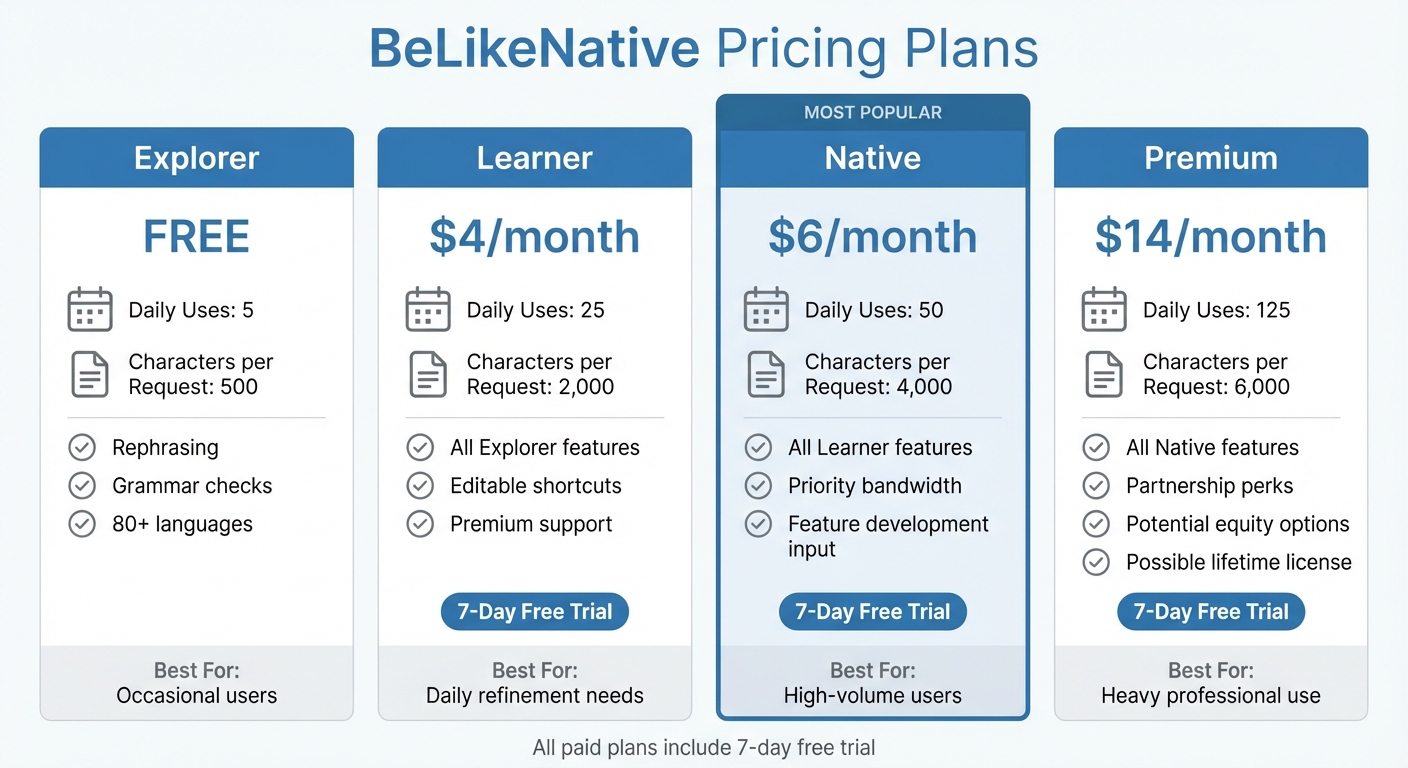
BeLikeNative Pricing Plans Comparison – Features and Limits
If you’re looking to refine your writing while balancing volume and complexity, take a closer look at BeLikeNative’s pricing options.
Plan Comparison
BeLikeNative offers four subscription tiers designed to meet varying professional needs.
- Explorer: This free plan provides essential features like rephrasing, grammar checks, and support for over 80 languages. It includes a daily limit of 5 uses and allows up to 500 characters per request.
- Learner: Priced at $4 per month, this plan increases your daily limit to 25 uses and supports up to 2,000 characters per request. It also introduces editable keyboard shortcuts and access to premium support.
- Native: For $6 per month, this plan offers 50 daily uses, supports up to 4,000 characters per request, and provides priority bandwidth for faster processing. Subscribers also get a say in future feature development.
- Premium: At $14 per month, this plan is designed for heavy users. It includes 125 daily uses, supports up to 6,000 characters per request, and offers partnership perks, potential equity options after two years, and a possible lifetime license in the future.
All paid plans come with a 7-day free trial, letting you explore advanced features like tone customization and politeness adjustments before deciding.
Choosing the Right Plan
The best plan for you depends on how often you write and the length of your typical texts.
- The Explorer plan is ideal for occasional users who need converting informal text to formal.
- The Learner plan is perfect for those refining up to 25 texts a day.
- The Native plan caters to users handling up to 50 texts daily and needing faster processing times.
- The Premium plan is tailored for professionals managing high volumes of content daily.
Start your free trial today to see which plan aligns with your writing habits and goals.
Conclusion: Politeness Made Simple with BeLikeNative
BeLikeNative takes the hassle out of adapting writing tone. With just a quick keyboard shortcut, it provides polished, courteous alternatives for your text – no need to rewrite or juggle between apps. Simply highlight your text, and you’ll have a refined version ready to paste into your email, message, or document.
This simplicity not only saves time but also improves clarity and the quality of responses. Studies show that a moderate level of politeness in communication enhances how messages are received, making thoughtful phrasing a smart move for strengthening professional relationships. BeLikeNative helps you achieve this balance effortlessly, keeping your communication clear and direct without wasting time on manual edits. From business emails to LinkedIn messages and client proposals, the tool adapts to your needs, supporting over 80 languages and working seamlessly on platforms like Gmail, Slack, and Microsoft Teams.
With customizable tone settings and clipboard integration, BeLikeNative ensures a smooth workflow that keeps you focused. This streamlined process allows professionals to save time and significantly boost productivity.
Plus, with pricing options starting at a free Explorer tier and scaling to meet professional needs, BeLikeNative is accessible to everyone. Give it a try with a 7-day free trial and discover how easy polite communication can be.
FAQs
How does BeLikeNative help make my writing more polite in different languages?
BeLikeNative leverages cutting-edge AI technology with language-specific tone settings to ensure your writing comes across as polite and culturally aligned. By choosing a "polite" style, the tool automatically refines your text using carefully crafted phrase libraries and rephrasing rules designed for over 80 languages.
This helps your communication maintain the right level of courtesy and professionalism, regardless of the language or cultural context. With just one click, you can adjust tone and phrasing, making your messages more respectful and engaging.
What’s the difference between the free and paid BeLikeNative plans?
The free plan lets you use the tool up to 5 times per day, with a limit of 500 characters per use. If you need more freedom, the paid plans start at just $4 per month. These plans remove usage limits and unlock advanced features, giving you more room to work and explore.
For those who want greater flexibility and access to premium tools, upgrading to a paid plan is an excellent way to maximize what BeLikeNative has to offer.
Can I adjust the level of politeness in my writing for different situations?
Yes, you can tweak the politeness level in your writing to fit any situation using BeLikeNative’s tone and style settings. After installing the Chrome extension, you’ll have the ability to adjust options like Tone and Style to align with the formality or mood you need. For instance, you could select a Professional tone for business emails or opt for a Friendly tone for more casual chats.
BeLikeNative provides 15 unique tones and 15 writing styles, allowing you to create presets tailored to different communication needs. Whether you’re drafting a polite client proposal or crafting a warm, approachable message for your team, you can apply the perfect tone with a single click. This makes it easy to write politely and appropriately for your audience, all while saving time and maintaining a polished impression.

