

How To Summarize Long Research Papers In Browser Instantly
Tired of spending hours reading dense research papers? AI-powered browser tools like Scholarcy and BeLikeNative can help you summarize 40-page papers in just minutes. These tools extract key insights, highlight main arguments, and even refine summaries – all without switching apps. Here’s how they work:
- Scholarcy: Automatically breaks papers into sections, highlights key points, and creates flashcards. Great for quick overviews and detailed insights.
- BeLikeNative: Lets you manually refine text, paraphrase, or adjust tone directly in your browser. Perfect for customizing summaries.
With these tools, you can process up to 10 papers in the time it used to take for one. Install them as browser extensions, and save time while improving your research workflow.
Transform Any Text, On Any Site, In Seconds
Rephrase, translate, and improve text with one shortcut. Works everywhere you write.
Add to Chrome - It's Free!8 Free AI Summarizers to Read Research Articles Faster || Find Out Which Is Best For You!
sbb-itb-32359dc
Tools You Need to Summarize Research Papers in Your Browser
Getting started is easy – browser extensions allow you to summarize research papers without switching between apps or uploading files. Two standout tools for academic research are Scholarcy and BeLikeNative, each offering unique features to streamline your workflow. Let’s break down how they work and how to integrate them into your research process.
Scholarcy is tailored for academic papers, pulling out key points, creating interactive flashcards, and even showing how a paper builds on prior research with its "Comparative Analysis" feature. It can reduce the time spent on extracting information by up to 70%. With over 80,000 users and a 4.1/5 star rating from 40 reviews on the Chrome Web Store, it’s a popular choice for researchers.
BeLikeNative takes a different approach. Instead of automatic summaries, it allows you to manually highlight text and use shortcuts to summarize, paraphrase your research, or adjust tone instantly. It works directly on any webpage and supports over 50 languages. With a 4.6/5 star rating from 266 users, it’s especially handy for fine-tuning summaries after extraction. Plus, there’s no need to create an account to start using it. While Scholarcy excels at extracting content, BeLikeNative shines when you need to refine and customize text on the spot.
How to Install the BeLikeNative Chrome Extension
To get started with BeLikeNative, visit the Chrome Web Store and search for "BeLikeNative." Click Add to Chrome, then confirm by selecting Add extension in the popup. After installation, the BeLikeNative icon will appear in your browser toolbar. To use it, highlight any text on a webpage and press Ctrl+M (Windows) or Cmd+M (Mac) to open the summarization menu. Alternatively, you can right-click the highlighted text for the same options. The extension processes everything through your clipboard, so there’s no need to copy and paste into separate windows. This seamless integration makes it simple to refine your summaries as you work.
AI Summarization Tools Explained
Here’s a closer look at how these tools handle summarization. Scholarcy, for example, processes the HTML content or PDF from your active browser tab. It identifies key sections like the abstract, methodology, results, and conclusions, extracting the most crucial sentences and organizing them into structured flashcards. If the initial summary lacks detail, you can adjust the "Source priority" settings to switch between HTML and PDF processing. Additionally, Scholarcy can locate open-access versions of cited sources from platforms like Google Scholar and arXiv, making it easier to dive into related research. Some tools even extract tables and figures, which often hold the most valuable data points in a paper.
These tools simplify the process of summarizing and analyzing research papers, saving you time and effort while enhancing your workflow.
How to Summarize Research Papers in 2 Steps
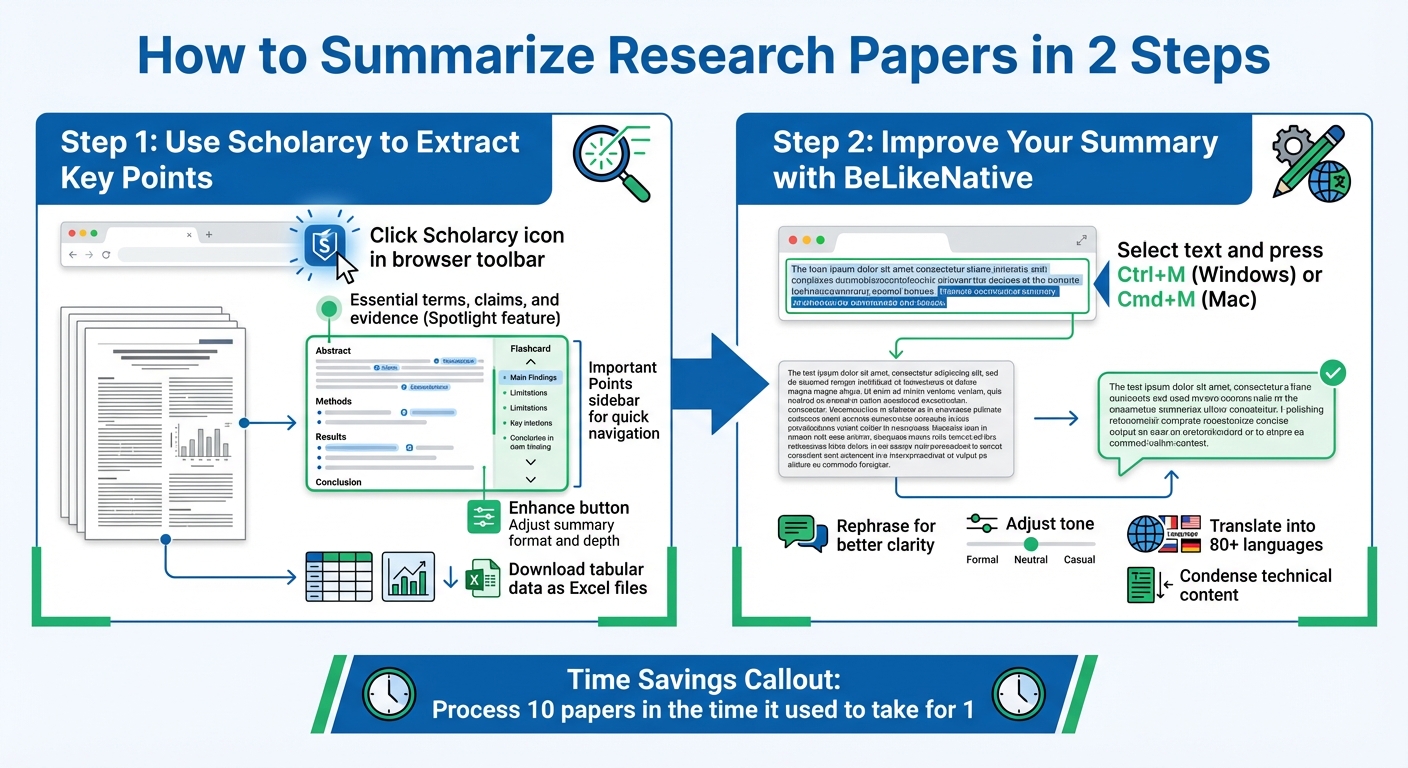
2-Step Process to Summarize Research Papers Using Scholarcy and BeLikeNative
Streamline your research process by combining Scholarcy’s automatic extraction with BeLikeNative’s manual refinement. This two-step method simplifies summarizing research papers, saving time while ensuring clarity.
Step 1: Use Scholarcy to Extract Key Points
Start by opening a research paper in your browser and clicking the Scholarcy icon in your toolbar. Scholarcy generates a "Flashcard" that breaks the paper into manageable sections, highlighting essential terms, claims, and evidence-based findings through its Spotlight feature. This eliminates the need to sift through dense paragraphs.
The Important Points sidebar allows you to jump straight to the paper’s key contributions. Need a different level of detail? Use the Enhance button to tweak the summary’s format and depth. Scholarcy even extracts tables and figures into a dedicated section, letting you download tabular data as Excel files for further analysis.
Once Scholarcy has done its job, the next step is refining the summary with BeLikeNative.
| Feature | Free Plan | Scholarcy Plus (€8.99/month) |
|---|---|---|
| Daily Limit | 3 summaries per day | Unlimited summarization |
| Summary Types | Standard summaries | Enhanced summaries (bulleted, etc.) |
| Storage | No saving | Save flashcards to a searchable library |
| Customization | View only | Take notes, highlight, and edit text |
| Organization | N/A | Organize flashcards into collections |
| Export | One at a time | Advanced export options |
Step 2: Improve Your Summary with BeLikeNative
After Scholarcy extracts the key points, refine the content by selecting the text and pressing Ctrl+M (Windows) or Cmd+M (Mac). BeLikeNative allows you to rephrase for better clarity, adjust the tone, or even translate the summary into over 80 languages.
This step is especially helpful when Scholarcy’s output feels too technical or when further condensation is needed. BeLikeNative offers different plans based on character limits and daily usage. The free Explorer plan handles up to 500 characters with 5 uses per day, while the Learner plan ($4/month) expands to 2,000 characters and 25 daily uses. For more intensive research, the Native plan ($6/month) supports up to 4,000 characters and 50 daily uses.
| Plan Name | Price | Daily Uses | Character Limit | Best For |
|---|---|---|---|---|
| Explorer | $0/month | 5 | 500 | Light use |
| Learner | $4/month | 25 | 2,000 | Regular research work |
| Native | $6/month | 50 | 4,000 | High use |
| Premium | $14/month | 125 | 6,000 | Professional researchers |
Tips for Better Research Paper Summaries
Here’s how you can refine your approach to summarizing research papers, making the process smoother and the results more effective.
Choose the Right Papers to Summarize
Not every research paper is ideal for browser-based summarization tools. Focus on papers available in online formats like those hosted on ArXiv or in HTML on publisher websites. These formats allow browser extensions to process the content directly, sparing you the hassle of downloading PDFs or manually extracting text.
Make sure you’re working with the full paper, not just the abstract. Tools like Unpaywall can help you legally access open-access versions of paywalled papers, which accounts for about 47% of such content. To save time, use citation counts to identify key studies and consider creating one-sentence summaries to quickly evaluate their relevance.
Use Multiple Tools Together
Combining tools can lead to better summaries. Start with a quick-screening tool like Scholarcy’s "One-liner" preset to get a high-level overview. Then, refine the language or condense dense sections using a tool like BeLikeNative. This step-by-step approach keeps your workflow organized, helping you manage papers, summaries, and citations efficiently – all while addressing paywall challenges.
For the best results, stick to a manageable number of tools – around 3 to 5 extensions should suffice. This keeps your process streamlined without overwhelming you with too many options.
Adjust Summary Length and Check Accuracy
Always cross-check the summary against the paper’s conclusions to ensure accuracy. Use tools like BeLikeNative to tweak the tone and adjust the length of your summaries. While AI tools can speed up the process, they might miss subtle details or misinterpret tentative language, such as turning "may suggest" into "proves."
A well-rounded summary should answer four key questions: Why was the research conducted? How was it done? What were the results? And what are the broader implications? Pay attention to formatting issues, as AI tools may struggle with complex elements like mathematical notations or multi-column tables. As a rule of thumb, aim to keep your summary at about 10–15% of the original paper’s length.
Conclusion
Main Benefits Reviewed
Skim through dense articles in just 3–5 minutes instead of the usual 10–20, saving valuable time for your research. This efficiency allows you to review more sources, spot relevant studies faster, and dedicate your focus to the material that truly matters.
Everything works seamlessly within your browser – no need to juggle apps or copy and paste text. BeLikeNative adapts its summaries to your preferences, offering quick TLDRs, bullet points, or even Markdown formats to suit your workflow. With on-device processing now available in Chrome 138 and later, your data stays private while enabling offline summarization after the initial setup.
These tools also make understanding complex material easier, reducing mental fatigue. By cutting through weak arguments and spotlighting key findings, they simplify dense content, helping you grasp intricate concepts without getting bogged down by technical jargon. You can dive deeper by asking follow-up questions, pulling out specific methodology details, or breaking down technical sections into manageable insights. By eliminating the hassle of tedious navigation and note-taking, BeLikeNative transforms the way you approach research, moving from time-consuming manual reading to instant, actionable summaries.
Try it out and see the difference for yourself.
Get Started with BeLikeNative
Streamline your work with the BeLikeNative Chrome extension. Summarize webpages, PDFs, and even YouTube videos instantly with just one click. Supporting 40 languages and adjustable summary lengths, this tool is designed to meet both academic and professional needs.
For only $3.99 per month, you get access to over 500 summaries (currently free during the launch period), offering approximately 500,000 summary tokens. That’s enough to tackle dozens of research papers each month without stretching your budget. Download the extension today and turn hours of reading into just minutes of focused understanding.
FAQs
How do I summarize a paywalled paper legally?
To summarize a paywalled research paper legally, focus on rephrasing its key points and central ideas rather than copying large sections of text. This approach aligns with fair use principles, as long as the summary is used for educational or research purposes. Avoid sharing the full content of the paywalled material. Whenever possible, provide links to open-access versions or preprints of the paper to ensure broader accessibility.
How can I make sure an AI summary is accurate?
To make sure an AI-generated summary hits the mark, compare it directly with the original research paper. Pay close attention to key aspects like the study’s scope, limitations, and the specific terminology and language used. It’s also important to verify that the summary accurately reflects the main claims and methods outlined in the source. A thorough human review is essential to spot any mistakes or misinterpretations the AI might have introduced.
What should I do if the paper has tables, figures, or equations?
To make sense of structured content like tables, figures, and equations, AI tools can be incredibly helpful. For instance, Scholarcy specializes in breaking down complex research papers into digestible sections, spotlighting the most important concepts and findings. Similarly, browser extensions like TLDR This or Article Summarizer can analyze entire webpages, including structured data, and generate concise summaries. These tools make it easier to grasp even the most detailed and intricate data.
Related Blog Posts
- Best Ai Tools For Summarizing Research Papers Quickly
- Best Ai Tools To Shorten Essays While Keeping Key Points
- How to Summarize Long Research Papers in Minutes with a Chrome Extension
- How To Summarize Long Articles In Chrome Instantly
BeLikeNative fixes grammar, rephrases, translates, and simplifies text on any website in 1 second — just highlight and hit a keyboard shortcut. No tab switching. Try it free →

