
Translate Reddit Comments Instantly While Browsing
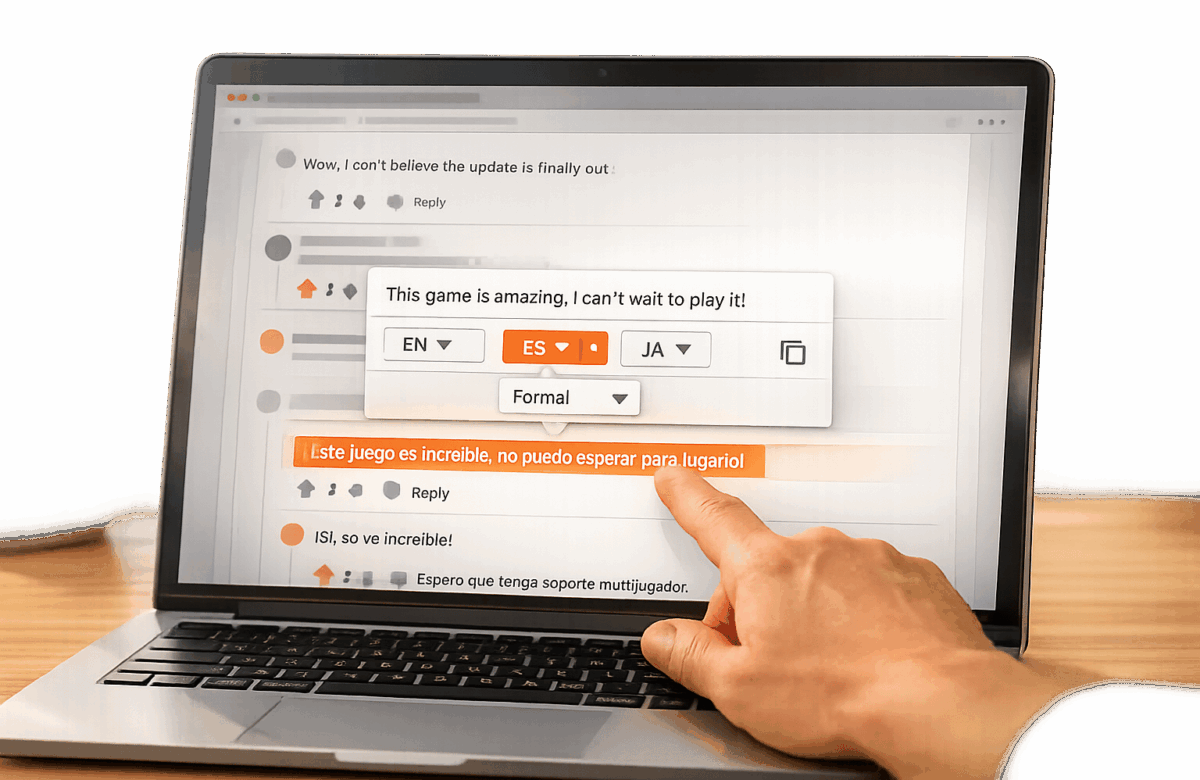
Tired of juggling between Reddit and translation tools? With the BeLikeNative Chrome extension, you can translate Reddit comments instantly without leaving the page. Highlight text, press a shortcut, and get translations in seconds – all while staying focused on your browsing.
Key Features:
- Quick Translations: Highlight text and use a shortcut to translate directly on Reddit.
- 80+ Supported Languages: Engage with Reddit’s global communities seamlessly.
- Tone Adjustment: Choose formal or casual translations to match subreddit vibes.
- Subscription Options: Free plan available; paid plans start at $4/month for higher usage.
Why It’s Useful:
- Saves time by eliminating copy-paste tasks.
- Keeps you engaged in real-time discussions.
- Helps decode slang, memes, and multilingual comments.
Set it up in minutes, and enjoy a smoother Reddit experience. Whether you’re learning a new language or just curious about international conversations, BeLikeNative simplifies the process.
Transform Any Text, On Any Site, In Seconds
Rephrase, translate, and improve text with one shortcut. Works everywhere you write.
Add to Chrome - It's Free!Getting Started with BeLikeNative
First things first – install and set up your BeLikeNative extension to make Reddit translations a breeze.
System Requirements
BeLikeNative is compatible with Google Chrome and works on Windows, macOS, and Linux. Once you grant it permission to access your user activity and website content, it can function on any site, including Reddit. The extension is lightweight, with a size of just 970 KiB, and the latest version (1.4.1 as of August 2025) has a spotless reputation on the Chrome Web Store.
Installing the BeLikeNative Chrome Extension
To get started, head over to the Chrome Web Store and search for "BeLikeNative." Click the "Add to Chrome" button, and when prompted, confirm by selecting "Add extension." Once installed, click the puzzle icon in your browser’s toolbar, locate BeLikeNative, and pin it for easy access. Make sure its permissions are set to "On all sites" or specifically "on reddit.com" via Chrome’s extension settings.
The extension features a side panel interface, introduced in version 1.2.0, which you can open by clicking the extension icon or using the shortcut Alt + E (Windows) or Command + E (Mac).
Setting Up Your Language Preferences
Open the BeLikeNative side panel using your preferred method. From there, choose your target language (like English [US]) and select a tone – formal or casual – to suit the subreddit you’re browsing. For example, a formal tone might be ideal for r/AskHistorians, while a casual tone can fit r/CasualConversation better. With support for over 80 languages, you can tailor your settings to match the vibe of different Reddit communities. Once configured, simply highlight any Reddit comment and use the shortcut to translate and copy the text directly to your clipboard.
How to Translate Reddit Comments Instantly
With your extension set up, you’re all set to translate Reddit comments effortlessly. The process is designed to keep you focused on your browsing without needing to switch tabs or disrupt your reading flow. Let’s dive into how clipboard integration and display options work to make this seamless.
Translating Comments with Clipboard Integration
To translate a Reddit comment, simply select the text and use the shortcut you’ve configured. BeLikeNative will instantly translate the comment and copy the result to your clipboard. This eliminates the hassle of jumping between tabs, allowing you to turn foreign-language comments into readable English without ever leaving the Reddit page.
Once the translation is in your clipboard, you can decide how best to use it.
Using and Viewing Translated Comments
If you’re replying to a comment, just paste the translated text directly into the Reddit reply box using Ctrl + V (Windows) or Command + V (Mac). Alternatively, you can paste it into a text editor or note-taking app for future reference. For a more streamlined view, open the BeLikeNative side panel with Alt + E (Windows) or Command + E (Mac). This feature displays translations in a clean, easy-to-read format.
This setup is especially handy when browsing international subreddits, where discussions often involve multiple languages. The translated text preserves the original comment’s intent while letting you choose the tone – formal for serious topics or casual for relaxed conversations.
Advanced Features for Reddit Browsing
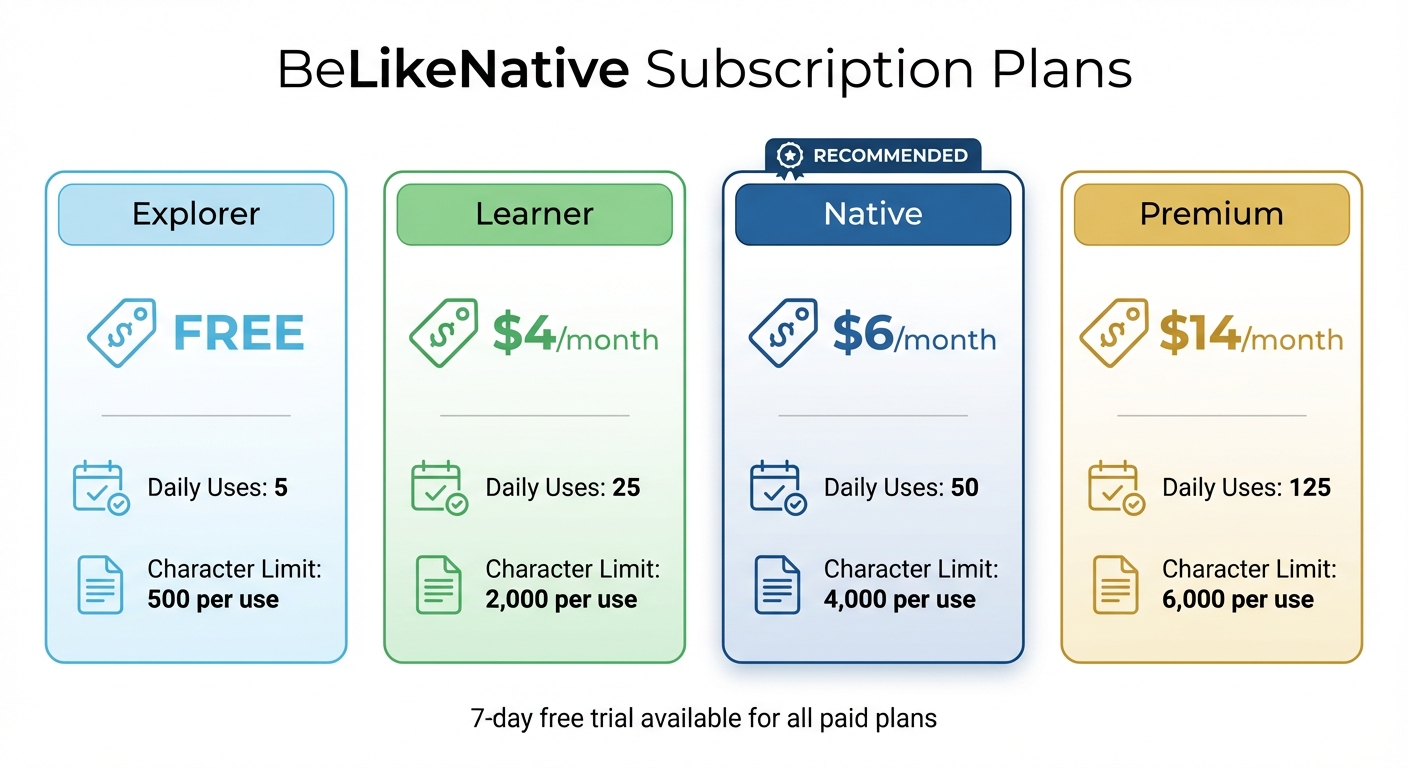
BeLikeNative Subscription Plans Comparison – Features and Pricing
Once your extension is set up, dive into these advanced features to tailor your Reddit browsing experience to your preferences.
Customizing Translation Tone and Style
Adjust the translation tone to suit the vibe of the Reddit community you’re exploring. Whether you’re reading a detailed debate in r/science or joking around in r/gaming, you can switch between formal and casual tones with ease. This option is available in the extension’s preferences and automatically kicks in whenever you highlight text and use your shortcut.
For a more relaxed, conversational feel, set the tone to "Casual" while browsing Reddit. Your preferences are saved, ensuring consistent translations every time. Plus, the extension supports translations in over 80 languages, so you can engage with communities worldwide.
Understanding Free and Paid Plan Benefits
BeLikeNative offers four subscription plans to suit different needs:
- Free Plan: 5 uses per day, up to 500 characters per use.
- Learner ($4/month): 25 uses per day, up to 2,000 characters each.
- Native ($6/month): 50 uses per day, up to 4,000 characters per use.
- Premium ($14/month): 125 uses per day, up to 6,000 characters each.
If you’re working with longer comments, simply break them into smaller sections to stay within the character limits.
sbb-itb-32359dc
Troubleshooting and Best Practices
Fixing Extension Activation Issues
If BeLikeNative isn’t working as expected, here’s how to get it back on track. First, check its permissions by heading to chrome://extensions. Make sure BeLikeNative has the necessary access to Reddit data and that the keyboard shortcut (Alt + E on Windows; Command + E on Mac) is properly set up. If you’re using an older version, update to version 1.2.0 or later, as this resolves previous shortcut-related problems. You can also click "Repair" in the extension’s details on the same page if the option is available.
For Incognito mode, ensure "Allow in incognito" is enabled for BeLikeNative. If translations stop working mid-session, try refreshing the Reddit page or clicking the BeLikeNative icon in your browser’s toolbar.
Managing Character Limits and Usage
Once activation issues are resolved, understanding character limits can help you make the most of your plan. The Free plan includes a 500-character limit, which works for most comments. For longer posts, like those in r/AskHistorians or r/explainlikeimfive, break the content into smaller sections.
If you often translate longer posts or guides, upgrading to the Learner plan might be worth considering. Priced at $4/month, it offers a 2,000-character limit and 25 daily uses, making it easier to handle more substantial content without splitting it. Keep an eye on your daily usage in the dashboard to avoid hitting your limit. The Free plan allows 5 uses per day, while the Learner, Native, and Premium plans offer 25, 50, and 125 daily uses, respectively. If a translation fails, double-check your usage to ensure you haven’t exceeded your plan’s limits before trying again.
Conclusion
Translate Reddit comments effortlessly with just one shortcut. Using BeLikeNative, you can process text directly from your clipboard by pressing Alt + E on Windows or Command + E on Mac, ensuring you stay in the zone. This extension supports over 80 languages and delivers translations in about one second.
These features simplify your Reddit experience. Users have reported saving over an hour daily by eliminating tedious copy-paste tasks. Power users even claim a 66% productivity boost and substantial monthly time savings. With a 4.6/5-star rating on the Chrome Web Store and a growing community of over 3,000 users, BeLikeNative has become a trusted tool for seamless multilingual browsing.
You can try it risk-free with a 7-day free trial. Plans are available to fit various needs, ranging from the free Free plan for casual use to paid options that provide higher usage limits and increased character capacity. Simply set your preferences, use the shortcut, and maintain your focus.
Stay engaged without interruptions – let BeLikeNative take care of the translations for you.
FAQs
How does BeLikeNative translate slang and memes effectively?
BeLikeNative employs sophisticated translation and paraphrasing tools to tackle the tricky task of handling slang, idioms, and memes while keeping their original meaning intact. Since these elements are often hard to translate word-for-word, the platform prioritizes rephrasing them in a way that resonates in the target language.
By doing so, it preserves the tone and humor of the original content, ensuring that translations come across as natural and relatable for audiences across various languages.
What are the advantages of upgrading to a paid plan?
Upgrading to a paid plan opens the door to premium features that can take your experience to the next level. These features often include higher usage limits, advanced translation tools, and the ability to tailor settings to your needs, giving you more control and efficiency.
A paid plan helps you simplify your workflow, tackle language barriers with ease, and enjoy a more seamless, personalized experience when browsing and translating content.
How can I set up BeLikeNative to translate content into my preferred language?
To get started with BeLikeNative in your preferred language, first install the Chrome extension and head to its settings. Here, you can pick your primary language from a list of over 80 options and tweak translation and writing style settings to suit your needs.
You also have the option to enable automatic translation, which makes navigating and understanding content in different languages a breeze. This setup lets you effortlessly translate and rephrase content in your chosen language, making platforms like Reddit even more enjoyable to explore.
Related Blog Posts
- How to Instantly Translate and Paraphrase Text in Chrome with One Shortcut
- Keyboard Shortcut to Translate Selected Text into Spanish Instantly on Any Webpage
- Instantly Translate WhatsApp Web Messages To English
- Best Chrome Extension For Translating Discord Messages
BeLikeNative fixes grammar, rephrases, translates, and simplifies text on any website in 1 second — just highlight and hit a keyboard shortcut. No tab switching. Try it free →

