

How To Translate Telegram Web Chats Automatically
Telegram Web now supports real-time automatic chat translation, making multilingual conversations easier. While Telegram‘s built-in translation feature is available, it requires a Premium subscription for automatic translations. Free users can only translate messages individually, which can be tedious in fast-moving chats.
A browser extension like BeLikeNative offers a solution. It integrates with Telegram Web to provide automatic translations for over 100 languages without needing a subscription. Here’s how it works:
- Install BeLikeNative: Add the extension via the Chrome Web Store.
- Create an Account: Start with the free plan, which includes limited daily translations.
- Set Preferences: Choose input and output languages, enable auto-translate, and customize the tone.
- Translate Messages: Use real-time auto-translation for chats or manually translate specific messages with a click.
BeLikeNative ensures privacy by processing translations locally without storing data externally. It’s a practical tool for bridging language gaps in group chats, business discussions, or personal conversations.
Why Translate Telegram Web Chats Automatically
Common Problems with Multilingual Messaging
Switching back and forth between Telegram and external translation tools can be a real headache. It disrupts the natural flow of conversations, especially when you’re juggling international clients or participating in diverse group chats. Manually copying and pasting messages into a translator takes time – and by the time you’ve got your translation, the discussion may have already moved on. This makes it tough to keep up with fast-moving group chats or critical business negotiations.
And then there’s the risk of misunderstandings. Partial translations often lead to confusion, derailing conversations or complicating customer support. Without automatic translation, you’re left asking people to repeat themselves (which can feel awkward) or making decisions based on incomplete information. These hurdles highlight the need for a solution that keeps communication smooth and efficient.
How Real-Time Translation Helps
Automatic translation solves these problems by processing messages as they arrive. It displays both the original and translated text side by side, so you can follow the conversation without interruptions. This real-time feature is a game changer for remote teams working across time zones, where every moment of synchronized communication counts.
The benefits are immediate. With support for over 100 languages, you can confidently join global communities, educational channels, and business discussions without worrying about misunderstandings. Plus, intelligent language detection automatically identifies the language being used, so you don’t have to fiddle with settings. This accuracy ensures smoother communication in multilingual group chats and keeps engagement high.
Two-way translation takes it a step further. You can type in your native language, and your message will be delivered in the recipient’s language. Whether you’re traveling, studying abroad, or managing international clients, this feature breaks down language barriers, making it easy to connect without extra effort.
How to Install BeLikeNative for Telegram Web
Download and Install the Chrome Extension
Getting BeLikeNative up and running is simple. Start by visiting the Chrome Web Store and searching for "BeLikeNative", or head straight to its dedicated page. Once there, click the "Add to Chrome" button to install the extension. It will automatically download and integrate into your browser.
To make it easily accessible, pin the extension to your browser’s toolbar. Click the puzzle icon in Chrome, locate BeLikeNative in the list, and pin it. Once pinned, the extension will automatically activate whenever you use Telegram Web.
With the extension installed and pinned, you’re ready to set up your account and unlock its translation features.
Create Your Account and Get Started
To start translating, you’ll need to create a BeLikeNative account. Click on the extension icon in your toolbar and sign up by entering your email and creating a password. When you sign up, you’ll begin with the free Explorer plan, which supports translations in over 50 languages.
The Explorer plan provides basic features, including a daily limit of 5 translations and up to 500 characters per translation. It’s perfect for testing out BeLikeNative’s tools on Telegram Web, such as spelling and grammar checks, fluency improvements, and secure data handling. If you find yourself needing more translations or higher character limits, you can always upgrade to a paid plan later.
Set Up Automatic Translation for Telegram Web
Select Your Target Language and Enable Auto-Detection
Once your account is ready, open Telegram Web in Chrome and click on the BeLikeNative icon. The extension will automatically integrate with the Telegram Web interface, giving you access to its translation settings.
From the settings panel, choose your input and output languages. For instance, if you’re chatting with Spanish-speaking colleagues, set Spanish as your input language and English as your output language. With support for over 80 languages, BeLikeNative makes multilingual conversations a breeze.
Activate the "Auto-Translate" or "Intelligent Recognition" mode by toggling it on in the settings. This feature works in real time, translating both incoming and outgoing messages as they appear. Once your language preferences are set, you can fine-tune the translation style to match your tone.
Personalize Translation Style and Tone
After enabling auto-detection, take it a step further by customizing the translation style and tone. Whether you’re having a casual chat with friends or need a polished tone for professional exchanges, you can adjust the formality level directly in the extension panel.
Your privacy is protected, as BeLikeNative processes translations securely without storing your personal data or chat history on external servers. This ensures you can tailor your communication style without compromising security across your Telegram Web conversations.
Leverage Keyboard Shortcuts for Instant Translation
BeLikeNative also integrates with your clipboard, allowing quick translations with a simple keyboard shortcut. Just select the text you need translated and press the assigned shortcut for immediate results.
You can switch between manual and automatic modes based on your needs. Whether you want every message translated automatically or prefer to translate specific messages on demand, this flexibility ensures smooth, natural conversations. These shortcuts streamline multilingual communication, making Telegram Web even more efficient for managing multiple languages.
Translate Telegram Web Chats with BeLikeNative
Turn On Automatic Translation for Incoming Messages
To enable automatic translation, open a Telegram Web chat and toggle the Auto-Translate switch in the BeLikeNative extension. Once it’s on, the extension will instantly translate messages in private chats, group conversations, and channels without requiring any extra steps. All translations happen securely on your device, ensuring your privacy is protected.
This feature is especially handy for busy multilingual group chats where messages come in fast and in various languages. When you install the extension, you’ll get 50 free translations right away. Plus, you can unlock an extra 50 bonus translations by signing up and verifying your email, giving you a total of 100 free translations to start with.
If you prefer more control, you can switch to manual mode to translate only the messages you choose.
Translate Individual Messages with One Click
For times when you only need to translate specific messages, the one-click manual option is perfect. Hover over a message in your Telegram Web chat, and a translation icon will appear next to it. Click the icon to see the message translated into your chosen language instantly.
This feature is great for conversations where only occasional phrases need clarification. You can easily switch between manual and automatic modes based on your needs – use manual mode for translating select messages in sensitive chats, and switch to automatic mode for smooth, real-time multilingual interactions.
The extension works seamlessly within the Telegram Web interface, so there’s no need to copy text or rely on external apps.
sbb-itb-32359dc
Customize Settings and Fix Common Problems
Change Language Settings and Manage Usage Limits
You can tweak your language preferences anytime by clicking the BeLikeNative extension icon in your Chrome toolbar. From the settings menu, you’ll have access to over 100 supported languages for both input and output translations. To make things even easier, enable "Auto-Translate" or "Intelligent Recognition" to let the extension automatically detect incoming languages.
By default, you get 50 free translations daily without needing to log in. If you create an account and verify your email, you’ll unlock an extra 50 translations, giving you a total of 100 free translations per day. You can always check your translation quota and account status by clicking the extension icon.
If there are languages you already know well and don’t need translations for, you can add them to the "Do Not Translate" list. This way, BeLikeNative won’t process messages in those languages, helping you save your daily translations for the ones you actually need.
Solve Common Translation Problems
Once your language settings are adjusted, you might still encounter translation hiccups. If the extension doesn’t correctly detect the language, switch to Manual Mode in the settings to specify the source language. Another option is to hover over the message and click the translation icon to re-translate it. If the icon doesn’t show up or errors persist, make sure the extension is pinned to your Chrome toolbar and refresh the Telegram Web tab.
For ongoing issues, check the Chrome Web Store for updates – new versions often include fixes for compatibility problems with Telegram Web’s interface. If nothing works, logging out and back into your BeLikeNative account can reset your session and refresh your usage counters.
These steps will help you maintain smooth and efficient multilingual communication on Telegram Web.
How to Translate Telegram Messages Automatically
BeLikeNative Plans for Telegram Web Translation
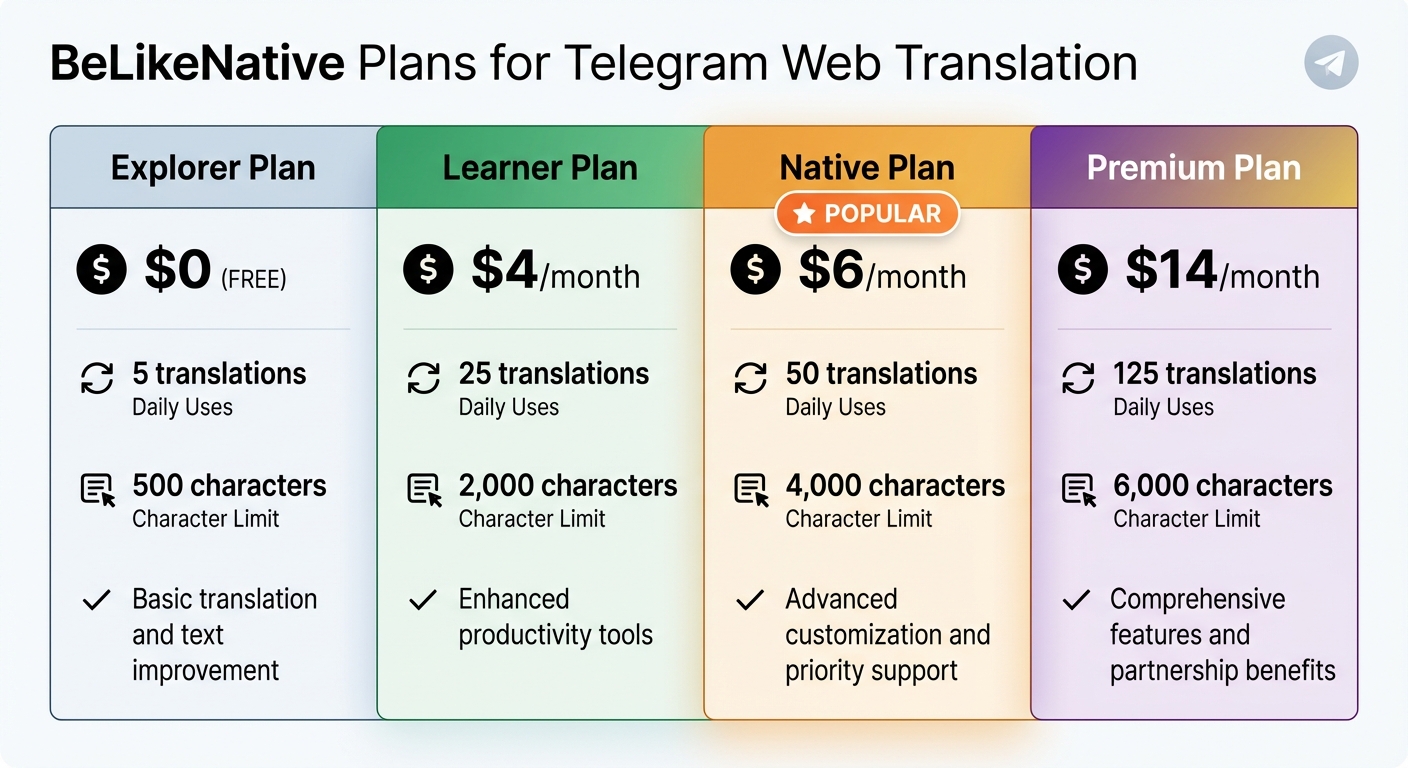
BeLikeNative Telegram Translation Plans Comparison
Plan Features and Pricing Comparison
BeLikeNative offers four subscription options tailored to different Telegram Web translation needs. The Explorer plan is free and allows for 5 translations per day with a 500-character limit, making it a great option for light, occasional use. If you need more flexibility, the Learner plan costs $4 per month and increases the daily limit to 25 translations with a 2,000-character cap. For those with heavier usage, the Native plan, priced at $6 per month, provides 50 translations daily with a 4,000-character limit and priority bandwidth. At the top tier, the Premium plan, costing $14 per month, supports 125 daily translations and raises the character limit to 6,000. Here’s a quick breakdown:
| Plan Name | Price | Daily Uses | Character Limit | Key Features |
|---|---|---|---|---|
| Explorer | $0 | 5 | 500 | Basic translation and text improvement |
| Learner | $4 | 25 | 2,000 | Enhanced productivity tools |
| Native | $6 | 50 | 4,000 | Advanced customization and priority support |
| Premium | $14 | 125 | 6,000 | Comprehensive features and partnership benefits |
Conclusion
BeLikeNative integrates seamlessly into your browser, making it easy to detect and translate over 100 languages in real-time – all without leaving your chat. Whether you’re handling international clients, engaging in multilingual community groups, or chatting with friends overseas, this tool ensures conversations stay smooth and natural.
With its one-click translation feature and privacy-first design, you can shift between conversations effortlessly, knowing your chat history remains secure. Unlike the old hassle of switching tabs or relying on third-party translation sites, BeLikeNative translates directly within your browser and doesn’t store your data on external servers.
Boasting a 4.8/5 star rating on the Chrome Web Store, users frequently highlight its accuracy and user-friendly interface. As one reviewer shared, "The free version is great, but the premium features take it to the next level. A valuable investment" (Verified User AG, Chrome Web Store Reviewer). This feedback reflects the tool’s effectiveness and its importance for global communication.
Start with the free Explorer plan, which includes 5 daily translations, and upgrade as needed to keep your conversations running smoothly. Pin the extension to your Chrome toolbar for quick access, activate auto-translate for busy group chats, and experience how easily language barriers can disappear.
FAQs
How does BeLikeNative protect my privacy while translating messages?
At the moment, there isn’t any detailed information available regarding how BeLikeNative handles privacy during message translation. If you happen to have insights about BeLikeNative’s privacy policies or practices, please share them, and we can ensure the information provided is more precise.
What features are included in the free Explorer plan on BeLikeNative?
Currently, there isn’t detailed information about the features or restrictions of BeLikeNative’s free Explorer plan in the given context. For the most reliable and current details, it’s best to visit BeLikeNative’s official website or reach out to their support team directly.
Does BeLikeNative support real-time translations in Telegram group chats?
Currently, there’s no indication that BeLikeNative provides real-time translation specifically for Telegram group chats.
To get the most accurate and up-to-date information about its features, it’s best to explore the platform directly or keep an eye on any updates. BeLikeNative is always working on improving its tools to make multilingual communication easier and more effective.

