

Instantly Translate WhatsApp Web Messages To English
Tired of switching between apps to translate WhatsApp Web messages? With over 3 billion users globally, WhatsApp connects people across languages, but the lack of built-in translation on WhatsApp Web can make conversations cumbersome. Enter BeLikeNative, a Chrome extension that integrates translation directly into WhatsApp Web, letting you translate incoming messages and convert outgoing ones without leaving the chat.
Key Features:
- Works exclusively on Google Chrome with WhatsApp Web.
- Supports real-time translation for both received and sent messages.
- Automatically translates text into English (or other supported languages).
- Offers free and paid plans based on usage needs.
Setup in Minutes:
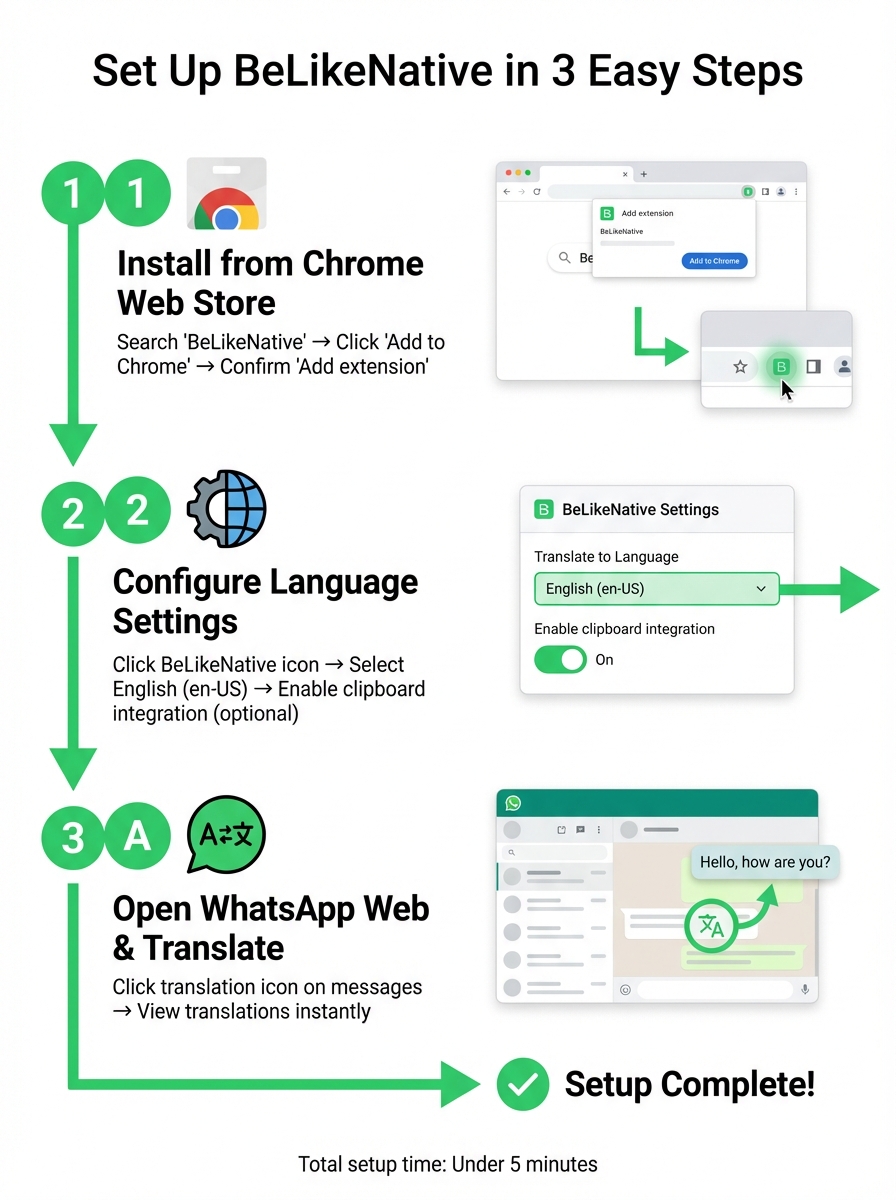
- Install BeLikeNative from the Chrome Web Store.
- Set English (en-US) as your translation language in the extension settings.
- Start translating messages instantly within WhatsApp Web.
Whether you’re chatting with friends abroad, managing international customer support, or collaborating with global teams, BeLikeNative simplifies multilingual communication. Stay focused on conversations, not translation hassles.
Transform Any Text, On Any Site, In Seconds
Rephrase, translate, and improve text with one shortcut. Works everywhere you write.
Add to Chrome - It's Free!How to translate WhatsApp Web messages and inputs into any language in 2025
What You Need Before Starting
Getting ready to use WhatsApp Web translation is simple, but there are a few things you’ll need to have in place. Here’s what to check before diving in.
Google Chrome and WhatsApp Web Access
BeLikeNative is designed to work only as a Chrome extension. This means you’ll need Google Chrome installed on your computer. Make sure to log in to WhatsApp Web through Chrome and keep your browser updated to ensure everything runs smoothly. Also, don’t forget: a reliable internet connection is key for seamless translation.
Stable Internet Connection
Since real-time translation relies on cloud-based processing, a stable internet connection is a must. If your connection is spotty, you may experience delays or incomplete translations. So, ensure your connection is steady for the best results.
How to Install and Set Up BeLikeNative
How to Install and Set Up BeLikeNative for WhatsApp Web Translation
Getting BeLikeNative up and running takes just a few minutes. With it, you can instantly translate WhatsApp Web messages without jumping between tabs or apps.
Installing the BeLikeNative Chrome Extension
Head over to the Chrome Web Store and type "BeLikeNative" into the search bar. Once you find it, click the Add to Chrome button in the top-right corner. A pop-up will appear – confirm by selecting Add extension. After installation, you’ll see the BeLikeNative icon in your Chrome toolbar. Now, open WhatsApp Web in Chrome, and you’re ready to start using the translation features.
Setting English as Your Translation Language
Click on the BeLikeNative icon in your Chrome toolbar to access the settings panel. From there, choose English (en-US) as your target language. This ensures all translations are formatted for American English. If you’d like, you can enable clipboard integration by toggling the appropriate switch. This feature allows BeLikeNative to automatically translate any text you copy from WhatsApp Web chats.
Creating Custom Keyboard Shortcuts
Once BeLikeNative is installed and configured, you’re all set to streamline your message translations with ease.
How to Translate WhatsApp Web Messages
With BeLikeNative set up, you can instantly translate both incoming and outgoing messages on WhatsApp Web.
Translating Incoming Messages
When you receive a message, simply click the translation icon. This will show the English translation right next to the original text, allowing you to view both versions side by side.
Translating Outgoing Messages
The process works just as easily for messages you send. Write your message as usual, then use the translation tool to preview how it will appear in English before sending it. This helps avoid any misunderstandings in your communication.
sbb-itb-32359dc
BeLikeNative Pricing Plans
BeLikeNative has subscription options designed to cater to different levels of usage. If you only need translations occasionally, the free plan might be all you need. For those who use the service more frequently, paid plans offer perks like higher daily usage limits, customizable shortcuts, and faster processing. All plans include access to key translation features and tools to improve your writing.
To see the latest pricing details, usage limits, and plan features, head over to the official BeLikeNative website.
Fixing Common Translation Problems
Even the most dependable tools can sometimes misinterpret your message. These issues often arise from unclear source text or incorrect settings within the tool.
Getting Better Translation Results
The accuracy of your translation largely depends on how well you craft your original text. Stick to clear and straightforward language. Avoid slang, abbreviations, or overly complicated sentences that might confuse the translation engine.
For example, break down technical jargon or complex phrases into simpler terms. Instead of saying, "We need to sync up on the deliverables ASAP", go with something like, "We need to meet soon to discuss the project tasks." The easier your text is to understand, the more precise the translation will be.
Resetting Your BeLikeNative Settings
If translation errors persist despite improving your text, it might be time to tweak your settings. Start by clicking the puzzle icon in Chrome’s top-right corner. Then, right-click on BeLikeNative and choose "Options" or "Manage extension."
From there, select the reset option to restore the tool’s default settings. This can help fix compatibility issues. Once reset, you can reconfigure your preferred translation language and any custom keyboard shortcuts. If the issue continues, consider uninstalling and reinstalling BeLikeNative via the Chrome Web Store for a fresh start.
Summary
BeLikeNative enhances your WhatsApp Web experience by breaking down language barriers with ease. It eliminates the hassle of manual copy-pasting by automatically translating both incoming and outgoing messages directly within WhatsApp Web.
With a simple setup, you can instantly translate messages you receive and preview translations before sending your replies. This two-way functionality ensures you stay in control of multilingual conversations in real time.
The tool integrates effortlessly with WhatsApp Web, making communication smooth and efficient. Whether you’re collaborating with international colleagues, catching up with friends overseas, or handling customer inquiries in multiple languages, BeLikeNative keeps your conversations flowing seamlessly.
For tips on improving translation accuracy or resetting your settings, check out the troubleshooting advice in the previous section.
BeLikeNative offers a range of plans to suit different needs, from a free Free plan with basic features to premium options that include higher usage limits and character counts. Trusted by 30,000 users and boasting an impressive 4.9 out of 5-star rating, it’s a dependable companion for multilingual messaging on WhatsApp Web.
FAQs
How does BeLikeNative provide accurate real-time translations?
BeLikeNative brings instant and precise translations to your WhatsApp Web messages. Using smart algorithms and advanced language models, it ensures that translations flow naturally and fit the context, so you can communicate clearly across languages.
Built for real-time use, BeLikeNative helps eliminate language barriers, keeping your conversations effortless and natural, no matter the language.
What’s the difference between BeLikeNative’s free and paid plans?
BeLikeNative offers a range of plans to suit different needs, starting with the Free plan, which is completely free. This plan allows up to 5 translations per day, each capped at 500 characters, and includes basic grammar correction tools – perfect for dipping your toes in.
For $4/month, the Learner plan steps things up with 25 translations per day and an increased character limit of 2,000. It also includes access to editable functions and shortcut keys, making it a great option for those who need more flexibility.
The Native plan, priced at $6/month, offers even more. You’ll get 50 translations daily, a 4,000-character limit, priority bandwidth, and the ability to provide feedback on updates – ideal for users with higher translation demands.
For those seeking the most robust features, the Premium plan delivers. At $14/month, it includes 125 translations per day, a 6,000-character limit, exclusive tools, and premium support. Each paid plan not only boosts your translation capacity but also unlocks tools to make your workflow smoother and more efficient.
Is BeLikeNative compatible with browsers other than Google Chrome?
At this time, there’s no verified information on whether BeLikeNative functions with browsers other than Google Chrome. From what’s known, Google Chrome is the recommended browser to ensure the best experience. If support for additional browsers is introduced, BeLikeNative will likely share updates.
Related Blog Posts
- Top 7 Grammar Tools for Multilingual Chats
- Keyboard Shortcut to Translate Selected Text into Spanish Instantly on Any Webpage
- Quick Start Guide – Using Keyboard Shortcuts for AI Translation in WhatsApp Web
- Top 7 Tools for Translating Business Proposals
BeLikeNative fixes grammar, rephrases, translates, and simplifies text on any website in 1 second — just highlight and hit a keyboard shortcut. No tab switching. Try it free →

