
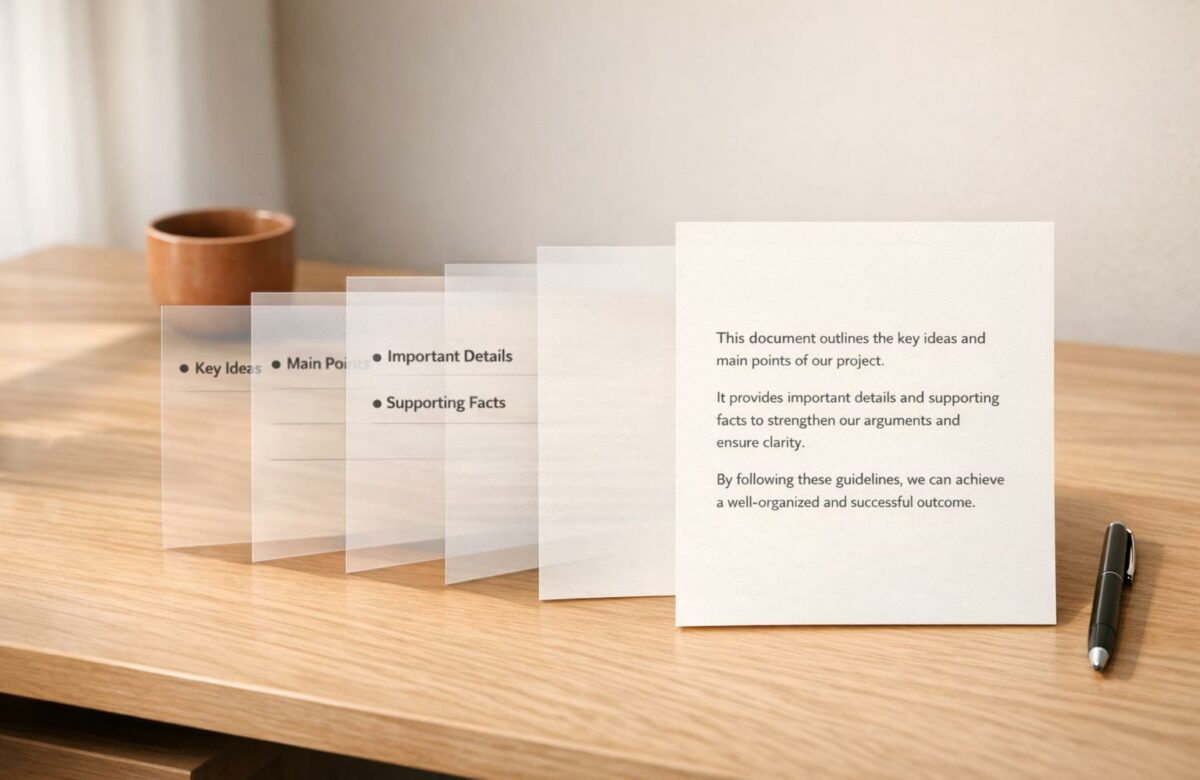
Turn Bullet Points Into Full Paragraphs Automatically
Writing polished paragraphs from bullet points is now easier than ever. AI tools can analyze your notes, identify key ideas, and instantly transform them into well-structured paragraphs. These tools save time, improve clarity, and allow you to focus on high-priority tasks. For example, BeLikeNative uses natural language processing to create cohesive text in seconds, supporting over 80 languages and offering customizable tones for business, academic, or creative writing.
Key Benefits:
- Time Savings: Automates repetitive writing tasks, saving users over 85 hours per month.
- Improved Clarity: AI organizes ideas with proper grammar, transitions, and flow.
- Customizable Output: Adjust tone and style to fit your audience or purpose.
How It Works:
- Input: Organize bullet points clearly and add context.
- AI Processing: The tool identifies main ideas, connects them, and generates text.
- Output: Copy the generated paragraph and refine as needed.
BeLikeNative integrates with platforms like Google Docs and Microsoft Teams, allowing you to highlight notes, press a shortcut, and instantly generate polished paragraphs. Starting at $4/month, it’s an affordable way to streamline your writing process.
Transform Any Text, On Any Site, In Seconds
Rephrase, translate, and improve text with one shortcut. Works everywhere you write.
Add to Chrome - It's Free!How AI Converts Bullet Points into Paragraphs
How AI Converts Bullet Points to Paragraphs in 3 Steps
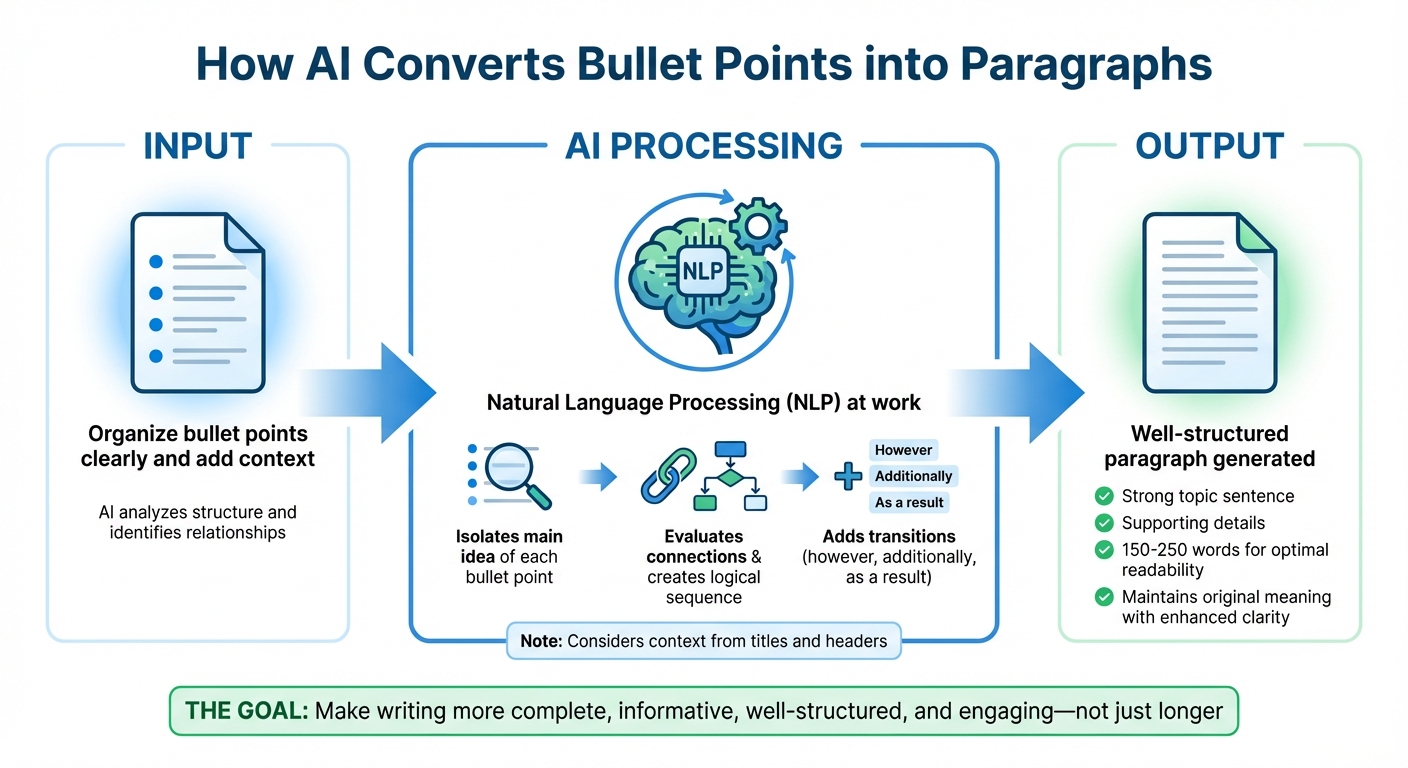
Building on our earlier discussion of AI-driven writing, let’s dive into how AI transforms bullet points into well-structured paragraphs. This process relies on generative AI, which combines machine learning and natural language processing (NLP) to understand language patterns and craft coherent text. When you input bullet points, the system analyzes their structure, identifies relationships between ideas, and generates paragraphs that flow naturally.
"Generative AI tools combine machine learning with natural language processing technology. They learn from underlying patterns and use that information to ‘decide’ what details to include in a paragraph, image, or other output." – QuillBot
The process starts with the AI isolating the main idea of each bullet point. It then evaluates how these ideas connect, creating a logical sequence. Context – like section titles and headers – is also factored in to ensure the generated content aligns with the overall theme of your document. This foundation allows the AI to produce paragraphs that maintain both relevance and clarity.
Natural Language Processing (NLP) Basics
NLP plays a key role in this transformation. These algorithms identify the relationships between bullet points and distill them into a clear topic sentence for each paragraph. Once the main ideas are established, the AI determines the best order for presenting the information. It also introduces transitions like "however", "additionally", or "as a result" to ensure smooth connections between ideas. When several bullet points revolve around a single topic, the AI combines them into one cohesive paragraph.
Maintaining Meaning and Readability
The AI ensures that your intended meaning stays intact while enhancing clarity. Instead of padding the text with unnecessary filler, it expands on your ideas by adding clarifications and supporting details that strengthen your message. The tone remains consistent because the AI applies patterns it identifies in your input.
"The goal is to make the writing more complete, informative, well-structured, and engaging – not just longer." – DocsBot AI
To enhance readability, the AI structures each paragraph with a strong topic sentence, followed by supporting details. Ideally, paragraphs fall within the 150 to 250-word range for optimal readability. You can further refine the output by providing specific prompts – clearly stating the desired length, context, and purpose will help the AI fine-tune its response. These techniques not only create well-organized content but also improve its flow, setting the stage for increased productivity, which will be explored in later sections.
Step-by-Step Guide to Converting Bullet Points
Turning bullet points into polished paragraphs might seem like a straightforward task, but doing it effectively requires some planning. Here’s a practical guide to help you make the most of your notes and transform them into cohesive, professional text.
Preparing Your Bullet Points
Start by organizing your bullet points in the order you want them to appear in your final paragraph. This ensures that the narrative flows naturally. Be specific and clear when writing your points. For instance, instead of jotting down something vague like "Q1 results – good", try "Q1 revenue increased by 15% compared to last year." Providing context allows the AI to create more detailed and meaningful sentences.
Another thing to keep in mind is the character limit of your plan. Platforms like BeLikeNative have different limits, ranging from 500 characters on the Free plan to 6,000 characters on the Premium plan. If your list is too long, consider breaking it into smaller, manageable sections to fit these limits.
How you structure and detail your bullet points plays a big role in the quality of the final output. Once you’ve organized your notes, you’re ready to use BeLikeNative for the conversion.
Using BeLikeNative to Convert Bullet Points
BeLikeNative integrates seamlessly with tools like Google Docs, Notion, WhatsApp Web, and Microsoft Teams, making it easy to convert bullet points directly within these platforms. Start by opening the side panel of the extension. Choose your preferred tone – whether formal for professional use or casual for informal settings – and select your target language from over 80 options.
Highlight your bullet points and use the shortcut: Alt + E on Windows or Command + E on Mac. This instantly converts your notes into a paragraph and copies it to your clipboard, saving time by eliminating the need to switch tabs or use a separate AI tool.
"BeLikeNative eliminates that friction entirely. Highlight text, press a shortcut, and paste perfection." – BeLikeNative
Once the paragraph is generated, you can paste it wherever you need and move on to the final step: reviewing and refining.
Reviewing and Editing the Output
After pasting the converted text, take a moment to review it for accuracy and flow. Ensure that the AI captured your original intent while improving the clarity of your ideas. Watch out for any awkward phrasing or transitions that might disrupt the reader’s experience.
If the output doesn’t meet your expectations, revisit your original bullet points. Adding more context or refining the details can make a big difference. Then, run the shortcut again to generate a revised version. BeLikeNative also offers an "improve" function that allows you to fine-tune individual sentences for better results.
While BeLikeNative’s algorithms are designed to handle complex edits and go beyond fixing simple typos, your final review is essential to ensure the content aligns with your voice and purpose.
Practical Uses for Bullet-to-Paragraph Conversion
Business Communication
Turning bullet points into paragraphs can elevate the quality of professional communication. Think about meeting notes, project updates, or client proposals – they often begin as quick bullet lists but need to be polished into full documents before being shared. With this approach, key decisions and action items can be seamlessly expanded into professional emails or detailed reports.
This process ensures a consistent and professional tone in business writing. You can even tweak the level of formality to match your audience, transforming casual brainstorming notes into a formal proposal with ease. By combining individual points into well-constructed paragraphs, even complex topics become easier for stakeholders to understand. This clarity is just as important in academic settings, where brief notes are often developed into comprehensive essays.
Academic Writing
For students and researchers, converting fragmented notes or raw data into structured paragraphs is a common hurdle. Tools designed for bullet-to-paragraph conversion can help expand rough notes into fully developed sections that explain theories or data in detail. This is particularly helpful during the prewriting phase, where you might need to elaborate on a thesis or research question to build a strong foundation for your paper.
By automating the more mechanical aspects of drafting, these tools let you focus more on your research and critical analysis, saving time while improving the quality of your work.
Content Creation for Digital Platforms
This technique isn’t limited to formal writing – it’s a game-changer for creative content too. Bloggers, marketers, and social media managers often start with simple outlines. Bullet-to-paragraph conversion allows them to quickly turn those outlines into engaging blog posts, social media captions, or marketing copy. For example, a list of product features can be expanded into a narrative that highlights benefits and tells a story.
The flexibility to adjust tone makes these tools especially useful for digital creators. A friendly, conversational tone might work best for social media, while a more analytical style could suit a white paper or case study. Plus, the tool can automatically add transitions and topic sentences, ensuring your content flows smoothly and keeps your audience hooked.
sbb-itb-32359dc
Benefits of Automating Paragraph Generation
Time and Effort Savings
Automating the process of turning bullet points into paragraphs eliminates unnecessary delays in your workflow. Instead of manually crafting sentences, you can simply highlight your notes and use a shortcut to generate polished text instantly. For example, pressing Alt+E (Windows) or Command+E (Mac) transforms your bullet points into clean paragraphs, automatically copying the content for use across various platforms.
This approach can save a ton of time. Users have reported cutting out over an hour of repetitive tasks daily, with top users seeing a 66% boost in productivity. High-frequency users save more than 85 hours each month, which could translate to approximately $35,700 in annual savings. This efficiency also ensures your document maintains a consistent flow, even when juggling multiple tasks.
Consistent Tone and Style
AI-driven automation ensures your writing stays consistent, both in tone and style, no matter how long or complex your project becomes. Whether you need a formal tone for a business report, a conversational voice for a blog post, or a technical style for a research paper, the tool applies your chosen tone across the entire document.
By understanding the context of your writing, the AI aligns new paragraphs with your existing narrative, creating a seamless and professional result. With support for over 80 languages, this consistency extends to multilingual projects as well, helping you deliver clear and polished content no matter your audience.
Better Clarity and Readability
This automation doesn’t just save time – it makes your writing clearer and easier to read. Bullet points often lack the transitions needed for smooth comprehension. Automation steps in to reorganize fragmented ideas into well-structured paragraphs, complete with logical flow and proper transitions. Beyond simple grammar fixes, the AI refines awkward phrasing and eliminates inconsistencies, elevating your notes to a level of fluency that feels natural.
The result? Polished, audience-ready content that requires little to no additional editing. Whether you’re working on a client proposal, academic paper, or marketing material, this clarity ensures your message is both engaging and effective.
Best Practices for Quality Results
When it comes to refining AI-generated content, following specific strategies can significantly improve its quality and precision.
Structuring Bullet Points Effectively
Consistency is key when working with bullet points. Start each point with the same grammatical form, such as action verbs or nouns, to make the AI’s task of generating coherent paragraphs easier.
"The section title is especially important for getting a good paragraph from bullet points" – John Shahawy, Founder of Moonbeam
Keep your lists concise – stick to 3–7 points per list to maintain readability and structure. If you have more than 8 points, consider breaking them into smaller groups under subheadings for clarity. Also, ensure punctuation is consistent: use periods for complete sentences and omit them for fragments. This helps the AI understand how to construct sentences properly.
Customizing Output for Your Audience
Tailor the tone and style of the content by selecting the appropriate audience tone, whether formal, casual, or something in between. Provide clear, detailed prompts, such as: "Act as a marketing copywriter and turn these points into a professional, energetic paragraph".
Clearly define your objective – whether you’re aiming to persuade, inform, or summarize – as this shapes the AI’s approach to word choice and sentence structure. For international audiences, set the target language (from over 80 options) to ensure grammatical accuracy and cultural appropriateness.
Editing AI-Generated Text
Always review AI-generated content for accuracy and flow. Use tools like the "Finetune" feature to adjust wording to align with your brand’s voice and ensure proper sentence structure and punctuation. If the output doesn’t meet expectations, refine your prompts and try again.
For more detailed editing tips, refer to the "Reviewing and Editing the Output" section. By combining these best practices with a strong initial setup, you can ensure the AI-generated content matches your communication goals perfectly.
Conclusion
BeLikeNative makes turning bullet points into polished paragraphs fast and effortless. It integrates smoothly with platforms like WhatsApp Web, Google products, Notion, and Microsoft Teams, helping you stay in the zone while producing professional-quality content in just about a second. These capabilities not only simplify your workflow but also improve overall performance.
The tool saves time, boosting productivity and making your writing process more efficient. With a 4.6/5-star rating on the Chrome Web Store from 194 users and over 3,000 active users, it’s clear that BeLikeNative has become a trusted companion for a variety of writing tasks.
Whether you’re drafting business emails, creating digital content, or perfecting academic papers, the tool’s ability to tailor tone and style in over 80 languages ensures your message connects with any audience. This multilingual functionality is especially helpful in professional and academic settings where effective communication across languages is a priority. Plus, its advanced error detection goes beyond standard grammar checks, identifying awkward phrasing and style issues that basic tools often overlook.
With keyboard shortcuts, you can transform rough drafts instantly – simply highlight your text and get a polished version ready to paste. Starting at just $4 per month with a 7-day free trial, it’s an easy and affordable way to see how automation can take your writing to the next level.
FAQs
How does BeLikeNative create accurate and high-quality paragraphs from bullet points?
BeLikeNative leverages AI algorithms and natural language processing (NLP) to transform bullet points into well-crafted paragraphs. By analyzing the context of the input, it generates sentences that flow naturally while staying true to the original message. The tool uses methods like contextual analysis, sentence restructuring, and vocabulary adjustments to create polished, professional content.
To ensure accuracy, users can review and tweak the output before finalizing it. This added layer of oversight helps align the content with specific needs and eliminates potential errors. By blending advanced AI technology with user input, BeLikeNative streamlines the writing process and improves the quality of written communication.
Can BeLikeNative turn technical bullet points into clear and detailed paragraphs?
BeLikeNative is built to tackle even the most intricate and technical bullet points effortlessly. Using AI-driven tools, it turns brief notes into well-organized, professional paragraphs that are also easy to understand.
By evaluating the context and specifics of your bullet points, BeLikeNative delivers text that is clear, precise, and refined. It’s a great way to save time while ensuring your written communication stays top-notch.
What options does BeLikeNative offer for customizing writing styles and tones?
BeLikeNative offers a range of options to tailor your writing’s tone and style to fit any situation. Whether you’re aiming for a confident, formal, or casual voice – or something in between – you can easily tweak the settings to suit your needs. This flexibility is perfect for crafting business emails, academic papers, or even personal messages.
On top of that, BeLikeNative supports over 80 languages, making it an excellent choice for multilingual communication. You can also effortlessly switch between formal and informal styles, ensuring your content feels polished and appropriate for any audience. These features make BeLikeNative a versatile tool to refine your writing in various contexts.
Related Blog Posts
- Struggling to Start? The Best AI Topic Sentence Generators to Kickstart Your Writing!
- Convert Informal Text To Formal With Ai For Professional Writing
- Ai-powered Sentence Finishers That Complete Your Thoughts
- Simplify Long Paragraphs With AI For Better Readability
BeLikeNative fixes grammar, rephrases, translates, and simplifies text on any website in 1 second — just highlight and hit a keyboard shortcut. No tab switching. Try it free →

