

How To Write Cold Emails That Get Replies Using AI
Cold emails often fail because they’re generic, irrelevant, or overly formal. Today, AI can help fix this by making emails more personalized, timely, and engaging. Instead of sending mass emails, focus on smaller, highly-targeted campaigns. Here’s how AI can help:
- Personalization at Scale: AI tools analyze LinkedIn activity, company news, and industry trends to craft tailored introductions.
- Better Subject Lines: AI generates concise, data-driven subject lines that grab attention and avoid spam triggers.
- Clear Email Bodies: Keep messages short (under 70 words), focus on the recipient’s challenges, and use a conversational tone.
- Follow-Ups: Automate follow-ups based on recipient behavior, ensuring consistent engagement across multiple touchpoints.
- Compliance and Deliverability: AI checks spam scores, warms up domains, and ensures legal compliance with regulations like CAN-SPAM and GDPR.
In short, AI doesn’t replace the human touch – it amplifies it. With tools like BeLikeNative, you can write emails that feel natural, save time, and improve reply rates.
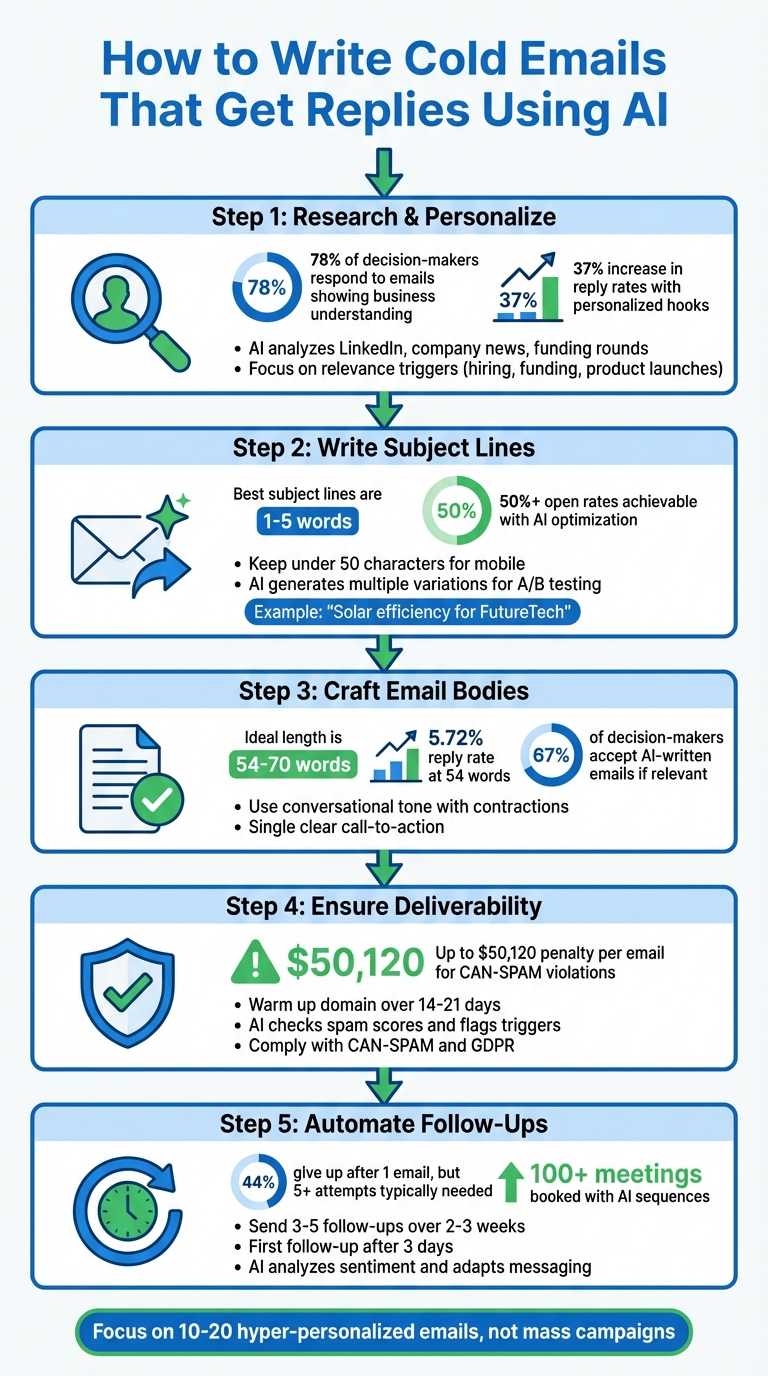
5-Step AI Cold Email Writing Process with Key Statistics
How I Use AI to Write Better Cold Emails (Without Losing Personalization)
sbb-itb-32359dc
Step 1: Research and Personalize Your Emails with AI
The difference between a cold email that gets ignored and one that gets a reply often boils down to how well you understand your recipient. Generic emails that could apply to anyone are easy to dismiss – 78% of decision-makers are more likely to respond when an email demonstrates a clear understanding of their business. Here’s where AI steps in: it can handle the time-consuming task of gathering insights, analyzing countless data points in seconds to uncover what truly matters.
How AI Gathers Recipient Information
AI tools sift through publicly available sources to create detailed profiles of your prospects. They pull data from LinkedIn (recent posts, job changes, skills), company websites (press releases, product updates, pricing pages), and business databases (funding rounds, hiring trends, office expansions). Even Chrome extensions can extract contact details, job titles, and company information as you browse. Advanced tools take it further by monitoring social signals – like when a prospect comments on industry news or celebrates a company milestone – and flagging these as ideal moments for outreach.
But the goal isn’t just to collect random facts. It’s about spotting relevance triggers – key details that make your outreach timely and meaningful. For example, AI can identify when a company secures Series B funding, posts job openings for several sales reps, or announces a new product. These triggers form the backbone of emails that feel purposeful rather than generic. Kyle Coleman, CMO at Copy.ai, puts it perfectly:
"The word ‘personalization’ is the most overused word in all of sales. I’d like to take this opportunity to change it to ‘Relevance in the first line.’"
By identifying these relevance triggers, AI enables you to craft introductions that immediately connect.
Writing Custom Introductions with AI
AI can help you write opening lines that directly reference specifics about the recipient’s world. Instead of a vague statement like, “I see you work in marketing,” an AI-powered introduction might say: “I noticed your team recently posted openings for three SDRs – looks like you’re scaling your outbound efforts quickly.” That one sentence shows you’ve done your homework and explains why you’re reaching out now.
Emails with personalized hooks – like insights from LinkedIn activity or hiring trends – see reply rates increase by up to 37%. The secret? Focus on one concrete detail, such as a LinkedIn post, a blog update, or a funding announcement, and tie it to a potential challenge the recipient might face. For instance: “Congrats on the $10M Series A last month. With that kind of growth, keeping your sales team trained and aligned must be a priority.”
To get the most out of AI, provide structured prompts that include the recipient’s role, potential pain points, and the specific trigger you want to highlight. Tools like AiSDR and Smartwriter.ai can automate this process across entire prospect lists, delivering unique introductions for each recipient while you focus on refining the final output. Once you’ve secured a response, you can also use AI to generate polite email replies to keep the conversation moving. This level of tailored research sets the stage for writing attention-grabbing subject lines and compelling email bodies.
Step 2: Write Subject Lines That Get Opened
Your subject line plays a critical role in whether your email gets opened or ignored. Along with your name and the preview text, it’s one of the first things recipients notice – so it needs to be short and impactful. Kyle Coleman, CMO at Copy.ai, puts it plainly:
"Nailing a compelling subject line is half the battle, because you can’t start a conversation with someone who never opens your email."
Thanks to AI, crafting subject lines has become more precise and data-driven. By analyzing large datasets and historical trends, AI can recommend concise, personalized subject lines tailored to your audience. It even draws from real-time data – like recent website visits, LinkedIn activity, or company updates – to make your email feel uniquely relevant.
The numbers don’t lie: the best subject lines are usually between 1–5 words. Keeping them short ensures they’re fully visible on mobile devices (under 50 characters) and maximizes the impact of preview text. AI helps you hit this sweet spot by generating subject lines that are brief, typically 3–4 words in sentence case. It can also create multiple variations for A/B testing, helping you find the version that resonates most with your audience.
Examples of AI-Generated Subject Lines
AI shines when it comes to crafting subject lines tied to specific, timely events. For example, instead of a generic "Quick question", it might suggest "Solar efficiency for FutureTech" after detecting a company post about sustainability goals. Or, it could generate "How [Competitor] got 20%+ MRR", sparking curiosity with a measurable outcome. By incorporating dynamic variables like {{firstName}}, {{companyName}}, or industry-specific stats, AI makes your email feel highly personalized.
Consider this real-world success: in 2024, People HR, an HR software company, used Reply.io‘s AI-powered platform to automate their cold email campaigns. By leveraging AI-crafted subject lines and personalized messaging, they generated an extra $15,000 in revenue within three months. Their emails consistently achieved open rates above 50% and reply rates of 10%.
AI also helps you steer clear of spam triggers that could harm your deliverability. It flags problematic keywords like "free", "guarantee", or "reminder", as well as formatting issues like excessive punctuation or ALL CAPS. This ensures your emails land in the primary inbox, not the promotions tab or spam folder, safeguarding your domain reputation while boosting visibility.
With AI-generated subject lines that grab attention, you’re set to create email bodies that drive action.
Step 3: Craft Clear and Persuasive Email Bodies with AI
Once your subject line grabs attention, the email body needs to deliver value right away. AI can help structure your email with a personal opening, a straightforward value proposition, and a single call-to-action. Aim to keep it short – ideally under 70 words for easy scanning. Research suggests that emails with around 54 words perform well, achieving a 5.72% reply rate and a 31.47% interest rate.
Before using AI, try a simple exercise: write three sentences about your product as if you were texting a friend. This helps establish a conversational, natural tone. When prompting AI, encourage it to use contractions like "you’re" or "we’ve", and start sentences with words like "And", "So", or "But" to make the email feel more like a real conversation. Kyle Coleman, CMO at Copy.ai, emphasizes the importance of clarity:
"Nail your value proposition in plain English – if you can’t explain it to a 10-year-old, it’s too complicated."
Avoid jargon like "synergies" or "cutting-edge". Interestingly, two-thirds of decision-makers are open to AI-written emails, provided the message is relevant and feels human. Once AI generates a draft, read it aloud – if it sounds stiff or overly formal, tweak it. This process lays a solid foundation for refining the tone and addressing specific recipient needs.
Using BeLikeNative to Adjust Tone and Style
BeLikeNative simplifies the process of tailoring tone and style to fit your recipient’s persona. Whether you’re writing to a startup founder or a corporate VP, you can adjust the tone – casual for one, polished for the other – and fine-tune the style to align with their expectations. Just paste your draft, choose a tone, and BeLikeNative will rewrite it while keeping your core message intact.
This tool supports 80+ languages and integrates with platforms like Gmail, LinkedIn, and Notion. For instance, if you’re targeting tech-savvy urban professionals, you can prompt for a relaxed, approachable tone. For enterprise buyers, focus on value-driven language that addresses specific challenges and includes social proof. This flexibility ensures your email resonates with your audience’s communication style.
Once the tone is set, shift your focus to addressing the recipient’s unique challenges.
Addressing Recipient Challenges with AI
AI is particularly effective at identifying and addressing the specific challenges your recipient may be facing. By analyzing LinkedIn profiles, company websites, and hiring trends, AI can uncover issues like low response rates or the inefficiencies of manual follow-ups. It can even provide tailored insights, such as, "I noticed these 5 blog articles rank between 12th–15th positions", showing that your email isn’t generic.
This "challenge and solution" approach builds trust. For example, you might mention how People HR leveraged AI-driven outreach to secure over 100 meetings and generate $15,000 in new revenue within three months. Keep your call-to-action simple and easy to act on – something like "Free next week to discuss?" works far better than overwhelming the recipient with multiple requests. AI also optimizes formatting, ensuring your emails are mobile-friendly and make good use of whitespace.
Step 4: Improve Deliverability and Follow Regulations
Making sure your email lands in the inbox – and not the spam folder – is crucial for successful campaigns. Without this, your carefully crafted messages may never even reach your audience. To tackle this challenge, you need both technical know-how and legal compliance. Thankfully, AI can take on much of the heavy lifting, from preparing your sending domain to scanning for potential spam triggers before you hit send.
Using AI to Check Spam Scores
AI tools can analyze your email drafts and flag words or phrases that might set off spam filters. For instance, terms like "synergy", "revolutionary", and "leverage" are common culprits. These tools not only suggest better alternatives but also evaluate your email’s overall structure. They’ll review elements like subject line accuracy, formatting, and even verify authentication records to ensure your email looks trustworthy.
If you’re starting with a new email account, it’s essential to "warm it up" over 14 to 21 days before launching any major campaigns. AI tools can simulate natural email-sending behavior, gradually increasing your daily email volume from 5–10 to 30–50 messages. This method helps build a solid sender reputation. Jumping into large-scale sending too quickly from a new account can harm your deliverability. AI also pre-validates your email list by removing invalid addresses, which protects your sender score from the damage caused by high bounce rates.
Another smart tactic? Use AI Variables to create personalized content for each recipient. This dynamic approach helps your emails avoid being flagged as spam due to identical bulk messaging. And remember: never send cold emails from your primary business domain. Instead, purchase alternate domains to safeguard your main email infrastructure. Once deliverability is optimized, the next step is ensuring you follow all legal requirements.
Following Email Marketing Laws
Compliance isn’t optional – it’s the law. For example, breaking the CAN-SPAM Act could cost you up to $50,120 per email. AI can simplify compliance by automatically including required elements in your emails and processing opt-out requests within the mandated 10 business days.
AI can also help you navigate different regulatory frameworks, such as CAN-SPAM for U.S. audiences and GDPR for those in the EU. For GDPR compliance, AI tools can maintain detailed records, including timestamps and IP addresses of consent, which are essential for audits. They’ll even scan subject lines to ensure they’re clear and truthful, a key requirement under CAN-SPAM. Adelina Peltea, CMO at Usercentrics, emphasizes:
"Regularly review and audit regulatory compliance requirements, technologies in use, data held and its handling, consent status, and other relevant aspects of email and other marketing operations."
While AI is a powerful tool, it’s important to keep human oversight in the loop. Review AI-generated content to ensure it aligns with your brand’s ethics and values. Additionally, stick to gathering publicly available professional data – like job titles or company news – rather than sensitive private information. This approach not only keeps you compliant with data minimization principles but also fosters trust with your audience.
Step 5: Automate Follow-Ups and Analyze Responses
Closing a sale often takes persistence – research shows it typically requires at least five follow-up attempts, yet 44% of salespeople give up after just one email. This is where AI steps in, taking on the repetitive task of follow-ups. By automating these processes, AI ensures consistent engagement, tailoring messages based on recipient behavior and improving future campaigns through continuous learning.
Setting Up AI-Powered Follow-Up Sequences
AI simplifies follow-ups by creating workflows that adapt to real-time engagement. For example, if someone opens your email, clicks a link, or visits your website, the system triggers a follow-up tailored to that specific action. Let’s say a recipient opens your email twice without responding – AI might send a follow-up three days later, offering new content like a case study to re-engage them.
Conditional sequencing adds another layer of precision. AI can classify responses into categories such as "Interested", "Meeting Intent", "Pricing Request", or "Out of Office", and then send the most relevant follow-up automatically. This approach has shown impressive results, including over 100 booked meetings and notable revenue increases within just a few months.
For best results, aim to send 3–5 follow-up messages over a two-to-three-week period. Start with the first follow-up three days after your initial email – this timing keeps your outreach fresh without coming across as overly aggressive. Avoid following up the next day, as it can lower reply rates. Use simple, low-pressure calls to action like “Worth a quick chat?” instead of pushing for a lengthy meeting. This strategy often doubles response rates. Keep your follow-ups concise – around 54 words – since this length is linked to a 5.72% reply rate and a 31.47% interest rate.
Using AI to Analyze Response Patterns
AI doesn’t just automate follow-ups; it also improves your strategy by analyzing responses. It categorizes replies as positive, negative, or out-of-office and uses sentiment analysis to identify leads with genuine interest. Metrics like open rates, click-throughs, and response patterns are tracked to refine future outreach. AI also runs A/B tests, replacing underperforming copy with better alternatives.
This creates a feedback loop that sharpens your approach over time. For instance, if certain tones, value propositions, or subject lines drive higher response rates, AI adjusts its messaging to replicate those successes. You can even feed your best-performing emails back into the system to train it on what resonates most with your audience. By combining real-time sentiment analysis and continuous testing, AI fine-tunes your messaging to consistently improve response rates.
BeLikeNative Pricing for Cold Email Writing
If you’re looking for a plan that fits your email outreach needs, BeLikeNative has got you covered with four pricing tiers. These plans are designed to cater to different levels of email activity, from occasional tweaks to high-volume campaigns. Each plan supports 80+ languages, offers tone and style customization, and includes clipboard integration to make your workflow smoother.
The Explorer plan is completely free and allows for 5 uses per day with a 500-character limit, making it perfect for occasional email touch-ups. For more regular use, the Learner plan costs $4/month and provides 25 daily uses with a 2,000-character limit, ideal for standard outreach efforts. If you need more capacity, the Native plan at $6/month increases the limit to 50 daily uses and 4,000 characters, along with priority bandwidth – great for small sales teams juggling multiple campaigns.
For businesses or agencies handling high-volume outreach, the Premium plan is available at $14/month. This tier offers 125 daily uses and a 6,000-character limit, along with partnership perks, including a lifetime license option after two years. It’s the go-to choice for those sending hundreds of personalized emails each week.
BeLikeNative Plan Comparison
Here’s a quick breakdown of the plans to help you find the right fit for your email campaigns:
| Plan | Price | Daily Uses | Character Limit | Best For |
|---|---|---|---|---|
| Explorer | $0/month | 5 | 500 | Occasional email edits and testing |
| Learner | $4/month | 25 | 2,000 | Individual users with steady outreach |
| Native | $6/month | 50 | 4,000 | Small teams managing multiple campaigns |
| Premium | $14/month | 125 | 6,000 | High-volume senders and agencies |
Each paid plan also includes editable options and custom shortcuts, making it easier to adjust tones and add personalization tokens to your emails effortlessly.
Conclusion
Getting replies to cold emails boils down to three key factors: relevance, trust, and personalization. Forget the old-school approach of mass emailing – it’s all about creating messages that feel tailored and genuine. AI tools can handle the heavy lifting, like research, drafting, and follow-ups, but your personal touch is what makes the difference. Think of AI as your co-pilot: it helps you streamline the process, but your tone and insights keep the message real. Instead of sending out thousands of generic emails, focus on smaller, hyper-personalized campaigns of 10–20 emails. This approach is proving much more effective.
Stick to the tips we covered for crafting subject lines and structuring your emails. And here’s an encouraging stat: 67% of decision-makers are fine with AI-written emails – as long as they’re relevant. That’s where tools like BeLikeNative come in. They help you fine-tune AI-generated drafts so they feel natural and human. Whether you’re on the free Explorer plan sending five emails a day or using the Premium tier to send up to 125, this tool ensures your emails avoid sounding robotic while keeping a conversational tone that gets results.
Once you’ve nailed your email strategy, don’t forget the follow-ups. Automate them, warm up your domain, and track engagement. Consistency is key – many responses happen after the second or third email. By combining AI-driven personalization with smart follow-up tactics, you can boost reply rates while saving time and effort.
FAQs
How can AI make cold emails more personalized and effective?
AI has the ability to turn generic cold emails into highly customized messages by analyzing publicly available information like company news, social media updates, or recent accomplishments. It uses this data to craft personalized subject lines, opening statements, and calls-to-action, making the email feel like it’s been carefully written for the recipient. This kind of tailored approach not only captures attention but also helps establish a connection.
AI-powered tools can also incorporate dynamic placeholders such as {{firstName}} or {{recentAward}}, automatically populating them with specific details for each recipient. On top of that, these tools continuously learn from engagement metrics – like reply rates – to refine the tone, language, and timing of your emails. This ensures your outreach stays effective, even at scale. By automating routine tasks, AI frees you up to focus on having meaningful interactions while still keeping a personal touch in your communication.
How can AI help create subject lines that get more email responses?
Crafting subject lines that grab attention is a whole lot easier with AI. Start by using an AI tool to come up with multiple variations and then test them to see which ones resonate most with your audience. Keep subject lines short – ideally under 50 characters – so they display properly across most devices. And here’s a tip: put the key benefit or value right at the start. This way, readers immediately see why your email is worth opening.
AI can also take personalization to the next level. By weaving in details like the recipient’s company name, recent accomplishments, or other specifics, your subject lines will feel more tailored and relevant. Plus, AI tools can suggest punchier, more engaging words while cutting out weak or overused phrases. On top of that, AI can analyze past email performance, helping you fine-tune your approach over time and dodge those pesky spam filters.
How does AI help ensure cold emails comply with legal regulations?
AI-powered tools make navigating email marketing laws much easier by handling the essential legal details for you. These tools automatically include critical elements in your emails, such as consent notices, unsubscribe links, and clear data-handling language. On top of that, they can identify content that might trigger spam filters or break regulations, reducing the risk of fines or penalties.
By keeping up with key privacy laws like GDPR and CCPA, these systems can manage consent records and even generate audit trails for verification. This means you can focus on creating engaging email campaigns while the platform ensures your outreach stays compliant, whether you’re targeting audiences in the U.S. or overseas.

