
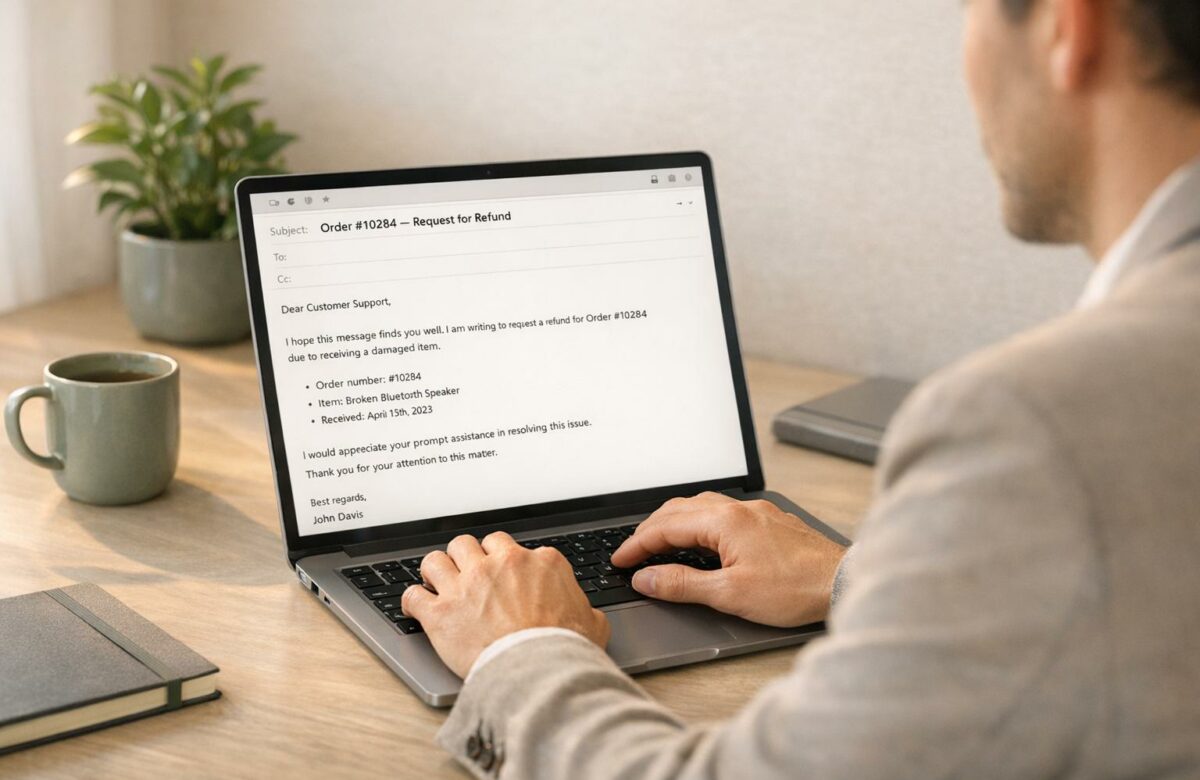
How To Write A Complaint Email That Gets Results
When something goes wrong with a product or service, writing an effective complaint email can help you resolve the issue quickly and professionally. Here’s how to ensure your email gets results:
- Start with a clear subject line: Include details like an order or account number (e.g., "Refund Request for Order #12345").
- Explain the problem clearly: Describe the issue, include a timeline, and specify how it has affected you (e.g., financial loss, inconvenience).
- Request a specific solution: State what you want – refund, replacement, or repair – and set a reasonable deadline for a response.
- Attach supporting evidence: Add receipts, photos, or other documents to strengthen your case.
- Maintain a professional tone: Be polite and factual, avoiding emotional or accusatory language.
A concise, respectful email with all necessary details increases your chances of a prompt and positive resolution. Including a response deadline and evidence makes it harder for the company to ignore your request. Use the provided template to structure your email effectively.
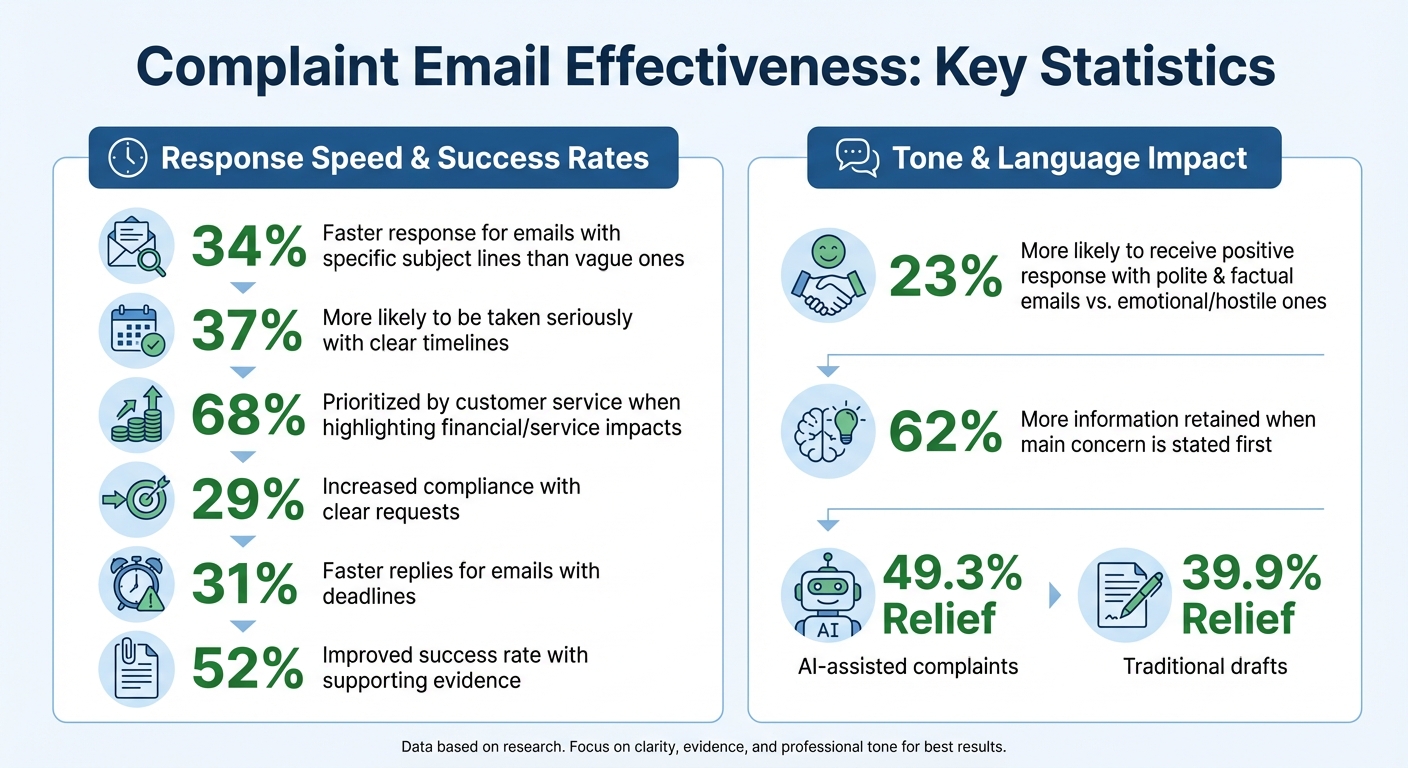
Complaint Email Effectiveness Statistics and Success Rates
Complaint Letter–How to Write an Effective Letter/Email of Complaint
sbb-itb-32359dc
What to Include in a Complaint Email
When writing a complaint email, including the right elements can lead to a quicker and more effective resolution.
Contact Information and Subject Line
Start with a clear and specific subject line to ensure your email reaches the correct department. For example, "Refund Request for Order #12345 – Defective Kettle" makes it easy for the company to verify your claim. Including details like the order number, account number, or service date helps customer service teams process your request without delays.
Avoid vague subject lines like "Problem" or "Issue." Instead, be precise with something like "Order #12345 Missing Item." Emails with direct and specific subject lines are responded to 34% faster than those with unclear headings.
Once the subject line is set, provide your contact information and move on to explaining the issue.
Problem Description and Requested Solution
Clearly describe the problem in your email. Start with a straightforward statement of the issue, then outline the details in chronological order. For example, include when you made the purchase, the delivery date, and when the issue began. A clear timeline adds credibility to your complaint, making it 37% more likely to be taken seriously by customer service teams.
Explain how the problem has impacted you. Instead of general statements like "I’m upset", specify the consequences: "This defect caused $50 in spoiled groceries." Complaints that highlight financial or service-related impacts are prioritized in 68% of cases.
"If you do not ask for a clear outcome, the business may choose the easiest response instead of the fairest one." – RequestLetters.com
Be explicit about what you’re seeking – whether it’s a refund, replacement, repair, or account adjustment. A clear request increases the likelihood of compliance by 29%. Set a reasonable deadline for a response, such as 7 to 14 days, to encourage accountability. Emails with deadlines receive replies 31% faster.
Supporting Documents and Sign-Off
Attach any relevant documents, such as receipts, photos, or past correspondence. Keep the originals for your records. Including supporting evidence improves the success rate of complaints by 52%.
Mention the attachments in your email, like "I have included a copy of the receipt" or "Attached is a photo of the damage." Use clear filenames, such as "Receipt_Order_44821.pdf", and keep the total file size under 10MB. Stick to common formats like PDF, JPG, or PNG for easier access.
End your email with professional email etiquette with a clear expectation for a reply. For instance, "I look forward to your response by March 25, 2026" sets a firm but polite deadline. Sign off with "Sincerely" or "Best regards", followed by your full name and contact details.
How to Use the Right Tone and Language
When crafting a complaint, your tone and language play a huge role in whether your concerns are taken seriously. The way you phrase your message can directly influence the outcome. In fact, polite and factual emails are 23% more likely to receive a positive response compared to emotional or hostile ones. The key is to strike a balance: firm enough to convey the seriousness of your issue but polite enough to encourage action.
Stay Polite and Professional
Instead of venting frustration, focus on explaining how the issue has impacted you. For instance, instead of saying, "Your terrible service disrupted my plans", try something more specific like, "The delayed delivery caused me to miss an important client meeting, resulting in a $500 loss." This approach highlights the seriousness of the problem without unnecessary emotion.
Using "I" statements is another effective strategy. For example, "I feel disappointed because the service didn’t meet my expectations" avoids sounding accusatory, unlike statements such as "You failed to deliver as promised". It’s also helpful to remember that the person reading your email may not be directly responsible for the issue. A constructive tone often gets better results than assigning blame.
If you’re feeling upset, give yourself at least 30 minutes before writing or sending the email. This cooling-off period can help you approach the situation more objectively, reducing the likelihood of using language that could harm your credibility.
Write Clearly and Concisely
Start by stating the issue in the very first paragraph. Research shows that readers retain 62% more information when the main concern is introduced right away. Use neutral, factual language and include specific details like dates, order numbers, and locations to establish credibility and provide context.
Avoid vague or overly emotional phrases. For example, instead of saying, "I’m really upset about this", you could write, "This defect caused $180 in spoiled groceries". Keeping your sentences short and to the point ensures that your message is clear and easy to follow.
Here are some professional phrases to consider:
- "I would like to bring to your attention…"
- "I am writing to express my concern about…"
- "I would appreciate it if you could…"
- "Thank you for your prompt attention to this matter."
Steer clear of words or phrases that might escalate tension, such as "Actually…" or "You should have…", as these can make the recipient defensive. Once your email is clear and factual, you can refine it further with tools like BeLikeNative.
Using BeLikeNative to Refine Your Email
BeLikeNative is a Chrome extension designed to help you maintain the right balance between professionalism and assertiveness. For example, it can rephrase overly harsh statements like "Your service is completely unacceptable" into something more constructive, such as "The service did not meet the standards outlined in your policy." It also supports over 80 languages, making it a useful tool for addressing international companies and ensuring your tone aligns with professional norms.
This tool doesn’t just improve clarity – it reinforces your professional approach, which can increase the likelihood of resolving your complaint quickly. BeLikeNative integrates seamlessly with platforms like Gmail and Outlook, allowing you to refine your email with a simple shortcut, all without needing to switch between applications. It’s a quick and effective way to polish your message before you hit send.
5 Steps to Write a Complaint Email
When writing a complaint email, maintaining a professional tone is essential. These five steps will help you structure your email effectively and increase your chances of resolving the issue.
Step 1: Include Purchase Details and Order Information
Start by providing your full contact details and any relevant identifiers, such as an account number, order number, or transaction ID. These details make it easier for the company to locate your purchase.
For physical products, list the product name, model number, and serial number. Be sure to include specifics like the purchase date, the time of the incident, and the location – whether it’s a store address or a website URL. If shipping is involved, add tracking numbers or package label details.
Details like these are crucial. Including accurate and complete information improves the likelihood of a quick resolution. Use a clear subject line, such as "Issue with Order #12345", to direct your email to the right department.
Step 2: Describe the Problem
Clearly explain the issue at the beginning of your email. Stick to the facts, listing details like dates, times, and specific actions in an organized manner.
Use precise language. For example, instead of saying, "The product doesn’t work", specify the issue: "The Model X kettle leaks from the base when filled." If possible, quantify the impact of the problem, such as financial loss or inconvenience (e.g., "lost $180 in spoiled groceries" or "missed two hours of work"). If you’ve already spoken to customer service, mention the representative’s name and the date of the conversation.
"A business can ignore a vague rant, but it is much harder to ignore a letter that names the purchase, the date, the problem, the supporting documents, and the exact fix requested." – RequestLetters
Step 3: State What You Want
Once the problem is outlined, clearly state what you’re asking for – whether it’s a refund, replacement, repair, or credit. For example, you might write, "I am requesting a full refund of $89.99 to my original payment method", or "I would like a replacement unit shipped within five business days."
Being specific about your desired resolution makes it easier for the company to act. Highlighting financial losses or service disruptions often prompts faster reviews, with 68% of such cases receiving priority attention.
Step 4: Request a Response Deadline
Adding a deadline creates urgency and accountability. Complaints that include a specific response timeframe are resolved 31% faster than those without one. Use clear terms like "10 business days" or "two weeks", or specify a date, such as "March 26, 2026."
For example, you could say, "Please respond in writing by March 26, 2026", or "I request that this matter be resolved within 10 business days." If appropriate, mention your next steps – like escalating the issue to the Better Business Bureau – if the deadline isn’t met. Be reasonable with your timeline, typically allowing 7 to 14 days.
Step 5: Close Professionally
End your email with a polite and professional closing. Thank the recipient for their attention, and express your expectation for a prompt response. A closing like "Thank you for your prompt attention to this matter. I look forward to your response" works well.
Repeat your contact information at the end, including your phone number and email address, so the company can easily reach you. Sign off formally with "Sincerely" or "Best regards", followed by your full name. These final touches ensure your email is clear, respectful, and actionable, increasing the likelihood of a timely resolution.
Complaint Email Template
Ready-to-Use Template
Here’s a structured template you can use to draft an effective complaint email. Simply replace the bracketed placeholders with your specific details.
Subject: Complaint: [Product/Service Name] – Order #[Order Number]
[Your Full Name]
[Your Street Address]
[City, State, ZIP Code]
[Your Email Address]
[Your Phone Number]
[Date: MM/DD/YYYY]
[Company Name]
[Department Name or Manager’s Name]
[Company Street Address]
[City, State, ZIP Code]
Dear [Company Name] Customer Service Team,
I am writing to report an issue with
, which I purchased on [MM/DD/YYYY] from [store or website]. The order number is [order number], and my account number is [account number].On [MM/DD/YYYY], I noticed that [specific description of the problem]. The
[provide details of the defect or service failure]. I reached out to [representative’s name] on [MM/DD/YYYY], but the issue remains unresolved.This situation has caused [specific impact, such as "a financial loss of $150" or "service interruption for three days"].
I have attached [list documents: receipt, photos of damage, warranty, previous correspondence] for your reference.
I am requesting [specific resolution: a full refund of $XX.XX, a replacement unit, repair, or service credit]. Please reply in writing by [MM/DD/YYYY] or within [10 business days] to confirm how this issue will be addressed.
Thank you for your attention to this matter. I look forward to your response.
Sincerely,
[Your Full Name]
[Your Phone Number]
[Your Email Address]
Attachments: [List each document, such as "Receipt copy", "Product photos", "Warranty document"]
Tip: Keep your tone professional and neutral. For example, saying "I am disappointed that the service did not meet expectations" is more effective than using emotional phrases, as it increases the likelihood of a positive response by 23%.
Conclusion
Writing an effective complaint email requires a mix of clarity, professionalism, and supporting evidence. Including specific details – like order numbers or purchase dates – alongside any relevant documentation strengthens your case. Maintaining a neutral tone further increases the likelihood of a prompt and satisfactory response.
"A strong complaint letter can often achieve what repeated calls and frustrated emails cannot: it creates a clean written record, explains the facts, and asks for a specific solution." – Colleen Tressler, Consumer Education Specialist, FTC
Every part of your email matters. From clearly outlining your issue to stating the remedy you’re seeking – whether it’s a refund, replacement, or repair – you build a solid foundation for resolution. Adding a response deadline, typically 7 to 14 days, signals urgency and encourages timely action.
Services like BeLikeNative can refine your message by removing emotional language while keeping it professional. Research from Yale SOM highlights that AI-assisted complaints result in relief 49.3% of the time, compared to 39.9% for traditional drafts. Taking a moment to cool off after a frustrating experience can also help you maintain objectivity when writing.
FAQs
What if I don’t have an order number or receipt?
If you don’t have an order number or receipt, you can still file a complaint by giving a clear explanation of the issue and sharing as many details about your purchase as possible. Mention what you ordered, the date of purchase, and how the problem arose. Including supporting evidence, like emails or payment records, can strengthen your case. Keep your tone polite, lay out the situation clearly, and state what outcome you’re seeking – whether it’s a refund, replacement, or another solution.
Who should I email if I can’t find the right support address?
If you’re unable to find the specific support email address, reaching out to the organization’s general or customer service email is a smart move. These addresses are often set up to handle a variety of inquiries and can ensure your message gets forwarded to the right department or individual who can help. Many companies rely on this system to manage and route incoming messages effectively.
What should I do if they ignore my deadline?
If someone misses your deadline, clearly restate your expectations and ask for a quick response. Reference the original deadline and specify the action you’re waiting on. If they still don’t reply, send a polite follow-up, emphasizing why resolving the matter promptly is important. Keeping your tone professional and respectful can improve the likelihood of getting a response.

