
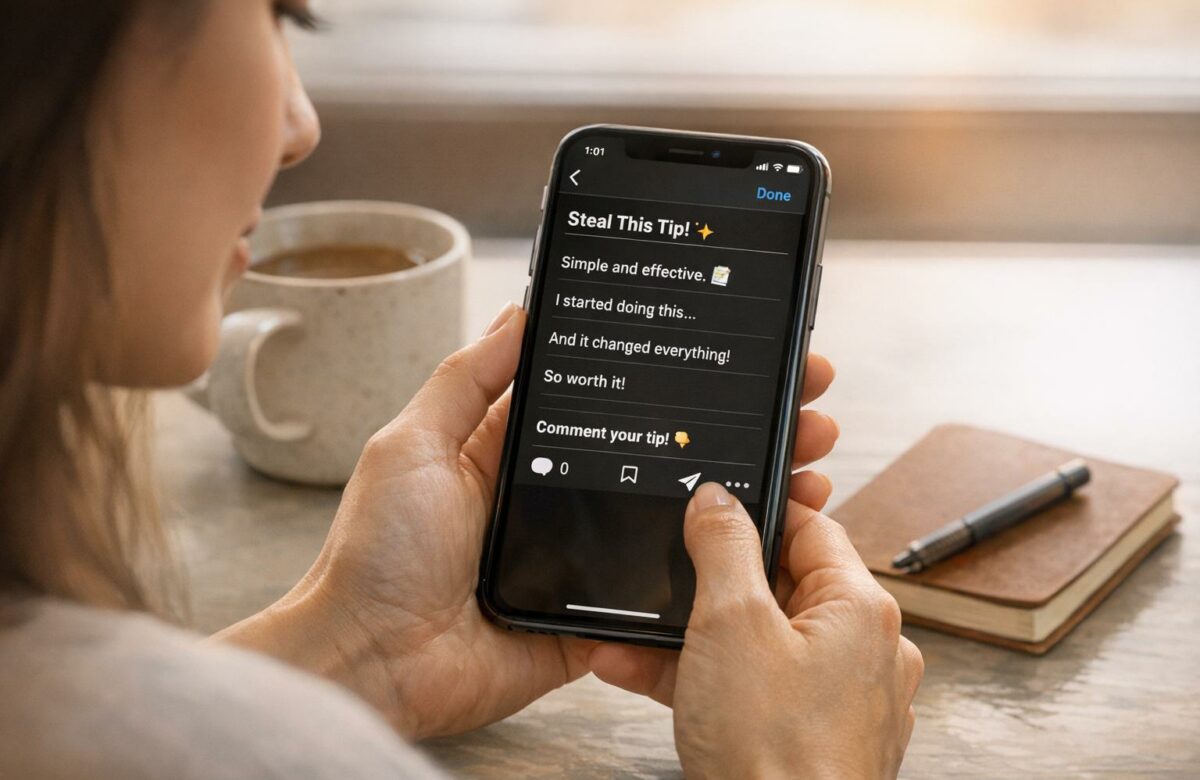
How To Write Instagram Captions That Get Engagement
Want more engagement on Instagram? Start with your captions.
A great caption isn’t just about describing a photo – it’s about connecting with your audience and keeping them engaged. Here’s what you need to know:
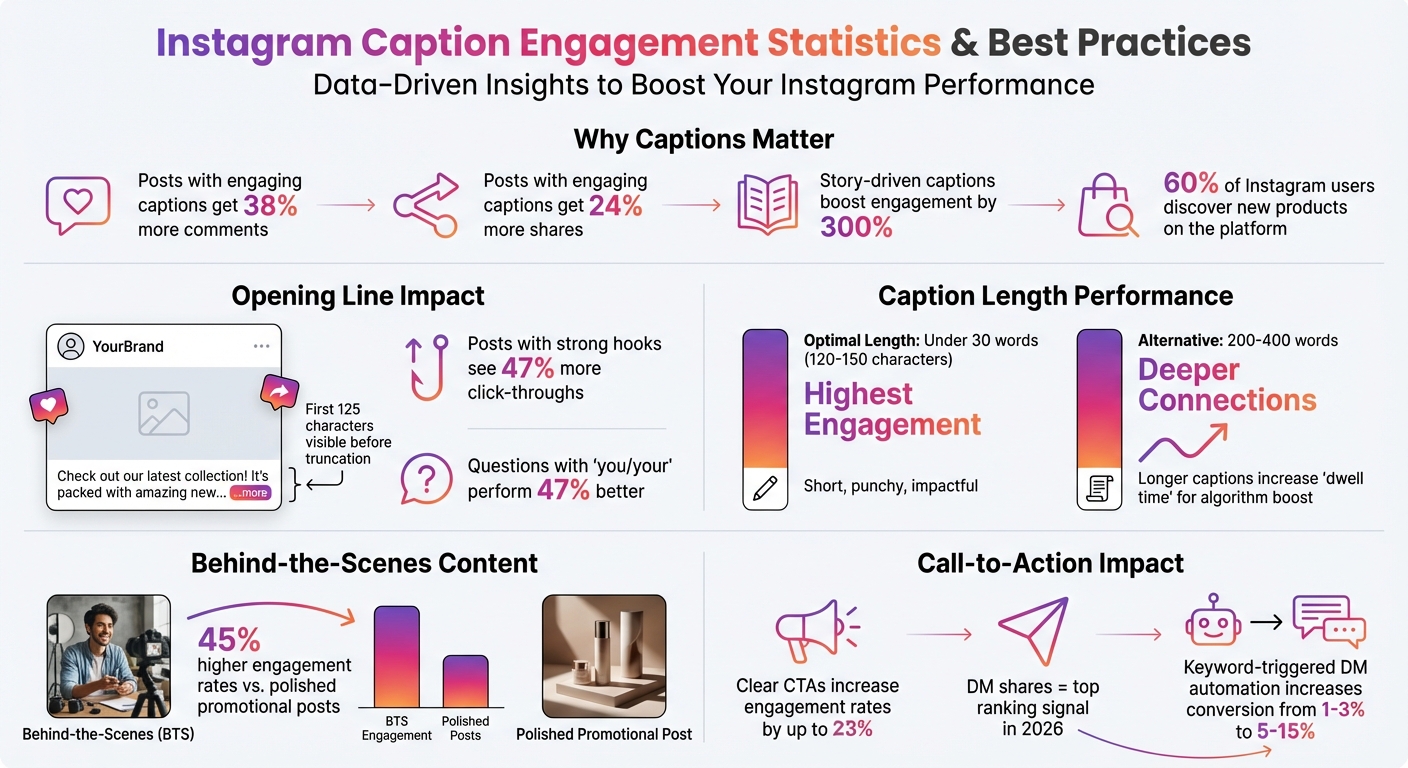
- Why Captions Matter: Posts with engaging captions get 38% more comments and 24% more shares. Story-driven captions? They can boost engagement by 300%.
- Key Elements of an Effective Caption: Use a strong opening line (first 125 characters are crucial), ask questions, evoke emotions, and make it personal.
- Instagram Algorithm Tips: Longer captions increase “dwell time,” signaling Instagram to show your post to more people.
- Formatting Tricks: Use line breaks, emojis, and white space to make captions easy to read.
- Storytelling Works: Share relatable stories or behind-the-scenes moments to build trust and spark interaction.
- Clear Calls-to-Action: Encourage specific actions like saving, sharing, or commenting with a single, focused CTA.
Want your captions to stand out? Test different lengths, hooks, and CTAs to see what resonates most with your audience. Keep it simple, personal, and actionable.
Instagram Caption Engagement Statistics and Best Practices
Writing Opening Lines That Stop the Scroll
Why the First Line Matters
Instagram captions on mobile devices get cut off after 125 characters – just two to three short sentences. That’s all users see before deciding whether to tap “Read More”. This makes your opening line not just an introduction but a critical moment to grab attention.
The stats prove it: posts with strong hooks see 47% more click-throughs to the full caption. Why? A powerful first line sparks curiosity, builds tension, or stirs emotion, pulling readers in. On the other hand, generic openers like “Happy Monday!” fade into the background and are easily ignored [1,7].
"Most Instagram captions don’t flop because they’re badly written – they flop because they’re invisible." – Weekhack
These insights underline the importance of crafting opening lines that demand attention right away.
Techniques for Writing Hooks
Great opening lines skip the warm-up and dive straight into grabbing attention. One effective method is the curiosity loop, which teases just enough to make readers want more. For example: “I posted daily for 14 days and my engagement tanked. Here’s why”.
Another tactic is to use bold statements or reframes that challenge common assumptions. Instead of saying, “3 ways to grow your followers,” try something like, “You don’t need more followers; you need better ones.” This kind of opener shifts the reader’s perspective and builds trust instead of just chasing likes. Questions that include “you” or “your” also perform 47% better, as they invite readers to engage directly.
For promotional content, lead with the key value upfront, ensuring it appears before Instagram’s truncation cuts it off.
Examples of Strong Opening Lines
The right hook depends on your audience and content. Here are some examples tailored to different industries:
- Lifestyle brand: “Ever feel like you’re doing everything right but still not seeing results?”
- Fitness coach: “You’re not tired because you’re busy – you’re tired because you’re bored.”
- E-commerce sale: “20% off ends tonight. Here’s what’s actually worth buying.”
Each example gives readers a reason to keep scrolling. The lifestyle hook taps into shared frustration. The fitness line challenges a common belief. The e-commerce caption creates urgency and delivers immediate value. What they all avoid is wasting space on pleasantries or filler – they cut straight to what matters [1,4].
Here’s one last tip: write your hook last. Draft the full caption first, then go back and craft an opening line that highlights the most compelling part of your story. This ensures your hook feels specific, relevant, and impossible to ignore.
sbb-itb-32359dc
Formatting Captions for Easy Reading
Using Line Breaks and White Space
Instagram’s mobile-first design means captions need to be easy to read on small screens. Long, dense paragraphs can overwhelm readers and make them skip your post entirely. To avoid this, break your caption into smaller chunks – stick to one or two sentences per paragraph for better readability.
Instagram’s formatting can be tricky. For example, if you leave a space after a period or emoji and then hit "Return", the platform might collapse your intended line break. To prevent this, double-check that there’s no extra space after your last character before starting a new line.
"Formatting isn’t just aesthetic – it affects your completion rate, which affects your reach." – Weekhack
If Instagram still removes your line breaks, try adding a single period, a hyphen, or an invisible character on blank lines to force spacing. It’s a good idea to draft your captions in an app like Notes or a scheduling tool, where you can spot and fix formatting issues before posting.
Once your text is clean, consider adding visual elements to make your caption even more engaging.
Adding Emojis for Visual Appeal
Emojis aren’t just fun – they can make your captions more engaging and easier to follow. Use them to add personality or as visual markers to structure your text. For example, ✔️ works great for checklists, 🎯 highlights goals, and 💪 adds motivation.
"Emojis are basically Instagram’s love language. They’re also little visual markers that tell everyone who stumbles on your captions to keep reading." – Nikka Gurmani, Social Media Expert
To keep things tidy, space your emojis evenly and avoid overloading your caption with too many. Directional emojis like 👉 or 📍 are perfect for drawing attention to a call-to-action, like a "link in bio". However, avoid starting a new line with an emoji, as this can sometimes cause Instagram to ignore the previous line break.
Previewing Captions on Mobile Devices
Once your caption is formatted with line breaks and emojis, always preview it on a mobile device. Instagram cuts off captions after about 125 characters, so only the first line or two will show before users need to tap "more". What looks great on desktop might break oddly on a phone screen.
Draft your captions in an external app to catch any formatting mishaps. Better yet, use a scheduling tool that offers a mobile preview feature to ensure your line breaks and emojis display as intended. Always place your most important message within the first 125 characters to make sure it’s seen before the caption is truncated.
Using Storytelling to Connect with Your Audience
The Impact of Relatable Stories
Storytelling has the power to turn simple captions into meaningful exchanges. Sharing personal struggles, behind-the-scenes moments, or client success stories helps your brand feel human instead of just another corporate entity. Captions rooted in storytelling not only drive engagement but also foster lasting connections. For instance, behind-the-scenes content sees 45% higher engagement rates compared to polished promotional posts.
The magic lies in sensory details that make emotions tangible. Instead of saying, "I was nervous", try painting a picture: "My chest tightened with anxiety". Another tip? Use second-person language like "you" and "your" to make your audience feel personally addressed. Fun fact: incorporating "you" in questions can increase engagement by 47%.
"Storytelling content marketing is not only a more empathic and ethical way of addressing pain points, it also helps the reader imagine life beyond the problem." – Cyndi Zaweski, Founder, StoryCraft
Finding the Right Caption Length
When it comes to caption length, shorter often means more engagement. Captions under 30 words (roughly 120–150 characters) perform best across all post types. But for deeper connections, longer captions (200–400 words) can work wonders, especially when paired with a captivating opening. The trick is to focus on the emotional essence of your story – leave out unnecessary details.
Using a proven structure can help keep your narrative focused. Two popular frameworks are:
- BAB (Before-After-Bridge): Highlight the challenge, describe the desired outcome, and explain how your solution bridges the gap.
- SOAR (Situation, Obstacle, Action, Result): Walk readers through a specific problem and its resolution.
These frameworks ensure your story flows naturally, giving readers a complete arc without overwhelming them.
Avoiding Hard Sales Pitches
Let your stories do the selling for you. Instead of pushing "buy now" messages, share client transformations or user-generated content to showcase your value. With 60% of Instagram users discovering new products on the platform, this softer approach works wonders for brand discovery.
"People don’t engage because your content is smart. They engage because it’s felt." – Weekhack
Rather than listing advice, aim to shift perspectives. Help readers see their situation in a new light, sparking an "aha" moment that builds trust. This method acknowledges their feelings and experiences before presenting a solution, making your message feel genuine and empathetic instead of sales-focused.
How To Write Great Captions To Increase Engagement | Instagram Caption Writing Tips & Examples
Adding Calls-to-Action That Get Results
After crafting relatable stories, it’s time to incorporate a clear call-to-action (CTA) to encourage meaningful engagement.
What Makes a CTA Work?
A strong CTA is specific, offers value, and uses action-oriented language. One way to achieve this is by following the SPARK Method: Specific (tell your audience exactly what to do), include a Promise (highlight the benefit), use an Action verb, ensure Relevance to your content, and include a Keyword for automation.
Start with action verbs like "Tap", "Save", "Share", "Comment", or "Get". Then, answer the question: What’s in it for your audience? For instance, if you ask followers to comment "GUIDE", make sure they know they’ll receive a free PDF checklist in return.
Stick to one CTA per post – multiple calls can confuse your audience and lower conversion rates. Instagram’s algorithm now prioritizes DM shares as the top ranking signal in 2026, followed by saves and comments. This means your CTA directly influences your post’s reach and performance.
"The best CTAs aren’t about what you want followers to do. They’re about making action irresistible."
– Vytas, Founder, CreatorFlow
Once you’ve nailed the content of your CTA, it’s essential to position it effectively within your caption.
Placing CTAs Naturally in Your Caption
A well-placed CTA can significantly boost audience engagement. For captions, include your primary CTA within the first 125 characters to ensure it’s visible without needing to expand the post. In longer captions, a mid-caption prompt like "Agree so far? Tap the ❤️" can re-engage readers who might be skimming.
Using conversational questions makes CTAs feel more natural. For example, asking "Do you struggle with this too? Comment YES if you want my solution" is far more engaging than a generic sales pitch. Visual tricks like clear line breaks can also make your CTA stand out.
For Instagram Reels, include an end-screen CTA in the final 2–3 seconds. Keep it centered and free from Instagram’s UI elements. Additionally, keyword-triggered DM automation (e.g., "Comment GUIDE") can increase conversion rates from 1–3% to 5–15%.
Examples of CTAs That Work
Tailoring your CTA to the type of content you’re sharing is key. Here are some examples for different post formats:
- Educational Reels: Use CTAs like "Save this for later" or "Bookmark this checklist."
- Feed Posts: For existing followers, try prompts like "Vote A or B in the comments" or "Tell me your biggest takeaway".
- Carousels: Encourage interaction with lines like "Swipe through and save this guide" or "Comment TIPS to get the full breakdown in your DMs."
- Stories: For warmer audiences, use CTAs such as "Reply with your answer" or "Tap the link sticker to grab yours".
To keep things fresh, rotate 3–4 different CTAs each week. Repeating the same prompt too often can reduce its effectiveness.
When using keywords for automation, avoid generic terms like "YES" or "LOVE", as they can be triggered unintentionally. Instead, choose specific options like "GUIDE", "CALENDAR", or "PRICES". You can also use polarizing questions (e.g., "Agree or disagree?"), fill-in-the-blank prompts, or ask followers to "Tag someone who needs this" to encourage specific actions without sounding pushy.
"The best CTA is the one your audience actually engages with, so don’t be afraid to experiment until you find what works for your unique followers."
– Manu Muraro, Founder, Your Social Team
Using BeLikeNative to Improve Your Captions
BeLikeNative helps fine-tune your captions, making them clear, polished, and aligned with your brand’s voice.
How BeLikeNative Enhances Writing Efficiency
BeLikeNative simplifies caption creation by rephrasing text and fixing grammar instantly. Instead of spending time on manual edits, you can use the tool’s clipboard integration to refine your text with just a shortcut. Whether you want your tone to be witty, informative, or inspiring, BeLikeNative ensures your captions are consistent across all posts without needing to rewrite them individually.
This streamlined process also makes creating captions in multiple languages much easier.
Writing Captions in Multiple Languages with BeLikeNative
BeLikeNative supports over 80 languages, helping you expand your audience. It doesn’t just translate literally – it adapts the tone to maintain your brand’s voice, whether you’re aiming for a casual or formal style. The tool also localizes hashtags based on intent and applies regional formatting rules for numerals and punctuation automatically.
Adding BeLikeNative to Your Caption Workflow
Integrating BeLikeNative into your workflow is simple. It works across platforms like Google Docs, Notion, and WhatsApp Web without needing extra plugins. Just draft your caption, copy it, and refine it instantly with a shortcut. You can tailor the language, tone, and style settings to fit your specific goals. By streamlining the process, BeLikeNative helps you create engaging, story-driven captions that boost interaction on Instagram.
Conclusion: How to Master Instagram Captions
Key Strategies to Drive Engagement
To make your Instagram captions stand out, focus on five essential strategies:
- Grab attention immediately: Use a compelling hook within the first 125 characters to stop users from scrolling past your post.
- Make it easy to read: Break up large blocks of text with line breaks, emojis, and white space.
- Tell relatable stories: Instead of going for a hard sell, craft captions that connect emotionally with your audience. Story-driven content can significantly boost engagement.
- Include clear calls-to-action (CTAs): Prompt your audience to take specific actions, which can increase engagement rates by up to 23%.
- Leverage tools like BeLikeNative: This tool helps streamline your workflow, maintain a consistent tone, and adapt captions for various audiences and languages.
Don’t forget, Instagram’s algorithm increasingly rewards content that keeps users engaged for longer periods. Captions that hold attention are more likely to perform well.
Refine Through Testing and Analysis
The secret to mastering Instagram captions lies in constant experimentation. Test different approaches to see what resonates most with your audience. For instance, try varying caption lengths – short, punchy captions under 125 characters versus longer, story-driven ones in the 300–500 word range – to determine which generates higher engagement.
Use Instagram Insights to track performance, focusing on metrics like saves and shares, which indicate content value more than likes do. You can also experiment with A/B testing by posting similar visuals paired with different caption styles – such as one educational, one humorous, and one emotional – to see what gets the best response.
Before posting, read your captions aloud to catch any awkward phrasing or unnecessary filler words. Over time, build a library of high-performing hooks and CTAs that you can reuse and adapt for future posts. By continually testing, analyzing, and adjusting your captions, you’ll gain valuable insights into what drives clicks, comments, and shares.
FAQs
What should I put in the first 125 characters?
To get the most out of the first 125 characters of your Instagram caption, focus on crafting a hook that stops users in their tracks. Whether it’s a bold statement, an intriguing question, or a teaser, the goal is to spark curiosity or deliver instant value. This opening line should make people pause, engage, and consider liking, commenting, or sharing – key actions that boost engagement.
Should my captions be short or long?
When it comes to Instagram captions, both short and long formats have their place. Short captions are great for grabbing attention quickly – perfect for those scrolling through their feed. On the other hand, longer captions let you dive into storytelling or share more meaningful insights, which can help build a stronger connection with your audience and even spark more engagement.
The best approach? Try both! Experiment to see which style clicks with your followers and aligns with your content goals.
What’s the best CTA to get more saves and shares?
The most effective CTAs inspire specific actions, such as encouraging followers to save a post for future reference or share it with someone else. Phrases like “Save this for later” or “Share this with a friend” work well. The key is to use clear, action-driven language that prompts engagement.

