

How To Write A Literature Review Faster Using AI
Writing a literature review doesn’t have to take months anymore. With AI tools, you can cut the process in half – or more – by automating time-consuming tasks like finding, screening, and organizing research papers. Here’s how AI can help:
- Search smarter: Use semantic search to find relevant papers based on meaning, not just keywords.
- Save time screening: AI tools rank and filter studies, so you review the most relevant ones first.
- Extract data quickly: Automate pulling out key details like methods, results, and limitations.
- Organize notes better: AI groups papers by themes and builds outlines for structured writing.
- Write efficiently: AI drafts summaries and sections, leaving you to focus on analysis and argumentation.
Key takeaway: AI doesn’t replace your expertise – it handles repetitive tasks, giving you more time to think critically and write flawless academic essays. Follow these steps to speed up your review without compromising quality.
Transform Any Text, On Any Site, In Seconds
Rephrase, translate, and improve text with one shortcut. Works everywhere you write.
Add to Chrome - It's Free!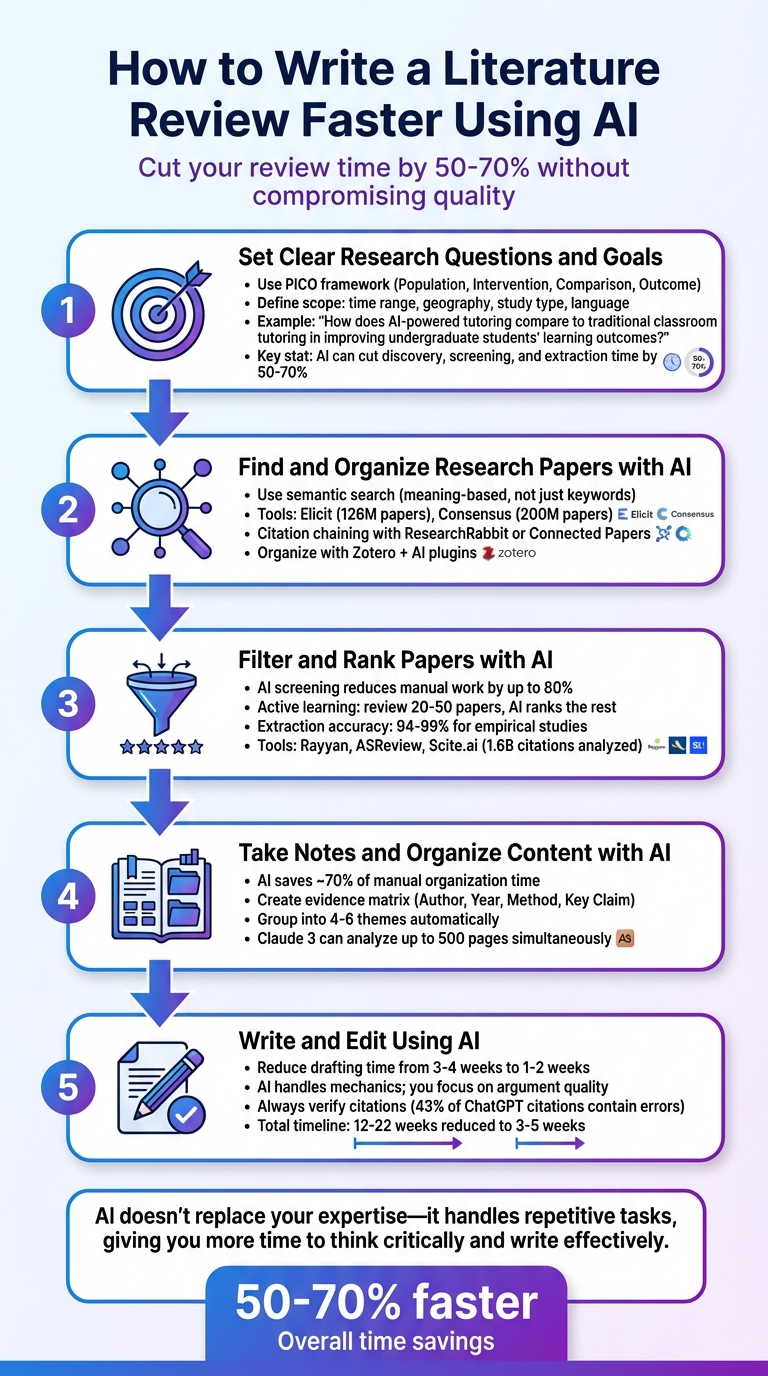
5-Step Process to Write Literature Reviews Faster Using AI
Full Guide to Writing Your Literature Review FAST (Step-By-Step + AI)
sbb-itb-32359dc
Step 1: Set Clear Research Questions and Goals
AI tools are only as effective as the instructions you give them. If your research question is vague or undefined, you’ll end up sifting through piles of irrelevant papers – completely defeating the purpose of using AI. Ilya Shabanov, Founder of The Effortless Academic, puts it simply:
"The more clearly and detailed you define your research question, the better AI replies".
Think of a well-defined question as your compass. It guides AI tools to focus on what matters most, avoiding unnecessary detours. By being specific, you enable AI to use semantic search, which looks for papers based on meaning rather than just matching keywords. This ensures you won’t miss critical research just because the terminology varies. In short, a clear question not only filters out irrelevant results but also makes AI more effective in every step that follows.
Define Your Research Objectives
One way to sharpen your focus is by using the PICO framework – Population, Intervention, Comparison, Outcome. This method turns broad topics into precise, searchable questions.
For instance, instead of asking something vague like "AI in education", refine it to: "How does AI-powered tutoring compare to traditional classroom tutoring in improving undergraduate students’ learning outcomes?". Precision like this allows tools like Elicit and Consensus – capable of searching through 126 million and 200 million papers, respectively – to deliver exactly what you need.
Before starting your search, establish clear boundaries for your scope. Define parameters such as time range, geography, study type, and language. For example, you might focus on studies from 2016 to 2026, conducted in English, and exclude non-empirical work or opinion pieces. These guardrails keep your search efficient and relevant.
Keep Your Focus Narrow
AI tools thrive on detailed research questions rather than single keywords. For example, if you search for "remote work productivity", you might get results ranging from telecommuting policies to virtual collaboration – many of which might not align with your actual interests. Instead, try something more specific, like: "How does remote work affect productivity for software developers in the United States?" This level of detail helps AI understand the context and return results that are directly relevant.
To refine your search further, list key concepts along with their synonyms. For example, if you’re studying postoperative cognitive issues, include terms like "surgery-related cognitive change" or "post-surgical mental function." Semantic search tools can use these variations to find studies that traditional keyword searches might overlook.
Another useful tip is to create a simple table of inclusion and exclusion criteria before starting. For instance, you might decide to include only peer-reviewed studies published in English between 2016 and 2026, while excluding opinion pieces or non-empirical research. Setting these criteria upfront can save you from manually filtering through hundreds of irrelevant papers. When used effectively, AI can cut your discovery, screening, and extraction time by 50% to 70%.
Once your research question is clearly defined, you’re ready to move on to Step 2 and let AI streamline the process of finding relevant papers.
Step 2: Find and Organize Research Papers with AI
Once you’ve defined your research question, the next step is finding the right papers – and AI makes this process far more efficient. Traditional keyword searches often fall short because they miss studies that use different terminology (like "remote work" versus "telecommuting"). AI-powered semantic search solves this by focusing on the meaning behind your query rather than exact keyword matches.
Instead of relying on isolated keywords, try framing your search as a full question. Tools like Elicit and Consensus allow you to use natural language queries, helping you capture a broader range of studies that might use varied terms. For instance, instead of searching "AI education", you could ask, "How does AI-powered tutoring affect undergraduate learning outcomes?" This approach taps into semantic understanding, uncovering relevant research you might otherwise overlook.
Another powerful method is citation chaining. Start with a "seed paper" and use tools like ResearchRabbit or Connected Papers to map out related studies. These tools let you explore influential prior works and newer studies that build on them, revealing dozens of related papers in just minutes – a task that would take hours if done manually.
Find Papers Using AI Search Tools
AI search tools simplify the discovery process in ways that save both time and effort. For example, Semantic Scholar provides one-sentence summaries (TLDRs) for millions of papers, letting you quickly assess results without opening every abstract. Tools like Consensus go a step further by allowing you to filter results based on evidence. You can ask questions like, "Does remote work increase productivity?" and get a "consensus meter" that shows what percentage of studies support or contradict the claim. Similarly, Scite.ai has indexed over 1.6 billion citation statements, categorizing them as supporting, contrasting, or simply mentioning related research.
While finding papers is essential, keeping your references organized is just as important for synthesizing your research effectively.
Manage References with Organization Tools
Proper organization of your findings is key, and a layered approach works best. As PapersFlow puts it:
"Zotero plus AI is not one tool. It is a stack. Zotero remains the foundation for storage, organization, and citation management. AI adds retrieval, comparison, summarization, and drafting support."
Start with Zotero as your foundation. It’s excellent for managing PDFs, organizing citations, and storing references. The Zotero Connector browser plugin makes it easy to import papers and their metadata directly from academic databases, saving you from tedious manual entry.
Once your library is set up in Zotero, you can integrate AI tools to enhance retrieval and organization. For example, sync Zotero with ResearchRabbit or use plugins like Beaver to search your library using natural language queries. Some researchers even export their Zotero library as a BibTeX file, convert it to .txt format, and upload it to ChatGPT to generate a prioritized reading list tailored to their research question.
To make synthesis easier later, organize your library thematically – grouping papers by research questions or topics rather than by authors or publication dates. This thematic structure allows you to quickly locate related studies and draw connections between them when it’s time to write.
Step 3: Filter and Rank Papers with AI
Once you’ve gathered a large set of papers, the next challenge is managing the sheer volume of studies. AI screening tools can make this process far more efficient. These tools learn from your initial reviews and rank the remaining papers, potentially reducing manual screening efforts by up to 80%.
Screen Papers Faster with AI
Using active learning can save you significant time. Tools like Rayyan and ASReview allow you to review an initial batch of 20–50 papers to identify relevant ones. Based on your input, the AI assigns probability scores to the rest and ranks them, prioritizing the most relevant studies. This approach ensures you focus on key papers first, as Jet New points out:
"AI-assisted relevance ranking… means you read the most relevant papers first instead of wasting time on borderline matches".
The efficiency gains are impressive. AI tools can reduce the time spent on discovery, screening, and data extraction by 50% to 70%.
You can also refine your screening process by applying filters based on study characteristics. For instance, Consensus enables filtering by study type, helping you zero in on high-quality evidence like randomized controlled trials or meta-analyses. Similarly, platforms like SciSpace and Elicit allow for custom filtering. You can input specific queries, such as "Was this study conducted on a pediatric population?" – capturing details that might be missed by basic keyword searches.
This streamlined approach prepares you for the next step: extracting key information from the most relevant studies.
Extract Key Points Quickly
Once you’ve identified your priority papers, AI tools can simplify the extraction of essential details. For example, Semantic Scholar provides concise one-sentence summaries (TLDRs) for millions of papers, allowing you to scan through hundreds of studies in minutes. For selected papers, AI can pull out critical data – such as sample size, methodology, outcomes, and limitations – into structured tables. Tests show an impressive extraction accuracy of 94%–99% for empirical studies.
Tools like Elicit let you customize extraction templates. You can specify categories like "Population", "Intervention", and "Result", and the AI will generate a comparison table from multiple papers. This makes it easy to analyze and compare findings side by side.
Additionally, assessing citation quality becomes more manageable with tools like Scite.ai, which has analyzed over 1.6 billion citation statements. It categorizes citations as "supporting", "contrasting", or "mentioning", offering a quick way to evaluate the credibility of highly cited research. As Scite.ai explains:
"A landmark study with 500 citations and mostly supporting Smart Citations tells a different story than one with 500 citations and significant contrasting evidence".
While AI can handle much of the heavy lifting, it’s essential to verify extracted data for critical studies. AI may occasionally misinterpret nuanced or qualitative findings, so a final review remains crucial.
Step 4: Take Notes and Organize Content with AI
Once you’ve filtered your papers, you’ll have a collection of relevant studies. But having a pile of raw notes and highlights won’t magically turn into a coherent review. That’s where AI comes in – it can help you organize these notes into themes and outlines, saving you around 70% of the time you’d spend doing this manually.
Group Notes by Topic
AI tools can analyze your notes, identify recurring themes, highlight methodological differences, and even pinpoint areas of disagreement. By asking consistent questions across your notes, you can uncover patterns that might not be immediately obvious.
To streamline the process, use AI to create a standardized table – often called an evidence matrix – with columns like Author, Year, Method, and Key Claim. This makes it easier to compare studies, even when they use slightly different terminology. For instance, AI semantic search can recognize that terms like "postoperative cognitive dysfunction" and "surgery-related cognitive change" are describing the same concept, which traditional keyword searches might miss.
Once your notes are standardized, you can prompt the AI to group them into themes. For example, ask: "Organize these notes into 4–6 themes. Provide a summary for each, list key citations, and identify one open question for further exploration.". You can also use consistent tags (e.g., topic:<keyword>, method:<type>) to make AI categorization even more precise.
Here’s a real-world example: In May 2025, a medical researcher used AI to condense the process of creating a systematic review, cutting what used to take weeks down to just days.
Once your themes are grouped, you’re ready to move on to the next step – building a structured outline.
Build an Outline with AI
With your thematic groups in hand, AI can help you craft a structured outline. Start by asking it to generate multiple outline formats – such as thematic, chronological, methodological, or theoretical – and highlight any gaps or missing perspectives in your notes. The Scite editorial team explains:
"A good literature review isn’t organized by paper. It’s organized by theme, by question, or by the arc of how understanding has developed over time".
You can also prompt the AI to include a brief rationale for each section in the outline, keeping your review focused on synthesizing ideas rather than just listing studies. Modern AI tools like Claude 3 can handle massive datasets – up to 200,000 tokens, or roughly 500 pages – making it possible to analyze dozens of full-text papers simultaneously.
Consider this example: In December 2025, PhD student Sarah used AI to condense 120 papers into 45 key sources and complete an 8,000-word review in just three weeks. Along the way, she identified three research gaps to include in her proposal. As Sarah put it:
"AI didn’t write my review – it gave me time to think deeply about the papers instead of drowning in logistics".
Step 5: Write and Edit the Literature Review Using AI
Now that your notes are organized, it’s time to turn them into a well-structured draft. AI can be a valuable tool in this process, helping to streamline the mechanics of writing while you focus on crafting a strong argument.
Write First Drafts with AI Help
AI tools can significantly cut down the time it takes to draft a literature review, often reducing the process from 3–4 weeks to just 1–2 weeks. The trick is to let the AI handle repetitive tasks, like summarizing or organizing information, while you stay focused on shaping the argument. Instead of summarizing individual studies one by one, you can prompt the AI to synthesize findings by broader themes. For example, you might ask:
"Group the findings from these papers into 4–6 themes. Highlight areas of agreement and disagreement."
To ensure the AI’s output is accurate and grounded in your research, use specific prompts tied directly to your notes. For instance:
"Analyze the papers listed in this document. Use only these sources and no external information."
This approach helps avoid issues like AI fabricating citations or introducing unrelated data. Tools such as Scite or Atlas can also help by linking claims back to the original PDFs, ensuring every point is traceable to a verified source.
Think of AI-generated drafts as a starting point. Always cross-check key claims with the original materials to catch potential inaccuracies. As Niko Korvenlaita from reconfigured.io puts it:
"Not about outsourcing thinking. It’s about offloading mechanics – summarization, recall, metadata wrangling – so your judgment stays on argument quality and evidence."
By using AI for drafting and editing, you can save time while maintaining the depth and rigor of your work.
Edit and Polish for Academic Standards
Once your draft is complete, the next step is to refine it, ensuring it meets academic expectations. Start with these key steps:
- Check for consistency: Review the AI’s paraphrasing to confirm it hasn’t altered the original meaning of your findings.
- Apply the "So What?" test: Evaluate each paragraph to confirm its relevance to your research question.
- Expand citation density: Prompt the AI to identify additional supporting or contrasting references to strengthen your arguments.
- Spot blind spots: Ask yourself, "What perspectives or contradictory evidence might I have missed?"
PapersFlow highlights a common pitfall to avoid:
"The biggest mistake is summarizing papers one by one instead of weaving them into a coherent argument."
AI can also help fine-tune your writing for clarity and tone, ensuring a formal, objective style while flagging unsupported claims. Although AI can reduce the overall timeline for completing a literature review – from 12–22 weeks to just 3–5 weeks – the ultimate responsibility for the quality and integrity of the work lies with you.
Ethical Guidelines for Using AI in Academic Writing
Using AI to streamline your literature review comes with its own set of responsibilities. While AI can handle time-consuming tasks, it’s essential to ensure that the process upholds academic standards. These tools might save hours, but they also bring risks, especially regarding accuracy and integrity. To maintain the quality of your work, follow these ethical practices when incorporating AI into your review process.
Prevent Plagiarism and Verify AI Output
One of AI’s major pitfalls is its tendency to produce inaccurate or even fabricated citations. Research shows this is not a minor issue. For instance, a 2023 study published in Nature revealed that 43% of citations generated by ChatGPT-3.5 contained serious errors, such as incorrect authors, dates, or publishers. Duke University emphasizes this risk clearly:
"Never trust AI-generated citations without verification."
To avoid these issues, always cross-check citations using reliable databases like Google Scholar, PubMed, or doi.org. A practical approach is to create a checklist that maps each factual statement in your draft to a specific source, complete with document ID and page number.
Additionally, rephrase AI-generated summaries in your own words to ensure consistency with your writing style and to avoid unintentional plagiarism. If your institution requires it, disclose the AI tools you used and explain their role in your methodology.
Use AI as a Support Tool, Not a Replacement
AI should complement your work, not replace it. Think of it as a skilled research assistant – helpful for managing tasks like organizing references and extracting data – but the core work of synthesis, evaluation, and argument-building should remain firmly in your hands. Scite.ai puts it well:
"The best literature reviews use AI the way an experienced researcher would use a highly capable research assistant: to handle the time-consuming searches, flag relevant connections, and organize raw material. The thinking is still yours."
Rely on original articles to capture the depth and nuances AI may miss. When using AI summarization tools to extract data into tools like spreadsheets, manually verify key papers to ensure accuracy. Finally, maintain detailed documentation of your process – record the tools you used, the prompts you provided, and your criteria for screening sources. This ensures your review is both reproducible and defensible.
Conclusion
AI is reshaping how literature reviews are conducted, cutting drafting time by an impressive 50-70%. By handling tasks like database searches, abstract screening, data compilation, and theme identification, AI frees up your time to focus on the deeper aspects – critical analysis, synthesis, and building a solid argument. As Jet New from Atlas aptly puts it:
"AI doesn’t write your literature review. It halves your drafting time."
That said, AI is best seen as a research assistant, not a substitute for your expertise. It can help you discover papers based on semantic relevance, rank them effectively, and organize your findings. However, the core intellectual effort – evaluating methodologies, resolving contradictions, and spotting research gaps – remains your responsibility. As a reminder:
"Faster is only a win if your citations stay defensible."
FAQs
Which AI tools should I use for each literature review step?
For a smoother literature review process, these AI tools can be incredibly helpful:
- Discovery: Platforms like Semantic Scholar and Litmaps make it easy to locate relevant research papers quickly.
- Screening: Elicit is great for systematic filtering and creating concise summaries.
- Data Organization: Use Zotero to keep your references neatly managed.
- Synthesis: Tools like ChatGPT can assist in summarizing and integrating key findings.
By incorporating these tools, you can save time while maintaining high standards of academic quality.
How do I stop AI from inventing citations or misquoting papers?
To ensure accuracy and integrity in your work, always double-check AI-generated references with the original sources. Tools like ChatGPT are not built to provide precise citations, so it’s crucial to cross-verify any outputs. While it’s fine to acknowledge the use of AI tools, they should not be treated as primary sources. Take the time to review and validate all references thoroughly to uphold academic standards and avoid potential mistakes.
Will using AI in my literature review violate academic policies?
Using AI for a literature review can be a helpful tool when approached responsibly and ethically. Always make sure to follow your institution’s guidelines, avoid disclosing sensitive or private information, and give proper credit to any AI-generated contributions. These tools are great for tasks like summarizing or organizing information, but the core intellectual effort and critical analysis should always come from you. When used responsibly, AI can complement your research process without undermining ethical standards.
Related Blog Posts
- Need to Find the Main Idea? AI Tools That Summarize Any Text Instantly
- How To Polish Your Writing With Chrome Ai Extensions
- Best Ai Tools For Summarizing Research Papers Quickly
- Ai-powered Sentence Finishers That Complete Your Thoughts
BeLikeNative fixes grammar, rephrases, translates, and simplifies text on any website in 1 second — just highlight and hit a keyboard shortcut. No tab switching. Try it free →

