

How To Write A Professional Bio For LinkedIn
Your LinkedIn bio is your digital first impression – a concise, searchable summary that showcases your expertise and attracts opportunities. In 2026, with AI tools like LinkedIn’s Hiring Assistant and semantic search, having a strong bio is essential to stand out. Here’s how to craft one:
- Start with a strong opening: Use the first 2–4 lines to clearly communicate your value. Example: “I help SaaS companies reduce churn by 30% using data-driven strategies.”
- Highlight achievements with data: Mention measurable results (e.g., “Increased traffic by 50%”).
- Use keywords: Optimize for LinkedIn’s search algorithm by including relevant industry terms.
- Keep it personal and professional: Write in the first person with a conversational tone.
- End with a Call-to-Action (CTA): Encourage readers to connect or message you for specific opportunities.
Updating your bio every 3–6 months ensures relevance and keeps your profile active. A polished LinkedIn bio not only tells your story but also boosts visibility, helping you attract the right connections and opportunities.
Write an OUTSTANDING LinkedIn Summary (with Examples)!
sbb-itb-32359dc
Key Parts of a Professional LinkedIn Bio
A well-crafted LinkedIn bio is made up of essential elements that grab attention, establish trust, and encourage interaction. Together, these pieces create a narrative that informs and engages your audience.
Writing an Opening Statement That Gets Attention
The first two to four lines of your bio – roughly 100 to 300 characters – are crucial. This snippet is all most readers see before deciding whether to click "See More". Think of it as your first impression.
Your opening should clearly communicate your value. A straightforward formula is: "I help [audience] achieve [result]." For example, instead of saying, "Experienced marketing professional", you might write, "I help SaaS companies cut customer churn by 30% using data-driven retention strategies." This tells readers exactly who you serve and what you deliver.
Incorporating key industry terms in your opening can also improve your profile’s visibility in LinkedIn’s search results.
"A great LinkedIn summary captures how you think, not just what you’ve done. The best ones make the reader stop and think, ‘This person is different.’"
– Matt Redler, Co-founder, Za-zu
Use first-person language like "I" and "me" to keep the tone conversational. Avoid vague buzzwords like "guru" or "ninja." Instead, focus on specific, clear language that resonates with your audience.
Showcasing Your Skills and Accomplishments
Use measurable data to highlight your achievements. For example, mention the revenue you generated, the percentage growth you achieved, or other concrete results.
Balance technical skills with interpersonal abilities. Mention tools and platforms you’ve mastered (e.g., "Python", "Salesforce") alongside methodologies you’ve used (e.g., "Agile project management"). This shows you’re both skilled and adaptable in team settings.
"Quantify the results you’ve achieved in straightforward language. It’s much more believable and easily understandable that way."
– Matthew Franzyshen, Business Development Manager, Ascendant Technologies Inc.
Go beyond listing past accomplishments – connect them to your future aspirations. Share the challenges you’re excited to take on next. Breaking your achievements into short, scannable sections also makes your profile easier to read.
Adding a Call-to-Action
End your bio with a clear call-to-action (CTA). This small addition can turn profile visitors into meaningful connections, collaborators, or clients.
Instead of a generic "feel free to connect", try something more specific, like, "Send me a message if you’re looking to enhance your team’s productivity with better workflow automation." A direct CTA gives visitors a clear way to engage with you.
How to Write Your LinkedIn Bio: Step-by-Step
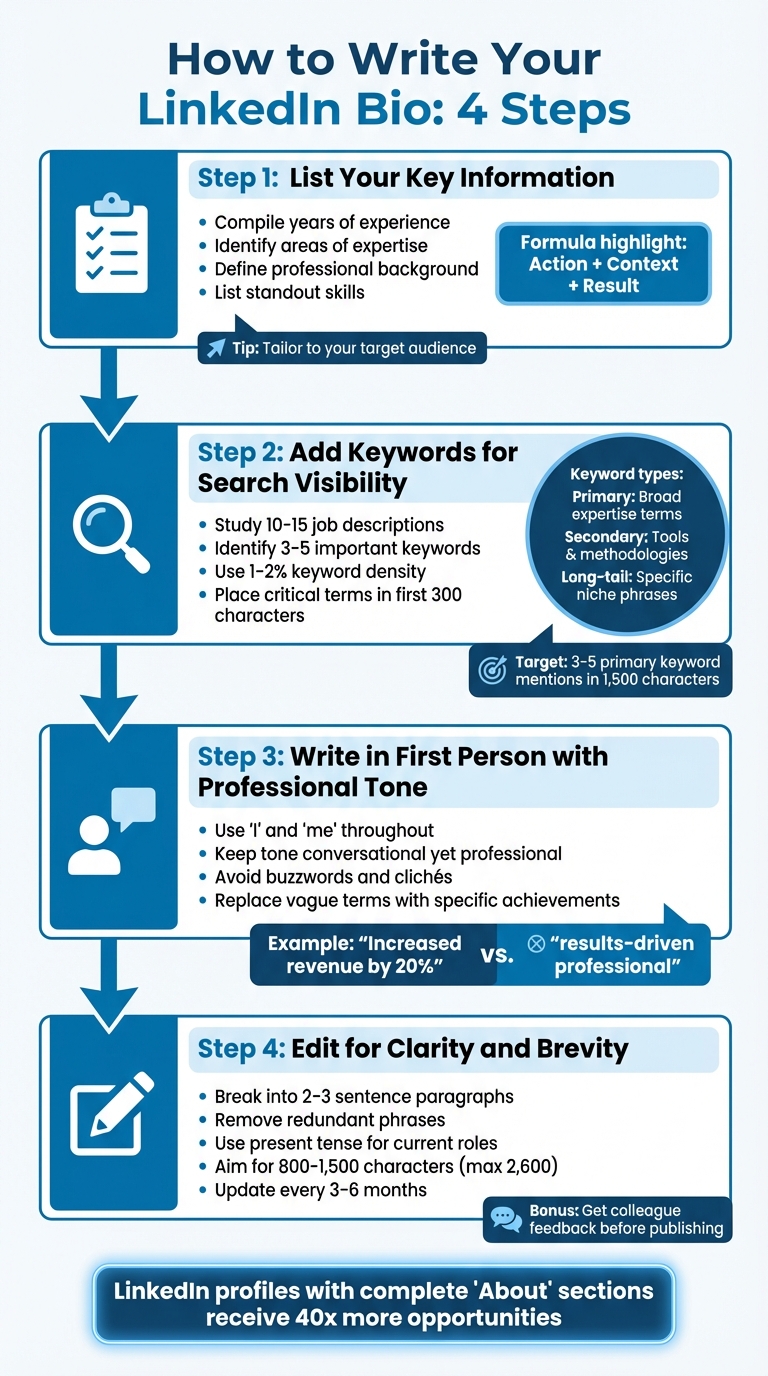
4-Step Process to Write a Professional LinkedIn Bio
Crafting a standout LinkedIn bio might seem daunting, but breaking it into smaller steps makes it manageable. Follow these steps to create a bio that highlights your strengths and captures attention.
Step 1: List Your Key Information
Start by compiling the essentials: your years of experience, areas of expertise, professional background, and standout skills. Think about your professional mission – what drives your work – and use this to shape your bio.
Focus on what makes you valuable. Clearly define what you do, who you help, and the problems you solve. Tailor this information to your audience. For instance, if you’re targeting fintech recruiters, emphasize your experience in financial technology and compliance over unrelated skills.
When showcasing achievements, use the "Action + Context + Result" formula. Instead of vague claims, provide measurable outcomes. For example, describe how you streamlined a process, the challenges you encountered, and the results you delivered. This approach gives concrete evidence of your expertise.
Once you’ve outlined your key points, move on to optimizing your profile for visibility.
Step 2: Add Keywords for Search Visibility
LinkedIn operates much like a search engine, and keywords are the key to being found. Study 10–15 job descriptions in your field to identify 3–5 important keywords. Also, review top profiles in your industry for inspiration.
Incorporate a mix of:
- Primary keywords: Broad terms that define your expertise (e.g., "Data Analyst").
- Secondary keywords: Tools, methodologies, or additional skills (e.g., "SQL" or "Agile").
- Long-tail keywords: Specific phrases for niche searches (e.g., "financial data visualization").
For a 1,500-character bio, aim for a keyword density of 1–2%, naturally weaving your primary keywords into the text about 3–5 times. Place the most critical terms in the first 300 characters, as this section plays a significant role in LinkedIn’s algorithm.
"LinkedIn is a search engine. If your profile doesn’t contain the right keywords in the right places, you don’t exist in those searches – no matter how qualified you are."
– Kolin Simon, Sales & Marketing Expert
Also, use standard job titles in your bio. For example, write "Enterprise Sales Director" instead of quirky internal titles like "Revenue Ninja" to align with what recruiters search for.
Now, let’s focus on tone and style.
Step 3: Write in First Person with a Professional Tone
Use first-person language throughout your bio. This makes your profile feel personal and approachable, standing out from the overly formal, third-person summaries many people default to.
"Writing in a conversational and engaging tone will help your profile stand out in a sea of formal, generic summaries. It demonstrates personality."
– Tracie Crites, CMO, HEAVY Equipment Appraisal
Keep your tone professional but conversational. Avoid overused buzzwords and replace vague descriptors with specific accomplishments. For example, instead of saying "results-driven professional", highlight a concrete achievement like "increased revenue by 20%."
With your draft written, it’s time to fine-tune.
Step 4: Edit for Clarity and Brevity
Break your bio into short paragraphs of 2–3 sentences. This makes it easy to skim, especially on mobile devices or for recruiters who are strapped for time.
Cut out redundant phrases and clichés like "proven track record." Use present tense for current roles and past tense for previous ones to keep things consistent. While LinkedIn allows up to 2,600 characters in the "About" section, the sweet spot is typically between 800 and 1,500 characters.
Before publishing, have a colleague or someone in Talent Acquisition review your bio for feedback. Update it every three to six months to include new milestones or certifications. Regular updates also trigger LinkedIn’s "Recency Boost", signaling to the platform that your profile is active and relevant.
Making Your LinkedIn Bio More Effective
Once you’ve got your bio written and polished, a few tweaks can make it even more impactful.
Customizing Your Bio for Your Audience
Take your draft and fine-tune it to speak directly to your target audience. For example, if you’re trying to grab a recruiter’s attention, lead with your expertise and measurable successes. If you’re looking to generate business leads, focus on how you solve client problems. Your bio should align with your specific goals and audience needs.
Different audiences respond to different approaches. Entrepreneurs often benefit from the Offer Bio, which highlights services and the value they bring. The Pain Bio works well when addressing specific challenges your audience faces, showing both empathy and expertise. For creative professionals or executives, the Visionary Bio emphasizes long-term goals and strategic thinking.
For sales professionals, think of your bio as more than just a resume – it’s a prospecting tool. Start with insights that show you understand your clients’ challenges.
"If you’re in sales, your LinkedIn bio is a prospecting tool. It’s the first thing potential buyers see when you reach out… It should build credibility, demonstrate expertise, and make buyers think ‘this person might actually understand my problems’"
– SwiftBio.io
To clearly communicate your value, try the Anchor Sentence Formula: "I’m a [role] who helps [audience] [achieve X]". This straightforward structure immediately tells readers what you do and who benefits from your work.
Using BeLikeNative to Improve Your Writing
If you’re struggling to express your value clearly, tools like BeLikeNative can help. Many professionals find it hard to articulate their expertise in a polished way, but this tool refines your text for clarity, tone, and readability in over 80 languages. It works directly from your clipboard with a simple shortcut, making it easy to transform rough ideas into polished paragraphs. You can adjust the language, tone, and style to fit your industry and personal brand. Whether you’re working in Google Docs, Notion, or directly on LinkedIn, BeLikeNative integrates seamlessly. If you have a strong idea but can’t quite put it into words, this tool can turn a single anchor sentence into a compelling story that highlights your strengths while maintaining a positive tone.
Formatting for Easy Reading
Make your bio visually appealing by ensuring the first 300 characters grab attention – LinkedIn truncates longer text. Use bullet points sparingly to highlight key achievements. Including a few lines about your personal interests or values at the end can make your profile feel more relatable and memorable. These small adjustments not only draw readers in but also reinforce your professional brand effectively.
Finishing and Maintaining Your LinkedIn Bio
Proofreading Your Bio
Before you hit "publish", take a moment to read your bio out loud. This can help you catch awkward phrasing and ensure your opening lines look great on mobile. Remember, those first three lines – visible before the "See More" button – are your hook. They must clearly communicate your value. Avoid falling into the trap of overused business jargon or "LinkedIn-ese", which can weaken your message.
"Please refrain from adding any ‘LinkedIn-ese’ or cliched business lingo in your summary. Quantify the results you’ve achieved in straightforward language." – Matthew Franzyshen, Business Development Manager, Ascendant Technologies Inc.
Instead of vague statements, use specific metrics that highlight your achievements. For example, saying "increased traffic by 50%" is far more impactful than "drove significant growth." If possible, ask a recruiting colleague or a trusted peer to review your bio for clarity and tone. Once you’ve nailed the draft, keep it fresh by revisiting and updating it regularly.
Updating Your Bio Regularly
After proofreading, make it a habit to update your bio every three to six months. This ensures it reflects your latest projects, certifications, role changes, or career goals. Whether it’s a new skill you’ve mastered or a major achievement, keeping your profile current is essential. Why? Because an active, fully completed profile can generate up to 40 times more professional opportunities than one that’s outdated.
Examples of Professional LinkedIn Bios
Once your bio is polished and up-to-date, here are some examples to inspire you. These showcase how to implement the strategies we’ve discussed:
For a Full-Stack Developer:
"I build scalable web applications using React and Node.js. Over the past 8 years, I’ve helped SaaS companies reduce page load times by an average of 35% and improve user retention. Currently leading the engineering team at [Company Name], where we recently launched a feature that increased daily active users by 22%. Let’s connect if you’re working on performance optimization challenges."
For a Digital Marketer:
"I help B2B companies generate qualified leads through SEO and content strategy. In my current role at [Company Name], I grew organic traffic from 10,000 to 65,000 monthly visitors in 18 months, resulting in a 40% increase in demo requests. Passionate about data-driven marketing and always testing new approaches. Reach me at na**@***il.com to discuss growth strategies."
For a Sales Professional:
"I partner with healthcare organizations to streamline their procurement processes and reduce costs. My clients typically see 15–25% savings within the first year. Before joining [Company Name], I spent 6 years in hospital operations, so I understand the challenges you’re facing. If you’re looking to optimize your supply chain, let’s talk – message me here or call (555) 123-4567."
These examples demonstrate the power of clear, concise, and targeted messaging. Each one opens with a strong value statement, highlights measurable results, and wraps up with a specific call-to-action, guiding readers on what to do next.
Conclusion
Your LinkedIn bio isn’t just a summary – it’s a dynamic tool for building your personal brand. Think of it as your 24/7 elevator pitch, designed to open doors to new opportunities. With over one billion members on LinkedIn, making your profile stand out starts with a compelling hook in the first three lines, highlights measurable achievements, and ends with a clear call-to-action. Done right, your bio not only showcases your strengths but also attracts the right opportunities.
Keeping your About section updated can significantly enhance your profile’s impact. The key difference between a generic bio and an effective one lies in the details. Replace vague phrases like "results-driven" with specific accomplishments, such as "increased organic traffic from 10,000 to 65,000 monthly visitors in 18 months." Numbers and concrete examples speak louder than buzzwords. Write in the first person, integrate relevant keywords, and make it easy for recruiters to find you.
"LinkedIn summaries offer a window into your experience. If I’m looking to fill a position, I can see not just where you worked but how those positions play into the narrative of your career." – Kaitlin Milliken, Senior Program Manager, HubSpot
Review your bio every few months to keep it current. An outdated profile can suggest disengagement, while a fresh one shows you’re actively managing your professional image. By focusing on clear achievements and a cohesive narrative, you not only strengthen your personal brand but also enhance your visibility on LinkedIn.
Take 30 minutes today to refresh your bio. It’s a small effort that can lead to stronger connections, better job opportunities, and a LinkedIn profile that truly represents your career.
FAQs
What should I write if I don’t have measurable results yet?
If you don’t have specific results to share yet, focus on emphasizing your skills, strengths, and potential. Talk about your enthusiasm for the field, any relevant experiences you’ve had, and the unique value you can offer. Highlight areas where you excel, your dedication to personal growth, or your ability to quickly learn and adapt to new challenges. This way, your bio can still come across as professional and engaging, even without hard data to back it up.
How do I choose the best keywords for my LinkedIn bio?
To choose the right keywords for your LinkedIn bio, concentrate on words and phrases that highlight your skills, expertise, and industry knowledge. Pull these keywords from job postings, industry-related materials, or LinkedIn’s own recommendations. Integrate them naturally into key areas of your profile, like your headline, "About" section, work experience, and skills list. Keep your keywords updated to reflect your evolving career goals and industry trends. Avoid stuffing your profile with keywords – provide meaningful context to ensure your profile stands out while staying relevant to your objectives.
Should my bio be different for job searching vs. client leads?
Your LinkedIn bio should serve the purpose you have in mind. If you’re job hunting, highlight your skills, experience, and achievements with keywords that recruiters are likely searching for. If you’re aiming to attract client leads, focus on showcasing your expertise, value proposition, and credibility to establish trust and position yourself as a reliable partner. Tailoring your bio ensures it resonates with your specific goals and audience.

