
How To Write Professional Rejection Emails Fast
Even rejection emails can leave a lasting impression on candidates and shape how they view your company. A well-written rejection email shows respect for the candidate’s effort, provides clarity, and helps maintain a positive relationship for future opportunities. Here’s what you need to know:
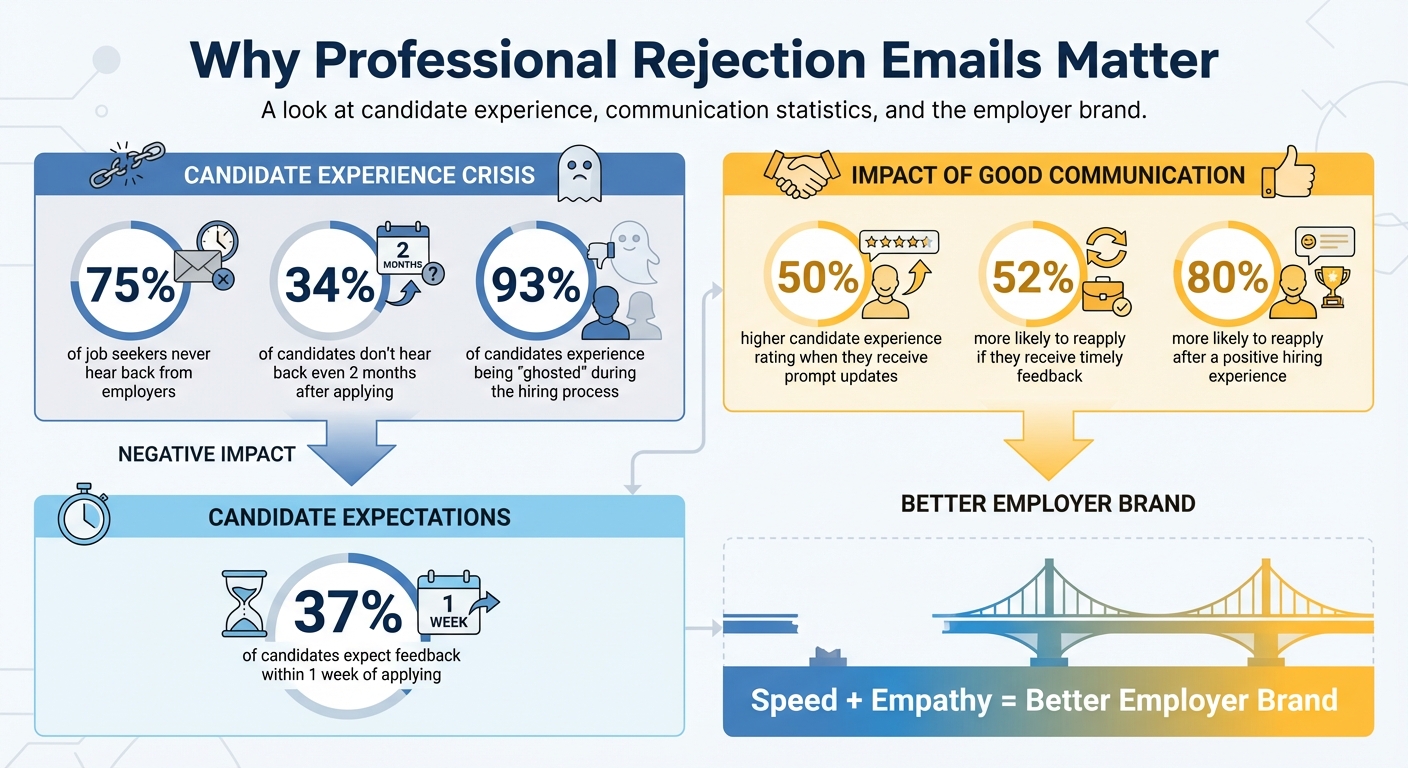
- Why It Matters: 75% of job seekers never hear back from employers. Prompt, thoughtful communication can improve candidate experience and protect your company’s reputation.
- Key Elements: Use a clear subject line, personalize the message, state the decision directly, and close with good wishes.
- Efficiency Tips: Leverage templates, batch processing, and tools like AI writing assistants to save time while keeping a human touch. Using an AI tool for customer care can further streamline this process.
- Tone: Be polite, neutral, and empathetic – avoid overly casual or ambiguous language.
The goal is to balance speed with empathy, ensuring candidates feel valued even when they don’t get the job.
Key Statistics on Candidate Communication and Rejection Email Impact
How to Write a Candidate Rejection Email (Quick Template)
What to Include in a Professional Rejection Email
A rejection email should clearly communicate the decision while respecting the effort and time the candidate invested. Crafting a professional rejection email involves a few key elements that provide closure and leave a positive impression of your organization.
How to Structure Your Email
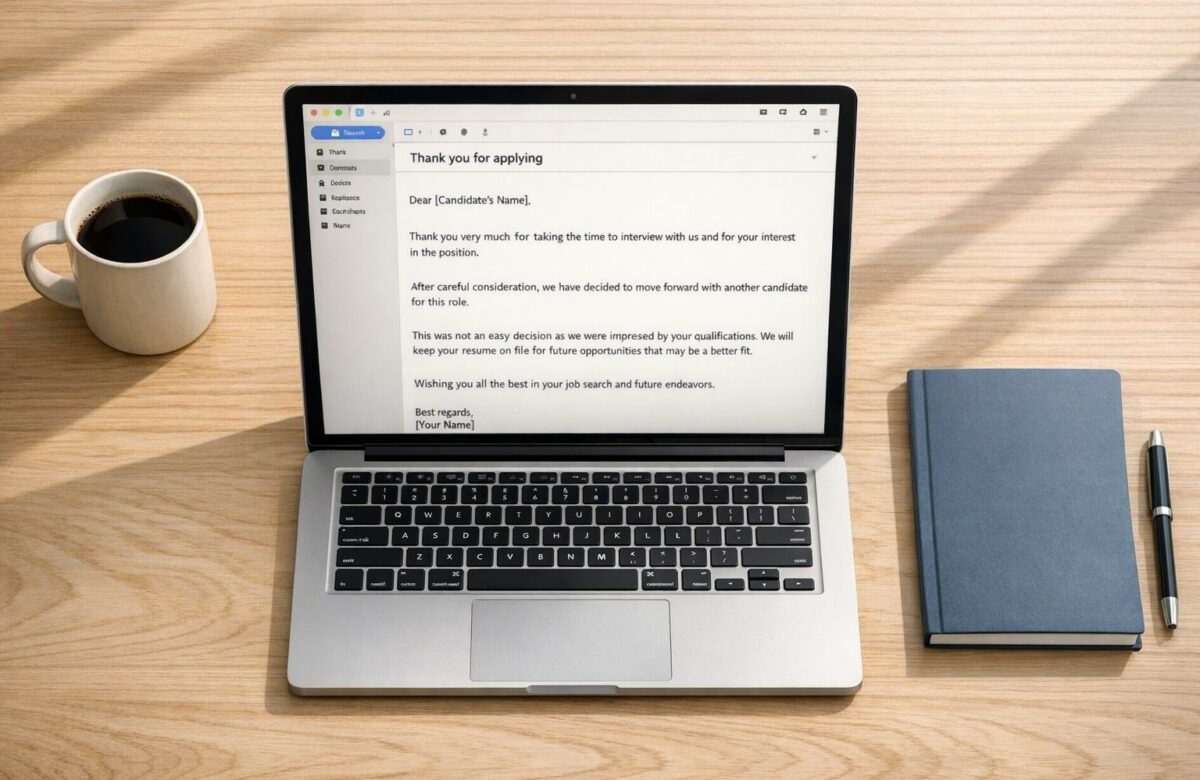
Start with a clear subject line that includes your company name and the job title. For example: "Your application for Marketing Manager at [Company Name]". Address the candidate by their first name (e.g., "Dear Sarah") and thank them briefly for their time and interest.
In the opening paragraph, use a personalized greeting and get straight to the point. Clearly state your decision to avoid leaving the candidate uncertain. For instance: "We have decided to move forward with another candidate for this position." This direct approach helps prevent confusion or frustration.
If appropriate, include a brief explanation. For example: "We selected a candidate with more experience in data analytics." For candidates who advanced far in the process, consider highlighting their strengths or suggesting future opportunities with your organization.
Conclude with a professional sign-off that expresses good wishes for their job search. Sign the email with your name and title. Keep the message concise – around 3–4 short paragraphs. Timely, clear communication can significantly improve a candidate’s perception of your company, with research showing that candidates rate their experience 50% higher when they receive prompt updates.
Once the structure is set, the next step is to focus on the tone and language.
Choosing the Right Tone and Words
The tone of your rejection email should be polite, neutral, and empathetic – not overly casual or playful. Ricardo Cuellar, VP of Human Resources at WAO Fintech, emphasizes:
"When you start being cute, you can come off as insensitive [and] maybe not emotionally intelligent."
Avoid language that softens the message to the point of creating ambiguity. Be clear and definitive to ensure there’s no misunderstanding about the outcome.
Express genuine gratitude for their time and effort, but avoid apologizing for the decision. Remember, this is a business choice made in the best interest of your organization.
This balance of clarity and empathy lays the groundwork for creating efficient, template-based emails while maintaining professionalism and respect.
How to Write Rejection Emails Faster
Timing is everything when it comes to sending rejection emails. Studies reveal that 34% of candidates don’t hear back from employers even two months after applying, and a staggering 93% experience being "ghosted" during the hiring process. Delays not only frustrate candidates but can also harm your employer brand. To strike a balance between speed, empathy, and efficiency, here are some strategies to streamline the process.
How to Use Email Templates
Email templates help maintain professionalism and ensure consistent communication. Tailor these templates to match the stage of the hiring process. For instance:
- For candidates rejected at the application stage, keep the email brief and neutral.
- For those who reached the interview stage, opt for a more detailed and encouraging tone.
Make sure to include placeholders for the candidate’s name and the job title they applied for. Adding a note about a positive trait or skill they demonstrated can show that their application was genuinely reviewed. This small touch goes a long way in leaving a positive impression.
In addition to templates, automation can make the process even smoother.
Batch Processing and Automation
Batch processing is a great way to handle similar rejections efficiently. For example, if you have 15 candidates to reject at the application stage, use a single template with minor personalization and send the emails in one batch. Tools like applicant tracking systems (ATS) can be invaluable here. They allow you to set up workflows that send automatic notifications to candidates at earlier stages, while flagging those in later stages for a more personalized follow-up.
This timely approach is crucial, especially since 37% of candidates expect feedback within a week of applying. By automating parts of the process, you can save time without sacrificing clarity or empathy.
Using Clipboard Shortcuts to Save Time
Clipboard tools are another handy way to speed up your rejection emails. These tools let you save and reuse common phrases, so you don’t have to retype them every time. For example, phrases like "Thank you for your interest in the Marketing Manager position" or standard closing lines can be stored as shortcuts. This makes it easy to adjust tone and personalize details without starting from scratch for every email. It’s a simple yet effective way to maintain consistency while saving valuable time.
sbb-itb-32359dc
Ready-to-Use Templates for Different Rejection Scenarios
When it comes to managing hiring rejections, balancing efficiency with empathy is key. These ready-to-use templates are designed to help you communicate clearly and consistently at every stage of the hiring process. The level of detail in your message should reflect how far the candidate progressed. For instance, early-stage rejections can be brief, while candidates who reached the interview stage deserve a more personalized response. If your drafts become too wordy, you can shorten long emails to maintain clarity. Below are examples tailored for various scenarios.
Template for Candidates Not Selected for Interview
Subject: Update on your application for [Job Title]
Hi [First Name],
Thank you for applying for the [Job Title] position at [Company Name]. We truly appreciate the time and effort you put into your application.
After reviewing all submissions, we’ve decided to move forward with candidates whose skills and experience are a closer match to the role’s requirements. This was a competitive process, with many highly qualified applicants.
We encourage you to explore other opportunities at [Company Name] that may align with your background.
Best regards,
[Your Name]
Even a short rejection email like this demonstrates respect for the candidate’s effort. With 75% of job seekers reporting they never hear back after applying, this small step can leave a positive impression.
Template for Candidates After Interview
Subject: Interview feedback for [Candidate Name]
Hi [First Name],
Thank you for taking the time to interview for the [Job Title] position on [Date]. It was a pleasure learning more about your experience, particularly your work on [specific skill or project they mentioned].
After careful consideration, we’ve decided to move forward with another candidate whose background more closely aligns with our needs. This was not an easy decision, given the high caliber of candidates we interviewed.
Your [specific positive trait, e.g., "problem-solving skills" or "team leadership abilities"] truly stood out, and we’d love to keep your resume on file for future opportunities. Would that be okay with you?
We wish you the very best in your career journey.
Best regards,
[Your Name]
By referencing specific details from their interview, you show the candidate that their application was thoughtfully reviewed. Research shows that candidates who receive timely feedback are 52% more likely to consider applying to the same company again.
Template for Internal Candidates
Subject: Following up on our conversation about [Job Title]
Hi [First Name],
Thank you again for discussing the [Job Title] position with me earlier today. As we talked about, we’ve decided to move forward with another candidate for this role.
I want to emphasize how much we value your contributions, especially your work on [specific project or team]. Based on our conversation, I believe focusing on [specific skill development area] could help position you for future opportunities within our organization.
Let’s set up a time next month to revisit your career development goals and explore ways we can support your growth here at [Company Name].
Thank you for your dedication to our team.
Best regards,
[Your Name]
Note: Always have a face-to-face or phone conversation before sending this follow-up email. It ensures clarity and provides the opportunity to discuss next steps for their professional development.
Template for Highly Competitive Roles
Subject: Update on your application for [Job Title]
Hi [First Name],
Thank you for expressing interest in the [Job Title] position at [Company Name]. Your background in [specific area] impressed us, and we truly appreciated the time you invested in the application process.
After reviewing all applications, we’ve decided to move forward with candidates whose experience more closely matches the role’s immediate needs. This was a challenging decision due to the competitive nature of this position.
We’d like to retain your information in our talent pool for future opportunities. May we have your permission to reach out when a role better aligns with your expertise?
We’re grateful for your interest in joining our team and wish you success in your career.
Best regards,
[Your Name]
This approach helps maintain relationships with strong candidates who weren’t selected. Studies show that 80% of candidates are more likely to reapply if they had a positive experience with the hiring process.
Template Comparison Table
| Template Type | Length | Future Opportunity Mention |
|---|---|---|
| No-Interview Rejection | Short | No |
| Post-Interview Rejection | Medium | Optional |
| Internal Candidate | Medium | Yes |
| Competitive Role | Long | Yes |
Select the template that best fits the candidate’s stage in the process. Early rejections can be brief and neutral, while later-stage candidates benefit from detailed, thoughtful responses that acknowledge their qualifications and effort.
Using Multilingual Tools to Speed Up the Process
When managing rejection emails or communicating with international candidates, simple translation tools often fall short. You need solutions that understand both professional context and subtle cultural differences. This is where AI-powered writing assistants designed for multilingual communication can make a real difference. These tools simplify and enhance the way you handle candidate communications across languages.
How BeLikeNative Improves Email Writing Speed
BeLikeNative is an AI-powered Chrome extension tailored for non-native speakers who need to communicate professionally. It works directly from your clipboard with a simple shortcut, letting you refine emails without jumping between apps. This feature is particularly useful for maintaining a consistent tone in multilingual settings.
One standout feature is the AI reply generator, which creates polished email drafts in seconds. Instead of starting from scratch, you get a ready-to-use draft that you can tweak to fit your needs. The tool also eliminates "translationese" – those awkward, overly literal phrases that might be grammatically correct but sound unnatural to native speakers. The result? Emails that feel smooth and professional, not robotic or clunky.
You can easily adjust the tone of your message – from formal to empathetic – depending on the situation and the candidate’s stage in the process. BeLikeNative even integrates with Microsoft Teams, allowing you to refine your text and tone directly in your workspace. This is a game-changer for HR teams managing rejection communications across multiple stakeholders.
Supporting over 80 languages, BeLikeNative ensures your emails are not only clear but also culturally appropriate – whether you’re writing in Spanish, Mandarin, or German. Plus, it works seamlessly across major platforms, making it a versatile tool for global communications.
BeLikeNative Pricing Plans
Clear and affordable pricing makes it easy to choose the right plan for your needs.
BeLikeNative offers four pricing tiers, catering to a range of usage requirements. The Explorer plan is free and includes basic spelling and grammar checks, with 5 uses per day and a 500-character limit – ideal for occasional emails. For $4/month, the Learner plan increases capacity to 25 uses per day with a 2,000-character limit, plus editable options and shortcuts.
For HR teams handling a higher volume of emails, the Native plan at $6/month offers 50 uses per day with a 4,000-character limit and priority support. The Premium plan at $14/month is designed for heavy users, providing 125 uses per day, a 6,000-character limit, and perks like partnership benefits and the option for a lifetime license after two years.
| Plan Name | Price | Features | Limitations |
|---|---|---|---|
| Explorer | $0/month | Basic correction, 5 uses/day, 500 chars | Limited to 5 uses/day |
| Learner | $4/month | 25 uses/day, 2,000 chars, editable options | Limited to 25 uses/day |
| Native | $6/month | 50 uses/day, 4,000 chars, priority support | Limited to 50 uses/day |
| Premium | $14/month | 125 uses/day, 6,000 chars, lifetime options | Limited to 125 uses/day |
For most HR teams, the Native or Premium plans strike the best balance between capacity and features, making them ideal for managing frequent, professional communications across multiple languages. With these plans, you can ensure your messages are polished, effective, and appropriate for every audience.
Conclusion
Writing quick and professional rejection emails doesn’t have to be a hassle. By being direct, tailoring messages to the stage of the process, and responding promptly, you not only respect candidates’ time but also protect your employer brand and maintain a strong talent pipeline.
Using tools like templates, batch processing, and AI can turn rejection emails from a tedious task into an efficient process. These approaches ensure consistency and professionalism while freeing up time for more strategic priorities – even when managing global communications.
"A quick no is better than a long maybe." – Sarah Green Carmichael, Harvard Business Review
In today’s fast-paced hiring environment, tools like BeLikeNative can make a big difference, especially for teams managing high volumes or multilingual communications. With features like AI-generated drafts, tone adjustments, and support for over 80 languages, you can ensure your messages are clear, empathetic, and culturally sensitive.
FAQs
How can AI tools help create professional rejection emails quickly?
AI tools are a game-changer for drafting rejection emails, making the process quicker and easier. They offer pre-made templates, tone adjustments, and helpful suggestions to ensure your message is clear, respectful, and professional. These tools help you write concise emails that strike the right balance between empathy and professionalism, saving you time while leaving a positive impression.
With options like automatic rephrasing and tone customization, AI tools can shift your message from casual to formal, ensuring it meets workplace expectations. This lets you focus on delivering thoughtful communication without getting bogged down in drafting or editing.
What are the advantages of using email templates for rejection messages?
Using email templates for rejection messages comes with several advantages. First, they save you time by offering pre-designed formats that can be easily tailored, allowing for quick and efficient responses. This ensures you can reply promptly without sacrificing quality.
Templates also help maintain a polished and consistent tone, reinforcing a positive image of your organization. Moreover, thoughtfully designed templates improve the candidate experience by delivering clear, empathetic, and respectful communication. Even when delivering disappointing news, they leave a professional and considerate impression.
Why should you personalize rejection emails when using templates?
Personalizing rejection emails, even when you rely on templates, demonstrates respect for the recipient and recognizes the effort they put in. It shows you value their time and individuality, leaving a positive impression that can help maintain professional connections.
Adding a personal touch also softens the impact of the rejection, making it feel more considerate and less detached. This thoughtful approach not only improves the recipient’s experience but also reflects positively on your organization. It keeps the door open for potential collaborations or opportunities down the line. Even small tweaks, like referencing specific details, can make your message feel more genuine and considerate.

