
How To Write A Real Estate Listing Description Instantly
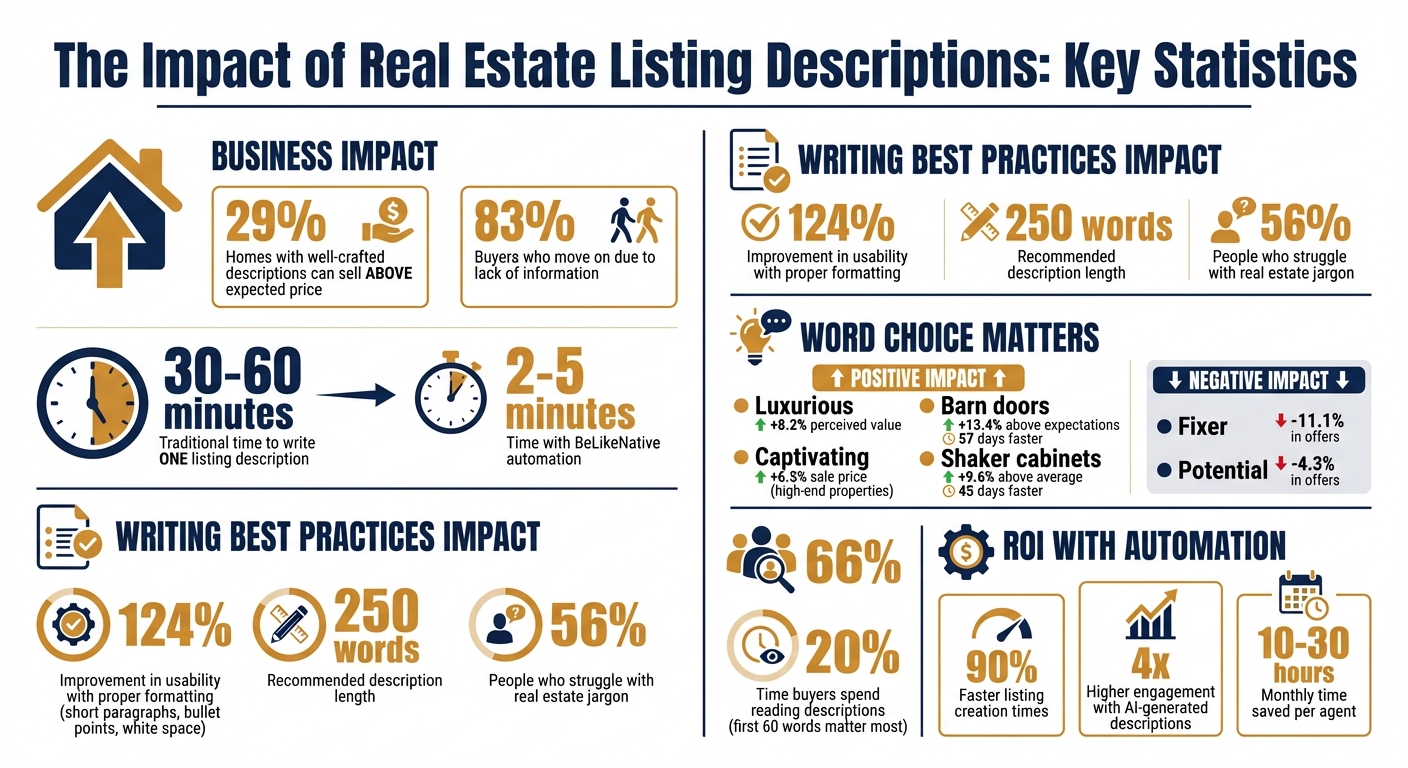
A great real estate listing starts with eye-catching photos, but it’s the description that convinces buyers to take action. Well-crafted descriptions can help homes sell for up to 29% above their expected price and prevent 83% of buyers from moving on due to lack of information. However, writing these descriptions can take 30–60 minutes per listing, which adds up quickly for busy agents.
That’s where BeLikeNative comes in. This Chrome extension transforms raw property details into polished, professional descriptions in just 2–5 minutes, saving time and ensuring consistency. It helps you highlight key features, stay compliant with Fair Housing guidelines, and tailor descriptions for the US market with proper formatting, measurements, and language.
Key Takeaways:
- Impact of Descriptions: Listings with detailed descriptions sell faster and for more money.
- Writing Tips: Use specific, benefit-focused language and avoid jargon. Highlight property features, location benefits, and lifestyle appeal.
- BeLikeNative Features: Automates description writing, supports US measurements, and allows tone/style adjustments.
- Plans: Free plan available; paid plans start at $4/month, with options for higher usage.
In just a few minutes, you can create engaging, accurate, and professional listings that attract buyers and save hours of work.
Real Estate Listing Description Statistics and Impact
How To Write A Real Estate Listing Description That Sells (Using AI)
sbb-itb-32359dc
What Makes a Good Real Estate Listing Description
A great real estate listing grabs attention, informs potential buyers, and motivates them to take action. Online descriptions have become the go-to marketing tool for most homebuyers. The difference between an average listing and one that stands out often lies in how well you highlight the property’s features, location advantages, and use persuasive language.
Aim for around 250 words and start with the home’s strongest selling point. Follow this with a virtual tour-style layout that uses short paragraphs and bullet points. Keep paragraphs to 2–3 sentences and use plenty of white space to make the text scannable. Listings written this way can improve usability by 124%.
Be mindful of wording. Positive terms like “luxurious” can increase perceived value by 8.2%, while words like “fixer” or “potential” can lower offers by 11.1% and 4.3%, respectively. Specific features can make a big difference too – homes with “barn doors” sell 13.4% above expectations and 57 days faster.
Stay Fair Housing compliant by focusing on the property’s features rather than suggesting an “ideal” buyer. For example, instead of saying “perfect for families,” describe the property with terms like “spacious backyard” or “four-bedroom layout”. Avoid confusing jargon such as “CAC” or “W/D,” as over 56% of people struggle with real estate terminology quizzes. Stick to plain language to ensure clarity.
Every listing should end with a clear call to action, like “Schedule a private tour today” or “Join us for the open house this Saturday”.
Describing Property Features
Buyers want more than just a list of specs – they want to imagine how the home will enhance their daily lives. Instead of simply stating “large windows,” explain the benefit: “natural light that brightens every room throughout the day”. This approach helps buyers visualize themselves in the space.
Be specific about upgrades. For instance, mention a “2023 kitchen remodel with quartz countertops and Sub-Zero appliances” to emphasize quality and justify pricing. Certain details can make a big impact – listings that highlight “shaker cabinets” sell for 9.6% more and 45 days faster than average.
Structure your description like a guided walk-through. Start with the heart of the home, such as the kitchen or living room, then move to bedrooms, bathrooms, and outdoor spaces. This logical flow helps buyers mentally map the layout. Use active verbs to make the description more engaging. For example, “The home combines historic architecture with modern comforts” sounds far more dynamic than “The home has historic architecture”.
Even perceived drawbacks can be reframed positively. A small bedroom could be described as “a minimalist home office perfect for remote work,” and a compact backyard might become “low-maintenance landscaping ideal for busy professionals.” Older homes can shine when you highlight charming details like original hardwood floors or crown molding.
Describing Location Benefits
The location is just as important as the property itself. Buyers aren’t just purchasing a home – they’re investing in a lifestyle. Highlight nearby schools, parks, transit options, and amenities.
"Consumers are buying not only the home but also the lifestyle. Make sure to list amenities and transportation. Also, walkability is a big selling point."
- Christy Denys, Miami Association of Realtors Trainer
Be specific with distances and timeframes. Instead of vague phrases like “walking distance,” include concrete details like “a five-minute walk to Lincoln Elementary” or “two blocks from the Metro station”. Tailor your description to the likely buyer. For example, young professionals may value nearby nightlife and coworking spaces, while families might prioritize schools and parks.
Use observable terms like “tree-lined streets” or “established community” rather than subjective phrases. Providing precise measurements, such as “0.3 miles to downtown,” not only adds credibility but also ensures compliance with Fair Housing guidelines.
Writing Clear and Persuasive Text
The best descriptions tell a story rather than just listing facts. Around 66% of homebuyers are drawn to narratives that highlight lifestyle benefits. Start with an engaging opening sentence that sets the tone. For example, “Start your mornings with coffee on a sun-drenched private balcony” is far more appealing than simply stating “Primary bedroom includes a balcony”.
Choose words that evoke emotion and signal quality. Terms like “impeccable,” “move-in ready,” “chef’s kitchen,” and “captivating” can make your listing more appealing. In fact, using “captivating” in high-end property descriptions has been shown to increase sale prices by 6.5%. On the other hand, avoid words like “TLC,” “cosmetic,” or “motivated seller,” which can raise red flags and attract lowball offers.
"On the average, five times as many people read the headline as read the body copy. When you have written your headline, you have spent eighty cents out of your dollar."
- David Ogilvy
Using active voice and storytelling techniques ensures your listing stands out. Over 83% of buyers will move on if they can’t quickly find the information they need. Read your description aloud to catch awkward phrasing or overly long sentences. And don’t overlook proofreading – typos can make buyers question whether the property has been well-maintained.
How to Write Descriptions Quickly with BeLikeNative
BeLikeNative makes creating professional listing descriptions a breeze, cutting the usual 30–60 minute process down to just 2–5 minutes. This efficient tool helps you produce fast, polished, and compliant descriptions, giving you more time to focus on other important tasks. The Chrome extension integrates seamlessly with your clipboard, making it easy to refine property details across any platform.
Installing and Setting Up BeLikeNative
To get started, head to the Chrome Web Store, search for "BeLikeNative", and click Add to Chrome. Once added, the extension immediately integrates into your browser – no extra setup required.
After installation, open the extension and configure your preferences. Set English (en-US) as your default language to ensure descriptions follow American spelling and phrasing. You can also select a tone and style that fits your typical listings, though these settings can be adjusted for individual properties. The extension supports over 80 languages, making it a handy tool if you cater to multilingual clients.
Once installed and customized, you’re ready to start creating descriptions effortlessly.
Entering Property Details and Creating Text
With BeLikeNative set up, input your property details directly into the tool. Include key information like the number of bedrooms and bathrooms, square footage, lot size, year built, and standout features such as recent upgrades or luxury appliances. Be as detailed as possible. For example, instead of saying "updated kitchen", specify "2023 kitchen remodel with quartz countertops and a Wolf 6-burner range".
Copy the property details to your clipboard and activate BeLikeNative using its shortcut. The extension transforms this raw information into a polished, engaging description. For instance, basic details like "3 bed, 2 bath, 1,850 sq ft, hardwood floors, fenced yard" are reworked into a narrative that emphasizes lifestyle benefits and connects with potential buyers.
Adding precise distances, such as "0.3 miles to transit" or "a 5-minute walk to a local elementary school", enhances the description while ensuring compliance with Fair Housing guidelines.
Adjusting Tone, Style, and Language
After generating the text, you can fine-tune its tone and style to fit your audience. BeLikeNative allows you to adapt the description for different property types and buyer demographics.
The tool offers presets like Professional, Lifestyle, and Minimalist, making it easy to match the tone to your listing. You can also adjust the length of the text with a character limit slider, which is especially useful for crafting shorter social media posts or more detailed website descriptions.
If the generated text needs further refinement, use specific prompts to tweak the tone or style of the opening or overall description [[15]](https://learnwithnathan.com/docs/GenAI for Real Estate/module-4-ai-powered-marketing/writing-winning-property-listings.html). This flexibility ensures each listing feels tailored to the property and resonates with your target audience.
Adapting Descriptions for the US Market
When writing for American buyers, incorporating local details is essential. BeLikeNative simplifies this process by automating adjustments to align with US conventions. This means you don’t need to manually convert measurements or second-guess your phrasing. These tweaks ensure your listings connect with American audiences.
Using Imperial Units and US Measurements
In the US, buyers expect measurements like floor space in square feet and lot sizes in acres. With the "Native" function, you can instantly convert metric values. Simply highlight text with meters or kilometers, use the shortcut, and the extension rephrases it using feet, yards, or miles.
For example:
- "150 square meters" becomes "approximately 1,615 sq ft."
- "0.4 hectares" converts to "1 acre."
- Distances like "2 km to downtown" are adjusted to "1.2 miles to downtown".
US real estate descriptions often use mixed units for specific measurements. For instance:
- Ceiling heights are typically listed as "9 feet" or "10 feet."
- Room dimensions appear as "12 feet by 15 feet."
The tool accounts for these conventions, ensuring your descriptions feel natural while also handling proper currency and date formatting.
Formatting Currency and Dates
Prices are automatically formatted with a dollar sign and correct decimals, like "$425,000", to meet MLS standards and buyer expectations.
Dates follow the MM/DD/YYYY format preferred in the US. Whether referencing renovation dates or availability, BeLikeNative ensures dates read as "3/15/2025" or "March 15, 2025", avoiding confusion and keeping your listings professional.
Beyond numbers, adapting language and phrasing is equally important for American audiences.
Using American English Spelling and Phrasing
Word choice plays a big role in localization. The tool converts international terminology to American English, such as:
- "Flat" to "apartment."
- "Garden" to "yard."
- "Ground floor" to "first floor".
It also refines phrasing to sound natural. Awkward constructions or overly formal language are replaced with descriptions that flow smoothly for US readers. By selecting a Professional or Formal tone in the settings, you can ensure your listings maintain industry standards while staying reader-friendly.
The localization even includes regional real estate terms. For example:
- It can replace outdated phrases with "primary bedroom."
- For Florida properties, the tool can include "lanai", a term familiar to local buyers.
With its custom dictionary feature, BeLikeNative adapts to specific markets, helping your listings resonate with the right audience.
BeLikeNative Pricing Plans for Real Estate Professionals
BeLikeNative provides four pricing options tailored to different needs. Every paid plan includes a 30-day money-back guarantee and offers a 25% discount for annual subscriptions. With support for over 80 languages, the plans primarily differ in daily usage limits and character allowances.
Think about how many listings you handle each month. BeLikeNative can help you save between 10 and 30 hours of manual work. For context, traditional copywriting services often charge $50 to $200 per listing, while AI-generated descriptions typically cost less than $10 – making this a time-efficient and cost-effective alternative.
Comparing BeLikeNative Plans
Here’s a breakdown of the pricing, daily limits, and ideal use cases for each plan:
| Plan | Monthly Price | Daily Uses | Character Limit | Best For |
|---|---|---|---|---|
| Explorer | $0/month | 5 | 500 | Testing the tool or handling 1–2 listings weekly |
| Learner | $4/month | 25 | 2,000 | Agents managing 5–10 listings monthly |
| Native | $6/month | 50 | 4,000 | Agents with 15–20+ listings monthly |
| Premium | $14/month | 125 | 6,000 | Teams, brokerages, or high-volume professionals |
The Explorer plan is perfect for trying out the tool or managing occasional listings. If you’re an agent handling descriptions regularly but don’t need high daily limits, the Learner plan is a great fit. Many real estate professionals prefer the Native plan, which balances affordability and functionality with 50 daily uses and 4,000 characters – enough for multiple detailed property descriptions per day. For those managing large portfolios, the Premium plan offers expanded limits and priority features.
Paid plans also include editable options, custom shortcuts, and priority bandwidth. Additionally, the Native and Premium plans let you contribute to shaping future features, ensuring BeLikeNative continues to adapt to your workflow. Pick the plan that aligns with your listing needs to streamline your property descriptions efficiently and affordably.
How to Review and Improve Your Descriptions
Once you’ve created a description using BeLikeNative, it’s time to refine it. While the tool provides a solid draft, your expertise adds the finishing touches that make the description shine. Think of BeLikeNative as a way to overcome the dreaded blank page – it’s your local knowledge and professional judgment that turn a good draft into a great one. Every description needs a human review to ensure accuracy, compliance, and the unique details that make it stand out. Here’s how to polish your draft and make it truly compelling.
Adding Specific Property Details
Generic descriptions don’t sell homes – details do. Swap vague phrases like "nearby parks" for specifics, such as "0.3 miles from Lincoln Park’s Saturday farmer’s market." Highlight branded features; for example, "Wolf range" or "Sub-Zero refrigerator" conveys more trust than "high-end appliances." If there’s a new roof or updated HVAC system, include the year – buyers love knowing these details.
Don’t forget transactional information, such as HOA fees, seller financing, or assumable mortgages. If the property is in a sought-after school district, name it. These small but meaningful details answer buyers’ questions upfront and make your listing memorable.
Checking Compliance and Accuracy
Accuracy and compliance are non-negotiable. Review every detail, from square footage and lot size to tax records and the age of major systems. AI tools can misinterpret data, so cross-check everything against MLS records and property documents.
Stay aligned with Fair Housing guidelines by focusing on the property, not the buyer. For example, replace "perfect for families" with "spacious layout with a large, fenced yard." Instead of "walking distance", use "0.5 miles to Metro station" to ensure inclusivity for all mobility levels. Update outdated terms like "master bedroom" to "primary suite", and avoid words like "cozy" (which implies small), "TLC" (which suggests neglect), or "motivated seller" (which might invite low offers).
| Focus On (Do) | Avoid (Don’t) | Reason |
|---|---|---|
| "Spacious layout with a large, fenced yard" | "Perfect for families" | Avoids assumptions about family status |
| "Located near vibrant nightlife and dining" | "Ideal for singles or young professionals" | Prevents steering based on age or lifestyle |
| "Primary bedroom" | "Master bedroom" | Reflects modern industry standards |
| "Priced to allow customization" | "Needs TLC" or "Fixer-upper" | Frames property condition positively |
Final Edits for Better Readability
Read your description out loud. Does it flow naturally? Does it reflect your personal brand? Keep paragraphs short – 2 to 3 sentences max – so the text is easy to read, especially on mobile devices. Remember, the first 60 words matter most since buyers typically skim descriptions, spending only about 20% of their time reading.
Use SEO-friendly keywords that buyers are likely to search for, such as "quartz countertops", "stainless steel appliances", or "open floor plan." Avoid using ALL CAPS or excessive exclamation marks, which can come across as unprofessional. Finally, double-check your local MLS character limits (usually 200–250 words) to ensure your call to action isn’t cut off.
Conclusion
Crafting real estate listing descriptions doesn’t have to eat up a chunk of your day. BeLikeNative transforms what used to take 30–60 minutes into a task that’s done in under 3 minutes. By turning simple property details into polished, professional descriptions, it frees up your time for what really matters – prospecting, negotiating, and closing deals.
The numbers speak for themselves. Real estate professionals report 90% faster listing creation times and experience 4x higher engagement with these AI-generated descriptions compared to traditional methods. Emil Johansson from Zeenah Realty & Co. shares his experience:
"We went from spending 30 minutes writing each listing to under 3 minutes. The AI-generated descriptions are professional and optimized for every platform".
BeLikeNative doesn’t just save time – it ensures your listings maintain brand consistency, integrate SEO-friendly keywords for better visibility on platforms like Zillow, and stay compliant with Fair Housing guidelines. Whether you’re handling a single property or managing a portfolio of hundreds, the tool scales effortlessly with your needs. These benefits not only simplify your workflow but also help you stand out in a competitive market.
It’s important to see BeLikeNative as a partner, not a replacement. Use it to create a strong draft, then fine-tune it with your local expertise, unique property details, and personal flair. This combination of AI speed and human touch transforms good listings into ones that grab attention and drive inquiries.
With BeLikeNative, you can turn basic property details into engaging, high-performing listings – making your workflow smoother and your results stronger. Start simplifying your process today.
FAQs
What property details should I include to get the best description?
When crafting a property description, focus on including the details that will grab buyers’ attention and help them picture themselves in the space. Here’s what to highlight:
- Number of rooms and bathrooms: Be specific about the layout and size.
- Square footage: Give potential buyers a sense of the property’s scale.
- Special features: Mention standout elements like updated appliances, modern finishes, or energy-saving upgrades.
- Construction year and furnishing status: Indicate when the property was built and whether it’s furnished or ready for customization.
- Unique amenities or renovations: Talk about features like a home office, remodeled kitchen, or outdoor spaces.
- Asking price and contact info: Make it easy for buyers to take the next step.
By including these details, you’ll create a description that’s clear, appealing, and helps buyers imagine the possibilities.
How do I keep my listing description Fair Housing compliant?
When writing a listing description, it’s crucial to follow Fair Housing laws. This means steering clear of any language that might be seen as discriminatory or suggest preferences related to protected characteristics, such as race, religion, gender, or family status. Instead, concentrate on providing clear, neutral details about the property itself. Avoid using terms that could exclude or favor specific groups, and aim for transparency and inclusiveness to stay within fair housing standards.
How can I tailor one description for MLS, Zillow, and social media fast?
Creating an effective property description starts with three key steps: crafting a standout headline, writing a core description that highlights the property’s best features, and using AI tools to adapt the content for different platforms. Here’s how you can make your descriptions work harder for you:
- Start with the audience in mind: Different platforms call for different approaches. For MLS listings, focus on structured, keyword-rich text that appeals to buyers searching with specific criteria. On Zillow, lean into emotional storytelling to help potential buyers imagine themselves in the space. For social media, keep it short and snappy – combine engaging snippets with eye-catching visuals to grab attention quickly.
- Save time with AI tools: Use AI to fine-tune descriptions for each platform, ensuring the tone, length, and format fit the audience perfectly. This not only saves time but also boosts the effectiveness of your marketing efforts.
By tailoring your property descriptions to each platform and audience, you’ll maximize your reach and make a stronger impression.

