
How To Write YouTube Video Descriptions Faster With AI
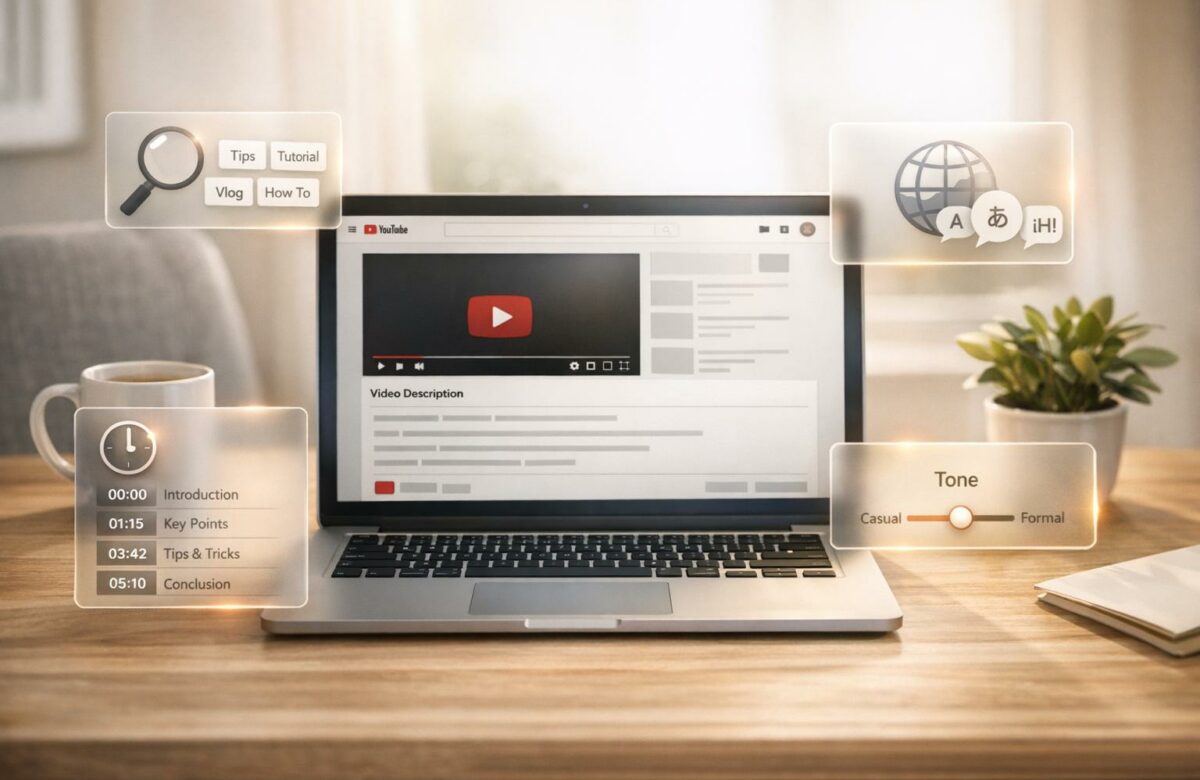
Writing YouTube video descriptions can be time-consuming, especially with tasks like adding SEO keywords, timestamps, and maintaining a consistent tone. AI tools like BeLikeNative simplify this process, saving time and effort. Here’s how AI can help:
- Automation: Quickly rephrase text, fix grammar, and add SEO keywords.
- Translation: Reach global audiences by translating descriptions into 80+ languages.
- Tone Adjustment: Tailor descriptions to match the style of your videos.
BeLikeNative integrates directly with YouTube Studio, making it easy to optimize descriptions without switching tools. With plans ranging from free to premium, it’s suitable for creators of all levels. Try the free plan to streamline your workflow and focus more on creating engaging videos.
Transform Any Text, On Any Site, In Seconds
Rephrase, translate, and improve text with one shortcut. Works everywhere you write.
Add to Chrome - It's Free!How I Use AI to Create Your YouTube Descriptions and Timestamps
sbb-itb-32359dc
Why Use AI for YouTube Descriptions
AI takes the hassle out of crafting YouTube descriptions by generating polished, ready-to-use text in seconds. From automation to translation and tone adjustments, these tools make the process faster and more efficient.
Save Time with Automation
Writing descriptions manually can eat up valuable time that could be better spent creating content. AI tools simplify this process by handling repetitive tasks like rephrasing awkward sentences, fixing grammar mistakes, and seamlessly adding SEO keywords. With just a quick command, you can improve or rework your text.
AI can even identify key moments in your videos and automatically generate formatted timestamps and chapters. This means you can batch-create descriptions for multiple videos without compromising on quality or consistency. One verified user shared that AI-powered editing cut their workload to just a quarter of the time it used to take, allowing them to double their content output.
These time-saving features help you focus on creating content while ensuring your descriptions are optimized for engagement.
Reach Global Audiences with Translation
Time-saving is great, but reaching a broader audience is just as important. YouTube boasts 2 billion logged-in users each month, speaking a wide range of languages. If your descriptions are only in English, you’re potentially missing out on millions of viewers. AI’s multi-language support can instantly translate and localize your descriptions, helping you connect with audiences worldwide.
Translation isn’t just about making content accessible – it also improves discoverability. Localized titles and descriptions can help your videos appear in international search results, extending your reach beyond borders. Plus, when viewers see descriptions in their own language, they’re more likely to click, watch, and engage with your content.
Adjust Tone and Style
Once you’ve streamlined production and expanded your audience, it’s time to fine-tune your descriptions to match the tone and style each video demands. For instance, a product launch might need a sense of urgency and excitement, while a tutorial should focus on clarity and professionalism. AI tools make it easy to adjust the tone with just a few tweaks.
You can also customize language and style settings to maintain a consistent brand voice across all your videos. This is especially helpful when managing different types of content or targeting specific audience segments. As Iliya Valchanov, CEO of Juma, puts it:
"Not all videos need the same style of writing. For example, a product launch needs urgency, whereas a behind-the-scenes video needs a relaxed tone".
How to Use BeLikeNative for YouTube Descriptions
BeLikeNative simplifies creating YouTube descriptions by working directly within YouTube Studio. No more switching tabs or copying text to external tools – this extension keeps everything in one place. Here’s how to get started and make the most of it.
Step 1: Install and Set Up the Extension
Head to the Chrome Web Store, search for "BeLikeNative", and click "Add to Chrome." Once installed, you can configure your preferred tone, target language, and writing style. The extension integrates with YouTube Studio automatically, so setup is quick and hassle-free.
When you’re ready to use it, simply highlight text in the description box. With Version 1.2.0, a new side panel replaces the older popup format, accessible via Alt + E (Windows) or Command + E (Mac). Supporting over 80 languages and boasting a 4.6/5-star rating from 195 reviews on the Chrome Web Store, it’s both efficient and reliable.
Step 2: Optimize Your Text
Before diving in, set your tone and language preferences. Draft your description in YouTube Studio, then highlight the section you want to refine and press the assigned keyboard shortcut. BeLikeNative offers tools like an AI paraphrasing tool, Translate, Fix Grammar, Summarize, and tools to simplify sentences. In about a second, the optimized text is ready and copied to your clipboard.
Users have reported a 66% boost in productivity, saving over 85 hours per month by cutting out repetitive tasks like switching tabs. The side panel also provides alternative phrasing options, giving you control over the final result before applying it.
Step 3: Apply Your Updated Description
Once your text is optimized, paste it directly into the description box using Ctrl+V (Windows) or Cmd+V (Mac). The clipboard integration ensures your polished description is ready to go without leaving the YouTube editor.
"Your ideal copy is waiting in your clipboard before you can even blink." – BeLikeNative
Advanced Tips for Multilingual and SEO-Optimized Descriptions
Optimize for Search Engines in Multiple Languages
Taking your global SEO strategy to the next level involves refining your approach. Use the translation feature in BeLikeNative to expand your reach beyond English-speaking audiences. Start by analyzing YouTube Analytics to pinpoint your key target countries, then prioritize creating content in those languages.
Make sure your primary keywords appear early – ideally within the first 60 characters and the first two lines of your description. This rule applies to every language version you create. When using BeLikeNative to translate your text, double-check that the keywords are properly integrated at the beginning. While AI-generated metadata can improve discoverability, it’s essential to verify that high-performing tags and phrases are accurately translated for each target market.
Add Timestamps and Keywords
Timestamps aren’t just for helping viewers navigate – they also enhance your video’s SEO. Videos with chapters tend to see an 8-12% increase in watch time and a 10-15% boost in average view duration compared to videos without chapters. To enable clickable chapters, start your first timestamp at 0:00, include at least three chapters, and ensure each segment is at least 10 seconds long.
Use keyword-rich titles for your chapters instead of generic labels. For instance, replace "Part 1" with something like "Python Installation Guide." Keep these titles under 40 characters to ensure they display properly on mobile devices. Additionally, timestamps can appear as "Key Moments" in Google search results, giving your video more visibility with minimal extra effort. If you’re unsure how to phrase chapter titles effectively, BeLikeNative can help you craft clear, keyword-optimized titles.
Create a Consistent Workflow for Multiple Videos
Once your descriptions are optimized, consistency becomes key for managing your channel efficiently. BeLikeNative’s integration with YouTube Studio simplifies repetitive tasks, allowing you to manage multiple videos without switching between tools. You can configure the tone and target languages once, and these settings will automatically apply to all future uploads. If you oversee multiple channels, this workflow is scalable – everything can be managed from one interface without needing to reconfigure settings repeatedly.
BeLikeNative Pricing Plans for YouTube Creators
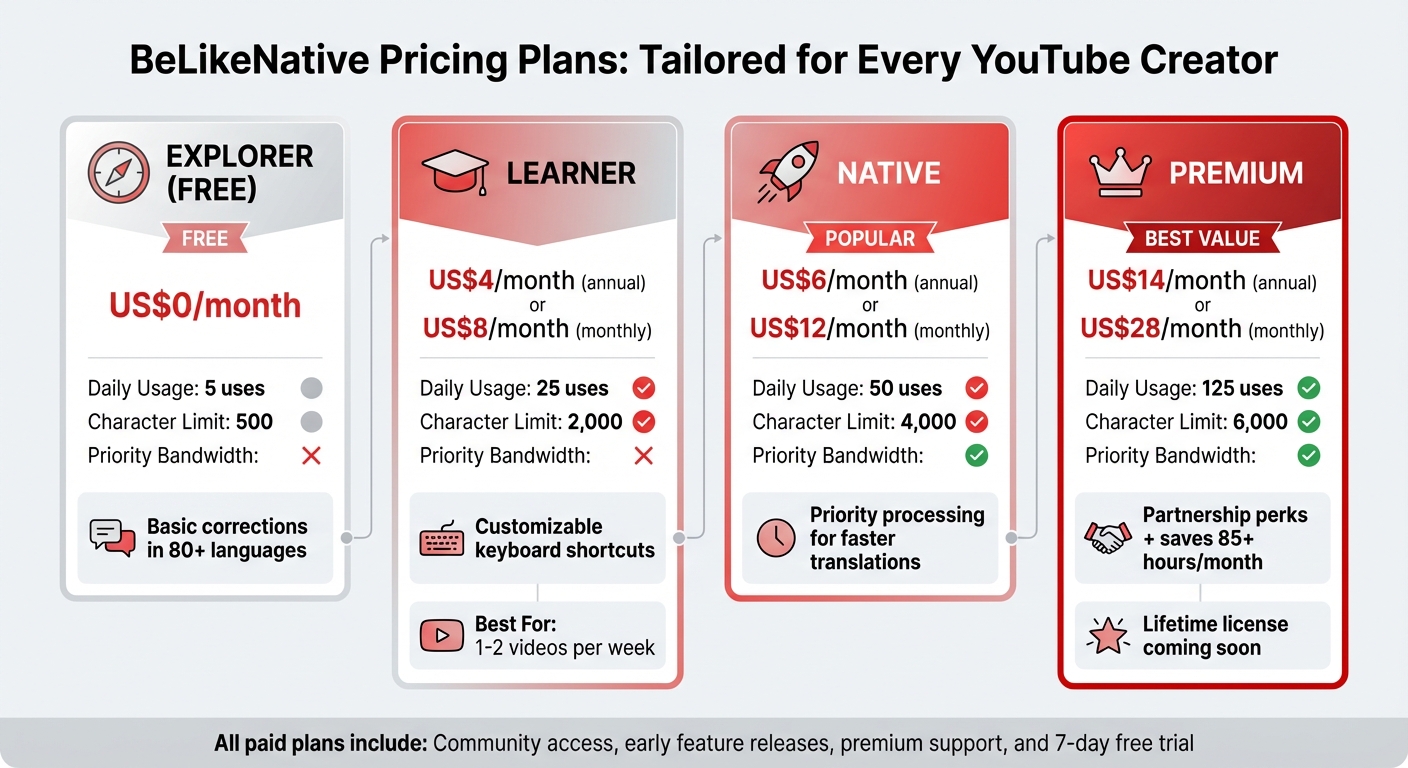
BeLikeNative Pricing Plans Comparison for YouTube Creators
Once you’ve fine-tuned your video descriptions, it’s time to pick the BeLikeNative plan that fits your creative goals and workflow.
Free plan vs. Learner Plans
The Free plan is completely free, making it a great way to try out the extension. It includes 5 daily uses and a 500-character limit for basic corrections in over 80 languages. This is perfect for occasional users who need simple edits.
On the other hand, the Learner plan costs US$4/month (billed annually) or US$8/month (billed monthly). This plan boosts your capacity to 25 daily uses and a 2,000-character limit, making it ideal for casual creators who upload one or two videos per week. Plus, it comes with handy features like customizable keyboard shortcuts to speed up your workflow.
Native vs. Premium Plans
The Native plan is priced at US$6/month (annual) or US$12/month (monthly). It offers 50 daily uses, a 4,000-character limit, and priority bandwidth. This ensures faster processing, especially when you’re translating descriptions into multiple languages or working on tight deadlines.
For creators with heavier workloads, the Premium plan is available for US$14/month (annual) or US$28/month (monthly). It provides 125 daily uses, a 6,000-character limit, and exclusive partnership perks, such as influencing future feature updates. Premium users can save over 85 hours a month, translating into notable yearly savings. Additionally, Premium subscribers will soon have the option to purchase a lifetime license.
| Feature | Free Plan | Learner | Native | Premium |
|---|---|---|---|---|
| Monthly Price | US$0 | US$4–US$8 | US$6–US$12 | US$14–US$28 |
| Daily Usage Limit | 5 | 25 | 50 | 125 |
| Character Limit | 500 | 2,000 | 4,000 | 6,000 |
| Priority Bandwidth | No | No | Yes | Yes |
| Key Benefits | Basic corrections | Shortcut editing | Priority processing | Partnership benefits |
All paid plans include access to the BeLikeNative community, early feature releases, and premium support. Not sure which plan works best for you? Start with a 7-day free trial to test how the extension’s shortcuts fit into your upload routine.
Choose the plan that matches your content schedule and production needs to streamline your workflow like never before.
Conclusion
Crafting YouTube video descriptions doesn’t have to feel overwhelming. With the sheer volume of uploads on YouTube, standing out means creating descriptions that are quick to write, optimized for search, and accessible to viewers worldwide.
BeLikeNative simplifies this process by helping you rephrase, translate, and fine-tune your descriptions – all in just a few clicks. Whether it’s tailoring your tone for different audiences, translating metadata into multiple languages, or nailing those crucial first 120 characters for SEO, this tool integrates seamlessly into your workflow.
Not only does it save you time, but it also ensures your descriptions stay polished and effective.
"Summarizing what you just spent hours producing into a snappy, engaging YouTube description can be really tedious." – Briana Brownell, Video Content Expert
Choose a plan that aligns with your needs. From the free Free tier for occasional edits to the Premium tier for creators managing large-scale, multilingual content, there’s an option for everyone. With character limits ranging from 500 to 6,000 and daily usage allowances of 5 to 125, you can scale as your channel grows.
Give the free Free plan a try and see how BeLikeNative can streamline your workflow. Spend less time on descriptions and more time creating videos your audience will love.
FAQs
How do I keep my brand voice when using AI for descriptions?
To keep your brand voice consistent when using AI, start by offering clear guidelines and examples that showcase your tone and style. Train the AI using your top-performing content so it understands what resonates with your audience. Sticking to consistent templates can also help minimize variations in tone. Many AI tools allow you to upload sample text, making it easier to align outputs with your brand’s personality. Finally, always review AI-generated content – especially anything customer-facing – to ensure it truly reflects your brand identity and voice.
What should I review before publishing an AI-written description?
Before posting a YouTube description written by AI, take the time to review it carefully. Check that it accurately represents your video, includes the right keywords, and provides useful links and timestamps. Make sure it aligns with your brand’s tone and style, is free of errors, and follows platform guidelines. This extra step helps boost your video’s visibility and encourages better audience engagement.
How do I choose the right BeLikeNative plan for my upload schedule?
When picking a BeLikeNative plan, think about how often you upload content and what your specific needs are.
- Frequent Uploads (Daily or Multiple Times a Week): Look for plans that include perks like faster processing, priority support, or multilingual features. These can save time and help manage a higher volume of content efficiently.
- Less Frequent Uploads (Weekly or Bi-Weekly): A basic plan might work just fine if your uploads are less frequent. It keeps costs manageable while still covering your essentials.
Also, consider other factors like the amount of content you handle, whether you need multilingual options, and if SEO tools are a priority. Choosing the right plan can help you stay productive without overspending.
Related Blog Posts
- How To Polish Your Writing With Chrome Ai Extensions
- Boost Productivity With Ai-powered Text Response Generators
- Top Ai Rewriter Tools For Flawless Content And Seo Optimization
- Ai-powered Sentence Finishers That Complete Your Thoughts
BeLikeNative fixes grammar, rephrases, translates, and simplifies text on any website in 1 second — just highlight and hit a keyboard shortcut. No tab switching. Try it free →

